
SQL Server 游标的应用
----------------SQL游标应用-----------------
今天由于业务需求,需要在存储过程中实现有一个表的主键去匹配在另一个表中作为外键所对应的数值
,若在C#中则非常简单只需要用两个for循环就可实现,但是在存储过程中时无法使用for循环的,于是想
到了使用游标来实现。
下面通过一个例子来介绍如何使用游标:
----------创建临时表------------
if object_id('tempdb..#test0001') is not null drop table #test0001---------物料临时表

create table #test0001(ItemCode nvarchar(30)----物料代码

            ,SL DEC(19,3)----物料所需数量

            ,RowsID Bigint----用于循环物料
primary key(ItemCode)
            )

if object_id('tempdb..#test0002') is not null drop table #test0002---------容器临时表

create table #test0002(Carton nvarchar(30)----容器代码

            ,ItemCode nvarchar(30)----物料代码

            ,CSL nvarchar(30)----容器里物料数量

            ,RowsID Bigint ----用于循环容器,相同物料不同的容器进行排序
primary key(Carton,ItemCode)
            )

if object_id('tempdb..#test0003') is not null drop table #test0003---物料在各个容器中最终要的数量表

create table #test0003(ItemCode nvarchar(30)

            ,CarTon nvarchar(30)

            ,LastSL DEC(19,3)---在容器上所得数量

            )
------------------向临时表中插入数据----------------
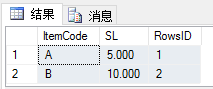
insert into #test0001(ItemCode,SL,RowsID)

      values('A',5,1),('B',10,2)---添加物料A、B所需数量分别为5、10个,并给予物料排序

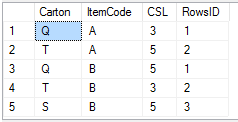
insert into #test0002(Carton,ItemCode,CSL,RowsID)

      values('Q','A',3,1),('T','A',5,2),('Q','B',5,1) ,('T','B',3,2),('S','B',5,3)---给容器添加物料以及数量并给予物料所在不同容器排序

      -----此时容器里的物料数为Q---A----3

      -------------------------T---A----5

      -------------------------Q---B----5

      -------------------------T---B----3

      -------------------------S---B----5

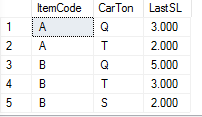
      -----则此时A物料在Q中获取3个、在T中取2个

      -----B物料在Q中取5个、在T中取3个、在S中取2个
--------------定义临时变量与游标---------------
declare @total_SL DEC(19,3)----临时物料总数量

declare @CT_SL DEC(19,3)----临时容器物料数量

declare @SL DEC(19,3)----临时物料数量

declare @test_cursor cursor------建立游标变量

declare @test_rowid bigint-------作为匹配游标变量
-------------游标应用开始--------
set @test_cursor = cursor for select RowsID from #test0001 ----设置游标绑定列

open @test_cursor--开启游标

fetch next from @test_cursor into @test_rowid--取第一个游标

while @@FETCH_STATUS = 0 ---一级循环

begin

  --循环主体

  select top 1

  @total_SL = temp01.SL

  from #test0001 temp01

  where temp01.RowsID = @test_rowid

  declare @test_cursor2 cursor

  declare @test_rowid2 bigint

  set @test_cursor2 = cursor for select temp02.RowsID --设置游标绑定列;此游标是在容器表中按相同物料不同容器进行排序的

  from #test0002 temp02

  inner join #test0001 temp01 on temp01.ItemCode=temp02.ItemCode

  where temp01.RowsID=@test_rowid

  --开启游标

  open @test_cursor2

  --取第一个游标

  fetch next from @test_cursor2 into @test_rowid2

  while @@FETCH_STATUS = 0 ------二级循环

  begin

    select top 1

    @CT_SL = temp02.CSL

    from #test0002 temp02

    inner join #test0001 temp01 on temp01.ItemCode=temp02.ItemCode

    where temp02.RowsID = @test_rowid2

    and temp01.RowsID = @test_rowid

    IF @CT_SL<@total_SL

    begin -----若容器中存货量小于物料总数量则取完容器内数量

    set @SL = @CT_SL

    set @total_SL = @total_SL-@SL

  end

  else

  begin

    set @SL = @total_SL

    set @total_SL = 0

  end

  -------------将循环每条记录插入#test0003表中-----------

  insert into #test0003(ItemCode

             ,CarTon

             ,LastSL

             )

        select temp01.ItemCode

            ,temp02.Carton

            ,@SL

        from #test0001 temp01

        inner join #test0002 temp02 on temp02.ItemCode=temp01.ItemCode

        where temp01.RowsID=@test_rowid

           and temp02.RowsID=@test_rowid2

        if @total_SL = 0 break;

        --循环取游标下一个值

        fetch next from @test_cursor2 into @test_rowid2

      end

      close @test_cursor2 --关闭二级游标

      deallocate @test_cursor2 --关闭二级游标

      --循环取游标下一个值

      fetch next from @test_cursor into @test_rowid

end

close @test_cursor--关闭一级游标

deallocate @test_cursor--关闭一级游标
结果:
select * from #test0001;
select * from #test0002;
select * from #test0003;
SQL Server 游标的应用的更多相关文章
- SQL Server 游标运用:鼠标轨迹字符串分割
一.本文所涉及的内容(Contents) 本文所涉及的内容(Contents) 背景(Contexts) 游标模板(Cursor Template) 鼠标轨迹字符串分割SQL脚本实现(SQL Code ...
- sql server 游标的简单用法
sql server游标: --定义游标 declare cursor1 cursor for select ID,Name from A --打开游标 open cursor1 declare @i ...
- SQL Server游标 C# DataTable.Select() 筛选数据 什么是SQL游标? SQL Server数据类型转换方法 LinQ是什么? SQL Server 分页方法汇总
SQL Server游标 转载自:http://www.cnblogs.com/knowledgesea/p/3699851.html. 什么是游标 结果集,结果集就是select查询之后返回的所 ...
- SQL Server 游标运用:查看所有数据库所有表大小信息(Sizes of All Tables in All Database)
原文:SQL Server 游标运用:查看所有数据库所有表大小信息(Sizes of All Tables in All Database) 一.本文所涉及的内容(Contents) 本文所涉及的内容 ...
- SQL Server 游标运用:查看一个数据库所有表大小信息(Sizes of All Tables in a Database)
原文:SQL Server 游标运用:查看一个数据库所有表大小信息(Sizes of All Tables in a Database) 一.本文所涉及的内容(Contents) 本文所涉及的内容(C ...
- SQL Server游标(转)
清晰地介绍了SQL游标,很好的学习资料. 转自 http://www.cnblogs.com/knowledgesea/p/3699851.html 什么是游标 结果集,结果集就是select查询之后 ...
- SQL Server游标
什么是游标 结果集,结果集就是select查询之后返回的所有行数据的集合. 游标则是处理结果集的一种机制吧,它可以定位到结果集中的某一行,多数据进行读写,也可以移动游标定位到你所需要的行中进行操作数据 ...
- SQL Server游标【转】
什么是游标 结果集,结果集就是select查询之后返回的所有行数据的集合. 游标则是处理结果集的一种机制吧,它可以定位到结果集中的某一行,多数据进行读写,也可以移动游标定位到你所需要的行中进行操作 ...
- SQL Server 游标
结果集,结果集就是select查询之后返回的所有行数据的集合. 在关系数据库中,我们对于查询的思考是面向集合的.而游标打破了这一规则,游标使得我们思考方式变为逐行进行. 正常面向集合的思维方式是: 而 ...
- SQL SERVER 游标的使用
首先,关于什么是游标大家可以看看这篇文章,介绍得非常详细!! SQL Server基础之游标 下面是我自己的应用场景-- 有个需求,需要把数据库表里面某一个字段的值设为随机不重复的值. 表是这样的: ...
随机推荐
- 最短路(floyd/dijkstra/bellmanford/spaf 模板)
floyd/dijkstra/bellmanford/spaf 模板: 1. floyd(不能处理负权环,时间复杂度为O(n^3), 空间复杂度为O(n^2)) floyd算法的本质是dp,用dp[k ...
- html常用标签及属性,常用英语单词
目录 html常用标签 html常用标签属性 前端常用英语单词表(未完待续) 欢迎评论点赞交流,转发请添加原博客连接谢谢! Ctrl键+F 可以查找你想要的内容哦! html常用标签 htmi结构 & ...
- vue element-ui IE9--11报 “无法获取未定义或null引用的属性‘toLowerCase’”
今天做zymh比赛的一个管理后台,用的技术是vue+element-ui+vue-router+axios,其他浏览器运行的很好,但是在IE(从IE11到IE9,vue支持IE9以上)都报错 点进去就 ...
- 解决sublime text无法安装插件问题
解决sublime text无法安装插件问题最近在sublime text3中使用命令ctrl+shift+p命令安装插件发现不能安装了,一会儿报错 这个错误表示没有可用的安装包,经过一番探索发现是配 ...
- 条件分页 分页条件和页参数传递方式一 超链接拼串 方式二 使用查询表单searchForm
<%-- Created by IntelliJ IDEA. User: jie Date: 2019/5/10 Time: 20:00 To change this template use ...
- IDEA导入HttpServlet包
转载此篇博客,言简意赅.https://blog.csdn.net/liu_yanzhao/article/details/78838670
- CC12:链式A+B
题目 有两个用链表表示的整数,每个结点包含一个数位.这些数位是反向存放的,也就是个位排在链表的首部.编写函数对这两个整数求和,并用链表形式返回结果. 给定两个链表ListNode* A,ListNod ...
- 运行node提示:events.js:160 throw er; // Unhandled 'error' event
运行node时遇到下述提示: events.js:160 throw er; // Unhandled 'error' event或者events.js:160 throw er; // ...
- OpenCV ——IplImage应用解析
由于OpenCV主要针对的是计算机视觉方面的处理,因此在函数库中,最重要的结构体是IplImage结构.IplImage结构来源于Intel的另外一个函数库Intel Image Processing ...
- Redis 基础特性讲解
目录 1.Redis基础杂项小节 1.是什么 2.能干嘛 3.去哪下 4.Redis启动后基础知识讲解 2.Redis数据类型 1.常用的五大数据类型 2.高级'玩家'才知道的其他数据类型 3.Red ...