
SQL Server 游标的应用
----------------SQL游标应用-----------------
今天由于业务需求,需要在存储过程中实现有一个表的主键去匹配在另一个表中作为外键所对应的数值
,若在C#中则非常简单只需要用两个for循环就可实现,但是在存储过程中时无法使用for循环的,于是想
到了使用游标来实现。
下面通过一个例子来介绍如何使用游标:
----------创建临时表------------
if object_id('tempdb..#test0001') is not null drop table #test0001---------物料临时表

create table #test0001(ItemCode nvarchar(30)----物料代码

            ,SL DEC(19,3)----物料所需数量

            ,RowsID Bigint----用于循环物料
primary key(ItemCode)
            )

if object_id('tempdb..#test0002') is not null drop table #test0002---------容器临时表

create table #test0002(Carton nvarchar(30)----容器代码

            ,ItemCode nvarchar(30)----物料代码

            ,CSL nvarchar(30)----容器里物料数量

            ,RowsID Bigint ----用于循环容器,相同物料不同的容器进行排序
primary key(Carton,ItemCode)
            )

if object_id('tempdb..#test0003') is not null drop table #test0003---物料在各个容器中最终要的数量表

create table #test0003(ItemCode nvarchar(30)

            ,CarTon nvarchar(30)

            ,LastSL DEC(19,3)---在容器上所得数量

            )
------------------向临时表中插入数据----------------
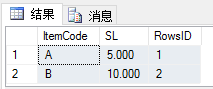
insert into #test0001(ItemCode,SL,RowsID)

      values('A',5,1),('B',10,2)---添加物料A、B所需数量分别为5、10个,并给予物料排序

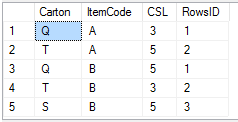
insert into #test0002(Carton,ItemCode,CSL,RowsID)

      values('Q','A',3,1),('T','A',5,2),('Q','B',5,1) ,('T','B',3,2),('S','B',5,3)---给容器添加物料以及数量并给予物料所在不同容器排序

      -----此时容器里的物料数为Q---A----3

      -------------------------T---A----5

      -------------------------Q---B----5

      -------------------------T---B----3

      -------------------------S---B----5

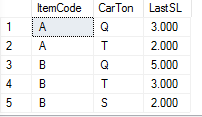
      -----则此时A物料在Q中获取3个、在T中取2个

      -----B物料在Q中取5个、在T中取3个、在S中取2个
--------------定义临时变量与游标---------------
declare @total_SL DEC(19,3)----临时物料总数量

declare @CT_SL DEC(19,3)----临时容器物料数量

declare @SL DEC(19,3)----临时物料数量

declare @test_cursor cursor------建立游标变量

declare @test_rowid bigint-------作为匹配游标变量
-------------游标应用开始--------
set @test_cursor = cursor for select RowsID from #test0001 ----设置游标绑定列

open @test_cursor--开启游标

fetch next from @test_cursor into @test_rowid--取第一个游标

while @@FETCH_STATUS = 0 ---一级循环

begin

  --循环主体

  select top 1

  @total_SL = temp01.SL

  from #test0001 temp01

  where temp01.RowsID = @test_rowid

  declare @test_cursor2 cursor

  declare @test_rowid2 bigint

  set @test_cursor2 = cursor for select temp02.RowsID --设置游标绑定列;此游标是在容器表中按相同物料不同容器进行排序的

  from #test0002 temp02

  inner join #test0001 temp01 on temp01.ItemCode=temp02.ItemCode

  where temp01.RowsID=@test_rowid

  --开启游标

  open @test_cursor2

  --取第一个游标

  fetch next from @test_cursor2 into @test_rowid2

  while @@FETCH_STATUS = 0 ------二级循环

  begin

    select top 1

    @CT_SL = temp02.CSL

    from #test0002 temp02

    inner join #test0001 temp01 on temp01.ItemCode=temp02.ItemCode

    where temp02.RowsID = @test_rowid2

    and temp01.RowsID = @test_rowid

    IF @CT_SL<@total_SL

    begin -----若容器中存货量小于物料总数量则取完容器内数量

    set @SL = @CT_SL

    set @total_SL = @total_SL-@SL

  end

  else

  begin

    set @SL = @total_SL

    set @total_SL = 0

  end

  -------------将循环每条记录插入#test0003表中-----------

  insert into #test0003(ItemCode

             ,CarTon

             ,LastSL

             )

        select temp01.ItemCode

            ,temp02.Carton

            ,@SL

        from #test0001 temp01

        inner join #test0002 temp02 on temp02.ItemCode=temp01.ItemCode

        where temp01.RowsID=@test_rowid

           and temp02.RowsID=@test_rowid2

        if @total_SL = 0 break;

        --循环取游标下一个值

        fetch next from @test_cursor2 into @test_rowid2

      end

      close @test_cursor2 --关闭二级游标

      deallocate @test_cursor2 --关闭二级游标

      --循环取游标下一个值

      fetch next from @test_cursor into @test_rowid

end

close @test_cursor--关闭一级游标

deallocate @test_cursor--关闭一级游标
结果:
select * from #test0001;
select * from #test0002;
select * from #test0003;
SQL Server 游标的应用的更多相关文章
- SQL Server 游标运用:鼠标轨迹字符串分割
一.本文所涉及的内容(Contents) 本文所涉及的内容(Contents) 背景(Contexts) 游标模板(Cursor Template) 鼠标轨迹字符串分割SQL脚本实现(SQL Code ...
- sql server 游标的简单用法
sql server游标: --定义游标 declare cursor1 cursor for select ID,Name from A --打开游标 open cursor1 declare @i ...
- SQL Server游标 C# DataTable.Select() 筛选数据 什么是SQL游标? SQL Server数据类型转换方法 LinQ是什么? SQL Server 分页方法汇总
SQL Server游标 转载自:http://www.cnblogs.com/knowledgesea/p/3699851.html. 什么是游标 结果集,结果集就是select查询之后返回的所 ...
- SQL Server 游标运用:查看所有数据库所有表大小信息(Sizes of All Tables in All Database)
原文:SQL Server 游标运用:查看所有数据库所有表大小信息(Sizes of All Tables in All Database) 一.本文所涉及的内容(Contents) 本文所涉及的内容 ...
- SQL Server 游标运用:查看一个数据库所有表大小信息(Sizes of All Tables in a Database)
原文:SQL Server 游标运用:查看一个数据库所有表大小信息(Sizes of All Tables in a Database) 一.本文所涉及的内容(Contents) 本文所涉及的内容(C ...
- SQL Server游标(转)
清晰地介绍了SQL游标,很好的学习资料. 转自 http://www.cnblogs.com/knowledgesea/p/3699851.html 什么是游标 结果集,结果集就是select查询之后 ...
- SQL Server游标
什么是游标 结果集,结果集就是select查询之后返回的所有行数据的集合. 游标则是处理结果集的一种机制吧,它可以定位到结果集中的某一行,多数据进行读写,也可以移动游标定位到你所需要的行中进行操作数据 ...
- SQL Server游标【转】
什么是游标 结果集,结果集就是select查询之后返回的所有行数据的集合. 游标则是处理结果集的一种机制吧,它可以定位到结果集中的某一行,多数据进行读写,也可以移动游标定位到你所需要的行中进行操作 ...
- SQL Server 游标
结果集,结果集就是select查询之后返回的所有行数据的集合. 在关系数据库中,我们对于查询的思考是面向集合的.而游标打破了这一规则,游标使得我们思考方式变为逐行进行. 正常面向集合的思维方式是: 而 ...
- SQL SERVER 游标的使用
首先,关于什么是游标大家可以看看这篇文章,介绍得非常详细!! SQL Server基础之游标 下面是我自己的应用场景-- 有个需求,需要把数据库表里面某一个字段的值设为随机不重复的值. 表是这样的: ...
随机推荐
- 51nod1117(简单huffman tree)
题目链接:https://www.51nod.com/onlineJudge/questionCode.html#!problemId=1117 题意:中文题诶- 思路:简单huffman tree ...
- cogs1583. [POJ3237]树的维护
1583. [POJ3237]树的维护 http://www.cogs.pro/cogs/problem/problem.php?pid=1583 ★★★☆ 输入文件:maintaintree.i ...
- 能量项链 洛谷P1063
1154 能量项链 2006年NOIP全国联赛提高组 时间限制: 1 s 空间限制: 128000 KB 题目等级 : 黄金 Gold 题解 题目描述 Description 在Mars星球上,每个M ...
- AcDbHelix Demo
AcDbObjectPointer<AcDbHelix> aHelix; aHelix.create(); aHelix->setAxisPoint(AcGePoint3d(, , ...
- Vue培训项目总结
昨天是最后一次给同事进行Vue的培训,这次培训主要是以基础入门为主. 整篇讲义参考了一些文章:https://gitbook.cn/gitchat/column/5a4af1c5658b7c0d9eb ...
- Python学习笔记(随机数)
random模块的作用是产生随机数. import random num = random.randint(1,100) random.randint(a, b)可以生成一个a到b间的随机整数,包括a ...
- 洛谷P1002 过河卒
关于蒟蒻的我,刚刚接触DP.... 那么就来做一道简单DP吧.... 首先先看题: 题目描述 棋盘上AA点有一个过河卒,需要走到目标BB点.卒行走的规则:可以向下.或者向右.同时在棋盘上CC点有一 ...
- 51nod1222最小公倍数计数
51nod1222 http://210.33.19.103/contest/1113/problem/2 同学的神仙做法: 首先考虑先去掉X<=Y的限制,也就是先计算满足要求的任意有序pair ...
- MapReduce实战项目:查找相同字母组成的字谜
实战项目:查找相同字母组成的字谜 项目需求:一本英文书籍中包含有成千上万个单词或者短语,现在我们要从中找出相同字母组成的所有单词. 数据集和期望结果举例: 思路分析: 1)在Map阶段,对每个word ...
- 渣渣菜鸡的 ElasticSearch 源码解析 —— 启动流程(上)
关注我 转载请务必注明原创地址为:http://www.54tianzhisheng.cn/2018/08/11/es-code02/ 前提 上篇文章写了 ElasticSearch 源码解析 -- ...