
MVC入门——增
创建数据库表如下:
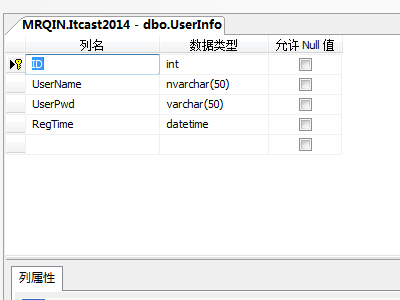
生成EF模型
//------------------------------------------------------------------------------

// <auto-generated>

//    此代码是根据模板生成的。

//

//    手动更改此文件可能会导致应用程序中发生异常行为。

//    如果重新生成代码,则将覆盖对此文件的手动更改。

// </auto-generated>

//------------------------------------------------------------------------------

namespace MvcApplicationStudy.Models

{

    using System;

    using System.Collections.Generic;

    public partial class UserInfo

    {

        public int ID { get; set; }

        public string UserName { get; set; }

        public string UserPwd { get; set; }

        public System.DateTime RegTime { get; set; }

    }

}
创建控制器HomeController
using System;

using System.Collections.Generic;

using System.Linq;

using System.Web;

using System.Web.Mvc;

using MvcApplicationStudy.Models;

namespace MvcApplicationStudy.Controllers

{

    public class HomeController : Controller

    {

        //

        // GET: /Home/

        public ActionResult Index()//注册页面

        {

            if (!string.IsNullOrEmpty(Request["msg"]))

            {

                ViewBag.Msg = Request["msg"];

            }

            return View();

        }

        public ActionResult Register()//从表单中获取参数

        {

            UserInfo userInfo = new UserInfo();

            userInfo.UserName = Request["txtName"].ToString();

            userInfo.UserPwd = Request["txtPwd"].ToString();

            userInfo.RegTime = DateTime.Now;

            TestEntities dbEntity = new TestEntities();

            dbEntity.UserInfo.Add(userInfo);

            if (dbEntity.SaveChanges() > 0)

            {

               return RedirectToAction("Index", "Home", new { msg = "注册成功" });

                //return Content("注册成功");

            }

            else

            {

               return RedirectToAction("Index", "Home", new  { msg="注册失败"});

            }

        }

        //表单中表单元素的name属性取值与当前方法中参数的名称一致,会自动填充。

        public ActionResult Register2(string txtName, string txtPwd)

        {

            UserInfo userInfo = new UserInfo();

            userInfo.UserName = txtName;

            userInfo.UserPwd = txtPwd;

            userInfo.RegTime = DateTime.Now;

            TestEntities dbEntity = new TestEntities();

            dbEntity.UserInfo.Add(userInfo);

            if (dbEntity.SaveChanges() > 0)

            {

                return Content("注册成功");

            }

            else

            {

                return Content("注册失败");

            }

        }

        //自动填充(如果表单中表单元素的name属性的取值与实体类中属性的名字保持一致,会自动填充。)

        /*public ActionResult Register3 (UserInfo userInfo)

    {

        userInfo.RegTime = DateTime.Now;

        TestEntities dbEntity = new TestEntities();

        dbEntity.UserInfo.Add(userInfo);

        if (dbEntity.SaveChanges() > 0)

        {

            return Content("注册成功");

        }

        else

        {

            return Content("注册失败");

        }

    }*/

    }

}
添加Index视图
@{

    Layout = null;

}

<!DOCTYPE html>

<html>

<head>

    <meta name="viewport" content="width=device-width" />

    <title>Index</title>

</head>

<body>

    <div>

      <form method="post" action="/Home/Register2">

          用户名<input type="text" name ="txtName"  id="txtName" />

          <br />

         密码 <input type="password" name="txtPwd" id="txtPwd" />

          <br />

          <input type="submit" value="注册" />@ViewBag.Msg

      </form>

    </div>

</body>

</html>
生成页面如下

MVC入门——增的更多相关文章
- 25、ASP.NET MVC入门到精通——Spring.net-业务层仓储
本系列目录:ASP.NET MVC4入门到精通系列目录汇总 上一节,我们已经把项目框架的雏形搭建好了,那么现在我来开始业务实现,在业务实现的过程当中,不断的来完善我们现有的框架. 1.假设我们来做一个 ...
- 26、ASP.NET MVC入门到精通——后台管理区域及分离、Js压缩、css、jquery扩展
本系列目录:ASP.NET MVC4入门到精通系列目录汇总 有好一段时间没更新博文了,最近在忙两件事:1.看书,学习中...2.为公司年会节目做准备,由于许久没有练习双截棍了,难免生疏,所以现在临时抱 ...
- asp.net mvc 入门资料
七天学会ASP.NET MVC (一)——深入理解ASP.NET MVC http://www.cnblogs.com/powertoolsteam/p/MVC_one.html 无废话MVC入门教程 ...
- ASP.NET MVC 入门8、ModelState与数据验证
原帖地址:http://www.cnblogs.com/QLeelulu/archive/2008/10/08/1305962.html ViewData有一个ModelState的属性,这是一个类型 ...
- ASP.NET MVC 入门系列教程
ASP.NET MVC 入门系列教程 博客园ASP.NET MVC 技术专题 http://kb.cnblogs.com/zt/mvc/ 一个居于ASP.NET MVC Beta的系列入门文章,有朋友 ...
- Spring MVC 入门教程示例 (一)
今天和大家分享下 Spring MVC 入门教程 首先还是从 HelloWorld web 工程开始 -------------------------- 1.首先创建一个Maven Web工程 ...
- Asp.net MVC入门视频教程
编程开发 > Asp.net视频教程 > Asp.net MVC入门视频教程 > 1.传统web处理方式和mvc处理方式 上传日期:2014-08-16 10:02:45 相关摘要 ...
- [转]ASP.NET MVC 入门8、ModelState与数据验证
ViewData有一个ModelState的属性,这是一个类型为ModelStateDictionary的ModelState类型的字典集合.在进行数据验证的时候这个属性是比较有用的.在使用Html. ...
- 分享一个自己写的MVC+EF “增删改查” 无刷新分页程序
分享一个自己写的MVC+EF “增删改查” 无刷新分页程序 一.项目之前得添加几个组件artDialog.MVCPager.kindeditor-4.0.先上几个效果图. 1.首先建立一个数 ...
随机推荐
- python自动化测试报告(excel篇)
转:https://www.jianshu.com/p/6c5d328bf390 # -*- coding: utf-8 -*- import xlsxwriter def get_format(wd ...
- jdk1.7升级到1.8遇到的问题
1.修改project structure 里面的Project , Modules , SDKs jdk的版本 2.修改Java Compiler 里面java的jdk版本 3.tomcat 里面j ...
- 利用jenkins和hockey组织iOS持续交付过程
1. jenkins可以单独作为web应用部署和启动,但建议将其部署在tomcat上,可以方便的管理其他一些web应用,下面讲解如何在Mac设备上安装tomcat 到tomcat官网下载适用于Mac设 ...
- NERDTree
What's NERDTree : A tree explorer plugin for vim. Install : Using Vundle on .vimrc " for ...
- hdu 1401(单广各种卡的搜索题||双广秒速)
Solitaire Time Limit: 2000/1000 MS (Java/Others) Memory Limit: 65536/32768 K (Java/Others)Total S ...
- HTML-在canvas画图中,图片的线上链接已配置允许跨域后,仍然出错提示跨域,怎么解决?
这个问题我已经遇到了2次,第一次解决了后,第二次又遇到了,所以这次做个笔记,怕以后再次遇到 举例: 1.要实现的问题:我需要在canvas画布上画上我的微信头像 2.后台配置已经完成了允许我头像地址的 ...
- vue 之循环添加不同class
在vue中按条件为class动态添加直接使用:class="[{ active: isActive }, errorClass]"之类的表达式就可以 但是如果我们要为一个循环列表按 ...
- Codeforces Educational Round 33 题解
题目链接 Codeforces Educational Round 33 Problem A 按照题目模拟,中间发现不对就直接输出NO. #include <bits/stdc++.h> ...
- 2017-10-29-afternoon-清北模拟赛
T1 洗澡 贪心:将未匹配的右括号花费1变为左括号,最有多余的左括号有一半变成右括号 #include <cstring> #include <cstdio> ); int n ...
- java常用IO
字节流:FileInputStream.FileOutputStream 字符流:FileWriter.FileReader 转换流:InputStreamReader.OutputStreamRea ...