
ASP.NETCore使用AutoFac依赖注入
实现代码
1、新建接口类:IRepository.cs,规范各个操作类的都有那些方法,方便管理。
using System;

using System.Collections.Generic;

using System.Linq;

using System.Linq.Expressions;

using System.Text;

namespace CMS.Entity.Interfaces

{

    public  interface IRepository<T> where T:class

    {

        /// <summary>

        /// 添加

        /// </summary>

        /// <param name="entity">实体对象</param>

        void Add(T entity);

        /// <summary>

        /// 更新

        /// </summary>

        /// <param name="entity">实体对象</param>

        void Update(T entity);

        /// <summary>

        /// 删除

        /// </summary>

        /// <param name="entity">实体对象</param>

        void Delete(T entity);

        /// <summary>

        /// 删除

        /// </summary>

        /// <param name="where">条件(lambda表达式)</param>

        void Delete(Expression<Func<T, bool>> where);

        /// <summary>

        /// 根据ID获取一个对象

        /// </summary>

        /// <param name="Id">主键ID</param>

        /// <returns>对象</returns>

        T GetById(long Id);

        /// <summary>

        /// 根据ID获取一个对象

        /// </summary>

        /// <param name="Id">主键ID</param>

        /// <returns>对象</returns>

        T GetById(string Id);

        /// <summary>

        /// 根据条件获取一个对象

        /// </summary>

        /// <param name="where">条件(lambda表达式)</param>

        /// <returns>对象</returns>

        T Get(Expression<Func<T, bool>> where);

        /// <summary>

        /// 获取所有数据

        /// </summary>

        /// <returns>所有数据</returns>

        IQueryable<T> GetAll();

        /// <summary>

        /// 根据条件获取数据

        /// </summary>

        /// <param name="where">条件(lambda表达式)</param>

        /// <returns>数据</returns>

        IQueryable<T> GetMany(Expression<Func<T, bool>> where);

        /// <summary>

        /// 根据条件获取记录数

        /// </summary>

        /// <param name="where">条件(lambda表达式)</param>

        /// <returns></returns>

        int GetCount(Expression<Func<T, bool>> where);

        /// <summary>

        /// 关闭代理

        /// </summary>

        void CloseProxy();

        /// <summary>

        /// 打开代理

        /// </summary>

        void OpenProxy();

        /// <summary>

        /// 是否有指定条件的元素

        /// </summary>

        /// <param name="where">条件(lambda表达式)</param>

        /// <returns></returns>

        bool IsHasValue(Expression<Func<T, bool>> where);

    }

}
2、新建仓储基础操作类RepositoryBase.cs,注意要一一对应实现IRepositroy接口的方法
using System;

using System.Collections.Generic;

using System.Text;

using System.Linq;

namespace CMS.Entity.Interfaces

{

    public abstract class BaseRepository<T>  where T: class

    {

        private BcmfDBContext db;//数据库上下文

        public BaseRepository(BcmfDBContext _db) {

            db = _db;

        }

        public virtual void Save()

        {

            db.SaveChanges();

        }

        public  virtual  void Add(T entity)

        {

            db.Set<T>().Add(entity);

        }

        public virtual void CloseProxy()

        {

            db.Database.CommitTransaction();

        }

        public virtual void Delete(T entity)

        {

            db.Set<T>().Remove(entity);

        }

        public virtual void Delete(System.Linq.Expressions.Expression<Func<T, bool>> where)

        {

            var dataList = db.Set<T>().Where(where).AsEnumerable();

            db.Set<T>().RemoveRange(dataList);

        }

        public virtual T Get(System.Linq.Expressions.Expression<Func<T, bool>> where)

        {

           return db.Set<T>().FirstOrDefault(where);

        }

        public virtual System.Linq.IQueryable<T> GetAll()

        {

            return db.Set<T>();

        }

        public virtual T GetById(long Id)

        {

            return db.Set<T>().Find(Id);

        }

        public virtual T GetById(string Id)

        {

            return db.Set<T>().Find(Id);

        }

        public virtual int GetCount(System.Linq.Expressions.Expression<Func<T, bool>> where)

        {

            return db.Set<T>().Count(where);

        }

        public virtual System.Linq.IQueryable<T> GetMany(System.Linq.Expressions.Expression<Func<T, bool>> where)

        {

            return db.Set<T>().Where(where);

        }

        public virtual bool IsHasValue(System.Linq.Expressions.Expression<Func<T, bool>> where)

        {

            return db.Set<T>().Any(where);

        }

        public virtual void OpenProxy()

        {

            db.Database.BeginTransaction();

        }

        public virtual void Update(T entity)

        {

            db.Set<T>().Attach(entity);

            db.Entry<T>(entity).State = Microsoft.EntityFrameworkCore.EntityState.Modified;

        }

    }

}
3、新建仓储类TUserRepository与TOperateLogRepository,TUserRepository用于操作用户表,TOperateLogRepository用于操作用户记录表,对应的User类与OperateLog类根据项目需求自行创建
using System;

using System.Collections.Generic;

using System.Text;

using CMS.Entity.Repository;

using CMS.Entity.Entity;

using Microsoft.EntityFrameworkCore;

using System.Linq;

using CMS.Entity.Interfaces;

namespace CMS.Entity.Repository

{

    public class TUserRepository :BaseRepository<User>,IUserRepository

    {

        public TUserRepository(BcmfDBContext db) : base(db) { }

    }

    public interface IUserRepository : IRepository<User> { }

}
using System;

using System.Collections.Generic;

using System.Text;

using CMS.Entity.Repository;

using CMS.Entity.Entity;

using Microsoft.EntityFrameworkCore;

using System.Linq;

using CMS.Entity.Interfaces;

namespace CMS.Entity.Repository

{

    public class TOperateLogRepository : BaseRepository<OperateLog>, IOperateLogRepository

    {

        public TOperateLogRepository(BcmfDBContext db) : base(db) { }

    }

    public interface IOperateLogRepository : IRepository<OperateLog>

    {

    }

}
4、分别在UserController与OperateLogController控制器中的构造函数注入仓储类
using System;

using System.Collections.Generic;

using System.Linq;

using System.Threading.Tasks;

using Microsoft.AspNetCore.Http;

using Microsoft.AspNetCore.Mvc;

using CMS.Entity;

using CMS.Entity.Entity;

using Newtonsoft.Json;

using CMS.WebApi.Core;

using Microsoft.EntityFrameworkCore.Query;

using CMS.Entity.Repository;

namespace CMS.WebApi.Controllers

{

    /// <summary>

    /// 用户中心

    /// </summary>

    //[Produces("application/json")]

    [Route("api/[controller]")]

    [ApiController]

    public class UsersController : ControllerBase

    {

        private readonly IUserRepository userRepository;

        public UsersController(IUserRepository _userRepository)

        {

            userRepository = _userRepository;

        }

        /// <summary>

        /// 获取用户列表

        /// </summary>

        /// <returns></returns>

        [HttpGet]

        public string Get()

        {

            var userList= userRepository.GetAll().ToList();

            return JsonConvert.SerializeObject(userList);

        }

    }

}
using System;

using System.Collections.Generic;

using System.Linq;

using System.Threading.Tasks;

using Microsoft.AspNetCore.Http;

using Microsoft.AspNetCore.Mvc;

using CMS.Entity.Repository;

using Newtonsoft.Json;

namespace CMS.WebApi.Controllers

{

    [Route("api/[controller]")]

    [ApiController]

    public class OperateLogController : ControllerBase

    {

        private readonly IOperateLogRepository operateLogRepository;

        public OperateLogController(IOperateLogRepository _operateLogRepository)

        {

            operateLogRepository = _operateLogRepository;

        }

        [HttpGet]

        public string Get()

        {

            var result = operateLogRepository.GetMany(m=>m.ActionLogId<);

            return JsonConvert.SerializeObject(result);

        }

    }

}
5、完成上述操作后,运行获取数据时会系统报错,那是由于还没将仓储类注入到服务中,接下来就实现用AutoFac注入仓储类到项目服务中
添加引用Autofac,Auto.Configuration,Autofac.Extensions.DependencyInjection到项目中
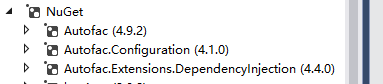
这里贴出Nuget程序控制台命令:
Install-Package Autofac -Version 4.9.2
Install-Package Autofac.Configuration -Version 4.1.0
Install-Package Autofac.Extensions.DependencyInjection -Version 4.4.0
6、打开项目Startup.cs,找到ConfigureServices方法,将void改为IServiceProvider返回值,如下
 //先引用命名空间
using Autofac;
using Autofac.Extensions.DependencyInjection;

public IServiceProvider ConfigureServices(IServiceCollection services)

        {

            ...

            ////批量匹配注入,使用AutoFac提供的容器接管当前项目默认容器

            var builder = new ContainerBuilder();

            //注入entity层的repository类builder.RegisterType(typeof(TUserRepository)).As(typeof(IUserRepository)).InstancePerDependency();

            //批量注入Repository的类

         builder.RegisterAssemblyTypes(typeof(TUserRepository).Assembly)

                .Where(t => t.Name.EndsWith("Repository"))

                .AsImplementedInterfaces();

            builder.Populate(services);

            var container = builder.Build();

            //ConfigureServices方法由void改为返回IServiceProvider

            return new AutofacServiceProvider(container);

        }
7、重新生成发布项目,完成
ASP.NETCore使用AutoFac依赖注入的更多相关文章
- ASP.NET MVC Autofac依赖注入的一点小心得(包含特性注入)
前言 IOC的重要性 大家都清楚..便利也都知道..新的ASP.NET Core也大量使用了这种手法.. 一直憋着没写ASP.NET Core的文章..还是怕误导大家.. 今天这篇也不是讲Core的 ...
- ADO.NET .net core2.0添加json文件并转化成类注入控制器使用 简单了解 iTextSharp实现HTML to PDF ASP.NET MVC 中 Autofac依赖注入DI 控制反转IOC 了解一下 C# AutoMapper 了解一下
ADO.NET 一.ADO.NET概要 ADO.NET是.NET框架中的重要组件,主要用于完成C#应用程序访问数据库 二.ADO.NET的组成 ①System.Data → DataTable, ...
- ASP.NET MVC IOC依赖注入之Autofac系列(二)- WebForm当中应用
上一章主要介绍了Autofac在MVC当中的具体应用,本章将继续简单的介绍下Autofac在普通的WebForm当中的使用. PS:目前本人还不知道WebForm页面的构造函数要如何注入,以下在Web ...
- ASP.NET MVC IOC依赖注入之Autofac系列(一)- MVC当中应用
话不多说,直入主题看我们的解决方案结构: 分别对上面的工程进行简单的说明: 1.TianYa.DotNetShare.Model:为demo的实体层 2.TianYa.DotNetShare.Repo ...
- asp.net mvc4 简单使用Autofac依赖注入小结
1,首先使用 NuGet下载适当的Autofac版本 文件一,Autofac.3.5.2 文件二,Autofac.Mvc4.3.1.0 1,接口类 public interface IReposito ...
- 【干货】利用MVC5+EF6搭建博客系统(二)测试添加数据、集成Autofac依赖注入
PS:如果图片模糊,鼠标右击复制图片网址,然后在浏览器中打开即可. 一.测试仓储层.业务层是否能实现对数据库表的操作 1.在52MVCBlog.IRepository程序集下创建IsysUserInf ...
- 几十行代码实现ASP.NET Core自动依赖注入
在开发.NET Core web服务的时候,我们习惯使用自带的依赖注入容器来进行注入. 于是就会经常进行一个很频繁的的重复动作:定义一个接口->写实现类->注入 有时候会忘了写Add这一步 ...
- Autofac 依赖注入小知识
Autofac 依赖注入小知识 控制反转/依赖注入 IOC/DI 依赖接口而不依赖于实现,是面向对象的六大设计原则(SOLID)之一.即依赖倒置原则(Dependence Inversion Prin ...
- 从零开始,搭建博客系统MVC5+EF6搭建框架(2),测试添加数据、集成Autofac依赖注入
一.测试仓储层.业务层是否能实现对数据库表的操作 1.创建IsysUserInfoRepository接口来继承IBaseRepository父接口 namespace Wchl.WMBlog.IRe ...
随机推荐
- NOIP 2017 D2T1 奶酪
#include<iostream> #include<cstdio> #include<cstdlib> #include<algorithm> #i ...
- Xshell 配色方案 Ubuntu Solarized_Dark isayme
前言 最近在用Ubuntu,发现它的配色方案挺好看的,所以查了下有没有大神做过Xshell的Ubuntu配色方案. 一看,果然还是有大佬做了这个的. 三套配色配置如下: 1. Ubuntu的Solar ...
- python-数字类型内置方法
数字类型内置方法 为什么要有数据类型? 数据是用来表示状态的,不同的状态就应该用不同的数据类型去表示 整型(int) 用途:年龄.号码.银行卡号等 定义:可以使用int()方法将纯数字的字符串转换为十 ...
- shell-code-2-传参
#在执行shell脚本时,带参数,如./test.sh 1 2 3,则在脚本test.sh内,参数表示为$n的形式,$1为第一个参数,以此类推. echo "第一个参数为:$1"; ...
- PAT Basic 1047
1047 编程团体赛 编程团体赛的规则为:每个参赛队由若干队员组成:所有队员独立比赛:参赛队的成绩为所有队员的成绩和:成绩最高的队获胜. 现给定所有队员的比赛成绩,请你编写程序找出冠军队. 输入格式: ...
- mvn 发布
mvn clean install deploy -Dadditionalparam=-Xdoclint:none
- grunt与seajs结合应用
9.seajs构建的问题 01.png和02.jpg 10.seajs与grunt如何结合开发.两个插件:grunt-cmd-transport grunt-cmd-contact ,去grunt官网 ...
- 【01】git下载和安装的完整过程
[03]下载地址: 有许多种安装方式,主要分为两种,一种是通过编译源代码来安装:另一种是使用为特定平台预编译好的安装包. Git 各平台安装包下载地址为:http://git-scm.com/down ...
- 【LeetCode】Intersection of Two Linked Lists(相交链表)
这道题是LeetCode里的第160道题. 题目讲的: 编写一个程序,找到两个单链表相交的起始节点. 如下面的两个链表: 在节点 c1 开始相交. 示例 1: 输入:intersectVal = 8, ...
- A. Light Bulb
A. Light Bulb Time Limit: 1000ms Case Time Limit: 1000ms Memory Limit: 32768KB 64-bit integer IO f ...