
ubuntu 16.0.4安装MySQL5.7
系统版本
root@sishen:~# uname -a
Linux sishen 4.10.0-35-generic #39~16.04.1-Ubuntu SMP Wed Sep 13 09:02:42 UTC 2017 x86_64 x86_64 x86_64 GNU/Linux
以下是通过APT的安装方式
官方参考文档
https://dev.mysql.com/doc/mysql-apt-repo-quick-guide/en/
下载MySQL官方提供的deb包:
https://repo.mysql.com//mysql-apt-config_0.8.8-1_all.deb
在终端执行:
root@sishen:~# dpkg -i mysql-apt-config_0.8.8-1_all.deb ,回车之后会弹出如下窗口:
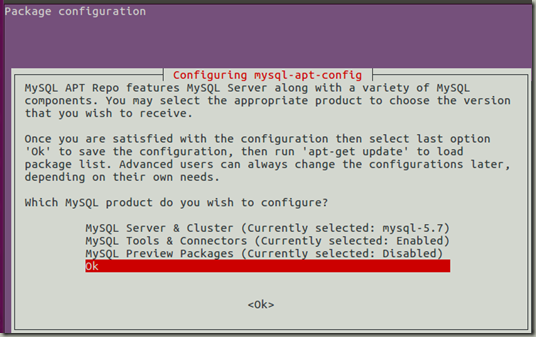
然后使用方向键选择OK,回车即可。
root@sishen:~# apt-get update
安装
root@sishen:~# apt-get install –y mysql-server
查看状态
root@sishen:~# service mysql status
● mysql.service - MySQL Community Server
Loaded: loaded (/lib/systemd/system/mysql.service; enabled; vendor preset: en
Active: active (running) since 一 2017-11-06 11:05:17 CST; 25s ago
Main PID: 46339 (mysqld)
CGroup: /system.slice/mysql.service
└─46339 /usr/sbin/mysqld --daemonize --pid-file=/var/run/mysqld/mysql
11月 06 11:05:16 sishen systemd[1]: Starting MySQL Community Server...
11月 06 11:05:17 sishen systemd[1]: Started MySQL Community Server.
root@sishen:~# netstat -tap | grep mysql
tcp 0 0 localhost:mysql *:* LISTEN 47316/mysqld
使用root登录mysql,注意:我的root账户密码是123456,
root@sishen:~# mysql -uroot -p123456
mysql: [Warning] Using a password on the command line interface can be insecure.
Welcome to the MySQL monitor. Commands end with ; or \g.
Your MySQL connection id is 6
Server version: 5.7.20 MySQL Community Server (GPL)
Copyright (c) 2000, 2017, Oracle and/or its affiliates. All rights reserved.
Oracle is a registered trademark of Oracle Corporation and/or its
affiliates. Other names may be trademarks of their respective
owners.
Type 'help;' or '\h' for help. Type '\c' to clear the current input statement.
mysql> show databases;
+--------------------+
| Database |
+--------------------+
| information_schema |
| mysql |
| performance_schema |
| sys |
+--------------------+
4 rows in set (0.00 sec)
mysql> \q
Bye
mysql的管理员密码文件存放位置
/etc/mysql/debian.cnf
如果是以普通用户登录mysql,则需要创建mysql的普通用户
创建普通用户时,密码要求太高了,简单的都不行,最后一条命令成功了。
mysql> create user 'sishen'@'%' identified by '123qwe';
ERROR 1819 (HY000): Your password does not satisfy the current policy requirements
mysql> create user 'sishen'@'%' identified by '12345Qwer';
ERROR 1819 (HY000): Your password does not satisfy the current policy requirements
mysql> create user 'sishen'@'%' identified by '123456';
ERROR 1819 (HY000): Your password does not satisfy the current policy requirements
mysql> create user 'sishen'@'%' identified by 'SiShen@123';
Query OK, 0 rows affected (0.01 sec)
mysql> grant all privileges on *.* to 'sishen'@'%' identified by 'SiShen@123';
Query OK, 0 rows affected, 1 warning (0.00 sec)
mysql> flush privileges;
Query OK, 0 rows affected (0.00 sec)
测试
root@sishen:~# mysql -usishen -pSiShen@123
mysql: [Warning] Using a password on the command line interface can be insecure.
Welcome to the MySQL monitor. Commands end with ; or \g.
Your MySQL connection id is 4
Server version: 5.7.20 MySQL Community Server (GPL)
Copyright (c) 2000, 2017, Oracle and/or its affiliates. All rights reserved.
Oracle is a registered trademark of Oracle Corporation and/or its
affiliates. Other names may be trademarks of their respective
owners.
Type 'help;' or '\h' for help. Type '\c' to clear the current input statement.
mysql> show databases;
+--------------------+
| Database |
+--------------------+
| information_schema |
| mysql |
| performance_schema |
| sys |
+--------------------+
4 rows in set (0.00 sec)
mysql> \q
Bye
到此安装结束。
ubuntu 16.0.4安装MySQL5.7的更多相关文章
- Ubuntu 16.04下安装MySQL5.7
原文链接:https://www.linuxidc.com/Linux/2017-06/144805.htm ps:ubuntu14.04下默认安装的是MySQL5.5 首先执行下面三条命令: sud ...
- Windows 10下怎么远程连接 Ubuntu 16.0.4(小白级教程)
前言: 公司因为用Ruby做开发,所有适用了Ubuntu系统,但是自己笔记本是W10,又不想装双系统,搭建开发环境,便想到倒不如自己远程操控公司电脑,这样在家的时候也可以处理一些问题.故此便有了下面的 ...
- ubuntu 16.0安装 hadoop2.8.3
环境:ubuntu 16.0 需要软件:jdk ssh https://mirrors.tuna.tsinghua.edu.cn/apache/hadoop/common/ 2.8.3 安装 jdk并 ...
- Ubuntu 16.04 LTS 安装 Nginx/PHP 5.6/MySQL 5.7 (LNMP) 与Laravel
Ubuntu 16.04 LTS 安装 Nginx/PHP 5.6/MySQL 5.7 (LNMP) 与Laravel 1.MySQL安装[安装 MariaDB]MariaDB是MySQL的一个分支首 ...
- Linux Ubuntu 16.04 初次安装使用总结zzz
装了两天的ubuntu系统终于算是勉强能用了,来来回回装了有三四次,期间出了各种各样的毛病.但是还是被我的Google大法给治好了.为了装这个系统,算是耗了两天的时间,啥事情都没干,干耗在这上面了.所 ...
- Ubuntu 16.04上安装SkyEye及测试
说明一下,在Ubuntu 16.04上安装SkyEye方法不是原创,是来自互联网,仅供学习参考. 一.检查支持软件包 gcc,make,vim(optional),ssh,subversionbinu ...
- ubuntu 16.04上安装php5.6
php --ini 按下面的步骤,在ubuntu 16.04上面安装成功了 php5.6 dpkg -l | grep php| awk '{print $2}' |tr "\n" ...
- 在 Ubuntu 16.04 中安装支持 CPU 和 GPU 的 Google TensorFlow 神经网络软件
TensorFlow 是用于机器学习任务的开源软件.它的创建者 Google 希望提供一个强大的工具以帮助开发者探索和建立基于机器学习的应用,所以他们在去年作为开源项目发布了它.TensorFlow ...
- netcore程序部署 ubuntu 16.0.4 报错 The type initializer for 'System.Net.Http.CurlHandler'的解决方案
最近业务扩展需要把netcore程序部署到ubuntu 16.0.4上,因为代码里面用到了HttpClient 请求. 部署ubuntu后一直报错 参考地址:https://github.com/do ...
随机推荐
- Mongo.setReadPref(mode, tagSet) primaries and secondaries are treated equivalently. 读优先级策略
https://docs.mongodb.com/manual/reference/method/Mongo.setReadPref/#Mongo.setReadPref Mongo.setReadP ...
- h5 getUserMedia error PermissionDeniedError
HTML5 在使用非 localhost 地址访问时打开摄像头失败 .报getUserMedia error PermissionDeniedError,火狐下是可以正常调取的. 需要https: 火 ...
- unzip解压指定我文件夹
解压try.zip中指定的文件夹 unzip try.zip "try/*" shell中异常处理 { # your 'try' block executeCommandWhich ...
- 自定义android 音乐通知栏 ——可伸缩扩展
Android custom notification for music player Example In this tutorial, you will learn how to creat ...
- HDU4188:RealPhobia (连分数的运用之一)
Bert is a programmer with a real fear of floating point arithmetic. Bert has quite successfully used ...
- NOIP2008题解
传送门 考查题型 二分图 暴力枚举 判断素数 dp T1 传纸条 题目描述 小渊和小轩是好朋友也是同班同学,他们在一起总有谈不完的话题.一次素质拓展活动中,班上同学安排做成一个m行n列的矩阵,而小渊和 ...
- #ifndef <标识> #define <标识> #endif
头件的中的#ifndef,这是一个很关键的东西.比如你有两个C文件,这两个C文件都include了同一个头文件.而编译时,这两个C文件要一同编译成一个可运行文件,于是问题来了,大量的声明冲突. 还是把 ...
- In-App Purchase Programming Guide----(七) ----Restoring Purchased Products
Restoring Purchased Products Users restore transactions to maintain access to content they’ve alread ...
- Hello,Cardboard!!-如何开发一个最简单的Cardboard虚拟现实应用(一)
[原创文章,转载请注明出处,谢谢 !] 温馨提醒,本篇第一节主要介绍cardboard虚拟现实系统的组成,如果只想看如何开发的具体步骤请直接跳到第二节^_^ 前述:恕我啰嗦一下,主要照顾对cardbo ...
- WPF DataGrid foreground 绑定问题
初学WPF , 希望对DataGrid 中所属的一个Column名下的值的颜色动态修改 <DataGridTextColumn Header="隐含回购利率(%)" Bin ...