
Glide4.0 centerCrop属性和圆角 冲突
首先致谢:https://blog.csdn.net/flyinbed_/article/details/75506062
咱们不是代码的生产者,只是代码的搬运工。
最近有个工作中有个需求就是展示的图片必须圆角、正方形,当时一想这太尼玛简单了,无非就是设置一个图片参数的大小,然后在设置一个centerCrop的属性,在自定义一个类去继承BitmapTransformation重画一下。
结果写的时候发现,在glide4.0上面 centerCrop和圆角图片有冲突只能显示一个,结果就度娘问了一边,大部分都是下面这行代码,发现这个在glide4.0上面直接报错 无法使用,最后没办法了只能自己撸一遍源码看看了。
transform(new CenterCrop(getActivity()),new GlideRoundImage(getActivity()))
点开centerCrop的源码
/**

 * Applies {@link CenterCrop} to all default types and

 * throws an exception if asked to transform an unknown type.

 *

 * <p>this will override previous calls to {@link #dontTransform()} ()}.

 *

 * @see #transform(Class, Transformation)

 * @see #optionalCenterCrop()

 */

public RequestOptions centerCrop() {

  return transform(DownsampleStrategy.CENTER_OUTSIDE, new CenterCrop());

}
原来这犊子也是调用的 transform的方法,在点开 new Centercrop()这个方法看看里面的实现
/**

 * Scale the image so that either the width of the image matches the given width and the height of

 * the image is greater than the given height or vice versa, and then crop the larger dimension to

 * match the given dimension.

 *

 * Does not maintain the image's aspect ratio

 */

public class CenterCrop extends BitmapTransformation {

  private static final String ID = "com.bumptech.glide.load.resource.bitmap.CenterCrop";

  private static final byte[] ID_BYTES = ID.getBytes(CHARSET);

  public CenterCrop() {

    // Intentionally empty.

  }

  @Deprecated

  public CenterCrop(@SuppressWarnings("unused") Context context) {

    this();

  }

  @Deprecated

  public CenterCrop(@SuppressWarnings("unused") BitmapPool bitmapPool) {

    this();

  }

  // Bitmap doesn't implement equals, so == and .equals are equivalent here.

  @SuppressWarnings("PMD.CompareObjectsWithEquals")

  @Override

  protected Bitmap transform(

      @NonNull BitmapPool pool, @NonNull Bitmap toTransform, int outWidth, int outHeight) {

    return TransformationUtils.centerCrop(pool, toTransform, outWidth, outHeight);

  }

  @Override

  public boolean equals(Object o) {

    return o instanceof CenterCrop;

  }

  @Override

  public int hashCode() {

    return ID.hashCode();

  }

  @Override

  public void updateDiskCacheKey(MessageDigest messageDigest) {

    messageDigest.update(ID_BYTES);

  }

}
不出所料 这里面也是继承了BitmapTransformation这个类然后重画了一边,后面我们自己有调用了transform()这个方法等于把系统的Centercrop这个方法给覆盖了,所以说这两个属性谁在后面就用哪种效果,但是现在的问题是我想两个都要用咋整,那么问题来了,这下只能在自己自定义的BitmapTransformation将两个效果一起画出来了;
先是我的布局文件:很简单就一个线性布局+3个ImageView
<?xml version="1.0" encoding="utf-8"?>

<LinearLayout xmlns:android="http://schemas.android.com/apk/res/android"

    xmlns:app="http://schemas.android.com/apk/res-auto"

    xmlns:tools="http://schemas.android.com/tools"

    android:layout_width="match_parent"

    android:layout_height="match_parent"

    android:orientation="vertical"

    tools:context="com.flyinbed.myapplication.MainActivity">

    <ImageView

        android:id="@+id/icon1"

        android:layout_width="150dp"

        android:layout_height="150dp" />

    <ImageView

        android:id="@+id/icon2"

        android:layout_marginTop="10dp"

        android:layout_width="150dp"

        android:layout_height="150dp"  />

    <ImageView

        android:id="@+id/icon3"

        android:layout_marginTop="10dp"

        android:layout_width="150dp"

        android:layout_height="150dp"  />

</LinearLayout>
Activity代码:3个Imageview加载3张本地图片
public class MainActivity extends AppCompatActivity {

    private ImageView icon1,icon2,icon3;

    @Override

    protected void onCreate(Bundle savedInstanceState) {

        super.onCreate(savedInstanceState);

        setContentView(R.layout.activity_main);

        icon1 = (ImageView) findViewById(R.id.icon1);

        icon2 = (ImageView) findViewById(R.id.icon2);

        icon3 = (ImageView) findViewById(R.id.icon3);

        Glide.with(this).load(R.drawable.item1).into(icon1);

        Glide.with(this).load(R.drawable.image2).into(icon2);

        Glide.with(this).load(R.drawable.image3).into(icon3);

    }

}
效果:
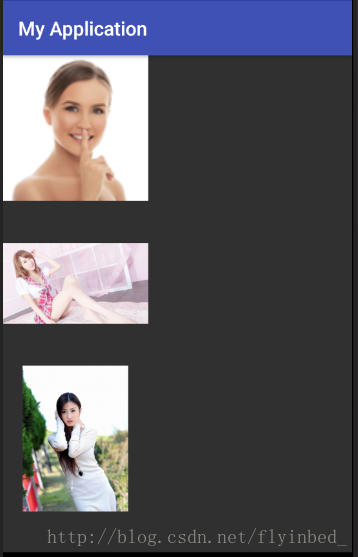
先设置一下Centercrop的属性:
题外话:glide4.0想设置图片的属性现在都是通过RequestOptions()这个类来实现的,然后在glide加载的时候通过
.apply()把那个类给塞进去就好了;
@Override

    protected void onCreate(Bundle savedInstanceState) {

        super.onCreate(savedInstanceState);

        setContentView(R.layout.activity_main);

        icon1 = (ImageView) findViewById(R.id.icon1);

        icon2 = (ImageView) findViewById(R.id.icon2);

        icon3 = (ImageView) findViewById(R.id.icon3);

        RequestOptions myOptions = new RequestOptions()

                .centerCrop();

        Glide.with(this)

                .load(R.drawable.item1)

                .apply(myOptions)

                .into(icon1);

        Glide.with(this)

                .load(R.drawable.image2)

                .apply(myOptions)

                .into(icon2);

        Glide.with(this)

                .load(R.drawable.image3)

                .apply(myOptions)

                .into(icon3);

    }
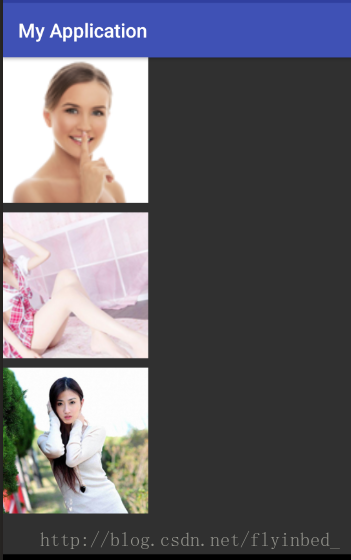
现在设置transform圆角属性
protected void onCreate(Bundle savedInstanceState) {

        super.onCreate(savedInstanceState);

        setContentView(R.layout.activity_main);

        icon1 = (ImageView) findViewById(R.id.icon1);

        icon2 = (ImageView) findViewById(R.id.icon2);

        icon3 = (ImageView) findViewById(R.id.icon3);

        RequestOptions myOptions = new RequestOptions()

                .centerCrop()

                .transform(new GlideRoundTransform(this,30));

        Glide.with(this)

                .load(R.drawable.item1)

                .apply(myOptions)

                .into(icon1);

        Glide.with(this)

                .load(R.drawable.image2)

                .apply(myOptions)

                .into(icon2);

        Glide.with(this)

                .load(R.drawable.image3)

                .apply(myOptions)

                .into(icon3);

    }

很明显把Centercrop的属性给覆盖了;
下面是我自定义类GlideRoundTransform()的代码:
public class GlideRoundTransform extends BitmapTransformation {

    private static float radius = 0f;

    public GlideRoundTransform(Context context) {

        this(context, 4);

    }

    public GlideRoundTransform(Context context, int dp) {

        super(context);

        this.radius = Resources.getSystem().getDisplayMetrics().density * dp;

    }

    @Override

    protected Bitmap transform(BitmapPool pool, Bitmap toTransform, int outWidth, int outHeight) {

        return roundCrop(pool, toTransform);

    }

    private static Bitmap roundCrop(BitmapPool pool, Bitmap source) {

        if (source == null) return null;

        Bitmap result = pool.get(source.getWidth(), source.getHeight(), Bitmap.Config.ARGB_8888);

        if (result == null) {

            result = Bitmap.createBitmap(source.getWidth(), source.getHeight(), Bitmap.Config.ARGB_8888);

        }

        Canvas canvas = new Canvas(result);

        Paint paint = new Paint();

        paint.setShader(new BitmapShader(source, BitmapShader.TileMode.CLAMP, BitmapShader.TileMode.CLAMP));

        paint.setAntiAlias(true);

        RectF rectF = new RectF(0f, 0f, source.getWidth(), source.getHeight());

        canvas.drawRoundRect(rectF, radius, radius, paint);

        return result;

    }

    public String getId() {

        return getClass().getName() + Math.round(radius);

    }

    @Override

    public void updateDiskCacheKey(MessageDigest messageDigest) {

    }

}
接下来就开始解决这个问题了,在这个自定义类当中,我们要先获取到Centercrop()这个属性后得到到图片,然后在根据这个图片在进行圆角加工然后在返回。
其实屡清楚了思路很简单 也就是一样代码的事,下面是我更改以后的代码:
public class GlideRoundTransform extends BitmapTransformation {

    private static float radius = 0f;

    public GlideRoundTransform(Context context) {

        this(context, 4);

    }

    public GlideRoundTransform(Context context, int dp) {

        super(context);

        this.radius = Resources.getSystem().getDisplayMetrics().density * dp;

    }

    @Override

    protected Bitmap transform(BitmapPool pool, Bitmap toTransform, int outWidth, int outHeight) {

        Bitmap bitmap = TransformationUtils.centerCrop(pool, toTransform, outWidth, outHeight);

        return roundCrop(pool, bitmap);

    }

    private static Bitmap roundCrop(BitmapPool pool, Bitmap source) {

        if (source == null) return null;

        Bitmap result = pool.get(source.getWidth(), source.getHeight(), Bitmap.Config.ARGB_8888);

        if (result == null) {

            result = Bitmap.createBitmap(source.getWidth(), source.getHeight(), Bitmap.Config.ARGB_8888);

        }

        Canvas canvas = new Canvas(result);

        Paint paint = new Paint();

        paint.setShader(new BitmapShader(source, BitmapShader.TileMode.CLAMP, BitmapShader.TileMode.CLAMP));

        paint.setAntiAlias(true);

        RectF rectF = new RectF(0f, 0f, source.getWidth(), source.getHeight());

        canvas.drawRoundRect(rectF, radius, radius, paint);

        return result;

    }

    public String getId() {

        return getClass().getName() + Math.round(radius);

    }

    @Override

    public void updateDiskCacheKey(MessageDigest messageDigest) {

    }

}
在看看效果:
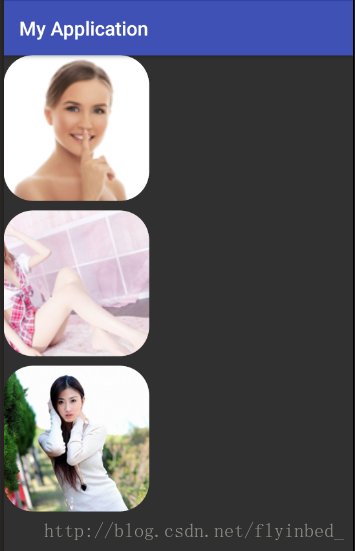
很完美,搞定收工,接下来是Activity的完整代码:
public class MainActivity extends AppCompatActivity {

    private ImageView icon1,icon2,icon3;

    @Override

    protected void onCreate(Bundle savedInstanceState) {

        super.onCreate(savedInstanceState);

        setContentView(R.layout.activity_main);

        icon1 = (ImageView) findViewById(R.id.icon1);

        icon2 = (ImageView) findViewById(R.id.icon2);

        icon3 = (ImageView) findViewById(R.id.icon3);

        //第一个是上下文,第二个是圆角的弧度

        RequestOptions myOptions = new RequestOptions()

                .transform(new GlideRoundTransform(this,30));

        Glide.with(this)

                .load(R.drawable.item1)

                .apply(myOptions)

                .into(icon1);

        Glide.with(this)

                .load(R.drawable.image2)

                .apply(myOptions)

                .into(icon2);

        Glide.with(this)

                .load(R.drawable.image3)

                .apply(myOptions)

                .into(icon3);

    }

}
要是设置的效果没用就清除下缓存,要是还不行就卸载重装好了!!!!!
总结: 核心代码
 public class GlideRoundTransform extends BitmapTransformation {

     private static float radius = 0f;

     public GlideRoundTransform(Context context) {

         this(context, 4);

     }

     public GlideRoundTransform(Context context, int dp) {

         super(context);

         this.radius = Resources.getSystem().getDisplayMetrics().density * dp;

     }

     @Override

     protected Bitmap transform(BitmapPool pool, Bitmap toTransform, int outWidth, int outHeight) {

         Bitmap bitmap = TransformationUtils.centerCrop(pool, toTransform, outWidth, outHeight);

         return roundCrop(pool, bitmap);

     }

     private static Bitmap roundCrop(BitmapPool pool, Bitmap source) {

         if (source == null) return null;

         Bitmap result = pool.get(source.getWidth(), source.getHeight(), Bitmap.Config.ARGB_8888);

         if (result == null) {

             result = Bitmap.createBitmap(source.getWidth(), source.getHeight(), Bitmap.Config.ARGB_8888);

         }

         Canvas canvas = new Canvas(result);

         Paint paint = new Paint();

         paint.setShader(new BitmapShader(source, BitmapShader.TileMode.CLAMP, BitmapShader.TileMode.CLAMP));

         paint.setAntiAlias(true);

         RectF rectF = new RectF(0f, 0f, source.getWidth(), source.getHeight());

         canvas.drawRoundRect(rectF, radius, radius, paint);

         return result;

     }

     public String getId() {

         return getClass().getName() + Math.round(radius);

     }

     @Override

     public void updateDiskCacheKey(MessageDigest messageDigest) {

     }

 }
圆角转换 GlideRoundTransform 核心代码
         //第一个是上下文,第二个是圆角的弧度

         RequestOptions myOptions = new RequestOptions()

                 .transform(new GlideRoundTransform(this,30));

         Glide.with(this)

                 .load(path)

                 .apply(myOptions)

                 .into(img);
使用方法 核心代码
Glide4.0 centerCrop属性和圆角 冲突的更多相关文章
- css3.0新属性效果在ie下的解决方案(兼容性)
css3.0增加的新属性,如投影.渐变.旋转.圆角等等!这些新标准属性在ie6.ie7.ie8浏览器版本里得不到很好的支持,相信ie以后的新版本也会支持这些新属性的.目前ie6.ie7.ie8浏览器不 ...
- Android 图片加载框架Glide4.0源码完全解析(一)
写在之前 上一篇博文写的是Picasso基本使用和源码完全解析,Picasso的源码阅读起来还是很顺畅的,然后就想到Glide框架,网上大家也都推荐使用这个框架用来加载图片,正好我目前的写作目标也是分 ...
- Android 图片加载框架Glide4.0源码完全解析(二)
写在之前 上一篇博文写的是Android 图片加载框架Glide4.0源码完全解析(一),主要分析了Glide4.0源码中的with方法和load方法,原本打算是一起发布的,但是由于into方法复杂性 ...
- PIE使IE浏览器支持CSS3属性(圆角、阴影、渐变)
http://www.360doc.com/content/12/1214/09/11181348_253939277.shtml PIE使IE浏览器支持CSS3属性(圆角.阴影.渐变) 2012-1 ...
- IT兄弟连 HTML5教程 CSS3属性特效 圆角
传统的圆角生成方案,必须使用多张图片作为背景图案.CSS3的出现,使得我们再也不必浪费时间去制作这些图片了,只需要border-radius属性,支持浏览器IE 9.Opera 10.5.Safari ...
- windows2003 IIS6.0右键属性没有asp.net选项卡的解决办法
windows2003 IIS6.0右键属性没有asp.net选项卡的解决办法 1,如果是只安装了.net framework 1.1 在iis中是不显示那个选项卡的.默认就会支持asp.net1.1 ...
- 给div设置background-color: rgba(0, 0, 0, 0.2)属性,并加了css3动画--opacity动画淡出动画,之后div子元素的字体会抖一下
问题:给div设置background-color: rgba(0, 0, 0, 0.2)属性,并加了css3动画--opacity动画淡出动画,之后div子元素的字体会抖一下: 解决:animati ...
- PSU 离11.2.0.3.0 -> 11.2.0.3.11 如果解决冲突的整个
Oracle rdbms 扑灭psu离11.2.0.3.0升级到11.2.0.3.11 参考patch :18522512 停止应用,停止听音乐并DB,将db的oracle_home在下面OPatch ...
- Spring Boot 2.0的属性绑定
Spring Boot2.0的属性绑定 原文从Spring boot第一个版本以来,我们可以使用@ConfigurationProperties注解将属性绑定到对象.也可以指定属性的各种不同格式.比如 ...
随机推荐
- Codeforces Round #246 (Div. 2) D. Prefixes and Suffixes
D. Prefixes and Suffixes You have a string s = s ...
- VNC Viewer 设置屏幕分辨率-解决屏幕分辨率问题
https://blog.csdn.net/runningtortoises/article/details/51425332
- Stockbroker Grapevine POJ 1125 Floyd
Stockbroker Grapevine Time Limit: 1000MS Memory Limit: 10000K Total Submissions: 37069 Accepted: ...
- C - How Many Tables 并查集
Today is Ignatius' birthday. He invites a lot of friends. Now it's dinner time. Ignatius wants to kn ...
- kendo grid 报错:length
其实是:events中的{}Onsave的问题,把events整个注释掉就好了
- poj——2084 Game of Connections
Game of Connections Time Limit: 1000MS Memory Limit: 30000K Total Submissions: 8664 Accepted: 42 ...
- NETCore项目报错 An error occurred while starting the application
在发布到IIS的webApi项目中,运行时报出以上错误, 解决方法: 1.打开发布目录文件夹,找到web.config文件 2.打开web.config找到stdoutLogEnabled=" ...
- 开源软件Review Board
开源软件, Review Board 代码审查的. https://www.reviewboard.org/
- cisco路由器上的DHCP
一.实验拓扑 二.具体配置 Router(config)#do sh run Building configuration... Current configuration : 604 bytes ...
- 最简单的视音频播放演示样例7:SDL2播放RGB/YUV
===================================================== 最简单的视音频播放演示样例系列文章列表: 最简单的视音频播放演示样例1:总述 最简单的视音频 ...