
input file 美化的方法
css input[type=file] 样式美化,input上传按钮美化
由于明天公司组织出去游玩,今天把这两天的博客都写了吧,今天的内容是input[type=file] 样式美化,input上传按钮美化。
我们在做input文本上传的时候,html自带的上传按钮比较丑,如何对其进行美化呢?同理:input checkbox美化,input radio美化是一个道理的,后面文章会总结。
思路:
input file上传按钮的美化思路是,先把之前的按钮透明度opacity设置为0,然后,外层用div包裹,就实现了美化功能。
代码如下:
DOM结构:
<a href="javascript:;" class="a-upload">

    <input type="file" name="" id="">点击这里上传文件

</a>

<a href="javascript:;" class="file">选择文件

    <input type="file" name="" id="">

</a>
CSS样式1:
/*a  upload */

.a-upload {

    padding: 4px 10px;

    height: 20px;

    line-height: 20px;

    position: relative;

    cursor: pointer;

    color: #888;

    background: #fafafa;

    border: 1px solid #ddd;

    border-radius: 4px;

    overflow: hidden;

    display: inline-block;

    *display: inline;

    *zoom: 1

}

.a-upload  input {

    position: absolute;

    font-size: 100px;

    right: 0;

    top: 0;

    opacity: 0;

    filter: alpha(opacity=0);

    cursor: pointer

}

.a-upload:hover {

    color: #444;

    background: #eee;

    border-color: #ccc;

    text-decoration: none

}
样式2:
.file {

    position: relative;

    display: inline-block;

    background: #D0EEFF;

    border: 1px solid #99D3F5;

    border-radius: 4px;

    padding: 4px 12px;

    overflow: hidden;

    color: #1E88C7;

    text-decoration: none;

    text-indent: 0;

    line-height: 20px;

}

.file input {

    position: absolute;

    font-size: 100px;

    right: 0;

    top: 0;

    opacity: 0;

}

.file:hover {

    background: #AADFFD;

    border-color: #78C3F3;

    color: #004974;

    text-decoration: none;

}
修改后如下:
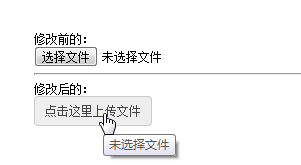
样式二:

备注:对于HTML5之input:file,还可以控制上传的类型的,但是这个是html5的,低版本浏览器不支持,详情请看:HTML5的 input:file上传类型控制 http://www.haorooms.com/post/input_file_leixing
美化后显示文件名
上面美化,把默认显示的文件名也给隐藏掉了,那么如何显示文件名称呢?没关系,我们可以用jquery来获取文件的文件名。
我们可以写个change事件
$(".a-upload").on("change","input[type='file']",function(){

    var filePath=$(this).val();

    if(filePath.indexOf("jpg")!=-1 || filePath.indexOf("png")!=-1){

        $(".fileerrorTip").html("").hide();

        var arr=filePath.split('\\');

        var fileName=arr[arr.length-1];

        $(".showFileName").html(fileName);

    }else{

        $(".showFileName").html("");

        $(".fileerrorTip").html("您未上传文件,或者您上传文件类型有误!").show();

        return false

    }

})
input file 美化的方法的更多相关文章
- WebView中input file的解决方法
public class MyWb extends Activity { /** Called when the activity is first created. */ WebView web; ...
- thinkphp配置rewrite模式访问时不生效 出现No input file specified解决方法
使用thinkphp配置rewire模式的路径访问网站时, 直接复制官网的.htaccess文件的代码复制过去 1 2 3 4 5 6 <IfModule mod_rewrite.c> ...
- input file美化,文件上传
此文学习至:http://www.haorooms.com/post/input_file_leixing 然而只会用,不会做,UI泪茫茫 效果图: 原图: 美化后: 此主要用css美化表单,然后用J ...
- input file 美化
<input type='file'>的默认外观实在难看,绝大多数情况都需要对其美化.找了很多资料,目前发现以下方式是最简单的美化方式. 1.将file input用label包裹起来,然 ...
- input file美化
<style> a{display:inline-block; width:100px; height:40px; position:relative; overflow:hidden;} ...
- Input file 文本框美化
HTML原生的input file 上传按钮有多(无)不(力)漂(吐)亮(槽)我就不多说了.大家几乎在项目中都会有遇到图片.等文件需要上传的地方,好看的文件上传按钮会使人身心愉悦(我瞎说的).好了不多 ...
- 伪触发 input file 的click事件
前端在做 input file 美化的时候,通常 把 input 定位position 到 已美化的按钮最上方 opacity: 0 HTML5时代,已有更方便的方法,点击美化按钮直接触发选择文件事件 ...
- Apache服务器网站访问伪静态内页出现No input file specified.的完美解决方案
原文地址:Apache服务器网站访问伪静态内页出现No input file specified.的完美解决方案 启用REWRITE的伪静态功能的时候,首页可以访问,而访问内页的时候,就提示:&quo ...
- thinkphp 5.6以上版本出现No input file specified解决办法
打开thinkphp,出现No input file specified. 解决方法:在工程下的.htaccess文件里, 把RewriteRule ^(.*)$ index.php/$1 [QSA, ...
随机推荐
- 2016/1/21 练习 创建 接口interface 应用implements 类class 并实例化调用
package testinterface; public interface ICpu { //电压 public boolean dianya(); //控制 public void kongzh ...
- 大文本 通过 hadoop spark map reduce 获取 特征列 的 属性值 计算速度
大文本 通过 hadoop spark map reduce 获取 特征列 的 属性值 计算速度
- go1
关键字: break default func interface select case defer go map struct chan else goto package switch cons ...
- MQTT Android端对比
根据收集到的信息,MQTT的Android端项目有这些 后面打算分别研究下
- TQ210--UBOOT移植笔记--添加自己的单板【学习笔记】
在uboot的源码的根目录下的readme中有介绍如何在uboot中添加自己的单板: 一.在boards.cfg中添加自己的单板的信息,可以模仿smdkc100去添加自己的单板的信息 二.复制单板的配 ...
- [NOI2004]小H的小屋 贪心
神仙贪心,洛谷没有插图导致我题一开始都没看懂.容易发现,块越多越优秀,然后为了满足题意,所以假如不能整除,就分为两个部分(能整除就直接均分就行了).前一部分是n/m,后一部分是n/m+1.数量也是固定 ...
- POJ 2104 HDU 2665 主席树 解决区间第K大
两道题都是区间第K大询问,数据规模基本相同. 解决这种问题, 可以采用平方划分(块状表)复杂度也可以接受,但是实际表现比主席树差得多. 这里大致讲一下我对主席树的理解. 首先,如果对于某个区间[L,R ...
- 在Android.mk文件中输出打印消息 (转载)
转自:http://blog.csdn.net/xiaibiancheng/article/details/8479694 在进行Android NDK的开发当中有时想看看Android.mk文件当中 ...
- log4j日志基本配置
Log4j有三个主要的组件:Loggers(记录器),Appenders (输出源)和Layouts(布局).这里可简单理解为日志类别,日志要输出的地方和日志以何种形式输出.综合使用这三个组件可以轻松 ...
- Android之条形码、二维码扫描框架(非原创)
文章大纲 一.条形码.二维码扫描框架介绍二.条形码.二维码的区别和组成结构介绍三.条形码.二维码扫描框架应用场景四.BGAQRCode-Android框架实战五.项目源码下载六.参考文章 一.条形码. ...