
Android Animation动画效果简介
AlphaAnimation 淡入淡出动画
<alpha>A fade-in or fade-out animation. Represents an AlphaAnimation.
attributes:
android:fromAlpha- Float. Starting opacity offset, where 0.0 is transparent and 1.0 is opaque.
- 动画开始时的透明度
android:toAlpha- Float. Ending opacity offset, where 0.0 is transparent and 1.0 is opaque.
- 动画结束时的透明度
For more attributes supported by <alpha>, see the Animation class reference (of which, all XML attributes are inherrited by this element).
    <alpha

        xmlns:android="http://schemas.android.com/apk/res/android"

        android:duration="1000"

        android:fromAlpha="1.0"

        android:toAlpha="0.5" />
要实现淡入淡出设置 android:fromAlpha 和android:toAlpha这俩个属性就可以了 还有一些其他属性可以参见Animation这个父类
android:duration="400" 动画持续的时间 单位毫秒
android:fillAfter="true|false" 如果fillAfter设为true,则动画执行后,控件将停留在动画结束的状态
android:fillBefore="true|false" 如果fillBefore设为true,则动画执行后,控件将回到动画开始的状态
android:startOffset="2000" 设置动画执行之前等待的时间(单位:毫秒)
android:repeatCount="5" 设置动画重复的次数
android:interpolator="@android:anim/linear_interpolator" 设置动画的变化速度
setInterpolator(new AccelerateDecelerateInterpolator()):先加速,后减速
setInterpolator(new AccelerateInterpolator()):加速
setInterpolator(new DecelerateInterpolator()):减速
setInterpolator(new CycleInterpolator()):动画循环播放特定次数,速率改变沿着正弦曲线
setInterpolator(new LinearInterpolator()):匀速
以及其他一些特定的动画效果
translate 实现滑动动画
 <translate

        android:duration="2000"

        android:fromXDelta="-50%p"

        android:fromYDelta="-50%"

        android:toXDelta="0%p"

        android:toYDelta="0%p" />
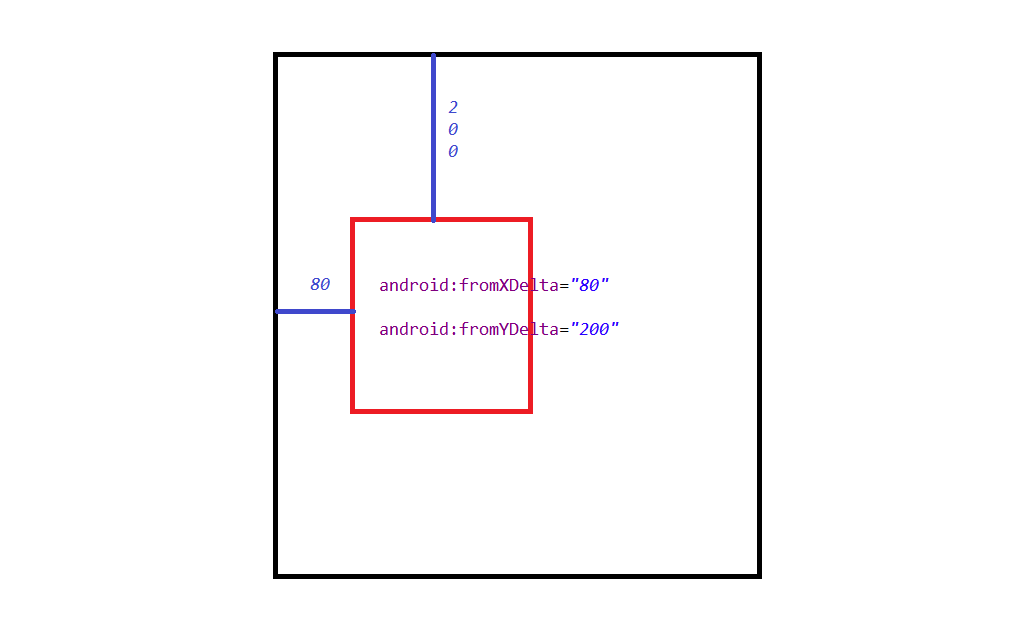
android:fromXDelta="" X轴偏移量起始时位置
android:toXDelta="" X轴偏移量结束时位置
android:fromYDelta="" Y轴偏移量起始时位置
android:toYDelta="" Y轴偏移量结束时位置
参数可以是 dp,%,%p
其中%是相对于控件本身的相对位置, %p是相对于父容器的位置
如果是%p 的意思是控件的 左边与上边 距离父容器的偏移量


<scale>标签为缩放节点
android:fromXscale="1.0" 表示开始时X轴缩放比例为 1.0 (原图大小 * 1.0 为原图大小)
android:toXscale="0.0"表示结束时X轴缩放比例为0.0(原图大小 *0.0 为缩小到看不见)
android:fromYscale="1.0" 表示开始时Y轴缩放比例为 1.0 (原图大小 * 1.0 为原图大小)
android:toYscale="0.0"表示结束时Y轴缩放比例为0.0(原图大小 *0.0 为缩小的看不到了)
android:pivotX="50%" X轴缩放的位置为中心点
android:pivotY="50%" Y轴缩放的位置为中心点
android:duration="2000" 动画播放时间 这里是2000毫秒也就是2秒
Android Animation动画效果简介的更多相关文章
- android Animation 动画效果介绍
Android的animation由四种类型组成 XML中 alpha 渐变透明度动画效果 scale 渐变尺寸伸缩动画效果 translate 画面转换位置移动动画效果 rotate 画面转移旋转动 ...
- Android中xml设置Animation动画效果详解
在 Android 中, Animation 动画效果的实现可以通过两种方式进行实现,一种是 tweened animation 渐变动画,另一种是 frame by frame animation ...
- android中设置Animation 动画效果
在 Android 中, Animation 动画效果的实现可以通过两种方式进行实现,一种是 tweened animation 渐变动画,另一种是 frame by frame animation ...
- Android Activity动画属性简介
Android Activity动画属性简介 在Android当中 设置activity的动画 需要复写 android:windowAnimationStyle这个属性 我们自定义一个动画样式来继承 ...
- Android Animation 动画属性
在 Android 中, Animation 动画效果的实现可以通过两种方式进行实现: 一种是 tweened animation 渐变动画,另一种是 frame by frame animation ...
- android Animation动画的xml使用
在Android应用程序,使用动画效果,能带给用户更好的感觉,做动画能够通过XML或Android代码来实现. Animation动画效果的实现能够通过两种方式进行实现,一种是tweened anim ...
- [Android]Animation 动画介绍和实现
Animation动画效果来实现菜单的显示和隐藏,本文就来介绍下吧. 1.Animation 动画类型 Android的animation由四种类型组成: XML中 alph 渐变透明度动画效果 sc ...
- Android Animation动画实战(二):从屏幕底部弹出PopupWindow
在这篇文章之前,我已经陆陆续续写了几篇博客,介绍了Android Animation是如何使用的,有还不明白的,可以点击查看: 1. Android Animation动画详解(一): 补间动画 2. ...
- Android Animation动画实战(一): 从布局动画引入ListView滑动时,每一Item项的显示动画
前言: 之前,我已经写了两篇博文,给大家介绍了Android的基础动画是如何实现的,如果还不清楚的,可以点击查看:Android Animation动画详解(一): 补间动画 及 Android An ...
随机推荐
- 测试化工具XCTestCase
layout: post title: "Xcode 7智能测试化工具XCTest学习" subtitle: "Xcode 7智能测试化工具XCTest学习" ...
- Eclipse 去掉JavaScript Validator
http://www.cnblogs.com/wucg/archive/2012/08/06/2625458.html eclipse有些时候,javascript文件总是通不过eclipse的编译校 ...
- vscode自定义背景颜色
vscode自定义背景颜色 大概做前端的builder(只会打代码的才是coder,嘻嘻~)一半以上都会使用vscode编辑代码吧,vscode很轻量,支持的文件拖拽加入编辑区功能我个人认为很方便 ...
- jquery动态绑定事件
什么是动态绑定? 动态绑定是指动态添加的DOM节点或者html元素,他们最开始时运行的时候是不存在的.如果要给这些动态加入的节点增加事件,就必须要用jquery的on方法来绑定事件. $('.cont ...
- Jquery与mootools对比
换了新公司以后就很少使用原生Js来实现界面交互了,而是更多的依赖Jquery. 1.Jquery优点: 良好的一致性$().().xxxxx与强大的DOM api组件可以让一个js菜鸟一周之类立马开发 ...
- redis 学习札记4-sortset
redis 学习笔记4--sortset redis学习笔记3--sortSet 终于到最后一个数据结构了,加油!! 整体结构图: http://dl.iteye.com/upload/picture ...
- GO1.6语言学习笔记1-基础篇
一.GO语言优势 可直接编译成机器码,Go编译生成的是一个静态可执行文件,除了glibc外没有其他外部依赖 静态类型语言,但是有动态语言的感觉 语言层面支持并发.Goroutine和channel ...
- ucosii事件控制块------消息邮箱与消息队列
UCOSII 使用叫做事件控制块(ECB)的数据结构来描述诸如信号量.邮箱(消息邮箱)和消息队列这些事件 #define OS_EVENT_EN (((OS_Q_EN > 0u) &&a ...
- MySQL的binlog日志恢复(转)
binlog 基本认识 MySQL的二进制日志可以说是MySQL最重要的日志了,它记录了所有的DDL和DML(除了数据查询语句)语句,以事件形式记录,还包含语句所执行的消耗的时间,MySQL的二进制日 ...
- linux中计划任务执行脚本
我使用的是ubuntu14.4,所以在ubuntu中一切正常,在其他linux系统中应该都差不多. 1 计划任务,crontab命令选项: -u指定一个用户, -l列出某个用户的任务计 ...