
通过 微软 pai-fs 上传数据到HDFS (Microsoft OpenPAI)
准备环境
(个人使用记录,方便下次使用查阅~~)
首先保证PAI是登陆状态:

进入GitHub项目所在地址:
https://github.com/Microsoft/pai/
然后切换分支到 
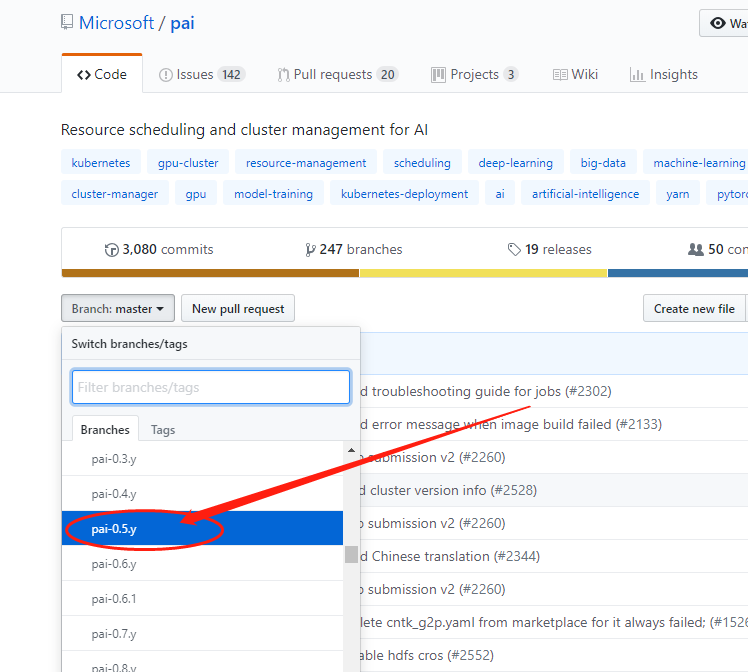
具体 使用文档再这里:

https://github.com/Microsoft/pai/tree/pai-0.5.y/pai-fs
将代码clone下来后执行:
`python pai-fs.py --config host=xxx.xxx.234.79 port=50070 user=root`(配置Server)
上传数据到HDFS
进到pai-fs.py目录下(也可以直接绝对路径),然后通过 :
python pai-fs.py + 参数 +路径
进行数据上传

具体使用方法:
(Github README.md)
example use:

  pai-fs --config host=10.0.3.9 port=50070 user=root         -- store hdfs config

  pai-fs -ls hdfs://                                         -- list the contents of a root HDFS directory

  pai-fs -ls hdfs:// --host 10.0.3.9                         -- list the contents of a root HDFS directory with host specified

  pai-fs -ls hdfs:// --host 10.0.3.9 --port 50070 --user root    -- list the contents of a root HDFS directory with host, port and user specified

  pai-fs -ls -r hdfs://                                      -- list the contents of a root HDFS directory, recursively

  pai-fs -mkdir hdfs://mydir/mysubdir/mysubdir2              -- makes mysubdir2 and all directories along the way

  pai-fs -rm hdfs://mydir/mysubdir/myfile                    -- removes myfile from mysubdir

  pai-fs -rm hdfs://mydir/mysubdir                           -- removes mysubdir and all files and directories in it

  pai-fs -cp c:\mylocalfile hdfs://mydir/myremotedir         -- copy mylocalfile into myremotedir

  pai-fs -cp -r c:\mylocaldir hdfs://mydir/myremotedir       -- copy mylocaldir into myremotedir, recursively

  pai-fs -cp -r c:\mylocaldir\* hdfs://mydir/myremotedir     -- copy mylocaldir's contents into myremotedir, recursively

  pai-fs -cp c:\mylocaldir\\a hdfs://mydir/myremotedir/b     -- copy file a from mylocaldir to myremotedir and rename to b

  pai-fs -cp -r hdfs://mydir/myremotedir c:\mylocaldir       -- copy myremotedir into mylocaldir, recursively

  pai-fs -cp -r hdfs://mydir/myremotedir/* c:\mylocaldir     -- copy myremotedir's contents into mylocaldir, recursively

exit code:

  0   -- Success

  1   -- An exception happened during the operation including bad connection

  2   -- PAI_VC environment variable not set to valid VC or insufficient/invalid command line argument(s)

  3   -- Path not found

  4   -- Unauthorized access

  5   -- Path not empty

  6   -- Check failed after operation

  100 -- Failed to copy too many times

  101 -- Failed to concat chunks into file
使用演示
执行命令后,开始上传

通过 微软 pai-fs 上传数据到HDFS (Microsoft OpenPAI)的更多相关文章
- sqoop上传数据到hdfs,并用hive管理数据。
sqoop导入mysql数据表到HDFS中sqoop import --connect jdbc:mysql://master:3306/test --username root --password ...
- 重新想象 Windows 8.1 Store Apps (89) - 通信的新特性: 下载数据, 上传数据, 上传文件
[源码下载] 重新想象 Windows 8.1 Store Apps (89) - 通信的新特性: 下载数据, 上传数据, 上传文件 作者:webabcd 介绍重新想象 Windows 8.1 Sto ...
- TortoiseGit和msysGit安装及使用笔记(windows下使用上传数据到GitHub)[转]
TortoiseGit和msysGit安装及使用笔记(windows下使用上传数据到GitHub) Git-1.7.11-preview+GitExtensions244SetupComplete+T ...
- Amzon MWS API开发之 上传数据
亚马逊上传数据,现有能操作的功能有很多:库存数量.跟踪号.价格.商品....... 我们可以设置FeedType值,根据需要,再上传对应的xml文件即可. 下面可以看看FeedType类型 这次我们拿 ...
- Amazon MWS 上传数据 (三) 提交请求
前面介绍了设置服务和构造请求,现在介绍提交请求. 上传数据,查询上传操作的工作状态,和处理上传操作返回的报告操作使用的Amazon API 分别为:SubmitFeed(),FeedSubmissio ...
- Amazon MWS 上传数据 (二) 构造请求
上一篇文章提到了Amazon 上传数据有三个步骤,但是每个步骤都需要构造服务和构造请求,服务是一样的,请求各不相同:这个很容易理解,这三个步骤都需要和Amazon服务器交互,所以他们的服务构造是一样的 ...
- Amazon MWS 上传数据 (一) 设置服务
Amazon 上传数据的流程为: 通过 SubmitFeed 操作.加密标头和所有必需的元数据(包括 FeedType 的值在内),来提交 XML 或文本型数据文件.正如亚马逊 MWS的所有提交内容一 ...
- 说说ajax上传数据和接收数据
我是一个脑袋不太灵光的人,所以遇到问题,厚着脸皮去请教大神的时候,害怕被大神鄙视,但是还是被鄙视了.我说自己不要点脸面,那是不可能的,但是,为了能让自己的技术生涯能走的更长远一些,受点白眼,受点嘲笑也 ...
- webclient上传数据到ashx服务
1.上传参数 UploadData()方法可以上传数据参数,需要将所要上传的数据拼成字符. // 创建一个新的 WebClient 实例. WebClient myWebClient = new ...
随机推荐
- Unity脚本中各函数成员的生命周期
在学习Unity时,掌握如何编写脚本是必须掌握的一项基本技能.但是关于Unity的游戏脚本中各函数的生命周期是怎样开始和结束的,它们的执行顺序是如何安排的?这一点我们要清楚的了解. 我们知道Unity ...
- Spring定时器Quartz的用法
首先导入需要的两个jar: spring-context-support-4.1.1.RELEASE.jar quartz-2.2.1.jar 1.创建两个类: 2. QuartzConfigurat ...
- 总结一下前端面试题之Html和CSS
总结一下关于前端的面试题,今天我们分享关于Html和CSS部分的 面试 (1) 1. 常用那几种浏览器测试?有哪些内核(Layout Engine)? 2. 说下行内元素和块级元素的区别?行内块元素的 ...
- kendo-ui的使用和开发自己的组件
摘要: 前面介绍了一款非常不错的前端框架kendo-ui,如果你想阅读,请点这里.通过使用它一段时间,感觉是非常好用.下面就介绍一下如何使用它和开发自己的组件 引入: 只需要引进下面三个文件即可 ke ...
- Python 处理命令行参数
optparse模块用于从命令行直接读取参数,用法基本与 argparse模块 一致,如下: #!/usr/bin/env python #-*- coding:utf-8 -*- from optp ...
- Python 列表表达式与生成器表达式
列表表达式: (1) 语法1:[表达式 for 变量 in 列表],表示把得到的每一个变量值都放到 for 前面的表达式中计算 ,然后生成一个列表(2) 语法2:[表达式 for 变量 in 列表 i ...
- VS2015编译GEOS3.5.1源码
官网下载下来的geos3.5.1,执行CMakeLists.txt,发现会报错:GenerateSourceGroups 去github上搜索geos,然后去\cmake\modules目录下复制一份 ...
- ThreadUtil 多线程处理List,回调处理具体的任务
每次想多线程处理一个大的结果集的时候 都需要写一大堆代码,自己写了个工具类 方便使用 package com.guige.fss.common.util; import com.guige.fss.c ...
- mySQL数据库三:命令行附录
一:where 在上一篇,粗略的介绍了where,但是where后面可以跟其他的条件,现在我们来一一说明 1.between:在某两个值之间 我建立一个名为person的表,里面有id,name,ag ...
- zookeeper-端口说明
一.zookeeper有三个端口(可以修改) 1.2181 2.3888 3.2888 二.3个端口的作用 1.2181:对cline端提供服务 2.3888:选举leader使用 3.2888:集群 ...