
CSLA.Net学习(3)INotifyPropertyChanged和IDataErrorInfo
今天晕晕糊糊的看CSLA.net,希望能找到验证数据正确性的方法,还是摸索出了INotifyPropertyChanged, IDataErrorInfo接口的使用方法,通过INotifyPropertyChanged实现了响应属性改变的事件,通过 IDataErrorInfo接口实现了在DataGridView或者GridControl中显示验证信息。
先看一个数据实体的抽象类:
  public abstract class BaseModel : INotifyPropertyChanged, INotifyPropertyChanging, IDataErrorInfo

     {

         protected BusinessRules mBusinessRules = new BusinessRules();

         public event PropertyChangedEventHandler PropertyChanged;

         public event PropertyChangingEventHandler PropertyChanging;

         public BaseModel()

         {

             mBusinessRules.info = this;

             AddRule();

         }

         public virtual void AddRule()

         {

         }

         protected virtual void PropertyHasChanged(string name)

         {

             var propertyNames = mBusinessRules.CheckRules(name);

             foreach (var item in propertyNames)

                 OnPropertyChanged(item);

         }

         protected virtual void OnPropertyChanged(string propertyName)

         {

             if (PropertyChanged != null)

                 PropertyChanged.Invoke(this, new PropertyChangedEventArgs(propertyName));

         }

         protected virtual void OnPropertyChanging(string propertyName)

         {

             if (PropertyChanging != null)

                 PropertyChanging.Invoke(this, new PropertyChangingEventArgs(propertyName));

         }

         #region IDataErrorInfo

         string IDataErrorInfo.Error

         {

             get

             {

                 return "Hello";

             }

         }

         string IDataErrorInfo.this[string columnName]

         {

             get { return mBusinessRules.GetBrokenRules(columnName); }

         }

         #endregion

     }
其中的BusinessRules对象mBusinessRules主要负责验证属性的正确性,这里只实现了一个粗糙版本的,没有抽象出验证规则Rule类。
将属性名和验证规则增加到mBusinessRules对象中,通过IDataErrorInfo的IDataErrorInfo.Error属性和IDataErrorInfo.this[string columnName]索引器验证每一列的正确性。Error是行头显示的提示信息。这里用到了lamda表达式和属性的遍历。
  public class BusinessRules

     {

         List<string> names = new List<string>();

         List<string> exp = new List<string>();

         public object info;//指向对象本身

         public List<string> CheckRules(string name)

         {

             return names;

         }

         public string GetBrokenRules(string columnName)

         {

             for (int i = ; i < names.Count; i++)

             {

                 List<object> list = new List<object>();

                 if (info == null) return null;

                 Type t = info.GetType();

                 IEnumerable<System.Reflection.PropertyInfo> property = from pi in t.GetProperties() where pi.Name.ToLower() == columnName.ToLower() select pi;

                 //IEnumerable<System.Reflection.PropertyInfo> property = t.GetProperties();

                 foreach (PropertyInfo prpInfo in property)

                 {

                     string sProName = prpInfo.Name;

                     object obj = prpInfo.GetValue(info, null);

                     if (!Regex.IsMatch(obj.ToString(), exp[i]))

                     {

                         return "Error";

                     }

                 }

             }

             return "";

         }

         public void AddRule(string ColName, string RegexExpress)

         {

             names.Add(ColName);

             exp.Add(RegexExpress);

         }

     }
BusinessRules
接下来是数据实体Student,继承自BaseModel
  public class Student : BaseModel

     {

         public Student(string name)

         {

             mName = name;

         }

         private string mName;

         public string Name

         {

             get

             {

                 return mName;

             }

             set

             {

                 if (mName != value)

                 {

                     mName = value;

                     PropertyHasChanged("Name");

                 }

             }

         }

         public override void AddRule()

         {

             mBusinessRules.AddRule("Name", @"^-?\d+$");

         }

     }
Student
最后是调用和效果:
  private void button1_Click(object sender, EventArgs e)

         {

             BindingList<Student> list = new BindingList<Student>();

             Student a = new Student("张三");

             list.Add(a);

             Student b = new Student("张三三");

             list.Add(b);

             gridControl1.DataSource = list;

         }

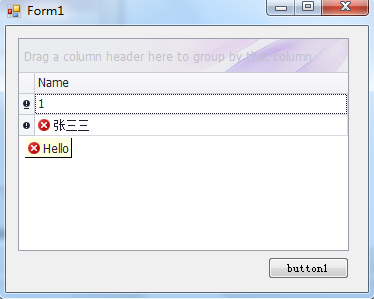
图1 初始化程序 图2修改第一行数据后,第一行错误提示消失
行头没有处理,所以一直有提示信息。
提供一个较完整的验证基类:
 using System;

 using System.Collections.Generic;

 using System.ComponentModel;

 using System.Reflection;

 using System.Text.RegularExpressions;

 namespace AppSurveryTools.Base

 {

     public abstract class EntityBase : IDataErrorInfo

     {

         protected BussinessRules mBussiness = null;

         public EntityBase()

         {

             mBussiness = new BussinessRules(this);

             AddRules();

         }

         public virtual void AddRules()

         {

         }

         public string Error

         {

             get { return ""; }

         }

         public string this[string columnName]

         {

             get

             {

                 string error = mBussiness.CheckRule(columnName);

                 return error;

             }

         }

     }

     public class BussinessRules

     {

         Dictionary<string, Rule> rules = new Dictionary<string, Rule>();

         Object mObj = null;

         private readonly Type _type;

         public BussinessRules(object obj)

         {

             mObj = obj;

             _type = mObj.GetType();

         }

         public void AddRules(string property, Rule rule)

         {

             if (!rules.ContainsKey(property))

             {

                 rules.Add(property, rule);

             }

         }

         public string CheckRule(string columnName)

         {

             if (rules.ContainsKey(columnName))

             {

                 Rule rule = rules[columnName];

                 PropertyInfo[] properties = _type.GetProperties(BindingFlags.Public | BindingFlags.Instance);

                 foreach (PropertyInfo prpInfo in properties)

                 {

                     if (prpInfo.Name == columnName)

                     {

                         object obj = prpInfo.GetValue(mObj, null);

                         if (obj==null)

                         {

                             return "";

                         }

                         if (rule.RuleType == RuleTypes.RegexExpression)

                         {

                             if (!Regex.IsMatch(obj.ToString(), rule.RegexExpression))

                             {

                                 return rule.ErrorText;

                             }

                         }

                         else if (rule.RuleType == RuleTypes.StringRequire)

                         {

                             if (string.IsNullOrEmpty(obj.ToString()))

                             {

                                 return rule.ErrorText;

                             }

                         }

                     }

                 }

             }

             return "";

         }

         public void RemoveRule(string property)

         {

             if (rules.ContainsKey(property))

             {

                 rules.Remove(property);

             }

         }

     }

     public enum RuleTypes

     {

         RegexExpression = ,

         Int32Require = ,

         DoubleRequire = ,

         DataRequire = ,

         StringRequire =

     }

     public class Rule

     {

         public RuleTypes RuleType { get; set; }

         public string ErrorText { get; set; }

         public string RegexExpression { get; set; }

         /// <summary>

         /// 验证规则

         /// </summary>

         /// <param name="typeRule">验证类型</param>

         /// <param name="error">提示信息</param>

         /// <param name="expression">表达式</param>

         public Rule(RuleTypes typeRule, string error, string expression)

         {

             if (typeRule == RuleTypes.RegexExpression)

             {

                 if (!string.IsNullOrEmpty(expression))

                 {

                     RegexExpression = expression;

                 }

             }

             RuleType = typeRule;

             ErrorText = error;

         }

         public string CheckRule(string RegexExpression)

         {

             return "";

         }

     }

 }
调用方法:
继承基类EntityBase,重载方法AddRules()
 public override void AddRules()

         {

             string express = "^([-]?(\\d|[1-8]\\d)[°](\\d|[0-5]\\d)['](\\d|[0-5]\\d)(\\.\\d+)?[\"]?[NS]?$)";

             mBussiness.AddRules("WGS84B", new Rule(RuleTypes.RegexExpression, "请输入正确的纬度数据", express));

             string express2 = "^([-]?(\\d|[1-9]\\d|1[0-7]\\d)[°](\\d|[0-5]\\d)['](\\d|[0-5]\\d)(\\.\\d+)?[\"]?[EW]?$)";

             mBussiness.AddRules("WGS84L", new Rule(RuleTypes.RegexExpression, "请输入正确的经度数据", express2));

             base.AddRules();

         }
补充:类似的介绍http://blog.csdn.net/t673afa/article/details/6066278
CSLA.Net学习(3)INotifyPropertyChanged和IDataErrorInfo的更多相关文章
- CSLA.Net学习(2)
采用CSLA.net 2.1.4.0版本的书写方式: using System; using System.ComponentModel; using Csla.Validation; using S ...
- CSLA框架的codesmith模板改造
一直有关注CSLA框架,最近闲来无事,折腾了下,在最新的r3054版本基础上修改了一些东西,以备自己用,有兴趣的园友可以下载共同研究 1.添加了默认的授权规则 如果是列表对象则生成列表权限,User的 ...
- 《Dotnet9》系列-FluentValidation在C# WPF中的应用
时间如流水,只能流去不流回! 点赞再看,养成习惯,这是您给我创作的动力! 本文 Dotnet9 https://dotnet9.com 已收录,站长乐于分享dotnet相关技术,比如Winform.W ...
- FluentValidation在C# WPF中的应用
原文:FluentValidation在C# WPF中的应用 一.简介 介绍FluentValidation的文章不少,零度编程的介绍我引用下:FluentValidation 是一个基于 .NET ...
- WPF学习总结1:INotifyPropertyChanged接口的作用
在代码中经常见到这个接口,它里面有什么?它的作用是什么?它和依赖属性有什么关系? 下面就来总结回答这三个问题. 1.这个INotifyPropertyChanged接口里就一个PropertyChan ...
- winform + INotifyPropertyChanged + IDataErrorInfo + ErrorProvider实现自动验证功能
一个简单的Demo.百度下载链接:http://pan.baidu.com/s/1sj4oM2h 话不多说,上代码. 1.实体类定义: class Student : INotifyPropertyC ...
- WPF学习笔记:(二)数据绑定模式与INotifyPropertyChanged接口
数据绑定模式共有四种:OneTime.OneWay.OneWayToSource和TwoWay,默认是TwoWay.一般来说,完成数据绑定要有三个要点:目标属性是依赖属性.绑定设置和实现了INotif ...
- 【2016-10-24】【坚持学习】【Day11】【WPF】【MVVM】
今天学习wpf的mvvm 人家说,APS.NET ===>MVC WPF===>MVVM 用WPF不用mvvm的话,不如用winform... 哈哈,题外话. 定义: MVVM: WPF的 ...
- Caliburn.Micro学习笔记(四)----IHandle<T>实现多语言功能
Caliburn.Micro学习笔记目录 说一下IHandle<T>实现多语言功能 因为Caliburn.Micro是基于MvvM的UI与codebehind分离, binding可以是双 ...
随机推荐
- GC浅析之三-性能调优经验总结
性能调优经验总结 问题的出现: 在日常环境下,以某server 为例,该机器的每秒的访问量均值在368左右,最大访问量在913.对外提供服务的表现为每两三个小时就有秒级别的时间客户端请求超时,在访问量 ...
- VC++ 操作Windows快捷方式
声明:本文是参考网友博文,然后自己实践整理所得,转载请注明出处! Windows的快捷方式实际上是一个带有扩展名LNK的数据文件,其中包含有用于访问Windows某一对象(即在资源管理器中所能浏览的所 ...
- mysql中什么是逻辑备份
需求描述: mysql中,或者说关系型数据库中逻辑备份到底指的是什么呢,主要还是对于 概念的理解,在此记录下. 概念解释: 逻辑备份:主要指的是保存数据库的逻辑结构(比如:create dattaba ...
- C#导出Excel按照指定格式设置单元格属性值
最近项目中一直在写XML.Table.Excel之间的转化.之前一直都是不考虑格式的导出,今天给出一个格式,让按照格式导出,还真把我这新手为难了一翻,网上给出的资料基本一样.为了一个单元格文字变色纠结 ...
- 为KindEditor编辑器中的内容添加样式,使得自己定义前台页面显示效果与编辑器效果一致
KindEditor 本身自带有一定的样式,且为内部样式,在使用过程中,难免会发现部分效果不是我们想要的,因此.KindEditor提代了两种方式供使用着调用 1.内部样式.通过 cssData 属性 ...
- day23<File类递归练习>
File类递归练习(统计该文件夹大小) File类递归练习(删除该文件夹) File类递归练习(拷贝) File类递归练习(按层级打印) 递归练习(斐波那契数列) 递归练习(1000的阶乘所有零和尾部 ...
- css揭秘读书笔记
currentColor属性让hr和段落相同的颜色: div { color: red; } hr { background: currentColor; /* 一定要设置高度*/ height: 0 ...
- swift--控件工厂类的实现
控件工厂类,简而言之就是,减少代码的复用率,只在哪里用,然后在哪里调: 代码如下: import UIKit class ViewFactory: UIView,UITextFieldDelegate ...
- android中必备的接口回调用法
1 ,这个方法很常见,本人觉得也很实用,分享下吧 public class DirverDistanceTool { public void getDirverDistance(LatLng star ...
- java基础---->多个排序的拓展
根据一些特定的规则,我们可以利用java的反射机制做到很有趣的封装. java的排序封装 一.定义一些comparator AmountComparatorAsc:amount升序 package c ...