
angular学习笔记(十四)-$watch(2)
下面来看一个$watch的比较复杂的例子:
还是回到http://www.cnblogs.com/liulangmao/p/3700919.html一开始讲的购物车例子,
给它添加一个计算总价和折扣的功能,如果总价超过500,则优惠10%:
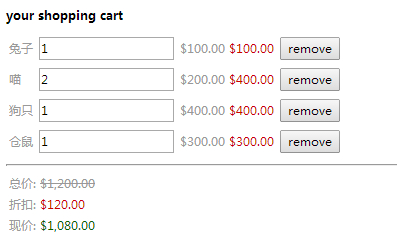
代码如下:
<!DOCTYPE html>

<html ng-app>

<head>

  <title>11.1$watch监控数据变化</title>

  <meta charset="utf-8">

  <script src="../angular.js"></script>

  <script src="script.js"></script>

</head>

<body>

<div ng-controller="CartController">

  <h1>your shopping cart</h1>

  <table>

    <tr ng-repeat="item in items">

      <td>{{item.title}}</td>

      <td><input ng-model="item.quantity"/></td>

      <td>{{item.price|currency}}</td>

      <td class="red">{{item.price*item.quantity|currency}}</td>

      <td><button ng-click="remove($index)">remove</button></td>

    </tr>

  </table>

  <hr>

  <table>

    <tr>

      <td>总价: <span class="del">{{bill.all|currency}}</span></td>

    </tr>

    <tr>

      <td>折扣: <span class="red">{{bill.discount|currency}}</span></td>

    </tr>

    <tr>

      <td>现价: <span class="green">{{bill.now|currency}}</span></td>

    </tr>

  </table>

</div>

</body>

</html>
function CartController ($scope) {

    $scope.items = [

        {"title":"兔子","quantity":1,"price":"100"},

        {"title":"喵","quantity":2,"price":"200"},

        {"title":"狗只","quantity":1,"price":"400"},

        {"title":"仓鼠","quantity":1,"price":"300"}

    ];

    $scope.remove = function(index){

        $scope.items.splice(index,1)

    };

    $scope.bill = {

        "all":0,

        "discount":0,

        "now":0

    };

    $scope.compute = function(){

        var total = 0;

        for(var i=0; i<$scope.items.length; i++){

            total += $scope.items[i].quantity*$scope.items[i].price;

        }

        $scope.bill.all = total;

        $scope.bill.discount = total >= 500 ? total*0.1 : 0 ;

        $scope.bill.now = $scope.bill.all - $scope.bill.discount

    };

    $scope.$watch('items',$scope.compute,true);

}
把需要计算的三个数据: 总价,折扣,现价,放在一个bill对象中,
监测商品列表items数组的变化,设置$watch的第三个参数为true,这样,商品的数据一旦发生变化,就会调用compute方法,重新计算bill对象中的三个数据
这个例子的js还可以写成这样:
function CartController ($scope) {

    $scope.items = [

        {"title":"兔子","quantity":1,"price":"100"},

        {"title":"喵","quantity":2,"price":"200"},

        {"title":"狗只","quantity":1,"price":"400"},

        {"title":"仓鼠","quantity":1,"price":"300"}

    ];

    $scope.remove = function(index){

        $scope.items.splice(index,1)

    };

    $scope.bill = {

        "all":0,

        "discount":0,

        "now":0

    };

    $scope.compute = function(){

        var total = 0;

        for(var i=0; i<$scope.items.length; i++){

            total += $scope.items[i].quantity*$scope.items[i].price;

        }

        $scope.bill.all = total;

        $scope.bill.discount = total >= 500 ? total*0.1 : 0 ;

        $scope.bill.now = $scope.bill.all - $scope.bill.discount

    };

    $scope.$watch($scope.compute);

}
差别只有最后一句红色的代码,把$watch的第一个参数从原来的items数组直接改为compute函数.也就是上一篇http://www.cnblogs.com/liulangmao/p/3722885.html讲到的$watch第一个参数的第4种情况.
---------------------------------------------------------------------------------------------------------------------------------------------------------------------------------
遗留问题同上一篇,不清楚直接在$watch的第一个参数中传入函数时,究竟在监测什么东西的变化.
angular学习笔记(十四)-$watch(2)的更多相关文章
- 【转】angular学习笔记(十四)-$watch(1)
本篇主要介绍$watch的基本概念: $watch是所有控制器的$scope中内置的方法: $scope.$watch(watchObj,watchCallback,ifDeep) watchObj: ...
- angular学习笔记(十四)-$watch(1)
本篇主要介绍$watch的基本概念: $watch是所有控制器的$scope中内置的方法: $scope.$watch(watchObj,watchCallback,ifDeep) watchObj: ...
- angular学习笔记(十四)-$watch(3)
同样的例子,还可以这样写: <!DOCTYPE html> <html ng-app> <head> <title>11.3$watch监控数据变化&l ...
- angular学习笔记(十四)-$watch(4)
如果需要同时监测多个属性或者对象,并且执行的是同样的回调,可以有两种选择: 1. 监测这些属性连接起来之后的值: $scope.$watch('objOne.a+objTwo.b+...', watc ...
- angular学习笔记(十五)-module里的'服务'
本篇介绍angular中的模块:module 在笔记(二)http://www.cnblogs.com/liulangmao/p/3711047.html里已经讲到过模块,这篇主要讲模块的 '服务' ...
- angular学习笔记(十九)-指令修改dom
本篇主要介绍angular使用指令修改DOM: 使用angular指令可以自己扩展html语法,还可以做很多自定义的事情.在后面会专门讲解这一块的知识,这一篇只是起到了解入门的作用. 与控制器,过滤器 ...
- angular学习笔记(十六) -- 过滤器(2)
本篇主要介绍angular自定义的过滤器: 直接看例子: <!DOCTYPE html> <html ng-app="MyFilter"> <head ...
- angular学习笔记(十六) -- 过滤器(1)
本篇主要介绍过滤器的基本用法: 过滤器用来对数据进行格式的转换,数据格式的转化与逻辑无关,因此,我们使用过滤器来进行这些操作: {{... | filter2: 参数1,参数2... }} expre ...
- angular学习笔记(十)-src和href处理
本篇主要介绍angular中图片的src和链接的href的处理: 用到了以下两个属性: ng-src: 绑定了数据的路径表达式 ng-href: 绑定了数据的路径表达式 例如: <!DOCTYP ...
随机推荐
- Docker网络一览
转自:http://dockone.io/article/1143 [编者的话]本文是Nuage Networks公司Filip Verloy的一篇博文,简介了一下Docker网络情况,单主机的四种模 ...
- 修复eclipse build-helper-maven-plugin 异常
安装 help --> install new http://repo1.maven.org/maven2/.m2e/connectors/m2eclipse-buildhelper/0.15. ...
- 使用 Scrapy 构建一个网络爬虫
来自weixin 记得n年前项目需要一个灵活的爬虫工具,就组织了一个小团队用Java实现了一个爬虫框架,可以根据目标网站的结构.地址和需要的内容,做简单的配置开发,即可实现特定网站的爬虫功能.因为要考 ...
- python easy_install 发生Unable to find vcvarsall.bat错误的处理方法
用python安装mmseg分词包时发生了 Unable to find vcvarsall.bat 错误 Searching for mmseg Reading http://pypi.python ...
- 指定spring中bean启动的顺序
参考链接: https://www.jb51.net/article/125846.htm 使用DependsOn Spring 中的 DependsOn 注解可以保证被依赖的bean先于当前bean ...
- linux利器expect的使用
1.什么是expect在做系统管理时,我们很多时候需要输入密码,例如:连接 ssh,连接ftp,那么如何能做到不输入密码,我们需要有一个工具,能代替我们实现与终端的交互,它能够代替我们实现与终端的交互 ...
- HDUOJ---2152
Fruit Time Limit: 1000/1000 MS (Java/Others) Memory Limit: 32768/32768 K (Java/Others)Total Submi ...
- Oracle SQL Developer,Oracle 开发工具之toad、SQL Developer、PL/SQL Developer等比较
参考: oracle 的几个开发工具比较 因Oracle几乎是中大型商业企业数据的首选,所以比较一下常用与Oracle的工具. Oracle SQL Developer 免费,一般开发使用足矣,常用. ...
- python webdriver API学习笔记
浏览器操作 driver.maximize_window() #浏览器最大化 driver.set_window_size(480,800) #设置浏览器宽,高 driver.back() & ...
- 命名管道FIFO和mkfifo函数
进程间通信必须通过内核提供的通道,而且必须有一种办法在进程中标识内核提供的某个通道,前面讲过的匿名管道是用打开的文件描述符来标识的.如果要互相通信的几个进程没有从公共祖先那里继承文件描述符,它们怎么通 ...