
angular学习笔记(十四)-$watch(2)
下面来看一个$watch的比较复杂的例子:
还是回到http://www.cnblogs.com/liulangmao/p/3700919.html一开始讲的购物车例子,
给它添加一个计算总价和折扣的功能,如果总价超过500,则优惠10%:
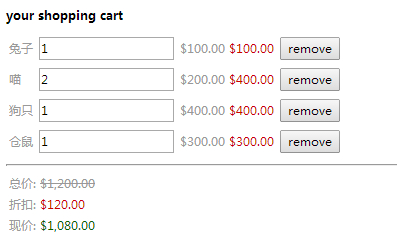
代码如下:
<!DOCTYPE html>

<html ng-app>

<head>

  <title>11.1$watch监控数据变化</title>

  <meta charset="utf-8">

  <script src="../angular.js"></script>

  <script src="script.js"></script>

</head>

<body>

<div ng-controller="CartController">

  <h1>your shopping cart</h1>

  <table>

    <tr ng-repeat="item in items">

      <td>{{item.title}}</td>

      <td><input ng-model="item.quantity"/></td>

      <td>{{item.price|currency}}</td>

      <td class="red">{{item.price*item.quantity|currency}}</td>

      <td><button ng-click="remove($index)">remove</button></td>

    </tr>

  </table>

  <hr>

  <table>

    <tr>

      <td>总价: <span class="del">{{bill.all|currency}}</span></td>

    </tr>

    <tr>

      <td>折扣: <span class="red">{{bill.discount|currency}}</span></td>

    </tr>

    <tr>

      <td>现价: <span class="green">{{bill.now|currency}}</span></td>

    </tr>

  </table>

</div>

</body>

</html>
function CartController ($scope) {

    $scope.items = [

        {"title":"兔子","quantity":1,"price":"100"},

        {"title":"喵","quantity":2,"price":"200"},

        {"title":"狗只","quantity":1,"price":"400"},

        {"title":"仓鼠","quantity":1,"price":"300"}

    ];

    $scope.remove = function(index){

        $scope.items.splice(index,1)

    };

    $scope.bill = {

        "all":0,

        "discount":0,

        "now":0

    };

    $scope.compute = function(){

        var total = 0;

        for(var i=0; i<$scope.items.length; i++){

            total += $scope.items[i].quantity*$scope.items[i].price;

        }

        $scope.bill.all = total;

        $scope.bill.discount = total >= 500 ? total*0.1 : 0 ;

        $scope.bill.now = $scope.bill.all - $scope.bill.discount

    };

    $scope.$watch('items',$scope.compute,true);

}
把需要计算的三个数据: 总价,折扣,现价,放在一个bill对象中,
监测商品列表items数组的变化,设置$watch的第三个参数为true,这样,商品的数据一旦发生变化,就会调用compute方法,重新计算bill对象中的三个数据
这个例子的js还可以写成这样:
function CartController ($scope) {

    $scope.items = [

        {"title":"兔子","quantity":1,"price":"100"},

        {"title":"喵","quantity":2,"price":"200"},

        {"title":"狗只","quantity":1,"price":"400"},

        {"title":"仓鼠","quantity":1,"price":"300"}

    ];

    $scope.remove = function(index){

        $scope.items.splice(index,1)

    };

    $scope.bill = {

        "all":0,

        "discount":0,

        "now":0

    };

    $scope.compute = function(){

        var total = 0;

        for(var i=0; i<$scope.items.length; i++){

            total += $scope.items[i].quantity*$scope.items[i].price;

        }

        $scope.bill.all = total;

        $scope.bill.discount = total >= 500 ? total*0.1 : 0 ;

        $scope.bill.now = $scope.bill.all - $scope.bill.discount

    };

    $scope.$watch($scope.compute);

}
差别只有最后一句红色的代码,把$watch的第一个参数从原来的items数组直接改为compute函数.也就是上一篇http://www.cnblogs.com/liulangmao/p/3722885.html讲到的$watch第一个参数的第4种情况.
---------------------------------------------------------------------------------------------------------------------------------------------------------------------------------
遗留问题同上一篇,不清楚直接在$watch的第一个参数中传入函数时,究竟在监测什么东西的变化.
angular学习笔记(十四)-$watch(2)的更多相关文章
- 【转】angular学习笔记(十四)-$watch(1)
本篇主要介绍$watch的基本概念: $watch是所有控制器的$scope中内置的方法: $scope.$watch(watchObj,watchCallback,ifDeep) watchObj: ...
- angular学习笔记(十四)-$watch(1)
本篇主要介绍$watch的基本概念: $watch是所有控制器的$scope中内置的方法: $scope.$watch(watchObj,watchCallback,ifDeep) watchObj: ...
- angular学习笔记(十四)-$watch(3)
同样的例子,还可以这样写: <!DOCTYPE html> <html ng-app> <head> <title>11.3$watch监控数据变化&l ...
- angular学习笔记(十四)-$watch(4)
如果需要同时监测多个属性或者对象,并且执行的是同样的回调,可以有两种选择: 1. 监测这些属性连接起来之后的值: $scope.$watch('objOne.a+objTwo.b+...', watc ...
- angular学习笔记(十五)-module里的'服务'
本篇介绍angular中的模块:module 在笔记(二)http://www.cnblogs.com/liulangmao/p/3711047.html里已经讲到过模块,这篇主要讲模块的 '服务' ...
- angular学习笔记(十九)-指令修改dom
本篇主要介绍angular使用指令修改DOM: 使用angular指令可以自己扩展html语法,还可以做很多自定义的事情.在后面会专门讲解这一块的知识,这一篇只是起到了解入门的作用. 与控制器,过滤器 ...
- angular学习笔记(十六) -- 过滤器(2)
本篇主要介绍angular自定义的过滤器: 直接看例子: <!DOCTYPE html> <html ng-app="MyFilter"> <head ...
- angular学习笔记(十六) -- 过滤器(1)
本篇主要介绍过滤器的基本用法: 过滤器用来对数据进行格式的转换,数据格式的转化与逻辑无关,因此,我们使用过滤器来进行这些操作: {{... | filter2: 参数1,参数2... }} expre ...
- angular学习笔记(十)-src和href处理
本篇主要介绍angular中图片的src和链接的href的处理: 用到了以下两个属性: ng-src: 绑定了数据的路径表达式 ng-href: 绑定了数据的路径表达式 例如: <!DOCTYP ...
随机推荐
- 10个最受欢迎的Java类(转)
原文:http://www.csdn.net/article/2012-06-04/2806277 每一个Java程序员都有一份属于自己的Java类排名表.这个排名表没有严格的规定,也没有可遵循的规则 ...
- java 散列与散列码探讨 ,简单HashMap实现散列映射表运行各种操作示列
java 散列与散列码探讨 ,简单HashMap实现散列映射表运行各种操作示列 package org.rui.collection2.maps; /** * 散列与散列码 * 将土拔鼠对象与预报对象 ...
- 4、Android Activity的生命周期 Activity的生命周期
watermark/2/text/aHR0cDovL2Jsb2cuY3Nkbi5uZXQveXV4aWt1b18x/font/5a6L5L2T/fontsize/400/fill/I0JBQkFCMA ...
- Autocomplete in ASP.NET MVC3自动检索并填充输入框
1.单一产品情况下使用: public ActionResult GetStockList() { var item = _db.Stocks.ToList().Select(s =>s.Pro ...
- echo “新密码”|passwd --stdin 用户名
--stdin This option is used to indicate that passwd should read the new password from standard input ...
- 微信小程序开发思路
小程序还没有完全开放,不能真实体验,但通过文档和开发工具,可以了解到他的开发思路 下面就介绍下小程序的开发方式,希望能帮助有兴趣的朋友对整体思路有个快速了解 整体结构 默认示例项目的目录结构 从后缀名 ...
- SDK Build Tools revision (19.0.3) is too low for project Minimum required is 19.1.0
假设你正在使用Android Studio工具进行开发,且将版本号更新到0.6.0的时候.莫名的出现这种错误 SDK Build Tools revision (19.0.3) is too low ...
- nyoj---快速查找素数
快速查找素数 时间限制:1000 ms | 内存限制:65535 KB 难度:3 描述 现在给你一个正整数N,要你快速的找出在2.....N这些数里面所有的素数. 输入 给出一个正整数数N ...
- 学习Tkinter
tutorial point这个网站教程很多,无所不包.还包括一堆在线IDE,值得收藏 一.第一个tkinter程序 import tkinter top = tkinter.Tk() # Code ...
- POJ 1836 Alignment (双向DP)
Alignment Time Limit: 1000MS Memory Limit: 30000K Total Submissions: 10804 Accepted: 3464 Descri ...