
PHP之SimpleXML函数
使用php创建XML文件十分简单,使用SimpleXML那就更简便了,同时读取XML文件也十分方便。XML文件是直接在浏览器中打开,以自定义标签的方式直观简洁的方式展示给读者。
1.创建XML文件
header("Content-type: text/html; charset=utf-8");

    $xml=new SimpleXMLElement('<?xml version="1.0" encoding="utf-8"?><returnRequest />');

    $item=$xml->addchild("client","DYSON");

    $item1=$xml->addchild("distributionCentre","DAMCO");

    $item2=$xml->addchild("order");

    $item2->addchild("ref",$info_all['id']);

    $item2->addchild("id","??");

    $item2->addchild("store","CN");

        $item3 = $item2->addchild("detail");

            $item3->addchild("created",$info_all['crated']);

            $item3->addchild("customer");

            $item3->addchild("ip");

            $item3->addchild("language","cn-GB");

            $item3->addchild("vatCountry","CN");

            $item3->addchild("origin","DYSON");

            $item3->addchild("originDate",$info_all['crated']);

            $item3->addchild("customerReference","???");

            $item3->addchild("csAgent");

        $item4 = $item2->addchild("people");

            $item4_1 = $item4->addchild("person");

            $item4_1->addchild("ref");

            $item4_1->addchild("title");

            $item4_1->addchild("firstName",$info_all['receiver_name']);

            $item4_1->addchild("lastName");

            $item4_1->addchild("phone",$info_all['receiver_mobile']);

            $item4_1->addchild("fax");

            $item4_1->addchild("mobile");

            $item4_1->addchild("email");

            $item4_1->addchild("department");

            $item4_1->addchild("companyName");

            $item4_1->addchild("gender");

            $item4_1->addchild("dateofbirth");

        $item5 = $item2->addchild("address");

            $item5_1 = $item5->addchild("address");

            $item5_1->addchild("addresstype","customer");

            $item5_1->addchild("addrss1",$info_all['receiver_district']);

            $item5_1->addchild("addrss2",$info_all['receiver_address']);

            $item5_1->addchild("city",$info_all['receiver_city']);

            $item5_1->addchild("state",$info_all['receiver_state']);

            $item5_1->addchild("zip",$info_all['receiver_zip']);

                $item5_1_1 = $item5_1->addchild("country");

                $item5_1_1->addchild("code","CN");

                $item5_1_1->addchild("name","CHINA");

    header("Content-type: text/xml");

    // echo $xml->asXml();exit;

    $xml->asXml("test.xml");
使用addchild方法可以无限创建XML标签,同时也可以无限层级,类似多维数组形式。文件打开显示为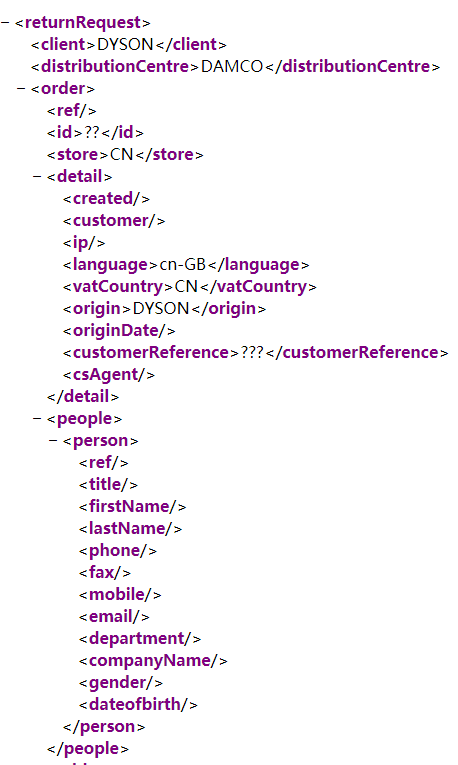
2.解析XML文件
$xml = simplexml_load_file("test.xml");

     $data['client'] = $xml->client;

     $data['language'] = $xml->order->detail->language;

     echo $data['language'];
使用 simplexml_load_file 函数可以解析XML文件 可以获取指定标签中的数据 (->标签)箭头指向哪个标签便获取所在标签中的数据。
PHP之SimpleXML函数的更多相关文章
- PHP 5 SimpleXML 函数
PHP SimpleXML 简介 SimpleXML 扩展提供了一种获取 XML 元素的名称和文本的简单方式,只要您知道 XML 文档的布局. SimpleXML 转换 XML 文档到 SimpleX ...
- PHP SimpleXMLElement::__toString SimpleXML 函数
定义和用法 SimpleXMLElement::__toString - 返回字符串内容 版本支持 PHP4 PHP5 PHP7 不支持 支持 支持 语法 SimpleXMLElement::__to ...
- PHP中遍历XML之SimpleXML
简单来讲述一些XML吧,XML是可扩展标记语言,是一种用于标记电子文件使其具有结构性的标记语言.XML是当今用于传输数据的两大工具之一,另外一个是json. 我们在PHP中使用XML也是用来传输数据, ...
- HP SimpleXML
PHP SimpleXML PHP SimpleXML 处理最普通的 XML 任务,其余的任务则交由其它扩展处理. 什么是 PHP SimpleXML? SimpleXML 是 PHP 5 中的新特性 ...
- PHP SimpleXML
安装 SimpleXML 扩展需要 PHP 5 支持. 自 PHP 5 起,SimpleXML 函数是 PHP 核心的组成部分.无需安装即可使用这些函数. PHP 5 SimpleXML 函数 函数 ...
- Php函数完整参考手册
序号 分类 描述 1 Array 函数 2 Calendar 函数 日历扩展包含了简化不同日历格式间的转换的函数. 3 Date/Time 函数 Date/Time 函数用于从 PHP 脚本运行的服务 ...
- PHP XML SimpleXML
PHP 可以基于 SimpleXML 生成和解析 xml 的方法,通过本节的实例,你将了解 PHP 是如何使用 SimpleXML 生成及解析 xml 格式数据的. PHP SimpleXML 处理最 ...
- 什么是 PHP SimpleXML?
PHP SimpleXML PHP SimpleXML 处理最普通的 XML 任务,其余的任务则交由其它扩展处理. 什么是 PHP SimpleXML? SimpleXML 是 PHP 5 中的新特性 ...
- PHP 语言特性
一.PHP 超级全局变量 PHP 超级全局变量列表: $GLOBALS $_SERVER $_REQUEST $_POST $_GET $_FILES $_ENV $_COOKIE $_SESSION ...
随机推荐
- C语言奇淫技巧,字符串的三种表示方法,不会用不是合格的程序员
1.在C语言中,是将字符串作为字符数组来处理的,字符串是逐个存放到数组元素中的 例如用一个一维的字符数组存放字符串"I am a boy.",如下代码: char c[12] = ...
- leetcode-867-Transpose Matrix(矩阵由按行存储变成按列存储)
题目描述: Given a matrix A, return the transpose of A. The transpose of a matrix is the matrix flipped o ...
- golang使用etcd实现分布式锁
package main import ( "context" "fmt" "time" "go.etcd.io/etcd/cli ...
- tomcat startup.brt启动一闪而过
今天启动皕杰自带的tomcat的时候,直接点startup.brt控制台窗口一闪而过. 改用cmd命令启动: 切换到 E:\皕杰报表\皕杰报表3.5\DemoServer\bin目录 运行startu ...
- c#StreamWriter,StreamReader类(主要用于文本文件访问)
1.为什么要使用StreamReader或者StreamWriter 如果对文本文件需要读取一部分显示一部分则使用FileStream会有问题,因为可能FileStream会在读取的时候把一个汉字的字 ...
- C#原生压缩和解压缩方法
string path = AppDomain.CurrentDomain.BaseDirectory; string startPath = @"c:\Client"; stri ...
- Check类之TypeValidation
(1)Validator类的visitTypeApply()方法 实例1: class TestTypeVal<T extends InputStream>{ TestTypeVal< ...
- Go语言学习笔记四: 运算符
Go语言学习笔记四: 运算符 这章知识好无聊呀,本来想跨过去,但没准有初学者要学,还是写写吧. 运算符种类 与你预期的一样,Go的特点就是啥都有,爱用哪个用哪个,所以市面上的运算符基本都有. 算术运算 ...
- master线程的主循环,后台循环,刷新循环,暂停循环
InnoDB存储引擎的主要工作都是在一个单独的后台线程master thread中完成的.master thread的线程优先级别最高.其内部由几个循环(loop)组成:主循环(loop).后台循环( ...
- C#定义一个类,并生成属性的例子
class Person { private string name; private string age; private string job; public Person(string nam ...