
SpringAOP的自定义注解实践
springaop属于spring的重要属性,在java中有相当广泛的用途,大家一般都接触过aop实现事务的管理,在xml里配好声明式事务,然后直接在service上直接加上相应注解即可,
今天我们来实现下SpringAOP的自定义注解,用来在前置通知中做下权限校验,有利于我们代码的解藕,提高复用性,增加代码B格;
话不多说,上代码,首先定义一个自定义注解
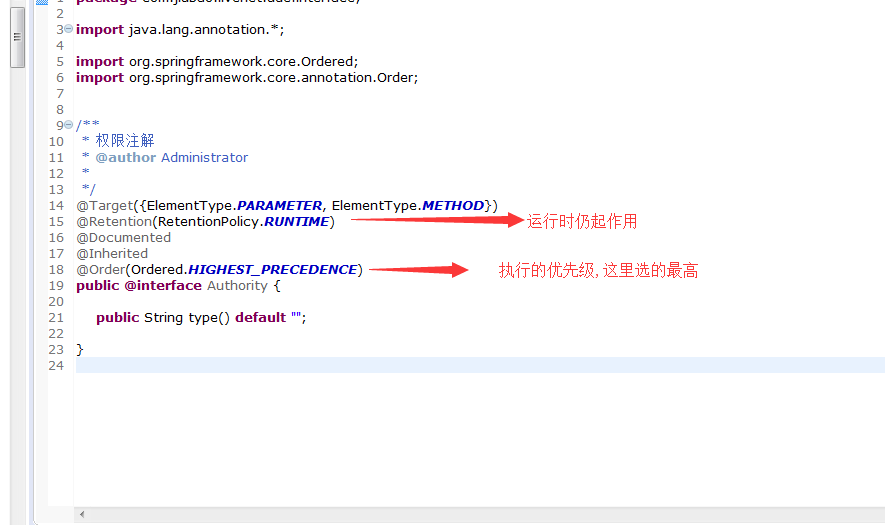
这里的参数我们并没有在使用,先随意定义个type,以后想使用时可以再赋值
再来看切面
import java.util.HashMap;
import java.util.List;
import java.util.Map;
import javax.annotation.Resource;
import javax.servlet.http.HttpServletRequest;
import org.apache.commons.lang.StringUtils;
import org.aspectj.lang.JoinPoint;
import org.aspectj.lang.ProceedingJoinPoint;
import org.aspectj.lang.annotation.After;
import org.aspectj.lang.annotation.AfterReturning;
import org.aspectj.lang.annotation.AfterThrowing;
import org.aspectj.lang.annotation.Around;
import org.aspectj.lang.annotation.Aspect;
import org.aspectj.lang.annotation.Before;
import org.aspectj.lang.annotation.Pointcut;
import org.slf4j.Logger;
import org.slf4j.LoggerFactory;
import org.springframework.stereotype.Component;
import com.jiubao.common.core.cache.redis.JedisUtil;
import com.jiubao.common.core.exception.MyException;
import com.jiubao.livenet.cache.JiuBaoCache;
import com.jiubao.livenet.constant.ServiceConstants;
import com.jiubao.livenet.enums.Limitsenum;
import com.jiubao.livenet.service.CustomerService;
/**
* 注解切面
* @author Administrator
*
*/
@Aspect
@Component
public class AuthorityAspect {
private static final Logger logger = LoggerFactory.getLogger(AuthorityAspect.class);
@Resource
private CustomerService customerService;
//Controller层切点
@Pointcut("execution (* com.jiubao.livenet.controller.*.*(..))")
public void controllerAspect() {}
/**
* 前置通知
* 只拦截带有Authority注解的controller方法
* @param joinPoint 切点
* @return
*/
//@org.springframework.stereotype.Controller *) 表示拦截controller方法 @annotation(Authority) 表示只拦截带此注解的方法
@Before("within(@org.springframework.stereotype.Controller *) && @annotation(Authority)")
public void doBefore(JoinPoint joinPoint) throws MyException {
logger.info("==========执行商户权限controller前置通知===============");
Object[] args = joinPoint.getArgs();
HttpServletRequest request=null;
for (int i = 0; i < args.length; i++) {
Object object = args[i];
if(object instanceof HttpServletRequest) {
request=(HttpServletRequest) args[i];
break;
}
}
Map<String, Object> paramMap = new HashMap<String, Object>();
if(request ==null) {
return;
}
String url = request.getRequestURI().toString(); //请求的url,注意,只有方法参数里有HttpServletRequest request才能获取到request
/**
* 权限控制
*/
JedisUtil jedis = JiuBaoCache.getJedisUtil();
String userId = jedis.getUserId(request);
paramMap.put("uid", userId); //登录人UID
boolean isAccess=false;
List<Map<String, String>> userAuthlist= customerService.getUserAuth(paramMap); //查询登录人的商户角色列表
for (int i = 0; i < userAuthlist.size(); i++) {
if(userAuthlist.get(i).get("role")!=null) {
String[] limitsArray = Limitsenum.limitsArray(Integer.valueOf(userAuthlist.get(i).get("role"))); //使用枚举得到此角色对应的URL数组
for (int a = 0; a < limitsArray.length; a++) {
if(url.contains(limitsArray[a])) { //判断是否有,如果有则跳出
isAccess=true;
break;
}
}
if(isAccess) {
break;
}
}
}
if (!isAccess){
throw new MyException(-1,ServiceConstants.NO_ACCESS); //无权限访问,如果没有权限直接扔出个自定义异常,在那里会用response返回给前端提示
}
}
//全部拦截,这样的before就是全局拦截,会拦截所有方法
@Before("controllerAspect()")
public void doBefore2(JoinPoint joinPoint) {
System.out.println("==========执行全部拦截controller前置通知===============");
}
@AfterReturning(returning="rvt",pointcut="controllerAspect()") //打印所有方法的返回值
public Object AfterExec(JoinPoint joinPoint,Object rvt){ //pointcut是对应的注解类 rvt就是方法运行完之后要返回的值
logger.info("返回值为:" + rvt);
return rvt;
}
}
再看看调用过程
直接加在controller里想要限制的方法上即可

上面就是全部逻辑了,还有after和Around注解在此省略,这里要开始测试了,我几次都测不通,发现根本无效,而且
我配置文件里也有 <aop:aspectj-autoproxy proxy-target-class="true" />,不知道怎么回事,后来才发现
如果你的配置文件是这样的:

你除了在spring-mybaits.xml里要有这个外,还需要在spring-mvc.xml里有,好吧,都要加上才有效,而且别忘了头部的声明哦
顺便鄙视一下springmvc,配置文件就是麻烦
在此就完成了所有代码了,亲测是有效的
需提醒是的,当一个切面里有多个同样的注解时,会按链式分先后执行,比如上面第1个before,所有配了@Authority的方法会执行,接着执行第2个before,
而没有配@Authority的方法会直接执行第2个before,第1个由于不满足条件不会执行,这样方便我们在一个切面里写多种灵活的逻辑.
springaop由于配置灵活,复用性强,无性能损耗,在封装代码上很好用,比拦截器更方法,推荐使用
再推荐几个这方面比较好的文章:
1.https://www.cnblogs.com/jianjianyang/p/4910851.html
2.https://www.cnblogs.com/sjlian/p/7325602.html
3.https://www.cnblogs.com/mouseIT/p/5033746.html
SpringAOP的自定义注解实践的更多相关文章
- SpringBoot+SpringAOP+Java自定义注解+mybatis实现切库读写分离
一.定义我们自己的切库注解类 自定义注解有几点需要注意: 1)@Target 是作用的目标,接口.方法.类.字段.包等等,具体看:ElementType 2)@Retention 是注解存在的范围,R ...
- springAop整合自定义注解做方法日志配置(源码在附件)
package com.aop.log.anno; import java.lang.annotation.ElementType; import java.lang.annotation.Reten ...
- java自定义注解注解方法、类、属性等等【转】
http://anole1982.iteye.com/blog/1450421 http://www.open-open.com/doc/view/51fe76de67214563b20b385320 ...
- JAVA自定义注解SpringAOP
原文:https://my.oschina.net/wangnian/blog/801348 前言:Annotation(注解)是JDK5.0及以后版本引入的,它的作用就是负责注解其他注解.现在开发过 ...
- SpringAOP拦截Controller,Service实现日志管理(自定义注解的方式)
转载:http://itindex.net/detail/50710-springaop-controller-service 从业近二,三年了,第一次写博客,平时做做脚手架或者架构一些基础框架然后给 ...
- Spring Boot系列——AOP配自定义注解的最佳实践
AOP(Aspect Oriented Programming),即面向切面编程,是Spring框架的大杀器之一. 首先,我声明下,我不是来系统介绍什么是AOP,更不是照本宣科讲解什么是连接点.切面. ...
- spring --解析自定义注解SpringAOP(配合@Aspect)
1:首先,声明自定义注解 @Retention(RetentionPolicy.RUNTIME) @Target({ElementType.METHOD}) public @interface DtT ...
- 使用自定义注解和springAOP捕获Service层异常,并处理自定义异常
一 自定义异常 /** * 自定义参数为null异常 */ public class NoParamsException extends Exception { //用详细信息指定一个异常 publi ...
- ssm+redis 如何更简洁的利用自定义注解+AOP实现redis缓存
基于 ssm + maven + redis 使用自定义注解 利用aop基于AspectJ方式 实现redis缓存 如何能更简洁的利用aop实现redis缓存,话不多说,上demo 需求: 数据查询时 ...
随机推荐
- LoadRunner简单培训相关笔记
学校花了20万买了LoadRunner,因此作为幸运的一届,赶上了这场培训.以下为笔记以及培训后制作的简易思维导图. Loadrunner思维导图源码(Xmind): http://pan.baidu ...
- Python学习---抽屉框架分析[数据库设计分析]180313
基本的: models.py ####################################以下都是抽屉的代码#################################### fro ...
- Mysql学习---使用Python执行存储过程
使用Python执行存储过程 使用Python执行存储过程[2部分]: 1.执行存储过程,获取存储过程的结果集 2.将返回值设置给了 @_存储过程名_序号 = #!/usr/bin/env pyt ...
- Linux下的Mysql的远程访问
mysql的服务端[192.168.25.136] 1,在远程访问之前需先配置防火墙 service iptables stop (不推荐,可配置开通3306端口) 2,授权 mysql> gr ...
- 解决网卡无法自动获取ip的办法
解决网卡无法自动获取IP址的方法 为了省钱或者一户多机,很多人都购买宽带路由器共享上网.在架设路由上网的时候,有些“师傅”可能不懂或是偷懒,开启了宽带路由器的DHCP( Dynami ...
- python3程序设计基本方法
实例 6.升级维护 总结: 打了多年的游击战.突然经过教官的指导,觉得很受益,程序自学需要总结和交流.
- IOS http(上传和下载)
HttpTool.h #import <Foundation/Foundation.h> typedef void (^HttpToolProgressBlock)(CGFloat pro ...
- JavaScript的事件的处理函数(鼠标,键盘,HTML)
事件处理函数概述 JavaScript 可以处理的事件类型为:鼠标事件.键盘事件.HTML 事件 所有的事件处理函数都会都有两个部分组成,on + 事件名称,例如 click 事件的事件处理函数就是: ...
- nd.array.where
http://mxnet.apache.org/api/python/ndarray/ndarray.html#mxnet.ndarray.where Return the elements, eit ...
- 哈希表和字典List和Ilist和array和arraylist的应用
string x = string.Empty; string y = string.Empty; Hashtable ht = new Hashtable(); ...