
android开发(49) android 使用 CollapsingToolbarLayout ,可折叠的顶部导航栏
概述
在很app上都见过 可折叠的顶部导航栏效果。google support v7 提供了 CollapsingToolbarLayout 可以实现这个效果。效果图如下:
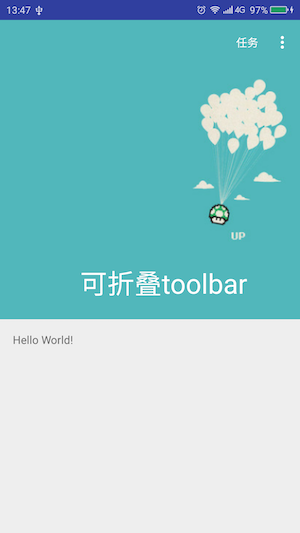
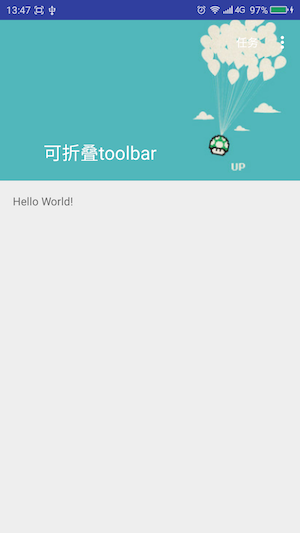
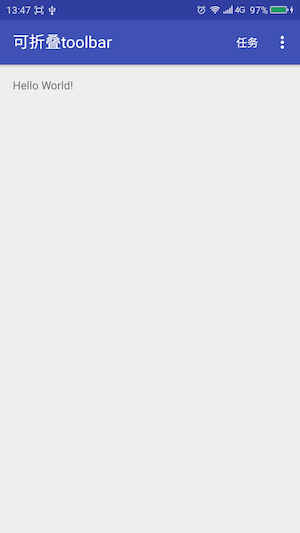
实现步骤
1. 写一个 CollapsingToolbarLayout,它有两个 子视图,一个就是上图显示的图片(降落伞哪个)的Imageview,另一个就是 顶部导航栏toobar
2. 为 CollapsingToolbarLayout 指定属性
app:layout_scrollFlags="scroll|exitUntilCollapsed"
3. 为ImageView 指定属性,声明 它是可以折叠的
app:layout_collapseMode="parallax"
4. 为 toobar指定属性,声明它是固定的
app:layout_collapseMode="pin"
5. 为 CollapsingToolbarLayout 所在的父布局(view)指定属性,以声明它适配当前窗体
android:fitsSystemWindows="true"
代码
布局xml如下
<?xml version="1.0" encoding="utf-8"?>

<android.support.design.widget.CoordinatorLayout xmlns:android="http://schemas.android.com/apk/res/android"

    xmlns:app="http://schemas.android.com/apk/res-auto"

    xmlns:tools="http://schemas.android.com/tools"

    android:layout_width="match_parent"

    android:layout_height="match_parent"

    android:fitsSystemWindows="true"

    tools:context="zhangyf.vir56k.app2.MainActivity">

    <android.support.design.widget.AppBarLayout

        android:layout_width="match_parent"

        android:layout_height="400dp"

        android:fitsSystemWindows="true"

        android:theme="@style/AppTheme.AppBarOverlay">

        <android.support.design.widget.CollapsingToolbarLayout

            android:layout_width="match_parent"

            android:layout_height="match_parent"

            app:contentScrim="@color/colorPrimary"

            app:expandedTitleMarginStart="100dp"

            app:layout_scrollFlags="scroll|exitUntilCollapsed">

            <ImageView

                android:layout_width="match_parent"

                android:layout_height="match_parent"

                android:scaleType="centerCrop"

                android:src="@drawable/img1"

                app:layout_collapseMode="parallax" />

            <android.support.v7.widget.Toolbar

                android:id="@+id/toolbar"

                android:layout_width="match_parent"

                android:layout_height="?attr/actionBarSize"

                app:layout_collapseMode="pin"

                app:popupTheme="@style/AppTheme.PopupOverlay" />

        </android.support.design.widget.CollapsingToolbarLayout>

    </android.support.design.widget.AppBarLayout>

    <include layout="@layout/content_main" />

</android.support.design.widget.CoordinatorLayout>
activity代码里没有什么特别
<?xml version="1.0" encoding="utf-8"?>

<android.support.design.widget.CoordinatorLayout xmlns:android="http://schemas.android.com/apk/res/android"

    xmlns:app="http://schemas.android.com/apk/res-auto"

    xmlns:tools="http://schemas.android.com/tools"

    android:layout_width="match_parent"

    android:layout_height="match_parent"

    android:fitsSystemWindows="true"

    tools:context="zhangyf.vir56k.app2.MainActivity">

    <android.support.design.widget.AppBarLayout

        android:layout_width="match_parent"

        android:layout_height="400dp"

        android:fitsSystemWindows="true"

        android:theme="@style/AppTheme.AppBarOverlay">

        <android.support.design.widget.CollapsingToolbarLayout

            android:layout_width="match_parent"

            android:layout_height="match_parent"

            app:contentScrim="@color/colorPrimary"

            app:expandedTitleMarginStart="100dp"

            app:layout_scrollFlags="scroll|exitUntilCollapsed">

            <ImageView

                android:layout_width="match_parent"

                android:layout_height="match_parent"

                android:scaleType="centerCrop"

                android:src="@drawable/img1"

                app:layout_collapseMode="parallax" />

            <android.support.v7.widget.Toolbar

                android:id="@+id/toolbar"

                android:layout_width="match_parent"

                android:layout_height="?attr/actionBarSize"

                app:layout_collapseMode="pin"

                app:popupTheme="@style/AppTheme.PopupOverlay" />

        </android.support.design.widget.CollapsingToolbarLayout>

    </android.support.design.widget.AppBarLayout>

    <include layout="@layout/content_main" />

</android.support.design.widget.CoordinatorLayout>
github演示代码下载
https://github.com/vir56k/demo/tree/master/CollapsingtoolbarlayoutDemo
android开发(49) android 使用 CollapsingToolbarLayout ,可折叠的顶部导航栏的更多相关文章
- android开发(49) Android 下拉刷新的实现。使用 SwipeRefreshLayout 代替 pull-to-refesh
概述 谷歌官方推出了SwipeRefreshLayout 来实现下拉刷新的效果.对比以前我们常用的 pull-to-refesh ,这个方案显得更加的简单方便. 关联项目引用(管理依赖) 在你的 应用 ...
- android 开发 修改系统背景(状态栏颜色、导航栏颜色、标题栏颜色等等)
1.打开values下的styles.xml 发现有以下代码: <resources> <!-- Base application theme. --> <style n ...
- AllJoyn+Android开发案例-android跨设备调用方法
AllJoyn+Android开发案例-android跨设备调用方法 项目须要涉及AllJoyn开源物联网框架.前面主要了解了一些AllJoyn主要的概念.像总线,总线附件,总线对象,总线接口这种概念 ...
- CSharp程序员学Android开发---3.Android内部元素不填充BUG
最近公司组织项目组成员开发一个Android项目的Demo,之前没有人有Andoid方面的开发经验,都是开发C#的. 虽说项目要求并不是很高,但是对于没有这方面经验的人来说,第一步是最困难的. 项目历 ...
- Android之仿今日头条顶部导航栏效果
随着时间的推移现在的软件要求显示的内容越来越多,所以要在小的屏幕上能够更好的显示更多的内容,首先我们会想到底部菜单栏,但是有时候像今日头条新闻客户端要显示的内容太多,而且又想在主界面全部显示出来,所以 ...
- Android开发学习——android体系结构
Android的体系结构采用了分层架构的思想, 从上层到底层共包括四层,分别是应用程序程序层.应用框架层.系统库和Android运行时和Linux内核. 一 应用程序层 该层提供一些核心应用程序包,例 ...
- Android开发学习---android下的数据持久化,保存数据到rom文件,android_data目录下文件访问的权限控制
一.需求 做一个类似QQ登录似的app,将数据写到ROM文件里,并对数据进行回显. 二.截图 登录界面: 文件浏览器,查看文件的保存路径:/data/data/com.amos.datasave/fi ...
- Google主推-Android开发利器——Android Studio,这可能是最全的AS教程!
Android Studio使用手册 "工欲善其事必先利其器" 作为一个Android开发人员来说,一款好的开发工具也是相当重要的,在相当长的时间礼,Google都是基于Eclip ...
- Android开发:Android Studio开发环境配置
一.android studio下载: 1.Windows版: 下载地址:https://pan.baidu.com/s/1-sg4dN_2B5nn2YJf-C7XLQ 提取码:yedc 2.Mac版 ...
随机推荐
- 基于 IdentityServer3 实现 OAuth 2.0 授权服务数据持久化
最近花了一点时间,阅读了IdentityServer的源码,大致了解项目整体的抽象思维.面向对象的重要性; 生产环境如果要使用 IdentityServer3 ,主要涉及授权服务,资源服务的部署负载的 ...
- 基于OWIN WebAPI 使用OAuth授权服务【客户端验证授权(Resource Owner Password Credentials Grant)】
适用范围 前面介绍了Client Credentials Grant ,只适合客户端的模式来使用,不涉及用户相关.而Resource Owner Password Credentials Grant模 ...
- [ACM_图论] Fire Net (ZOJ 1002 带障碍棋盘布炮,互不攻击最大数量)
Suppose that we have a square city with straight streets. A map of a city is a square board with n ...
- ciancd开源
github 开源项目:ciandcd : https://github.com/ciandcdjenkins:https://github.com/ciandcd/jenkins-awesomec ...
- 【原】对频率论(Frequentist)方法和贝叶斯方法(Bayesian Methods)的一个总结
注: 本文是对<IPython Interactive Computing and Visualization Cookbook>一书中第七章[Introduction to statis ...
- 固定表头/锁定前几列的代码参考[JS篇]
引语:做有难度的事情,才是成长最快的时候.前段时间,接了一个公司的稍微大点的项目,急着赶进度,本人又没有独立带过队,因此,把自己给搞懵逼了.总是没有多余的时间来做自己想做的事,而且,经常把工作带入生活 ...
- Head First Design Patterns
From Head First Design Patterns. Design Principle: Idnetify the aspects of your application that var ...
- 理解与模拟一个简单servlet容器
servlet接口 使用servlet编程需要实现或者继承实现了javax.servlet.Servlet接口的类,其中定义了5个签名方法: public void init(ServletConfi ...
- iphone6 plus 为什么打印出的宽度是375
首先看一张比较简单明了的 iPhone 6 与 iPhone 6 Plus 对比图,来自 PaintCode 的<The Ultimate Guide To iPhone Resolutions ...
- web应用程序 ---- 日志系统的设计
最近在做一个小的项目,是web的应用程序,最近也有点时间,把日志管理来简单的说说. 日志,就是需要记录一些自己感兴趣的信息,把它保存起来,具体保存在哪里?保存多长时间?这些要求都是根据不同的项目需求而 ...