
利用UIScrollView实现几个页面的切换
此实例可以了解一下UIScrollView的运用,以及表格跟页面跳转的内容;
原作者地址:http://www.cocoachina.com/bbs/read.php?tid=323514
效果图如下:
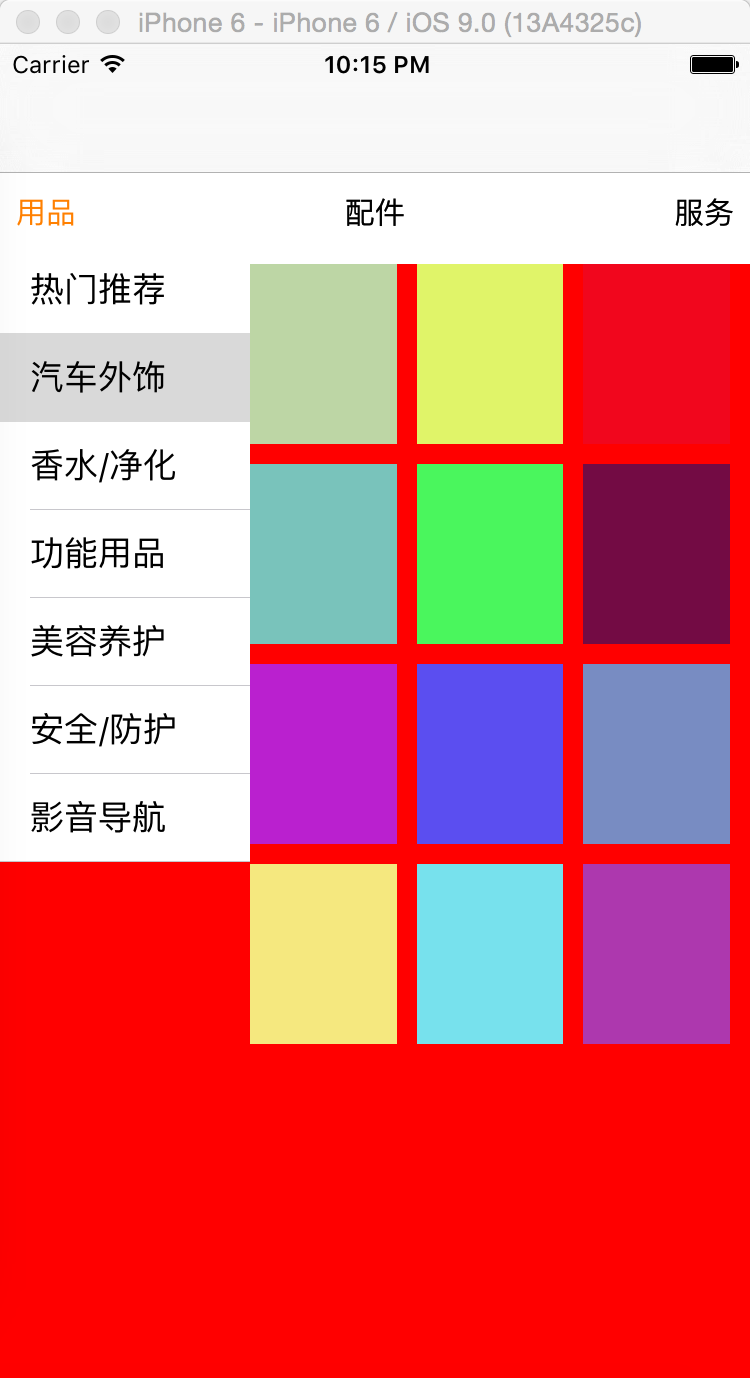
1:知识点滚动视图的运用
#import "YCView.h"

@interface ViewController ()<UIScrollViewDelegate>

@property (nonatomic, strong)UIScrollView *scrollV;

@property (weak, nonatomic) IBOutlet UIButton *usesbtn;

@property (weak, nonatomic) IBOutlet UIButton *partBtn;

@property (weak, nonatomic) IBOutlet UIButton *serverBtn;

@end

@implementation ViewController

//懒加载

- (UIScrollView *)scrollV

{

    if(!_scrollV)

    {

        _scrollV = [[UIScrollView alloc] init];

        //设置scrollView的frame

        CGFloat scrollX = ;

        CGFloat scrollY = ;

        CGFloat scrollW = CGRectGetWidth(self.view.bounds);

        CGFloat scrollH = CGRectGetHeight(self.view.bounds);

        _scrollV.frame = CGRectMake(scrollX, scrollY, scrollW, scrollH);

        //设置代理

        _scrollV.delegate = self;

        //将scrollView添加到控制器的view上

        [self.view addSubview:_scrollV];

    }

    return _scrollV;

}

- (void)viewDidLoad {

    [super viewDidLoad];

    //添加视图 view

    [self addScrollView];

    self.scrollV.contentOffset = CGPointMake(, );

}

- (void)addScrollView

{

    //添加3个view

    for(int i = ; i < ; i++)

    {

       CGFloat viewX = i * [UIScreen mainScreen].bounds.size.width;

       CGFloat viewY = ;

       CGFloat viewW = [UIScreen mainScreen].bounds.size.width;

       CGFloat viewH = [UIScreen mainScreen].bounds.size.height - ;

        YCView *v = [[YCView alloc] initWithFrame:CGRectMake(viewX, viewY, viewW, viewH)];

        v.backgroundColor = [UIColor colorWithRed:arc4random_uniform()/ 255.0 green:arc4random_uniform()/ 255.0 blue:arc4random_uniform()/ 255.0 alpha:1.0];

        [self.scrollV addSubview:v];

    }

    //设置frame,偏移量

    //设置分页

    self.scrollV.pagingEnabled = YES;

    self.scrollV.backgroundColor = [UIColor orangeColor];

    //设置滚动范围

    self.scrollV.contentSize = CGSizeMake([UIScreen mainScreen].bounds.size.width * , [UIScreen mainScreen].bounds.size.height);

    //设置偏移量

    self.scrollV.contentOffset = CGPointMake([UIScreen mainScreen].bounds.size.width, );

    //取消scrollView滚动到边缘的弹簧效果

    self.scrollV.bounces = NO;

    //隐藏水平滚动条

    self.scrollV.showsHorizontalScrollIndicator = NO;

}

#pragma mark --UIScrollViewDelegate

- (void)scrollViewDidScroll:(UIScrollView *)scrollView{

    //设置按钮被选中状态下的颜色

    scrollView.contentOffset.x ==  ? [self.usesbtn setTitleColor:[UIColor orangeColor] forState:UIControlStateNormal] : [self.usesbtn setTitleColor:[UIColor blackColor] forState:UIControlStateNormal];

    scrollView.contentOffset.x == ([UIScreen mainScreen].bounds.size.width) ? [self.partBtn setTitleColor:[UIColor orangeColor] forState:UIControlStateNormal] : [self.partBtn setTitleColor:[UIColor blackColor] forState:UIControlStateNormal];

    scrollView.contentOffset.x == ([UIScreen mainScreen].bounds.size.width) *  ? [self.serverBtn setTitleColor:[UIColor orangeColor] forState:UIControlStateNormal] : [self.serverBtn setTitleColor:[UIColor blackColor] forState:UIControlStateNormal];

}

#pragma mark --btnClick

- (IBAction)usesBtnClick:(id)sender {

    //跳转到第1个view  contentOffset.x = 屏幕的宽度 * 0

    //重置scrollView的位置

    [UIView animateWithDuration:0.5 animations:^{

        self.scrollV.contentOffset = [self ScrollViewWithContentOffSetPage:];

    }];

}

- (IBAction)partBtnClick:(id)sender {

    //跳转到第2个view  contentOffset.x = 屏幕的宽度 * 1

    //重置scrollView的位置

    [UIView animateWithDuration:0.5 animations:^{

        self.scrollV.contentOffset = [self ScrollViewWithContentOffSetPage:];

    }];

}

- (IBAction)serverBtnClick:(id)sender {

    //跳转到第3个view  contentOffset.x = 屏幕的宽度 * 2

    //重置scrollView的位置

    [UIView animateWithDuration:0.5 animations:^{

        self.scrollV.contentOffset = [self ScrollViewWithContentOffSetPage:];

    }];

}

//返回scrollView偏移量

- (CGPoint)ScrollViewWithContentOffSetPage:(NSInteger)page{

    return CGPointMake(([UIScreen mainScreen].bounds.size.width) * page, );

}

- (void)didReceiveMemoryWarning {

    [super didReceiveMemoryWarning];

    // Dispose of any resources that can be recreated.

}

@end
2:列表及跳转跳显示的内容
#import "YCView.h"

#import "YCCellView.h"

static NSString *idenifer = @"YCCollectionViewCell";

#define CellWeigth ([UIScreen mainScreen].bounds.size.width)/3.0

#define CellHeigth 44

@interface YCView ()<UITableViewDataSource, UITableViewDelegate>

@property (strong, nonatomic)NSArray *parts;

@property (strong, nonatomic)NSMutableArray *Views;

@end

@implementation YCView

//懒加载

- (NSMutableArray *)Views{

    if(!_Views){

        _Views = [NSMutableArray array];

    }

    return _Views;

}

//懒加载

- (NSArray *)parts{

    if(!_parts)

    {

        _parts = [NSArray array];

        _parts = @[@"热门推荐", @"汽车外饰", @"香水/净化", @"功能用品", @"美容养护", @"安全/防护", @"影音导航"];

    }

    return _parts;

}

- (instancetype)init

{

    if(self = [super init])

    {

        [self addView];

    }

    return self;

}

- (instancetype)initWithFrame:(CGRect)frame

{

    if(self = [super initWithFrame:frame])

    {

         [self addView];

    }

    return self;

}

- (void)addView

{

    //添加tableView

    UITableView *tableView = [[UITableView alloc] initWithFrame:CGRectMake(, -, CellWeigth, [UIScreen mainScreen].bounds.size.height) style:UITableViewStyleGrouped];

    tableView.backgroundColor = [UIColor redColor];

    tableView.dataSource = self;

    tableView.delegate = self;

    [self addSubview:tableView];

}

#pragma mark --UITableViewDataSource

- (NSInteger)tableView:(UITableView *)tableView numberOfRowsInSection:(NSInteger)section{

    return self.parts.count;

}

- (UITableViewCell *)tableView:(UITableView *)tableView cellForRowAtIndexPath:(NSIndexPath *)indexPath{

    static NSString *ID = @"YCCell";

    UITableViewCell *cell = [tableView dequeueReusableCellWithIdentifier:ID];

    if(cell == nil)

    {

        cell = [[UITableViewCell alloc] initWithStyle:UITableViewCellStyleDefault reuseIdentifier:ID];

    }

    cell.textLabel.text = self.parts[indexPath.row];

    return cell;

}

#pragma mark --UITableViewDelegate

- (void)tableView:(UITableView *)tableView didSelectRowAtIndexPath:(NSIndexPath *)indexPath{

    [self addBestView];

}

- (void)addBestView{

    YCCellView *view = [[YCCellView alloc] initWithFrame:CGRectMake(CellWeigth, , ([UIScreen mainScreen].bounds.size.width)-CellWeigth, [UIScreen mainScreen].bounds.size.height)];

    view.backgroundColor = [UIColor redColor];

    [[self.Views lastObject] removeFromSuperview];

    [self.Views addObject:view];

    [self addSubview:view];

}

- (void)layoutSubviews

{

    [super layoutSubviews];

}

@end
3:单元列的内容
#import "YCCellView.h"

#define ViewMagin 10

#define ViewHeight 90

#define ViewWeight (([UIScreen mainScreen].bounds.size.width)-CellWeigth - 3*ViewMagin)/3.0

#define CellWeigth ([UIScreen mainScreen].bounds.size.width)/3.0

@interface YCCellView ()

@end

@implementation YCCellView

- (instancetype)init

{

    if(self = [super init])

    {

        [self addCollectionView];

    }

    return self;

}

- (instancetype)initWithFrame:(CGRect)frame

{

    if(self = [super initWithFrame:frame])

    {

        [self addCollectionView];

    }

    return self;

}

- (void)addCollectionView

{

    for(int i = ; i < ; i++)

    {

        for(int j = ; j < ; j++)

        {

            UIView *v = [[UIView alloc] initWithFrame:CGRectMake(j * (ViewWeight + ViewMagin), i * (ViewHeight + ViewMagin), ViewWeight, ViewHeight)];

            v.backgroundColor = [UIColor colorWithRed:arc4random_uniform()/ 255.0 green:arc4random_uniform()/ 255.0 blue:arc4random_uniform()/ 255.0 alpha:1.0];

            [self addSubview:v];

        }

    }

}

@end
利用UIScrollView实现几个页面的切换的更多相关文章
- Android开发之利用ViewPager实现页面的切换(仿微信、QQ)
这里利用ViewPager实现页面的滑动,下面直接上代码: 1.首先写一个Activity,然后将要滑动的Fragment镶嵌到写好的Activity中. Activity的布局文件:activity ...
- Swift - 使用UIScrollView实现页面滚动切换
UIScrollView提供了以页面为单位滚动显示各个子页面内容的功能,每次手指滑动后会滚动一屏的内容. 要实现该功能,需要如下操作: 1,将UIScrollView的pagingEnabled属 ...
- 前端性能优化之利用 Chrome Dev Tools 进行页面性能分析
背景 我们经常使用 Chrome Dev Tools 来开发调试,但是很少知道怎么利用它来分析页面性能,这篇文章,我将详细说明怎样利用 Chrome Dev Tools 进行页面性能分析及性能报告数据 ...
- Qt学习笔记(2)-利用StackWidget实现选项卡式页面
学习笔记第二篇,利用Qt实现选项卡式的页面,效果如图1.1-图1.3所示.程序实现的功能是通过点击状态栏实现不同页面的切换,实际上Qt中自带有Tab选项卡式的控件,本文利用StackWidge实现类似 ...
- ViewPager+Fragment实现页面的切换
新知识,新摘要: 效果图:framgent导入包都是v4包下,谨慎导入错误! 首先设置viewPager布局: <?xml version="1.0" encoding=&q ...
- 利用Chrome插件向指定页面植入js,劫持 XSS
资源来自:http://www.2cto.com/Article/201307/225986.html 首页 > 安全 > 网站安全 > 正文 利用Chrome插件向指定页面植入js ...
- 利用curl并发来提高页面访问速度
在我们平时的程序中难免出现同时访问几个接口的情况,平时我们用curl进行访问的时候,一般都是单个.顺序访问,假如有3个接口,每个接口耗时500毫 秒那么我们三个接口就要花费1500毫秒了,这个问题太头 ...
- 利用Bootstrap框架制作查询页面的界面
UI设计实战篇——利用Bootstrap框架制作查询页面的界面 Bootstrap框架是一个前端UI设计的框架,它提供了统一的UI界面,简化了设计界面UI的过程(缺点是定制了界面,调整的余地不是太 ...
- ViewPager和View组合 实现页面的切换
//--------------主页面------------------------------- package com.bw.test; import java.util.ArrayList;i ...
随机推荐
- Netty5 + Protobuf 使用
1. 安装开发环境 1.1 Netty环境 这里我使用Netty5.0.0版本 到这里下载即可http://netty.io/ 下载netty-all-5.0.0.Alpha2.jar 这个jar包简 ...
- CSS选择器、优先级与匹配原理
为了分析Bootstrap源码,所以的先把CSS选择器相关的东东给巩固好 废话就不多说了 CSS 2.1 selectors, Part 1 计算指定选择器的优先级:重新认识CSS的权重 标签的权值为 ...
- java 去掉html标签
使用正则表达式删除HTML标签. import java.util.regex.Matcher; import java.util.regex.Pattern; public class HTMLSp ...
- 主机访问虚拟机中linux上的web服务
环境:主机windows xp 虚拟机centos 6.4 [root@localhost /]# iptables -I INPUT -p tcp --dport 80 -j ACCEPT[root ...
- [Node.js] ECMAScript 6中的生成器及koa小析
原文地址:http://www.moye.me/2014/11/10/ecmascript-6-generator/ 引子 老听人说 koa大法好,这两天我也赶了把时髦:用 n 安上了node 0.1 ...
- HMM 自学教程(二)生成模型
本系列文章摘自 52nlp(我爱自然语言处理: http://www.52nlp.cn/),原文链接在 HMM 学习最佳范例,这是针对 国外网站上一个 HMM 教程 的翻译,作者功底很深,翻译得很精彩 ...
- UITextField-secureTextEntry
1.UITextFiled的密文输入 secureTextEntry 安全文本输入 secure:安全 Entry:入口
- UWP开发入门(十九)——10分钟学会在VS2015中使用Git
写程序必然需要版本控制,哪怕是个人项目也是必须的.我们在开发UWP APP的时候,VS2015默认提供了对微软TFS和Git的支持.考虑到现在Git很火,作为微软系的程序员也不得不学一点防身,以免被开 ...
- XML to Entity
public static T GetEntityByXml<T>(string xml, string rootNode=null) where T : new() { if (stri ...
- 字符串 --- KMP Eentend-Kmp 自动机 trie图 trie树 后缀树 后缀数组
涉及到字符串的问题,无外乎这样一些算法和数据结构:自动机 KMP算法 Extend-KMP 后缀树 后缀数组 trie树 trie图及其应用.当然这些都是比较高级的数据结构和算法,而这里面最常用和最熟 ...