
ABAP - 3D Graphs with SAP
在ABAP设计中,程序员经常需要用图形显示报表的统计结果,我们可以使用函数:GRAPH_MATRIX_3D来达到图形显示。
GRAPH_MATRIX_3D函数参数很多,但只有三个参数必须需要输入:
Table DATA
The first field of table DATA must be a C field of any length. The number values must then be passed in one or more numeric fields. These fields can have type P or F.
Table OPTS
Table OPTS is used to pass all the options which can be changed interactively. Table OPTS must always be passed to the function module, but you can pass an empty table. In this case the default settings are used.
One of the parameters COL1 to COL6
Parameters COL1 to COL6 are used to pass column titles and they also define whether the corresponding table columns should be represented graphically. If a value which is not equal to SPACE is passed, then the corresponding column is represented.
Make sure that at least one of these parameters is passed. A maximum of 6 columns can be represented.
All other paramters are optional.
样例代码:
DATA: BEGIN OF itab_main OCCURS ,

      dataname(),

      quantity1 TYPE i,

      quantity2 TYPE i,

      quantity3 TYPE i,

      quantity4 TYPE i,

   END OF itab_main,

   BEGIN OF itab_options OCCURS ,

      option(),

   END OF itab_options.

itab_main-dataname = 'Gas'.

itab_main-quantity1 = .

itab_main-quantity2 = .

itab_main-quantity3 = .

itab_main-quantity4 = .

APPEND itab_main.

itab_main-dataname = 'Electricity'.

itab_main-quantity1 = .

itab_main-quantity2 = .

itab_main-quantity3 = .

itab_main-quantity4 = .

APPEND itab_main.

itab_main-dataname = 'Fuel'.

itab_main-quantity1 = .

itab_main-quantity2 = .

itab_main-quantity3 = .

itab_main-quantity4 = .

APPEND itab_main.

CALL FUNCTION 'GRAPH_MATRIX_3D'

  EXPORTING

    col1   = ''

    col2   = ''

    col3   = ''

    col4   = ''

    titl   = 'Expenses - India(INR).'

  TABLES

    data   = itab_main

    opts   = itab_options

  EXCEPTIONS

    OTHERS = .
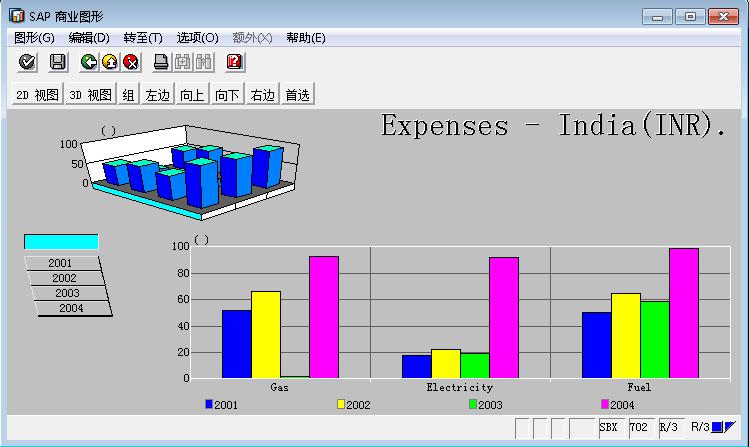
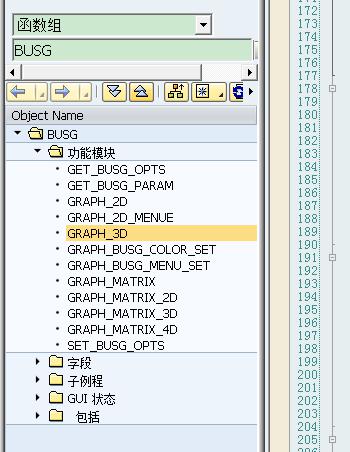
通过测试,满不错的。通过函数,找到相应的函数组的其他函数,举一反三了如图。
ABAP - 3D Graphs with SAP的更多相关文章
- 使用abapGit在ABAP On-Premises系统和SAP云平台ABAP环境之间进行代码传输
SAP ABAP顾问朋友们,应该都使用过SAPLink这个工具.如果两个ABAP Netweaver系统没有建立起传输路径时,我们无法使用标准的SE10事务码创建传输请求的方式进行这两个系统间的代码传 ...
- 一步步用ABAP Development Tools连接SAP云平台上的ABAP编程环境
使用ABAP Development Tools的项目创建向导: New->ABAP Cloud Project: Service Instance Connection,选择SAP Cloud ...
- [SAP ABAP开发技术总结]BAPI调用
声明:原创作品,转载时请注明文章来自SAP师太技术博客( 博/客/园www.cnblogs.com):www.cnblogs.com/jiangzhengjun,并以超链接形式标明文章原始出处,否则将 ...
- SAP ABAP 处理字符串串串串串串串串(详细)
关于ABAP中处理字符串的方法,非常详细,学习过程中总结一下分享给大家,,, ABAP/4 提供多个处理类型 C 即字符串 的数据对象的关键字. 处理字符串 的方法有: 1.拆分字符串split 2. ...
- SAP ABAP Development Tools in Eclipseのセットアップ
手順 1. Eclipse IDE インストール 以下からダウンロード.https://tools.hana.ondemand.com/#abap※2018/1月現在 Oxygen(4.7)詳細は割愛 ...
- 使用ABAP代码提交SAP CRM Survey调查问卷
Jerry之前曾经写过两篇关于SAP CRM Survey调查问卷的技术文章: SAP CRM Survey调查问卷的模型设计原理解析 如何使用SAP CRM Marketing Survey创建一个 ...
- 如何在SAP Cloud Platform ABAP编程环境里创建一个employee
用ABAP Development Tool登录SAP Cloud Platform ABAP编程环境后,对ABAP项目点击右键,选择属性,从而找到该环境的web访问的url: https://325 ...
- 学而不思则罔 - SAP云平台ABAP编程环境的由来和适用场景
最近Jerry写了一系列关于SAP云平台ABAP编程环境的技术文章,这些文章都是围绕着在云上的ABAP编程环境的具体知识点来分享,比如要完成一个具体的开发需求,所需要的编程步骤.这些文章陆续收到一些读 ...
- ABAP开发者上云的时候到了 - 现在大家可以免费使用SAP云平台ABAP环境的试用版了
之前Jerry已经写了一系列SAP Cloud Platform ABAP编程环境的文章,当时使用的环境,是SAP专门为SAP社区导师们创建的. 当时也有朋友留言,询问大家何时才能使用到免费的SAP云 ...
随机推荐
- js获取url参数值的方法
index.htm?参数1=数值1&参数2=数值2&参数3=数据3&参数4=数值4&...... 静态html文件js读取url参数 根据获取html的参数值控制htm ...
- toad 常用快捷键与配置
F8 调出以前执行的sql命令 F9 执行全部sql Ctrl+. 补全table_name Ctrl+t 补全table_name,或者显示字段 alt+ 箭头上下 看sql history Ctr ...
- oracle 日期获取
,'YYYY-MM-DD')星期一, to_char(NEXT_DAy(to_date(,'YYYY-MM-DD')星期日 from dual; select to_char(sysdate,'yyy ...
- zepto - scrollLeft
<div style="border:1px solid black;width:100px;height:130px;overflow:auto"> The long ...
- HANA Studio打开系统显示Secure storage is locked
之前一直用着好好的,今天打开HANA Studio突然发现一个系统都不在了: 提示:‘Secure storage is locked’ 我点旁边的Unlocked没有任何反应,右键也没有功能了.如下 ...
- SpringMVC 拦截器
类似于Servlet开发中的过滤器Filter,用于对处理器进行预处理和后处理. 常用场景: 1.日志记录:记录请求信息的日志,以便进行信息监控.信息统计.计算PV(Page View)等. 2.权限 ...
- UnWind Segue
iOS 6 和 Xcode 4.5 中添加了一个新特性叫做“Unwind Segue”. 使用Unwind Segue,可以方便的在Navigation Controller的Controllers之 ...
- Oracle实例和服务知识点
shutdown是对实例而言 service是启动的,根本不代表instance就是启动的. 启动数据库基本可分为三个过程: 1,nomount(即只启动instance,而不加载数据库) 2,mo ...
- Cwinux源码解析(一)
我在我的个人博客发表了新的文章,欢迎各位读者批评指正. Cwinux源码解析(一)
- [Tango] Basic Knowledge
Project Tango类设备能够给开发者在哪些领域带来机会. 室内导航*:室内GPS信号的缺失,使得Project Tango设备会成为室内导航重要应用场景之一.有了它,你就不会在不熟悉的室内商场 ...