
iOS tableViewCell侧滑改变收藏状态
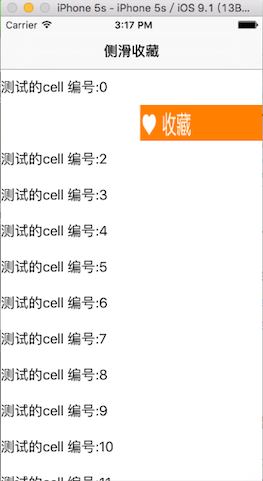
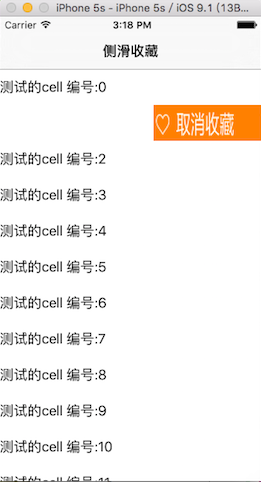
/**

 *  图片素材   链接: http://pan.baidu.com/s/1mhi1sfQ 密码: w2wq

 */

#import <UIKit/UIKit.h>

@interface AppDelegate : UIResponder <UIApplicationDelegate>

@property (strong, nonatomic) UIWindow *window;

@end
#import "AppDelegate.h"

#import "RootViewController.h"

@interface AppDelegate ()

@end

@implementation AppDelegate

- (BOOL)application:(UIApplication *)application didFinishLaunchingWithOptions:(NSDictionary *)launchOptions {

    self.window = [[UIWindow alloc] initWithFrame:[[UIScreen mainScreen] bounds]];

    // Override point for customization after application launch.

    self.window.backgroundColor = [UIColor whiteColor];

    UINavigationController *navi = [[UINavigationController alloc] initWithRootViewController:[[RootViewController alloc] init]];

    self.window.rootViewController = navi;

    [self.window makeKeyAndVisible];

    return YES;

}

@end
#import <UIKit/UIKit.h>

@interface RootViewController : UIViewController

@end
#import "RootViewController.h"

#import "LFCustomCell.h"

@interface RootViewController ()<UITableViewDataSource,UITableViewDelegate,LFCustomCellDelegate>

{

    UITableView *_tableView;

    NSMutableArray *staues;

}

@end

@implementation RootViewController

- (void)loadView{

    [super loadView];

    _tableView = [[UITableView alloc] initWithFrame:[[UIScreen mainScreen] bounds] style:UITableViewStylePlain];

    _tableView.dataSource = self;

    _tableView.delegate = self;

    _tableView.tableFooterView = [[UIView alloc] init];

    [self.view addSubview:_tableView];

}

- (void)viewDidLoad {

    [super viewDidLoad];

    self.title = @"侧滑收藏";

    for (int i = ; i < ; i++) {

        if (!staues) {

            staues = [[NSMutableArray alloc] init];

        }

        [staues addObject:@];//0代表未收藏,1代表已收藏

    }

}

#pragma mark -- UITableViewDataSource --

- (NSInteger)numberOfSectionsInTableView:(UITableView *)tableView{

    return ;

}

- (NSInteger)tableView:(UITableView *)tableView numberOfRowsInSection:(NSInteger)section{

    return ;

}

- (UITableViewCell*)tableView:(UITableView *)tableView cellForRowAtIndexPath:(NSIndexPath *)indexPath{

    static NSString *identifier = @"customCell";

    LFCustomCell *cell = [tableView dequeueReusableCellWithIdentifier:identifier];

    if (!cell) {

        cell = [[LFCustomCell alloc] initWithStyle:UITableViewCellStyleDefault reuseIdentifier:identifier];

        cell.delegate = self;

    }

    cell.contentLabel.text = [NSString stringWithFormat:@"测试的cell 编号:%ld",indexPath.row];

    cell.isCollected = [staues[indexPath.row] intValue];

    cell.indexPath = indexPath;

    return cell;

}

#pragma mark -- LFCustomCellDelegate --

- (void)processDataWithIndexPath:(NSIndexPath *)indexPath andStatue:(int)statue{

    NSLog(@"indexPath:%@ , statue:%d",indexPath,statue);

    [staues replaceObjectAtIndex:indexPath.row withObject:[NSNumber numberWithInt:statue]];

}

- (void)didReceiveMemoryWarning {

    [super didReceiveMemoryWarning];

    // Dispose of any resources that can be recreated.

}

@end
#import <UIKit/UIKit.h>

@protocol LFCustomCellDelegate <NSObject>

- (void)processDataWithIndexPath:(NSIndexPath*)indexPath andStatue:(int)statue;

@end

@interface LFCustomCell : UITableViewCell

@property(nonatomic, weak) id<LFCustomCellDelegate> delegate;

@property(nonatomic, strong) UILabel *contentLabel;

@property(nonatomic, strong) UIImageView *statueView;

@property(nonatomic, assign) int isCollected;

@property(nonatomic, strong) NSIndexPath *indexPath;

@end
#import "LFCustomCell.h"

#define CELL_WIDTH [UIScreen mainScreen].bounds.size.width

const float animateDuration = 0.3;

const double statueViewWidth = ;

@interface LFCustomCell ()<UIGestureRecognizerDelegate>

@property (nonatomic, assign) BOOL isLeft;

@end

@implementation LFCustomCell

- (void)awakeFromNib {

    // Initialization code

}

- (void)setSelected:(BOOL)selected animated:(BOOL)animated {

    [super setSelected:selected animated:animated];

    // Configure the view for the selected state

}

- (instancetype)initWithStyle:(UITableViewCellStyle)style reuseIdentifier:(NSString *)reuseIdentifier {

    self = [super initWithStyle:style reuseIdentifier:reuseIdentifier];

    if (self) {

        self.backgroundColor = [UIColor orangeColor];

        self.selectionStyle = UITableViewCellSelectionStyleNone;

        self.isLeft = YES;

        [self addSubview:self.contentLabel];

        [self addSubview:self.statueView];

    }

    return self;

}

/**

 *  初始化_contentLabel

 */

- (UILabel *)contentLabel{

    if (!_contentLabel) {

        _contentLabel = [[UILabel alloc] init];

        _contentLabel.backgroundColor = [UIColor whiteColor];

        _contentLabel.userInteractionEnabled = YES;

        UIPanGestureRecognizer *pan = [[UIPanGestureRecognizer alloc] initWithTarget:self action:@selector(panGestureAction:)];

        pan.delegate = self;

        [_contentLabel addGestureRecognizer:pan];

    }

    return _contentLabel;

}

/**

 *  初始化_statueView

 */

- (UIImageView *)statueView{

    if (!_statueView) {

        _statueView = [[UIImageView alloc] init];

    }

    return  _statueView;

}

- (void)panGestureAction:(UIPanGestureRecognizer*)sender{

    CGPoint translation = [sender translationInView:self];

    switch (sender.state) {

        case UIGestureRecognizerStateBegan:

            break;

        case UIGestureRecognizerStateChanged:

            //当垂直拖拽时,不执行方法

            if (fabs(translation.x)<fabs(translation.y)) {

                return;

            }

            //向左滑动时,移动_contentLabel;向右滑动时,直接返回

            if (translation.x <  ) {

                if (fabs(translation.x)<CELL_WIDTH/2.0) {

                    CGRect frame = _contentLabel.frame;

                    frame.origin.x = translation.x;

                    _contentLabel.frame = frame;

                    CGRect otherFrame = _statueView.frame;

                    otherFrame.origin.x = CGRectGetMaxX(_contentLabel.frame);

                    _statueView.frame = otherFrame;

                }

                if ((fabs(translation.x) > (CELL_WIDTH/2.0-)) && (self.isLeft == YES)) {

                    [self changeCollectionStatue];

                    self.isLeft = NO;

                }

            }else{

                return;

            }

            break;

        default:

            [UILabel animateWithDuration:animateDuration animations:^{

                _contentLabel.frame = self.bounds;

                _statueView.frame = CGRectMake(CGRectGetMaxX(self.contentLabel.frame), , statueViewWidth, self.bounds.size.height);

            } completion:^(BOOL finished) {

                self.isLeft = YES;

            }];

            break;

    }

}

- (void)layoutSubviews{

    self.contentLabel.frame = self.bounds;

    self.statueView.frame = CGRectMake(CGRectGetMaxX(self.contentLabel.frame), , statueViewWidth, self.bounds.size.height);

    if (self.isCollected) {

        _statueView.image = [UIImage imageNamed:@"isCollect"];

    }else{

        _statueView.image = [UIImage imageNamed:@"noCollected"];

    }

}

- (void)changeCollectionStatue{

    if (self.isCollected) {

        _statueView.image = [UIImage imageNamed:@"cancleCollect"];

        self.isCollected = ;

    }else{

        _statueView.image = [UIImage imageNamed:@"isCollect"];

        self.isCollected = ;

    }

    if ([_delegate respondsToSelector:@selector(processDataWithIndexPath:andStatue:)]) {

        [_delegate processDataWithIndexPath:self.indexPath andStatue:self.isCollected];

    }

}

#pragma mark -- UIGestureRecognizerDelegate --

- (BOOL)gestureRecognizer:(UIGestureRecognizer *)gestureRecognizer shouldRecognizeSimultaneouslyWithGestureRecognizer:(UIGestureRecognizer *)otherGestureRecognizer{

    return YES;

}

@end
iOS tableViewCell侧滑改变收藏状态的更多相关文章
- iOS开发网络篇—监测网络状态(转)
文章转载自:http://www.cnblogs.com/wendingding/p/3950114.html iOS开发网络篇—监测网络状态 一.说明 在网络应用中,需要对用户设备的网络状态进行实时 ...
- iOS开发网络篇—监测网络状态
iOS开发网络篇—监测网络状态 一.说明 在网络应用中,需要对用户设备的网络状态进行实时监控,有两个目的: (1)让用户了解自己的网络状态,防止一些误会(比如怪应用无能) (2)根据用户的网络状态进行 ...
- devexpress中gridview控件编辑时改变输入法状态
在win7环境下使用Devexpress中的SpinEdit控件,切换成中文[简/繁]输入法输入数字键时有不少输入法会重复产生数字如输入1会变成11,输入123会变成112233.使用SpinEdit ...
- iOS 开发网络篇—监测网络状态
iOS开发网络篇—监测网络状态 一.说明 在网络应用中,需要对用户设备的网络状态进行实时监控,有两个目的: (1)让用户了解自己的网络状态,防止一些误会(比如怪应用无能) (2)根据用户的网络状态进行 ...
- Android之怎样改变焦点状态【EditText】
以EditText为例 1.改变焦点状态 password.setOnFocusChangeListener(new OnFocusChangeListener() { @Override publi ...
- 2016年GitHub 排名前 100 的安卓、iOS项目简介(收藏)
排名完全是根据 GitHub 搜索 Java 语言选择 (Best Match) 得到的结果, 然后过滤了跟 Android 不相关的项目, 所以排名并不具备任何官方效力, 仅供参考学习, 方便初学者 ...
- WPF 后台数据触发改变界面状态-心跳实现
今年做的一个上位机工控WPF项目,做个小小的总结把,以后随时来找 请不要带血乱喷,我只是菜鸟.___by 鲍队 类似于这样子的;大致的意思是:一个代码变量,通过改变变量的值,绑定这个变量的这个圆颜色也 ...
- iOS - 在工程中试玩状态模式
做了一个项目,项目中一个藏品详情界面针对不同用户,和用户所处于的状态的不同,展示的效果和操作的权限都会不同.想到了状态模式,从来没有用过,赶紧学一下然后用一用.期待兴奋 看了这么多的博客,终于找到一个 ...
- IOS中设置状态栏的状态
IOS上 关于状态栏的相关设置(UIStatusBar) 知识普及 ios上状态栏 就是指的最上面的20像素高的部分 状态栏分前后两部分,要分清这两个概念,后面会用到: 前景部分:就是指的显示电池.时 ...
随机推荐
- PHP 对象和引用总结
PHP 中使用 简单变量 和 对象 时的区别: ① 很多数据类型都可以写时复制(copy-on-write),例: <?php $a = 'test1'; $b = $a; $b = 'test ...
- mysql字段额外属性,除去字段类型外的其他属性
如果你不想字段为 NULL 可以设置字段的属性为 NOT NULL, 在操作数据库时如果输入该字段的数据为NULL ,就会报错. AUTO_INCREMENT定义列为自增的属性,一般用于主键,数值会自 ...
- 使用国内镜像源来加速python pypi包的安装
pipy国内镜像目前有: http://pypi.douban.com/ 豆瓣 http://pypi.mirrors.ustc.edu.cn/ 中国科学技术大学 安装时,使用-i参数 pip i ...
- Turing Test
Computer Science An Overview _J. Glenn Brookshear _11th Edition In the past the Turing test (propose ...
- Thread safety
https://en.wikipedia.org/wiki/Thread_safety Thread safety is a computer programming concept applicab ...
- Delphi XE5 与其他版本共存
来源于http://www.board4allcz.eu 作者是gateway 如果你想使用Delphi诸如XE4.XE3.XE2.XE之类的版本跟Delphi XE5共存的话,在cglm.ini中简 ...
- Abstract Algebra chapter 7
7.7:Encrypt each of the following RSA messages x so that x is divided into blocks of integers of len ...
- C语言文法定义及C程序的推导过程
program à external_declaration | program external_declaration <程序> -> <外部声明> | < ...
- sphinx续5-主索引增量索引和实时索引
原文件地址:http://blog.itpub.net/29806344/viewspace-1400942/ 在数据库数据非常庞大的时候,而且实时有新的数据插入,如果我们不更新索引,新的数据就sea ...
- Ajax如何实现跨域问题
一个域名的组成 http:// www . abc.com : 8080 /scripts/jquery.js 协议 子域名 主域名 端口号 请求资源地址 当协议.子域名.主域名.端口号中任意一个不同 ...