
ASP.NET中进行消息处理(MSMQ) 一
MSMQ是微软消息队列的英文缩写。那么什么是消息队列?这些介绍网上一大片这里就不多说了。本文对于大虾级的人物来说这只是小玩意而已,对于初学者来说这文章还是有一定的帮助,希望路过的大虾们别笑话我班门弄斧。
一、MSMQ介绍和安装消息队列
关于MSMQ详细的介绍请大家向http://www.baidu.com/或http://www.g.cn/等专家咨询。
使用消息队列的优点:稳定、消息优先级、脱机能力以及安全性。
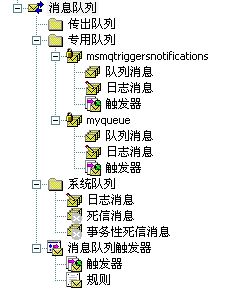
消息队列分为用户创建的队列(专用队列)和系统队列,用户队列分为,。我是Windows XP,看下图所示(myQueue为自己创建的消息队列,msmqtriggersnotifiations为通用队列):
对消息队列有了简单的了解后,使用MSMQ进行软件开发需要安装MSMQ,安装完后就该进入实际的开发阶段。具体的安装过程就是在控制面板里“添加/删除程序”下“添加/删除Windows组件”,完成添加就OK。安装完成后就可以通过交互界添加新的消息队列,详细如下图:
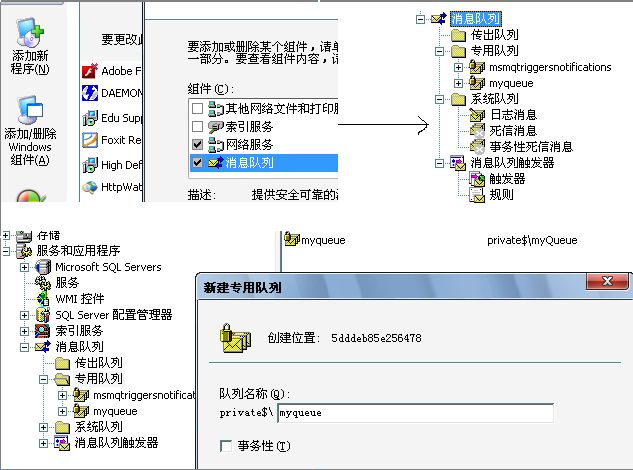
出了上面这种交互界面来创建MSMQ外,也可以通过编程来完成,.NET框架里的MessageQueue类下有一静态方法Create,用来完成消息队列的创建,其定义如下:
 1//

 2// 摘要:

 3//    在指定的路径中创建非事务性“消息队列”队列。

 4//

 5// 参数:

 6//   path:

 7//     要创建的队列的路径。

 8//

 9// 返回结果:

10//     表示新队列的 System.Messaging.MessageQueue。

11public static MessageQueue Create(string path);

12//

13// 摘要:

14//     在指定的路径中创建事务性或非事务性“消息队列”队列。

15//

16// 参数:

17//   transactional:

18//     如果创建事务性队列,为 true;如果创建非事务性队列,则为 false。

19//

20//   path:

21//     要创建的队列的路径。

22//

23// 返回结果:

24//     表示新队列的 System.Messaging.MessageQueue。

25public static MessageQueue Create(string path, bool transactional);
实现消息队列的创建简单代码(C#),创建一个名为"myQueue"的非事务性"消息队列",如下:
MessageQueue.Create(@".\private$\myQueue");
二、创建、删除和管理队列
在.NET环境下编写Message Queue程序的前提就是需要先安装MSMQ,本文之前已经作了详细的介绍。要开发MSMQ程序就必须学习一个很重要的类(MessageQueue),该类位于名称空间System.Messageing下。其中有几个常用的方法必须掌握:
--Create方法:创建使用指定路径的新消息队列。
--Delete方法:删除现有的消息队列。
--Existe方法:查看指定消息队列是否存在。
--GetAllMessages()方法:得到队列中的所有消息。
--GetPublicQueues方法:在“消息队列”网络中定位消息队列。
--Peek/BeginPeek方法:查看某个特定队列中的消息队列,但不从该队列中移出消息。
--Receive/BeginReceive方法:检索指定消息队列中最前面的消息并将其从该队列中移除。
--Send方法:发送消息到指定的消息队列。
--Purge方法:清空指定队列的消息。
上述列举的方法在此就不作详细介绍,大家可以通过下面的示例程序中来体会他们各自的功能。
三、发送和序列化消息
MSMQ消息队列中定义的消息由一个主体(body)和若干属性构成。消息的主体可以由文本、二进制构成,根据需要还可以被加密。在MSMQ 中消息的大小不能够超过4MB。发送消息是通过Send方法来完成的,需要一个Message参数。
1、发送消息:
步骤:连接队列-->指定消息格式-->提供要发送的数据(主体)-->调用Send()方法将消息发送出去。详细见后面的示例程序。
2、序列化消息:
消息序列化可以通过.NET Framework附带的三个预定义格式化程序来完成:
-- XMLMessageFormatter对象----MessageQueue组件的默认格式化程序设置。
-- BinaryMessageFormatter对象;
-- ActiveXMessageFormatter对象;
由于后两者格式化后的消息通常不能为人阅读,所以我们经常用到的是XMLMessageFormatter对象。该对象构造方法有三种重载:
1public XmlMessageFormatter();

2public XmlMessageFormatter(string[] targetTypeNames);

3public XmlMessageFormatter(Type[] targetTypes);
如我们后面的示例程序中用到的序列化语句:
1//序列化为字符串

2XmlMessageFormatter formatter = new XmlMessageFormatter(new Type[] { typeof(string) });
四、读取和接收消息
1、读取消息:
也就是从指定队列中获取消息,详细请查看本文前面的关于消息操作的方法介绍。
2、接收消息有两种方式:
--> 通过Receive方法--具体功能请返回本文前面有详细介绍。
--> 通过Peek方法--具体功能请返回本文前面有详细介绍。
五、消息使用实例
通过上面一系列的介绍,了解了MessageQueue类和常用的方法后,下面我们通过一个简单的示例程序来分析消息队列的创建、发送消息以及接收消息等相关知识点:
1、通过Create方法创建使用指定路径的新消息队列
 1/// <summary>

 2/// 通过Create方法创建使用指定路径的新消息队列

 3/// </summary>

 4/// <param name="queuePath"></param>

 5public static void Createqueue(string queuePath)

 6{

 7    try

 8    {

 9        if (!MessageQueue.Exists(queuePath))

10        {

11            MessageQueue.Create(@".\private$\myQueue");

12        }

13        else

14        {

15            Console.WriteLine(queuePath + "已经存在!");

16        }

17    }

18    catch (MessageQueueException e)

19    {

20        Console.WriteLine(e.Message);

21    }

22}
2、连接消息队列并发送消息到队列
 1/// <summary>

 2/// 连接消息队列并发送消息到队列

 3/// </summary>

 4public static void SendMessage()

 5{

 6    try

 7    {

 8        //连接到本地的队列

 9        MessageQueue myQueue = new MessageQueue(".\\private$\\myQueue");

10

11        Message myMessage = new Message();

12        myMessage.Body = "消息内容";

13        myMessage.Formatter = new XmlMessageFormatter(new Type[] { typeof(string) });

14        //发送消息到队列中

15        myQueue.Send(myMessage);

16    }

17    catch (ArgumentException e)

18    {

19        Console.WriteLine(e.Message);

20    }

21}
3、连接消息队列并从消息队列中接收消息
 1/// <summary>

 2/// 连接消息队列并从队列中接收消息

 3/// </summary>

 4public static void ReceiveMessage()

 5{

 6    //连接到本地队列

 7    MessageQueue myQueue = new MessageQueue(".\\private$\\myQueue");

 8    myQueue.Formatter = new XmlMessageFormatter(new Type[] { typeof(string) });

 9    try

10    {

11        //从队列中接收消息

12        Message myMessage = myQueue.Receive();

13        string context = (string)myMessage.Body; //获取消息的内容

14        Console.WriteLine("消息内容为:" + context);

15    }

16    catch (MessageQueueException e)

17    {

18        Console.WriteLine(e.Message);

19    }

20    catch (InvalidCastException e)

21    {

22        Console.WriteLine(e.Message);

23    }

24}
4、连接队列并清空队列的全部消息
1/// <summary>

2/// 清空指定队列的消息

3/// </summary>

4public static void ClearMessage()

5{

6    MessageQueue myQueue = new MessageQueue(".\\private$\\myQueue");

7    myQueue.Purge();

8}
5、连接队列并获取队列的全部消息
 1/// <summary>

 2/// 连接队列并获取队列的全部消息

 3/// </summary>

 4public static void GetAllMessage()

 5{

 6    //连接到本地队列

 7    MessageQueue myQueue = new MessageQueue(".\\private$\\myQueue");

 8    Message[] message = myQueue.GetAllMessages();

 9    XmlMessageFormatter formatter = new XmlMessageFormatter(new Type[] { typeof(string) });

10    for (int i = 0; i < message.Length; i++)

11    {

12        message[i].Formatter = formatter;

13        Console.WriteLine(message[i].Body.ToString());

14    }

15}
上面依次的列举出来5个方法,这里我就不做测试了。上述方法全部通过测试的,我在后面提供个连接,没弄清楚的朋友可下载源程序自己去运行调试下。
  1using System;

  2using System.Collections.Generic;

  3using System.Text;

  4using System.Messaging;

  5

  6namespace MSMQ

  7{

  8    class Program

  9    {

 10        static void Main(string[] args)

 11        {

 12            Createqueue(".\\myQueue");

 13            SendMessage();

 14            GetAllMessage();

 15            //ReceiveMessage();

 16        }

 17

 18

 19        /// <summary>

 20        /// 通过Create方法创建使用指定路径的新消息队列

 21        /// </summary>

 22        /// <param name="queuePath"></param>

 23        public static void Createqueue(string queuePath)

 24        {

 25            try

 26            {

 27                if (!MessageQueue.Exists(queuePath))

 28                {

 29                    MessageQueue.Create(@".\private$\myQueue");

 30                }

 31                else

 32                {

 33                    Console.WriteLine(queuePath + "已经存在!");

 34                }

 35            }

 36            catch (MessageQueueException e)

 37            {

 38                Console.WriteLine(e.Message);

 39            }

 40        }

 41

 42        /// <summary>

 43        /// 连接消息队列并发送消息到队列

 44        /// </summary>

 45        public static void SendMessage()

 46        {

 47            try

 48            {

 49                //连接到本地的队列

 50                MessageQueue myQueue = new MessageQueue(".\\private$\\myQueue");

 51

 52                Message myMessage = new Message();

 53                myMessage.Body = "消息内容";

 54                myMessage.Formatter = new XmlMessageFormatter(new Type[] { typeof(string) });

 55                //发送消息到队列中

 56                myQueue.Send(myMessage);

 57            }

 58            catch (ArgumentException e)

 59            {

 60                Console.WriteLine(e.Message);

 61            }

 62        }

 63

 64        /// <summary>

 65        /// 连接消息队列并从队列中接收消息

 66        /// </summary>

 67        public static void ReceiveMessage()

 68        {

 69            //连接到本地队列

 70            MessageQueue myQueue = new MessageQueue(".\\private$\\myQueue");

 71            myQueue.Formatter = new XmlMessageFormatter(new Type[] { typeof(string) });

 72            try

 73            {

 74                //从队列中接收消息

 75                Message myMessage = myQueue.Receive();

 76                string context = (string)myMessage.Body; //获取消息的内容

 77                Console.WriteLine("消息内容为:" + context);

 78            }

 79            catch (MessageQueueException e)

 80            {

 81                Console.WriteLine(e.Message);

 82            }

 83            catch (InvalidCastException e)

 84            {

 85                Console.WriteLine(e.Message);

 86            }

 87        }

 88

 89        /// <summary>

 90        /// 清空指定队列的消息

 91        /// </summary>

 92        public static void ClearMessage()

 93        {

 94            MessageQueue myQueue = new MessageQueue(".\\private$\\myQueue");

 95            myQueue.Purge();

 96        }

 97

 98        /// <summary>

 99        /// 连接队列并获取队列的全部消息

100        /// </summary>

101        public static void GetAllMessage()

102        {

103            //连接到本地队列

104            MessageQueue myQueue = new MessageQueue(".\\private$\\myQueue");

105            Message[] message = myQueue.GetAllMessages();

106            XmlMessageFormatter formatter = new XmlMessageFormatter(new Type[] { typeof(string) });

107            for (int i = 0; i < message.Length; i++)

108            {

109                message[i].Formatter = formatter;

110                Console.WriteLine(message[i].Body.ToString());

111            }

112        }

113    }

114}

115
六、复杂消息发送实例
通过上面一系列的介绍,对于简单消息的发送和接收及消息的管理应该都不会有什么问题了,下面我在介绍一下关于复杂的消息处理,现在有这样一个需求,要求通过消息队列将一本图书信息发送到队列里,然后从消息队列里读取出来。图书的基本信息包括图书编号、图书名称、图书作者以及图书定价,这样的一个复杂的对象类型怎么来传输呢?详细如下:
 1namespace MSMQ.App

 2{

 3    public class Book

 4    {

 5        private int _BookId;

 6        public int BookId

 7        {

 8            get { return _BookId; }

 9            set { _BookId = value; }

10        }

11

12        private string _BookName;

13        public string BookName

14        {

15            get { return _BookName; }

16            set { _BookName = value; }

17        }

18

19        private string _BookAuthor;

20        public string BookAuthor

21        {

22            get { return _BookAuthor; }

23            set { _BookAuthor = value; }

24        }

25

26        private double _BookPrice;

27        public double BookPrice

28        {

29            get { return _BookPrice; }

30            set { _BookPrice = value; }

31        }

32    }

33}
 1namespace MSMQ.App

 2{

 3    public class MsgQueue

 4    {

 5        /// <summary>

 6        /// 通过Create方法创建使用指定路径的新消息队列

 7        /// </summary>

 8        /// <param name="queuePath"></param>

 9        public static void Createqueue(string queuePath)

10        {

11            try

12            {

13                if (!MessageQueue.Exists(queuePath))

14                {

15                    MessageQueue.Create(@".\private$\myQueue");

16                    MessageBox.Show("创建队列成功!");

17                }

18                else

19                {

20                    MessageBox.Show(queuePath + "已经存在!");

21                }

22            }

23            catch (MessageQueueException e)

24            {

25                MessageBox.Show(e.Message);

26            }

27        }

28

29        /// <summary>

30        /// 连接消息队列并发送消息到队列

31        /// </summary>

32        public static bool SendMessage(Book book)

33        {

34            bool flag = false;

35            try

36            {

37                //连接到本地的队列

38                MessageQueue myQueue = new MessageQueue(".\\private$\\myQueue");

39

40                System.Messaging.Message myMessage = new System.Messaging.Message();

41                myMessage.Body = book;

42                myMessage.Formatter = new XmlMessageFormatter(new Type[] { typeof(MSMQ.App.Book) });

43                //发送消息到队列中

44                myQueue.Send(myMessage);

45                flag = true;

46            }

47            catch (ArgumentException e)

48            {

49                MessageBox.Show(e.Message);

50            }

51            return flag;

52        }

53

54        /// <summary>

55        /// 连接消息队列并从队列中接收消息

56        /// </summary>

57        public static string ReceiveMessage()

58        {

59            //连接到本地队列

60            MessageQueue myQueue = new MessageQueue(".\\private$\\myQueue");

61            myQueue.Formatter = new XmlMessageFormatter(new Type[] { typeof(MSMQ.App.Book) });

62            try

63            {

64                //从队列中接收消息

65                System.Messaging.Message myMessage = myQueue.Receive();

66                Book book = (Book)myMessage.Body; //获取消息的内容

67                return string.Format("编号:{0},书名:{1},作者:{2},定价:{3}",

68                    book.BookId,

69                    book.BookName,

70                    book.BookAuthor,

71                    book.BookPrice);

72            }

73            catch (MessageQueueException e)

74            {

75                MessageBox.Show(e.Message);

76            }

77            catch (InvalidCastException e)

78            {

79                MessageBox.Show(e.Message);

80            }

81            return null;

82        }

83    }

84}
其实发送复杂的消息也就是在消息序列化上有些差别,别的地方与发送普通文本消息没什么大的变化,上面类里提供了创建队列,发送消息到队列,从队列获取消息三个方法,测试结果如下:
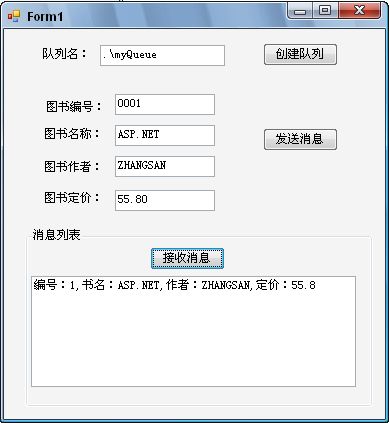
上示例中,完成了一个复杂类型的消息发送到队列及从队列中读取的演义,详细请下载代码查看:
点击这里下载本文示例代码 本文就简单介绍于此,更深入的学习MSMQ请查阅相关资料(如PetShop4里的定单处理策略)。
ASP.NET中进行消息处理(MSMQ) 一的更多相关文章
- ASP.NET中进行消息处理(MSMQ) 三(转)
在本文的前两篇文章里对MSMQ的相关知识点进行了介绍,很多阅读过这前两篇文章的朋友都曾问到过这样一些问题: 1.如何把MSMQ应用到实际的项目中去呢? 2.可不可以介绍一个实际的应用实例? 3. ...
- ASP.NET中进行消息处理(MSMQ) 二(转)
在我上一篇文章<ASP.NET中进行消息处理(MSMQ)一>里对MSMQ做了个通俗的介绍,最后以发送普通文本消息和复杂的对象消息为例介绍了消息队列的使用. 本文在此基础上继续介 ...
- ASP.NET中进行消息处理(MSMQ) 三
在本文的前两篇文章里对MSMQ的相关知识点进行了介绍,很多阅读过这前两篇文章的朋友都曾问到过这样一些问题: 1.如何把MSMQ应用到实际的项目中去呢? 2.可不可以介绍一个实际的应用实例? 3. ...
- ASP.NET中进行消息处理(MSMQ) 二
在我上一篇文章<ASP.NET中进行消息处理(MSMQ)一>里对MSMQ做了个通俗的介绍,最后以发送普通文本消息和复杂的对象消息为例介绍了消息队列的使用. 本文在此基础上继续介绍MSMQ的 ...
- ASP.NET中进行消息处理(MSMQ) 一(转)
MSMQ是微软消息队列的英文缩写.那么什么是消息队列?这些介绍网上一大片这里就不多说了.本文对于大虾级的人物来说这只是小玩意而已,对于初学者来说这文章还是有一定的帮助,希望路过的大虾们别笑话我班门弄斧 ...
- Asp.Net中的消息处理---MSMQ系列学习(一)
刚刚毕业一年,比较浮躁,上次面试被问到消息队列,觉得非常的惭愧因为不知道,所以下定决心一定要学会使用它.以前只是听说过有这么个东西,要说是什么,在什么场景下使用却是无从知晓,因为自己也确实没有在项目中 ...
- 在ASP.NET中如何运行后台任务
from:https://blogs.msdn.microsoft.com/scott_hanselman/2014/12/21/asp-net/ [原文发表地址] How to run Backgr ...
- ASP.NET Web API消息处理管道:Self Host下的消息处理管道[下篇]
ASP.NET Web API消息处理管道:Self Host下的消息处理管道[下篇] 我们知道ASP.NET Web API借助于HttpSelfHostServer以Self Host模式寄宿于当 ...
- 细说Asp.Net Web API消息处理管道(二)
在细说Asp.Net Web API消息处理管道这篇文章中,通过翻看源码和实例验证的方式,我们知道了Asp.Net Web API消息处理管道的组成类型以及Asp.Net Web API是如何创建消息 ...
随机推荐
- 保持listview当前位置
保持listview滑动的位置,一般用在增加listview子item中布局的评论或者退出当前活动,再次进入继续阅读时. 利用ListView.getFirstVisiblePosition()来获取 ...
- 深入理解java虚拟机(4)---类加载机制
类加载的过程包括: 加载class到内存,数据校验,转换和解析,初始化,使用using和卸载unloading过程. 除了解析阶段,其他过程的顺序是固定的.解析可以放在初始化之后,目的就是为了支持动态 ...
- SSL协议详解
背景介绍 最近在看<密码学与网络安全>相关的书籍,这篇文章主要详细介绍一下著名的网络安全协议SSL. 在开始SSl介绍之前,先给大家介绍几个密码学的概念和相关的知识. 1.密 ...
- JFrame小练习1
1.文本域组件 public class TestJTextArea { public static void main(String[] args) { JFrame jf=new JFrame(& ...
- 基础总结篇之一:Activity生命周期
子曰:溫故而知新,可以為師矣.<論語> 学习技术也一样,对于技术文档或者经典的技术书籍来说,指望看一遍就完全掌握,那基本不大可能,所以我们需要经常回过头再仔细研读几遍,以领悟到作者的思想精 ...
- poj 3169 Layout 差分约束模板题
Layout Time Limit: 1000MS Memory Limit: 65536K Total Submissions: 6415 Accepted: 3098 Descriptio ...
- [算法] Manacher算法线性复杂度内求解最长回文子串
参考:http://www.felix021.com/blog/read.php?2040 以上参考的原文写得很好,解析的非常清楚.以下用我自己的理解,对关键部分算法进行简单的描述: 回文的判断需要完 ...
- Python中的库使用之一 PIL
先上代码:本文主要工给自己参考,在需要的时候直接搜索查找就行了,不想看没有实际运行例子的文档,当参考完这部分还哦未能解决问题在参考PIL的相关文档! Skip to content This repo ...
- Python当中的正则表达式支持!
学习Python的正则表达式基础为网页爬虫做好准备
- 关于 Python 你需要知道的几个概念
Python 一种支持面向对象和函数式(面向过程)的高级编程语言 CPython 由 C 语言编译,一种默认的,通常我们所提及的基于 C 的 Python 的一种实现 Cython 一种 Python ...