
Eclipse下搭建Hadoop2.4.0开发环境
一、安装Eclipse
下载Eclipse,解压安装,例如安装到/usr/local,即/usr/local/eclipse
4.3.1版本下载地址:http://pan.baidu.com/s/1eQkpRgu
二、在eclipse上安装hadoop插件
1、下载hadoop插件
下载地址:http://pan.baidu.com/s/1mgiHFok
此zip文件包含了源码,我们使用使用编译好的jar即可,解压后,release文件夹中的hadoop.eclipse-kepler-plugin-2.2.0.jar就是编译好的插件。
2、把插件放到eclipse/plugins目录下
3、重启eclipse,配置Hadoop installation directory
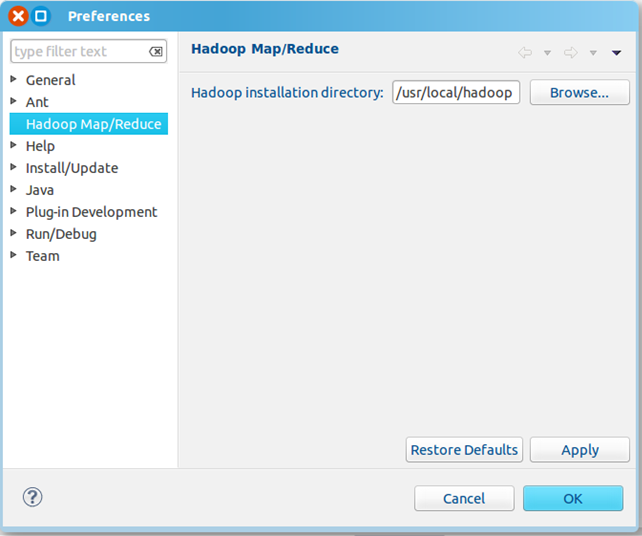
如果插件安装成功,打开Windows—Preferences后,在窗口左侧会有Hadoop Map/Reduce选项,点击此选项,在窗口右侧设置Hadoop安装路径。
4、配置Map/Reduce Locations
打开Windows—Open Perspective—Other
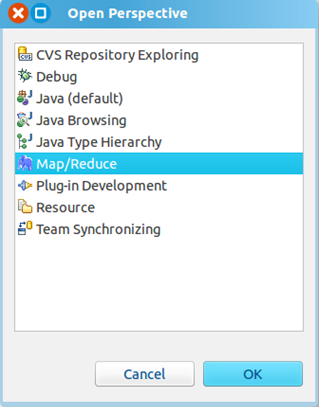
选择Map/Reduce,点击OK
在右下方看到如下图所示

点击Map/Reduce Location选项卡,点击右边小象图标,打开Hadoop Location配置窗口:
输入Location Name,任意名称即可.配置Map/Reduce Master和DFS Mastrer,Host和Port配置成与core-site.xml的设置一致即可。
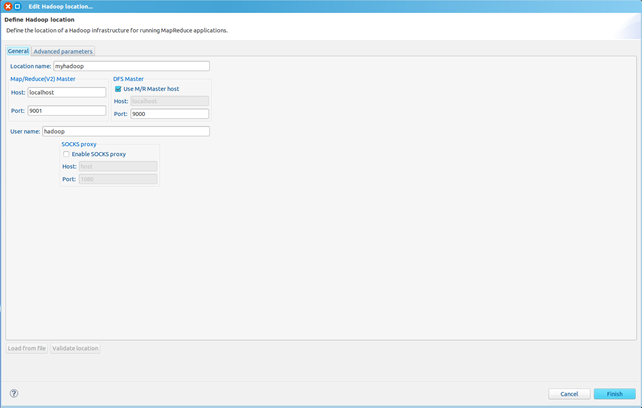

点击"Finish"按钮,关闭窗口。
点击左侧的DFSLocations—>myhadoop(上一步配置的location name),如能看到user,表示安装成功
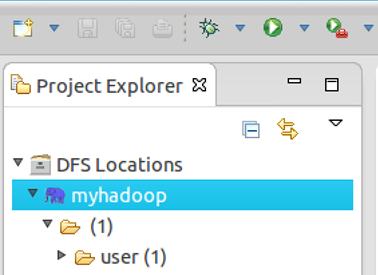
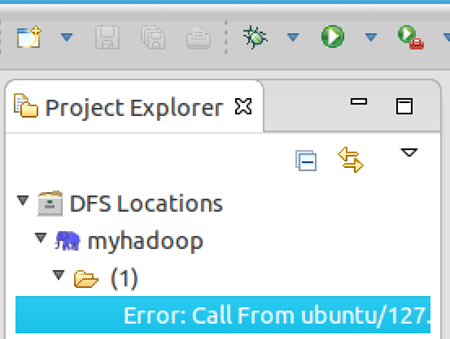
如果如下图所示表示安装失败,请检查Hadoop是否启动,以及eclipse配置是否正确。
三、新建WordCount项目
File—>Project,选择Map/Reduce Project,输入项目名称WordCount等。
在WordCount项目里新建class,名称为WordCount,代码如下:
import java.io.IOException;

import java.util.StringTokenizer;

import org.apache.hadoop.conf.Configuration;

import org.apache.hadoop.fs.Path;

import org.apache.hadoop.io.IntWritable;

import org.apache.hadoop.io.Text;

import org.apache.hadoop.mapreduce.Job;

import org.apache.hadoop.mapreduce.Mapper;

import org.apache.hadoop.mapreduce.Reducer;

import org.apache.hadoop.mapreduce.lib.input.FileInputFormat;

import org.apache.hadoop.mapreduce.lib.output.FileOutputFormat;

import org.apache.hadoop.util.GenericOptionsParser;

public class WordCount {

public static class TokenizerMapper extends Mapper<Object, Text, Text, IntWritable>{

  private final static IntWritable one = new IntWritable(1);

  private Text word = new Text();

  public void map(Object key, Text value, Context context) throws IOException, InterruptedException {

    StringTokenizer itr = new StringTokenizer(value.toString());

      while (itr.hasMoreTokens()) {

        word.set(itr.nextToken());

        context.write(word, one);

      }

  }

}

public static class IntSumReducer extends Reducer<Text,IntWritable,Text,IntWritable> {

  private IntWritable result = new IntWritable();

  public void reduce(Text key, Iterable<IntWritable> values,Context context) throws IOException, InterruptedException {

    int sum = 0;

    for (IntWritable val : values) {

      sum += val.get();

    }

    result.set(sum);

    context.write(key, result);

  }

}

public static void main(String[] args) throws Exception {

  Configuration conf = new Configuration();

  String[] otherArgs = new GenericOptionsParser(conf, args).getRemainingArgs();

  if (otherArgs.length != 2) {

    System.err.println("Usage: wordcount <in> <out>");

    System.exit(2);

  }

  Job job = new Job(conf, "word count");

  job.setJarByClass(WordCount.class);

  job.setMapperClass(TokenizerMapper.class);

  job.setCombinerClass(IntSumReducer.class);

  job.setReducerClass(IntSumReducer.class);

  job.setOutputKeyClass(Text.class);

  job.setOutputValueClass(IntWritable.class);

  FileInputFormat.addInputPath(job, new Path(otherArgs[0]));

  FileOutputFormat.setOutputPath(job, new Path(otherArgs[1]));

  System.exit(job.waitForCompletion(true) ? 0 : 1);

}

}
四、运行
1、在HDFS上创建目录input
hadoop fs -mkdir input
2、拷贝本地README.txt到HDFS的input里
hadoop fs -copyFromLocal /usr/local/hadoop/README.txt input
3、点击WordCount.java,右键,点击Run As—>Run Configurations,配置运行参数,即输入和输出文件夹
hdfs://localhost:9000/user/hadoop/input hdfs://localhost:9000/user/hadoop/output
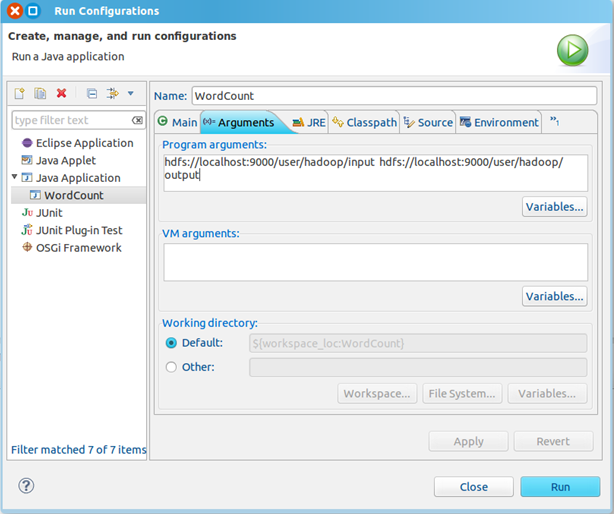
点击Run按钮,运行程序。
4、运行完成后,查看运行结果
方法1:
hadoop fs -ls output
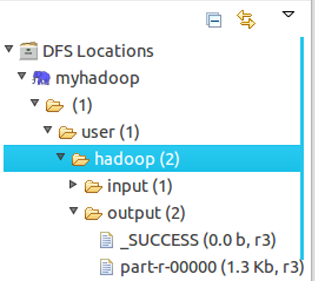
可以看到有两个输出结果,_SUCCESS和part-r-00000
执行hadoop fs -cat output/*
方法2:
展开DFS Locations,如下图所示,双击打开part-r00000查看结果
Eclipse下搭建Hadoop2.4.0开发环境的更多相关文章
- Linux下搭建gtk+2.0开发环境
安装gtk2.0 sudo apt-get install libgtk2.0-dev 查看 2.x 版本 pkg-config --modversion gtk+-2.0 #有可能需要sudo ap ...
- myeclipse下搭建hadoop2.7.3开发环境
需要下载的文件:链接:http://pan.baidu.com/s/1i5yRyuh 密码:ms91 一 下载并编译 hadoop-eclipse-plugin-2.7.3.jar 二 将had ...
- Linux下搭建gtk+2.0开发环境
1.执行如下命令,检查系统是否已安装gtk+ pkg-config --list-all |grep gtk 若命令提示如下,则系统已安装gtk+,否则未安装. 2.若未安装,则执行如下命令进行安装 ...
- 在Win7虚拟机下搭建Hadoop2.6.0+Spark1.4.0单机环境
Hadoop的安装和配置可以参考我之前的文章:在Win7虚拟机下搭建Hadoop2.6.0伪分布式环境. 本篇介绍如何在Hadoop2.6.0基础上搭建spark1.4.0单机环境. 1. 软件准备 ...
- Windows 8.0上Eclipse 4.4.0 配置CentOS 6.5 上的Hadoop2.2.0开发环境
原文地址:http://www.linuxidc.com/Linux/2014-11/109200.htm 图文详解Windows 8.0上Eclipse 4.4.0 配置CentOS 6.5 上的H ...
- 在Win7虚拟机下搭建Hadoop2.6.0伪分布式环境
近几年大数据越来越火热.由于工作需要以及个人兴趣,最近开始学习大数据相关技术.学习过程中的一些经验教训希望能通过博文沉淀下来,与网友分享讨论,作为个人备忘. 第一篇,在win7虚拟机下搭建hadoop ...
- 在Ubuntu下搭建ASP.NET 5开发环境
在Ubuntu下搭建ASP.NET 5开发环境 0x00 写在前面的废话 年底这段时间实在太忙了,各种事情都凑在这个时候,没时间去学习自己感兴趣的东西,所以博客也好就没写了.最近工作上有个小功能要做成 ...
- react-native —— 在Windows下搭建React Native Android开发环境
在Windows下搭建React Native Android开发环境 前段时间在开发者头条收藏了 @天地之灵_邓鋆 分享的<在Windows下搭建React Native Android开发环 ...
- Ruby on Rails入门——macOS 下搭建Ruby Rails Web开发环境
这里只介绍具体的过程及遇到的问题和解决方案,有关概念性的知识请参考另一篇:Ruby Rails入门--windows下搭建Ruby Rails Web开发环境 macOS (我的版本是:10.12.3 ...
随机推荐
- Linux 网络编程二(Socket创建)
TCP通信 一个程序使用套接字需要执行4个步骤. --分配套接口和初始化 --连接 --发送或接收数据 --关闭套接字 涉及到的调用包括socket.bind.listen.connect(阻塞线程) ...
- [转]SRTM、ASTER GDEM等全球数字高程数据(DEM)下载方式简介
之前写过一篇短文对比过几种数字高程数据的区别:5种全球高程数据对比,这篇文章简要介绍下如何下载这些数据. 1.DLR的数字高程数据.该数据也是SRTM(shuttle radar topo ...
- 访问 IIS 元数据库失败 的解决方法
系统是windows xp sp3,vs2010.安装了iis 5.1 ,创建了虚拟目录之后copy进去一个web sercices测试下能不能正常工作. 出现如下问题: 访问 IIS 元数据库失败. ...
- iOS 定位精度
时间 2015-03-19 18:30:59 图灵社区 由于iOS不能直接控制到GPS,一般来说我们都会使用CLLocationManager来获取地理位置信息,我们会使用 manager.des ...
- 20135316王剑桥 linux第十一周课实验笔记
getenv函数 1.获得环境变量值的函数 2.参数是环境变量名name,例如"HOME"或者"PATH".如果环境变量存在,那么getenv函数会返回环境变量 ...
- Opencv step by step - 图像融合
两个图像的融合就是像素的融合了,其实手动操作即可,用函数操作更方便了. 下面代码的作用是融合阿狸和doctor,很和谐有木有! #include <cv.h> #include <h ...
- Bootstrap系列 -- 16. 文本域textarea
文本域和原始使用方法一样,设置rows可定义其高度,设置cols可以设置其宽度.但如果textarea元素中添加了类名“form-control”类名,则无需设置cols属性.因为Bootstrap框 ...
- 第三十一课:JSDeferred详解2
这一课,我们先接着上一课讲一下wait方法,以及wait方法是如何从静态方法变化实例方法的. 首先我们先看wait方法为啥可以从静态方法变成实例方法,请看register源码: Deferred.re ...
- [设计模式] javascript 之 工厂方法模式
1. 简单工厂模式 说明:就是创建一个工厂类,里面实现了所对同一个接口的实现类的创建. 但是好像JavaScript 好像没有 接口 这号东西,所以我们去掉接口这个层; 当然,我们这里的 实现类 下的 ...
- 第二章:Javascript词法结构
编程语言的词法结构是一套基础性的规则,用来描述你如何编写这门语言.作为语法的基础,它规定了变量名是怎么样的,如何写注释,以及语句之间是如何区分的.本节用很短的篇幅来介绍javascript的词法结构. ...