
kettle从入门到精通 第三十六课 kettle carte 集群
1、carte服务可以单体运行也可以集群方式运行,今天我们一起来学习下carte的集群模式部署和使用。本次示例用一个master和两个slave从节点演示。
carte-config-master-8080.xml 配置文件:
 1 <slave_config>

 2 <!--

 3 Document description...

 4

 5 - masters: You can list the slave servers to which this slave has to report back to.

 6 If this is a master, we will contact the other masters to get a list of all the slaves in the cluster.

 7

 8 - report_to_masters : send a message to the defined masters to let them know we exist (Y/N)

 9

10 - slaveserver : specify the slave server details of this carte instance.

11 IMPORTANT : the username and password specified here are used by the master instances to connect to this slave.

12

13 -->

14

15 <slaveserver>

16 <name>master1</name>

17 <hostname>xxx.xxx.6.89</hostname>

18 <port>8080</port>

19 <master>Y</master>

20 </slaveserver>

21 <repository>

22 <id>KettleDatabaseRepository</id>

23 <name>kettleDb</name>

24 <description>Database repository</description>

25 <is_default>true</is_default>

26 <connection>kettleDb</connection>

27 </repository>

28

29 </slave_config>
carte-config-8081.xml 配置文件:
<slave_config>

<!--

Document description...

- masters: You can list the slave servers to which this slave has to report back to.

If this is a master, we will contact the other masters to get a list of all the slaves in the cluster.

- report_to_masters : send a message to the defined masters to let them know we exist (Y/N)

- slaveserver : specify the slave server details of this carte instance.

IMPORTANT : the username and password specified here are used by the master instances to connect to this slave.

-->

<masters>

<slaveserver>

<name>master1</name>

<hostname>xxx.xxx.6.89</hostname>

<port>8080</port>

<username>cluster</username>

<password>cluster</password>

<master>Y</master>

</slaveserver>

</masters>

<report_to_masters>Y</report_to_masters>

<slaveserver>

<name>slave1-8081</name>

<hostname>xxx.xxx.6.89</hostname>

<port>8081</port>

<username>cluster</username>

<password>cluster</password>

<master>N</master>

</slaveserver>

</slave_config>
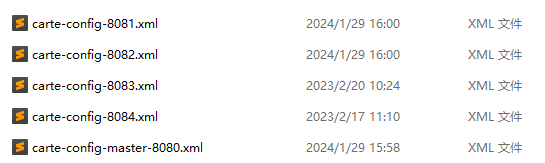
carte-config-8082.xml 配置文件同carte-config-8081.xml 配置文件类似,这里省略。以上配置文件在pwd目录下,如下图所示:
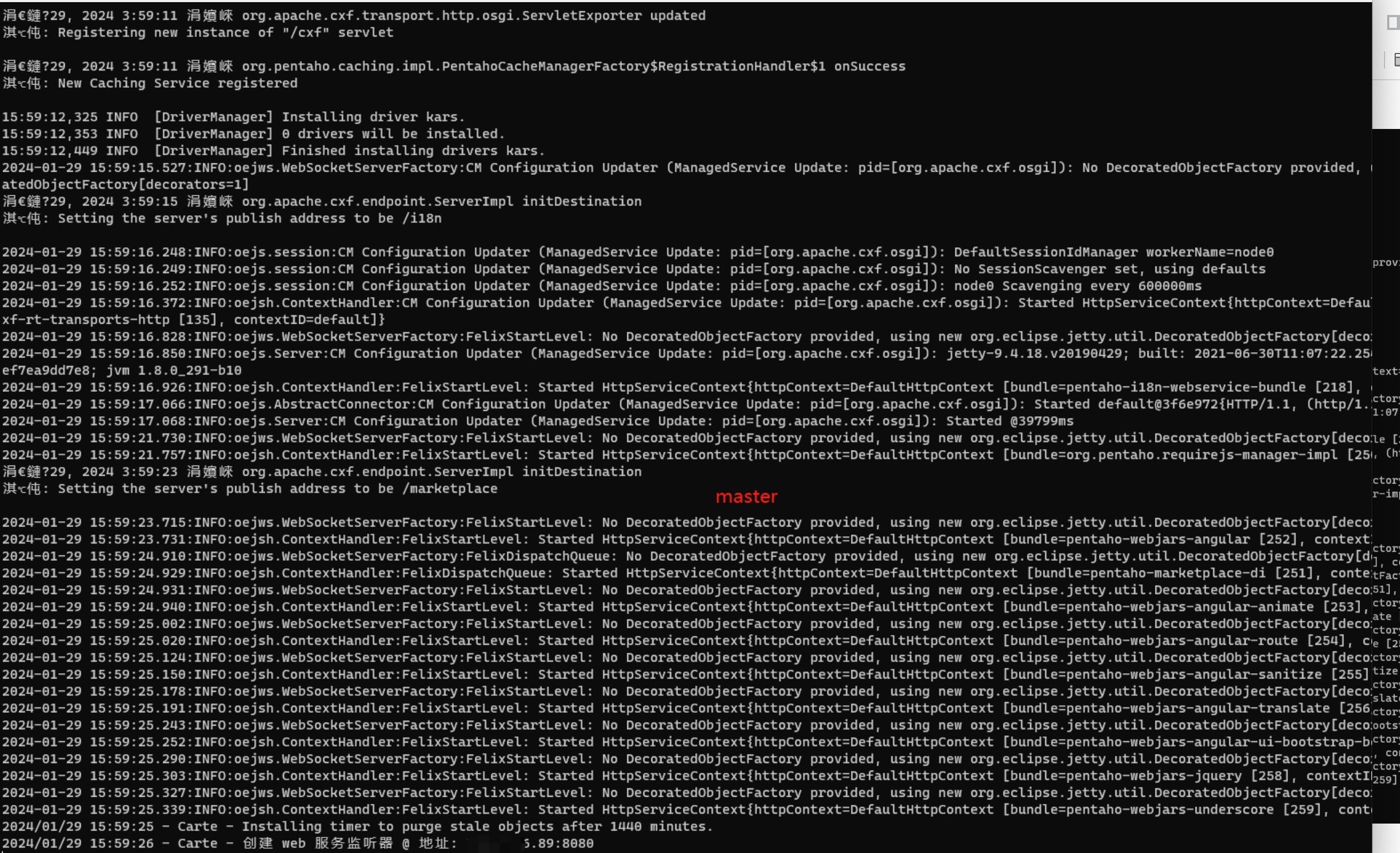
2、启动主carte服务
windows:Carte.bat pwd/carte-config-master-8080.xml
linux:sh carte.sh pwd/carte-config-master-8080.xml
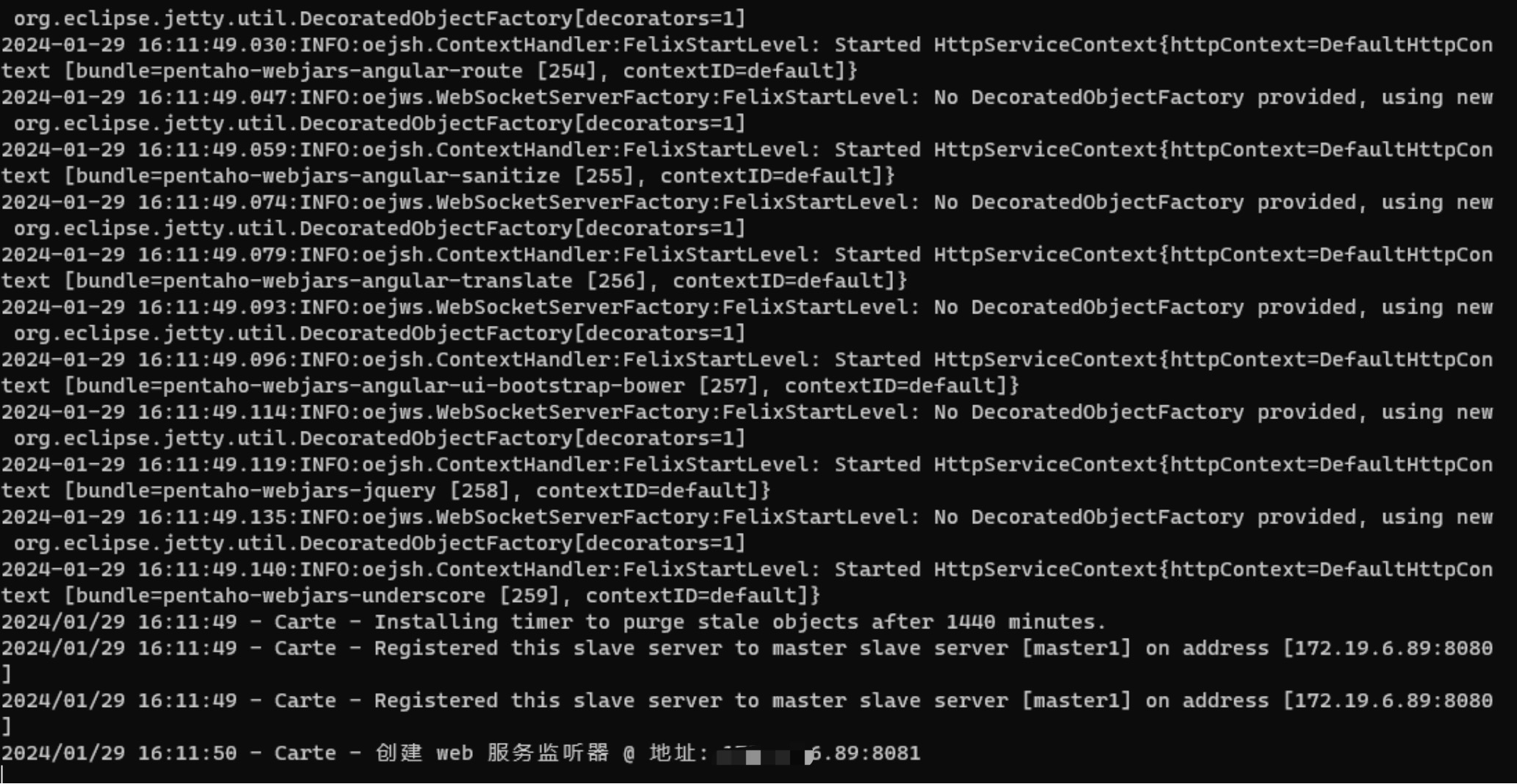
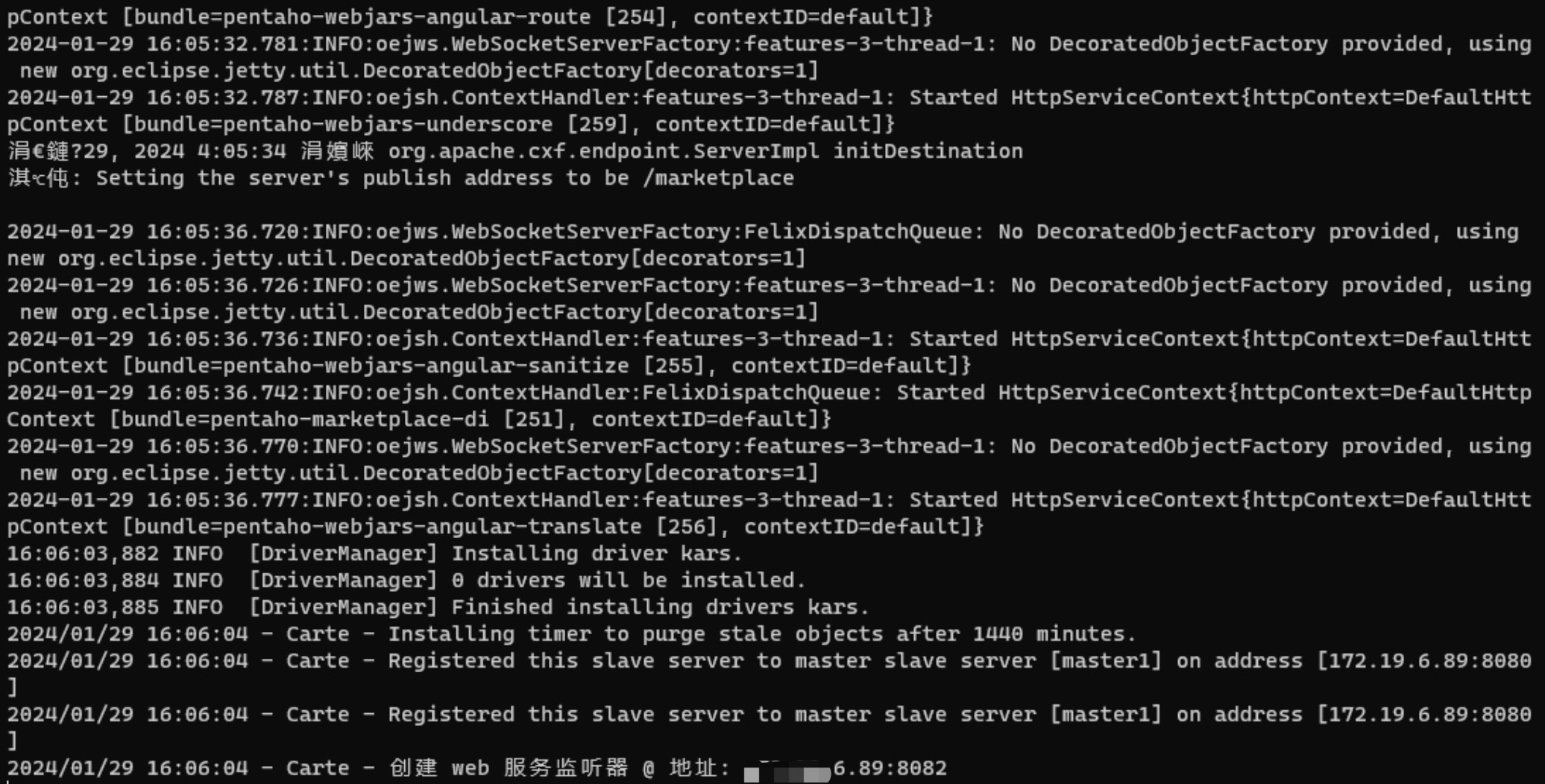
3、启动从carte服务
windows:
Carte.bat pwd/carte-config-8081.xml
Carte.bat pwd/carte-config-8082.xml
linux:
sh carte.sh pwd/carte-config-8081.xml
sh carte.sh pwd/carte-config-8082.xml
4、运行Spoon.bat或者spoon.sh 客户端,编辑转换文件,新建子服务器,将三个carte服务添加进来如下所示:
默认用户名和密码都是cluster,也可以自行修改。
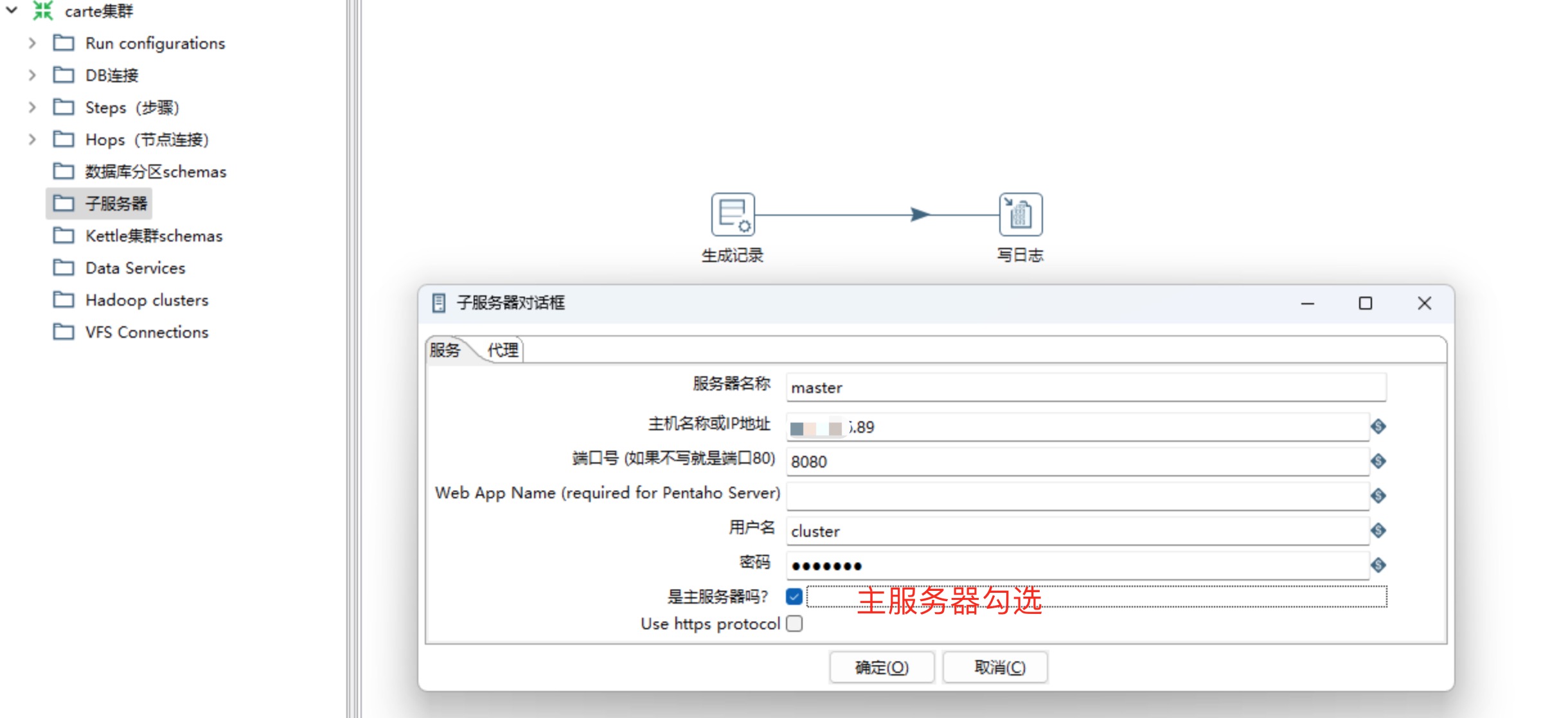
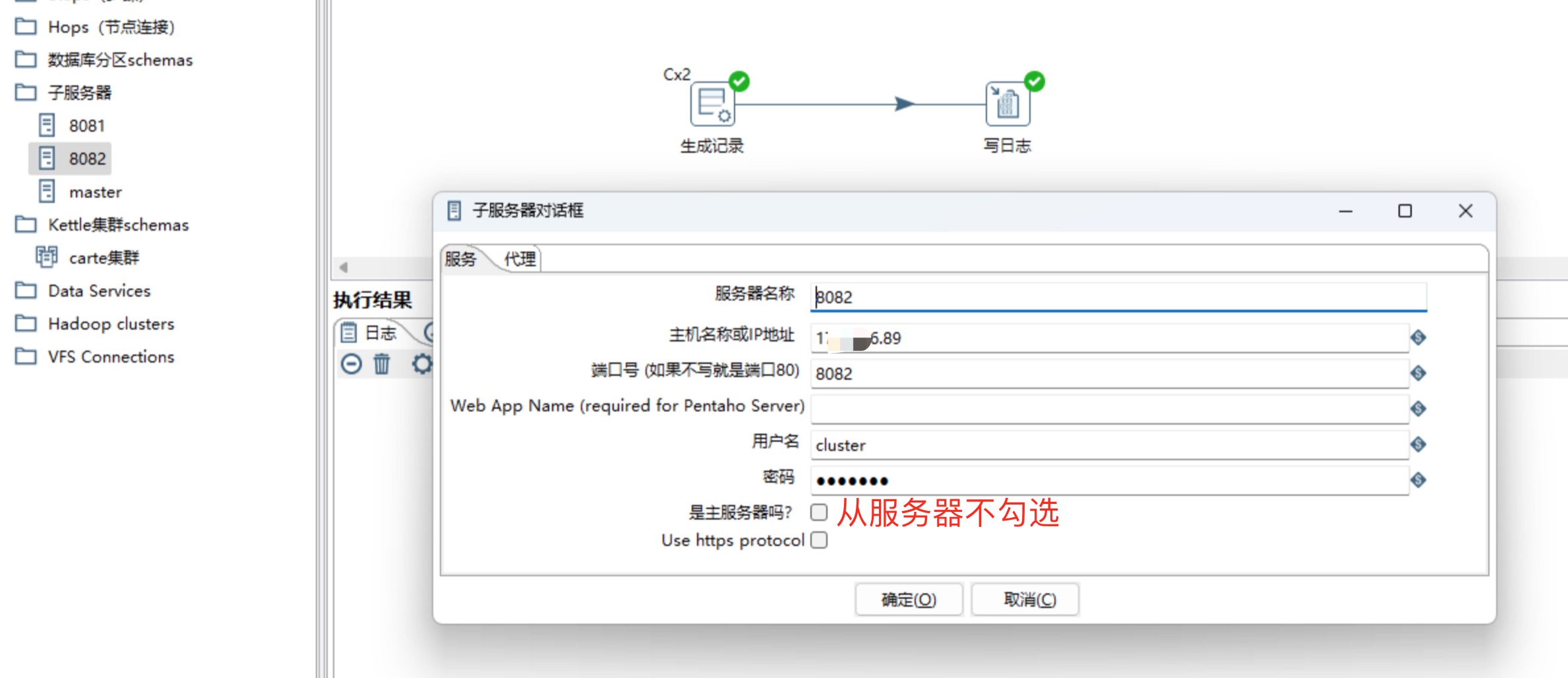
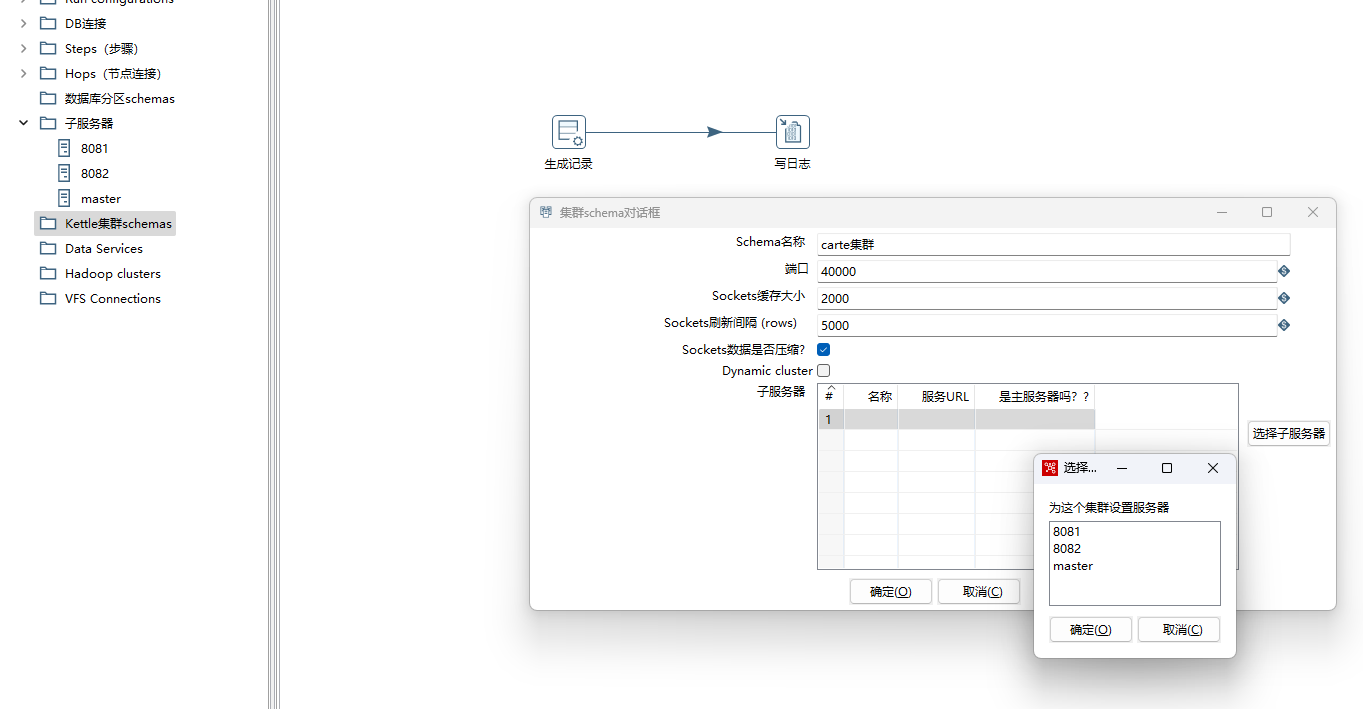
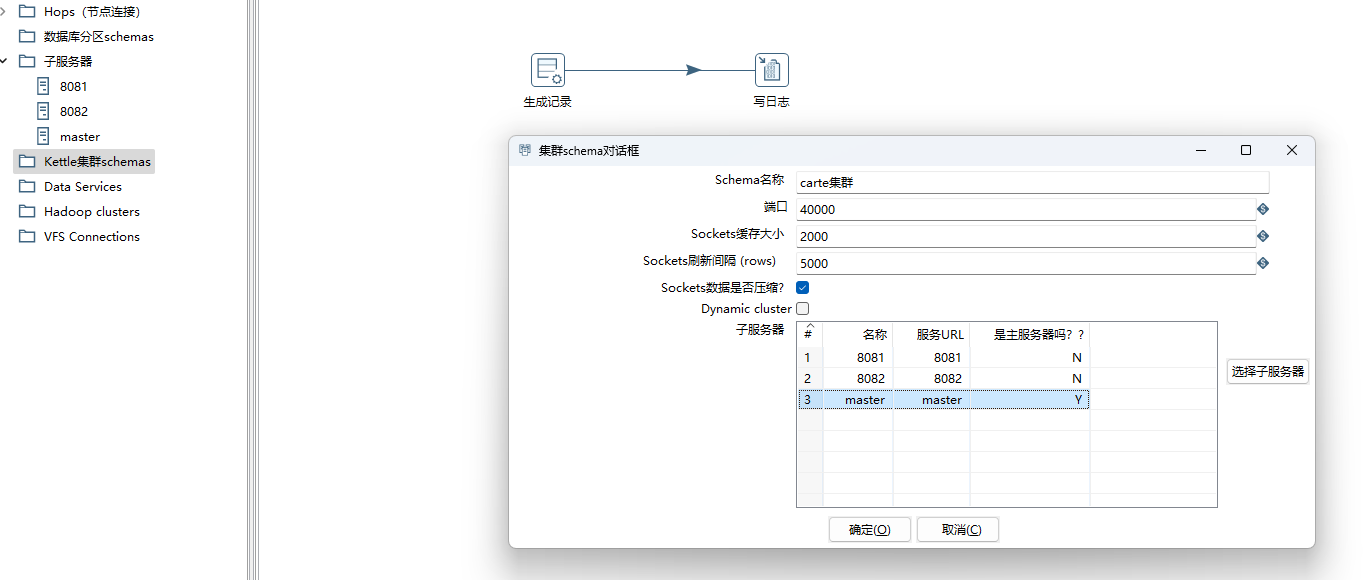
5、基于子服务器列表创建kettle集群schemas,选择设置好的子服务器,这里演示采用静态cluster,Dynamic cluster模式支持动态添加子服务器。
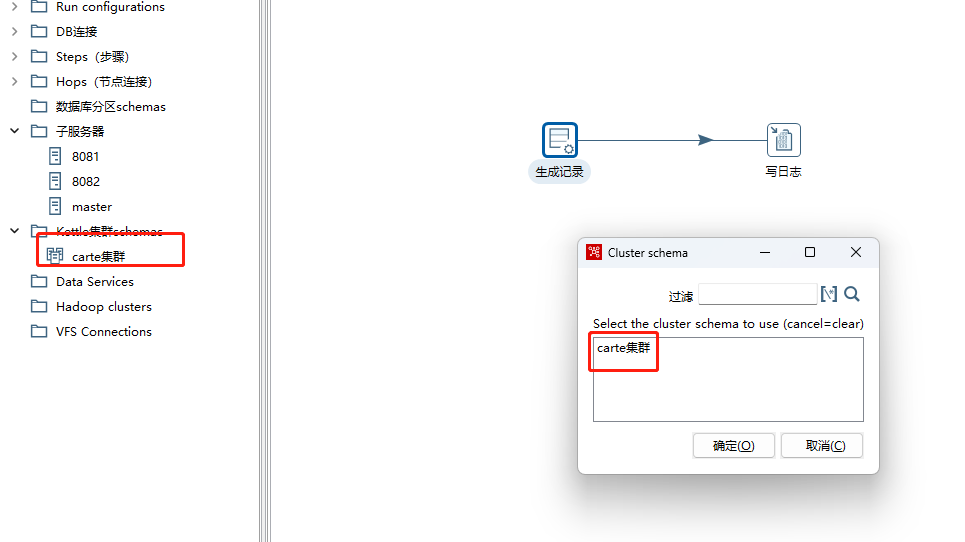
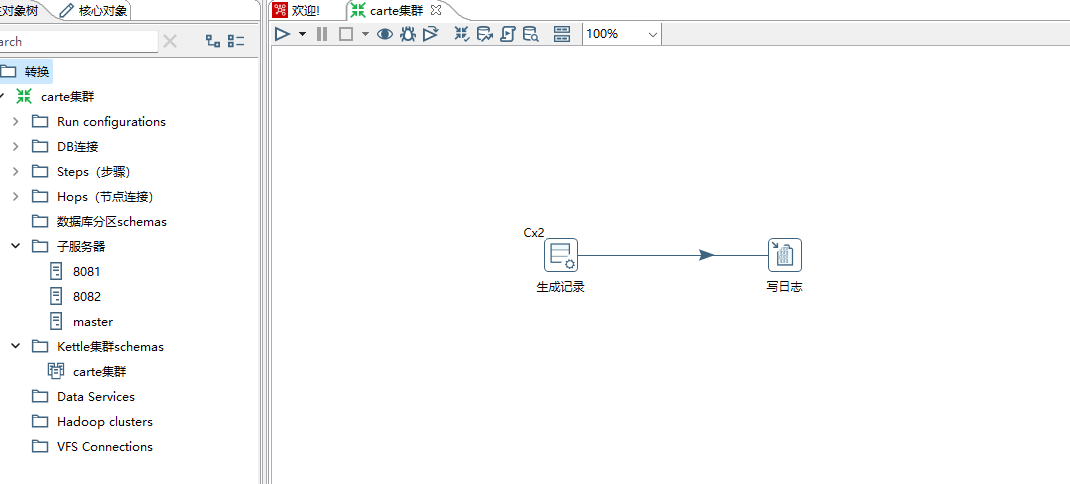
6、设置转换文件中步骤的集群模式,右键生成记录步骤,选择自己创建的carte集群即可。
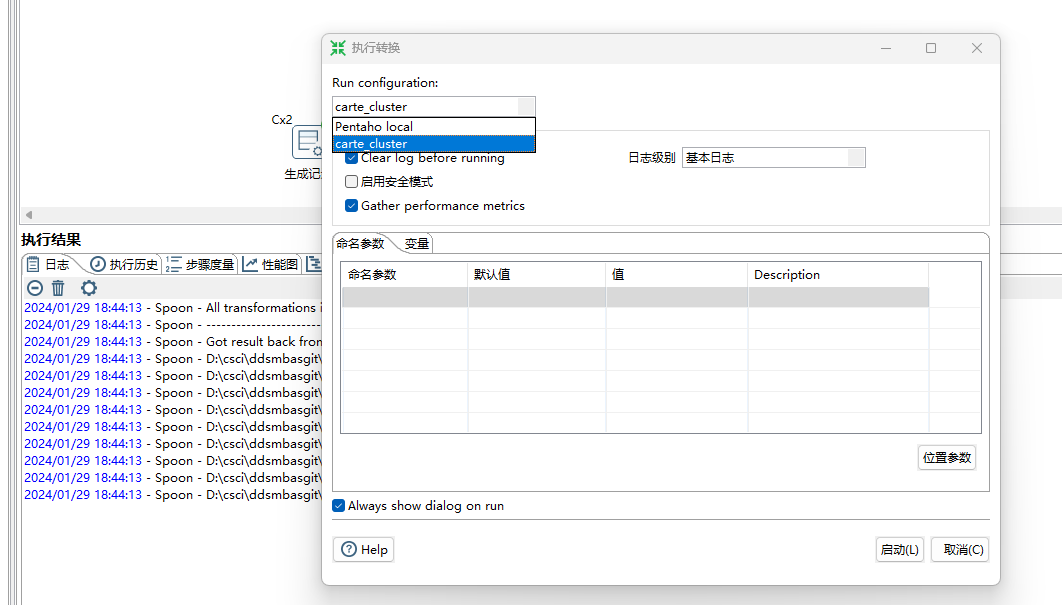
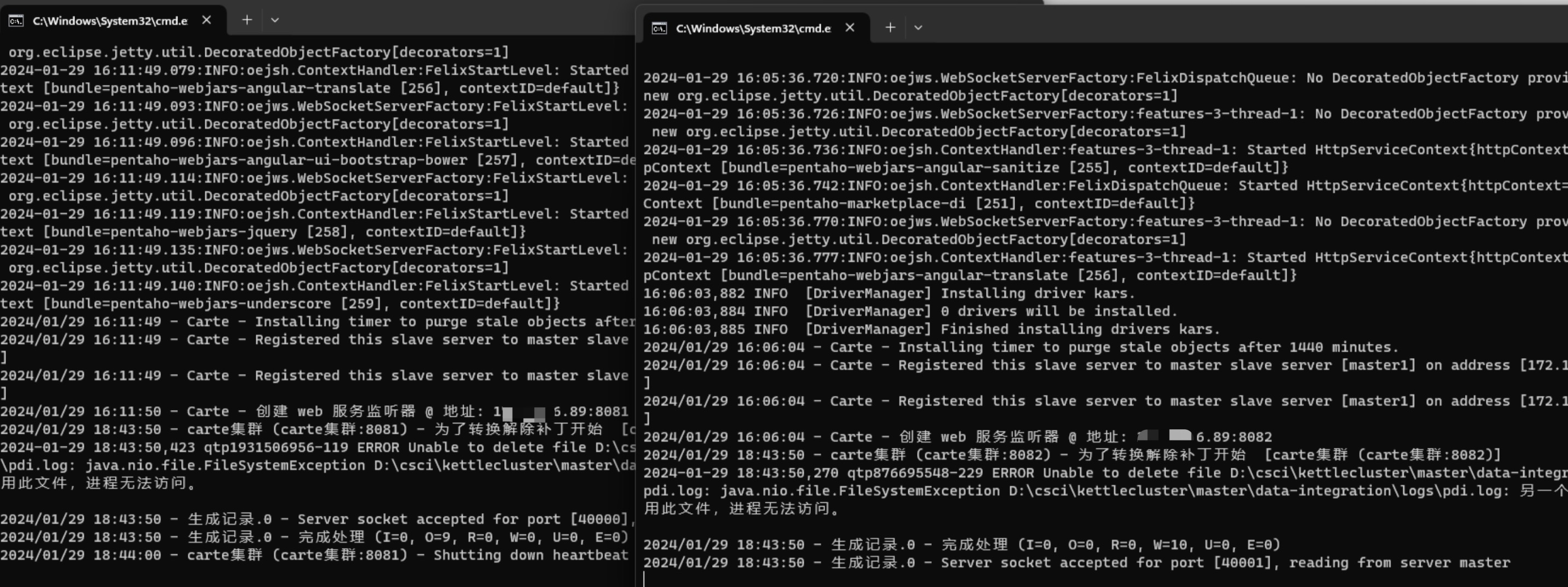
7、集群模式运行转换文件。通过集群提交时,作业或者转换是通过集群Master提交作业,Master和多个Slave采用动态抢占式(排它锁)机制抢占任务,实施任务的运行操作。

kettle从入门到精通 第三十六课 kettle carte 集群的更多相关文章
- NeHe OpenGL教程 第三十六课:从渲染到纹理
转自[翻译]NeHe OpenGL 教程 前言 声明,此 NeHe OpenGL教程系列文章由51博客yarin翻译(2010-08-19),本博客为转载并稍加整理与修改.对NeHe的OpenGL管线 ...
- Dubbo入门到精通学习笔记(十七):FastDFS集群的安装、FastDFS集群的配置
文章目录 FastDFS集群的安装 FastDFS 介绍(参考:http://www.oschina.net/p/fastdfs) FastDFS 上传文件交互过程: FastDFS 下载文件交互过程 ...
- Dubbo入门到精通学习笔记(十三):ZooKeeper集群的安装、配置、高可用测试、升级、迁移
文章目录 ZooKeeper集群的安装.配置.高可用测试 ZooKeeper 与 Dubbo 服务集群架构图 1. 修改操作系统的/etc/hosts 文件,添加 IP 与主机名映射: 2. 下载或上 ...
- 第三十六课:如何书写一个完整的ajax模块
本课主要教大家如何书写一个完整的ajax模块,讲解的代码主要跟ajax有关,而jQuery的ajax模块添加了Deferred异步编程的机制,因此对ajax的理解难度增大,还是忽略掉.但是我要讲解的代 ...
- JAVA学习第三十六课(经常使用对象API)— Set集合:HashSet集合演示
随着Java学习的深入,感觉大一时搞了一年的ACM,简直是明智之举,Java里非常多数据结构.算法类的东西,理解起来就轻松多了 Set集合下有两大子类开发经常使用 HashSet集合 .TreeSet ...
- 潭州课堂25班:Ph201805201 django 项目 第三十六课 后台文章管理(课堂笔记)
get 请求, 1,获取文章标签 , 2,拿到前台传来的值, 3,根据前台传来的值在数据库中查询 4.,返回数据到前台,渲染, 分页算法 : 在 utils 下创建 paginator_script ...
- python第三十六课——2.迭代器对象
满足前提: 1).必须是一个可迭代对象 2).可以被next()所作用的 举例: generator... 高效的检测一个对象是否是迭代器对象 需要使用collections模块中的Iterator类 ...
- python第三十六课——1.可迭代对象
1.可迭代对象: 满足前提: 只要能被循环操作的对象,就可以可迭代对象 举例: str.list.tuple.set.dict.range.generator... 高效的检测一个对象是否是可迭代对象 ...
- Hadoop入门学习笔记-第三天(Yarn高可用集群配置及计算案例)
什么是mapreduce 首先让我们来重温一下 hadoop 的四大组件:HDFS:分布式存储系统MapReduce:分布式计算系统YARN: hadoop 的资源调度系统Common: 以上三大组件 ...
- SaltStack 入门到精通第三篇:Salt-Minion配置文件详解
SaltStack 入门到精通第三篇:Salt-Minion配置文件详解 作者:ArlenJ 发布日期:2014-06-09 17:52:16 ##### 主要配置设置 ##### 配置 默认值 ...
随机推荐
- 一文详解用eBPF观测HTTP
简介: 随着eBPF推出,由于具有高性能.高扩展.安全性等优势,目前已经在网络.安全.可观察等领域广泛应用,同时也诞生了许多优秀的开源项目,如Cilium.Pixie等,而iLogtail 作为阿里内 ...
- RAG 工具和框架介绍: Haystack、 LangChain 和 LlamaIndex
Haystack. LangChain 和 LlamaIndex,以及这些工具是如何让我们轻松地构建 RAG 应用程序的? 我们将重点关注以下内容: Haystack LangChain LlamaI ...
- [FAQ] web3js, Error: Please pass numbers as strings or BN objects to avoid precision errors.
我们在调用合约方法时,都可以传一些参数的,比如转账金额 value. value 的单位是 wei,这是一个很小的单位,所以一般数值很大. 注意,把 ether 转 wei 需要先把 ether 的值 ...
- WPF 已知问题 开启 IsManipulationEnabled 之后触摸长按 RepeatButton 不会触发连续的 Click 事件
本文记录 WPF 的一个已知问题,在 RepeatButton 上开启 IsManipulationEnabled 漫游支持之后,将会导致触摸长按到 RepeatButton 之上时,不会收到源源不断 ...
- dotnet 将控制台 Console.WriteLine 内容输出到文件
很多伙伴喜欢使用 Console.WriteLine 打日志,也许是打起来顺手.打完了之后,又想着,要是能够输出到本机文件那就更好了.既然很多伙伴都有这个想法,那 dotnet 自然就是有方便的方法让 ...
- 2019-10-31-WPF-设置纯软件渲染
title author date CreateTime categories WPF 设置纯软件渲染 lindexi 2019-10-31 8:59:2 +0800 2018-04-20 16:36 ...
- 以 standalone 模式启动 Aapche Pulsar
以 standalone 模式启动 Aapche Pulsar standalone 模式常用于开发测试阶段,请勿在生产环境使用. 目录 以 standalone 模式启动 Aapche Pulsar ...
- OLAP系列之分析型数据库clickhouse备份方式(五)
一.常见备份方式 1.1 备份方式 备份方式 特点 物理文件备份 对物理文件进行拷贝,备份期间禁止数据写入 dump数据导入导出 备份方式灵活,但备份速度慢 快照表备份 制作_bak表进行备份 FRE ...
- VSCode 在 windows 下默认添加 _WIN32 的问题
现象 在 VSCode 在 windows 下环境中使用时,会默认添加 _WIN32 ,会出现查看代码时,出现错误提示,现象如下 检测到 #include 错误.请更新 includePath.已为此 ...
- 坐标轴调控大揭秘:Matplotlib坐标轴设置全攻略+顺口溜,一文掌握!
在数据可视化的世界里,Matplotlib是那把魔法棒,让枯燥的数据跃然纸上,而掌控这把魔法棒的核心,就是对坐标轴的精妙操作.今天,就让我们一起揭开Matplotlib坐标轴设置的神秘面纱,配上易记的 ...