
Kubernetes(K8S) helm chart
感觉和放到一个 yaml 文件中,用 ---- 分隔,操作繁琐程度上,没有太大区别
创建自定义 Chart
# 创建自定义的 chart 名为 mychart

[root@k8smaster ~]# helm create mychart

Creating mychart

[root@k8smaster ~]# cd mychart/

[root@k8smaster mychart]# ls

charts

Chart.yaml  # 当前chart 属性配置信息

templates   # 编写 yaml 文件放到这个目录,是 yaml 的集合

values.yaml # yaml文件可以使用的全局变量

[root@k8smaster mychart]#
创建 yaml 文件
在 templates 文件夹中创建两个 yaml 文件
- deployment.yaml
apiVersion: apps/v1

kind: Deployment

metadata:

  creationTimestamp: null

  labels:

    app: web1

  name: web1

spec:

  replicas: 1

  selector:

    matchLabels:

      app: web1

  strategy: {}

  template:

    metadata:

      creationTimestamp: null

      labels:

        app: web1

    spec:

      containers:

      - image: nginx

        name: nginx

        resources: {}

status: {}
- service.yaml
apiVersion: v1

kind: Service

metadata:

  creationTimestamp: null

  labels:

    app: web1

  name: web1

spec:

  ports:

  - port: 80

    protocol: TCP

    targetPort: 80

    nodePort: 30390  # 可以指定暴露出去的端口,防止重启 Pod 后发生变化

  selector:

    app: web1

  type: NodePort

status:

  loadBalancer: {}
# 切换到 templates 目录下

[root@k8smaster mychart]# cd templates/

# 创建一个web1应用--内容见上文

[root@k8smaster templates]# vi deployment.yaml

# 暴露端口--内容见上文

[root@k8smaster templates]# vi service.yaml

[root@k8smaster templates]#
安装
[root@k8smaster ~]# helm install web1 mychart/

NAME: web1

LAST DEPLOYED: Mon Nov 28 14:26:34 2022

NAMESPACE: default

STATUS: deployed

REVISION: 1

NOTES:

1. Get the application URL by running these commands:

  export POD_NAME=$(kubectl get pods --namespace default -l "app.kubernetes.io/name=mychart,app.kubernetes.io/instance=web1" -o jsonpath="{.items[0].metadata.name}")

  echo "Visit http://127.0.0.1:8080 to use your application"

  kubectl --namespace default port-forward $POD_NAME 8080:80

[root@k8smaster ~]# helm list

NAME    NAMESPACE       REVISION        UPDATED                                 STATUS          CHART                   APP VERSION

ui      default         1               2022-11-28 13:15:05.404335352 +0800 CST deployed        weave-scope-1.1.12      1.12.0

web1    default         1               2022-11-28 14:26:34.854631893 +0800 CST deployed        mychart-0.1.0           1.16.0

[root@k8smaster ~]# kubectl get pod,svc

NAME                                                READY   STATUS    RESTARTS   AGE

pod/nginx-f89759699-652r4                           1/1     Running   0          5d

pod/nginx-nfs-788564fbc8-g58xd                      1/1     Running   0          5d

pod/weave-scope-agent-ui-7qqd4                      1/1     Running   0          73m

pod/weave-scope-agent-ui-knqwk                      1/1     Running   0          73m

pod/weave-scope-agent-ui-r74cm                      1/1     Running   0          73m

pod/weave-scope-agent-ui-xnrht                      1/1     Running   0          73m

pod/weave-scope-cluster-agent-ui-7498b8d4f4-pmkzh   1/1     Running   0          73m

pod/weave-scope-frontend-ui-649c7dcd5d-jfg72        1/1     Running   0          73m

pod/web1-7f87dfbd56-w7p4d                           1/1     Running   0          91s

NAME                     TYPE        CLUSTER-IP       EXTERNAL-IP   PORT(S)          AGE

service/javademo1        NodePort    10.106.43.46     <none>        8111:31452/TCP   40d

service/kubernetes       ClusterIP   10.96.0.1        <none>        443/TCP          45d

service/nginx            NodePort    10.103.87.81     <none>        80:30339/TCP     45d

service/nginx-nfs        NodePort    10.99.84.9       <none>        80:30205/TCP     19d

service/ui-weave-scope   NodePort    10.101.4.212     <none>        80:30690/TCP     73m

service/web1             NodePort    10.100.238.141   <none>        80:30390/TCP     91s

[root@k8smaster ~]#
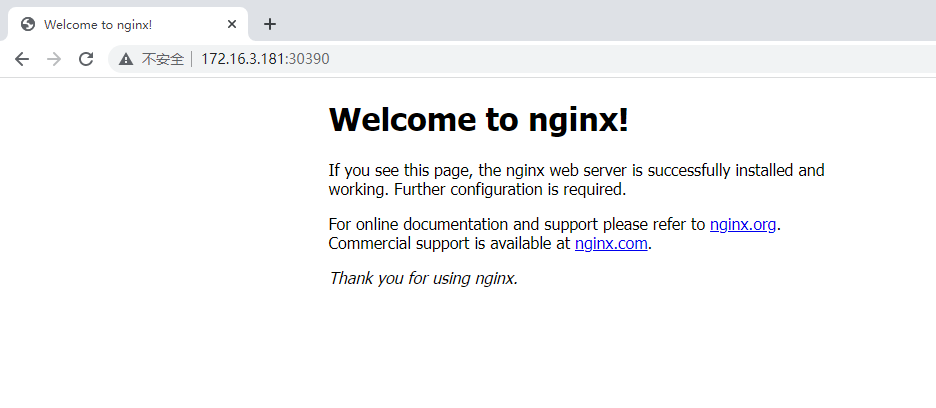
升级
[root@k8smaster ~]# helm upgrade web1 mychart/

Release "web1" has been upgraded. Happy Helming!

NAME: web1

LAST DEPLOYED: Mon Nov 28 14:29:39 2022

NAMESPACE: default

STATUS: deployed

REVISION: 2

NOTES:

1. Get the application URL by running these commands:

  export POD_NAME=$(kubectl get pods --namespace default -l "app.kubernetes.io/name=mychart,app.kubernetes.io/instance=web1" -o jsonpath="{.items[0].metadata.name}")

  echo "Visit http://127.0.0.1:8080 to use your application"

  kubectl --namespace default port-forward $POD_NAME 8080:80

[root@k8smaster ~]#
yaml 高效复用
通过传递参数,动态渲染模板 yaml 内容,动态传入参数生成
在 chart values.yaml 文件,定义 yaml 文件全局变量
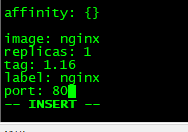
在 values.yaml 定义变量和值
在具体 yaml文件中,获取定义变量的值
- image、tag、label、port、replicas
定义变量
[root@k8smaster ~]# cd mychart/

[root@k8smaster mychart]# vi values.yaml

image: nginx

replicas: 1

tag: 1.16

label: nginx

port: 80
使用变量
方便统一定义
{{ .Values.变量名称}}
{{ .Release.Name}} -> 获取版本名称
- deployment.yaml
apiVersion: apps/v1

kind: Deployment

metadata:

  name: {{ .Release.Name}}-deploy

spec:

  replicas: 1

  selector:

    matchLabels:

      app: {{ .Values.label}}

  strategy: {}

  template:

    metadata:

      creationTimestamp: null

      labels:

        app: {{ .Values.label}}

    spec:

      containers:

      - image: {{ .Values.image}}

        name: nginx

        resources: {}

status: {}
- service.yaml
apiVersion: v1

kind: Service

metadata:

  name: {{ .Release.Name}}-deploy

spec:

  ports:

  - port: {{ .Values.port}}

    protocol: TCP

    targetPort: 80

  selector:

    app: {{ .Values.label}}

  type: NodePort

status:

  loadBalancer: {}
[root@k8smaster mychart]# vi templates/deployment.yaml

[root@k8smaster mychart]# vi templates/deployment.yaml

[root@k8smaster mychart]# cd

[root@k8smaster ~]# helm install --dry-run web2 mychart/

# Source: mychart/templates/service.yaml

apiVersion: v1

kind: Service

metadata:

  name: web2-deploy

spec:

  ports:

  - port: 80

    protocol: TCP

    targetPort: 80

  selector:

    app: nginx

  type: NodePort

status:

  loadBalancer: {}

---

# Source: mychart/templates/deployment.yaml

apiVersion: apps/v1

kind: Deployment

metadata:

  name: web2-deploy

spec:

  replicas: 1

  selector:

    matchLabels:

      app: nginx

  strategy: {}

  template:

    metadata:

      creationTimestamp: null

      labels:

        app: nginx

    spec:

      containers:

      - image: nginx

        name: nginx

        resources: {}

status: {}

[root@k8smaster ~]# helm install web2 mychart/

NAME: web2

LAST DEPLOYED: Mon Nov 28 15:13:48 2022

NAMESPACE: default

STATUS: deployed

REVISION: 1

[root@k8smaster ~]# kubectl get pod,svc

NAME                                                READY   STATUS    RESTARTS   AGE

pod/nginx-f89759699-652r4                           1/1     Running   0          5d1h

pod/nginx-nfs-788564fbc8-g58xd                      1/1     Running   0          5d1h

pod/weave-scope-agent-ui-7qqd4                      1/1     Running   0          119m

pod/weave-scope-agent-ui-knqwk                      1/1     Running   0          119m

pod/weave-scope-agent-ui-r74cm                      1/1     Running   0          119m

pod/weave-scope-agent-ui-xnrht                      1/1     Running   0          119m

pod/weave-scope-cluster-agent-ui-7498b8d4f4-pmkzh   1/1     Running   0          119m

pod/weave-scope-frontend-ui-649c7dcd5d-jfg72        1/1     Running   0          119m

pod/web1-7f87dfbd56-w7p4d                           1/1     Running   0          47m

pod/web2-deploy-f89759699-9z5n4                     1/1     Running   0          22s

NAME                     TYPE        CLUSTER-IP       EXTERNAL-IP   PORT(S)          AGE

service/javademo1        NodePort    10.106.43.46     <none>        8111:31452/TCP   40d

service/kubernetes       ClusterIP   10.96.0.1        <none>        443/TCP          45d

service/nginx            NodePort    10.103.87.81     <none>        80:30339/TCP     45d

service/nginx-nfs        NodePort    10.99.84.9       <none>        80:30205/TCP     19d

service/ui-weave-scope   NodePort    10.101.4.212     <none>        80:30690/TCP     119m

service/web1             NodePort    10.100.238.141   <none>        80:30390/TCP     47m

service/web2-deploy      NodePort    10.111.219.124   <none>        80:30277/TCP     22s

[root@k8smaster ~]# helm uninstall web2

release "web2" uninstalled
Kubernetes(K8S) helm chart的更多相关文章
- kubernetes(k8s) helm安装kafka、zookeeper
通过helm在k8s上部署kafka.zookeeper 通过helm方法安装 k8s上安装kafka,可以使用helm,将kafka作为一个应用安装.当然这首先要你的k8s支持使用helm安装.he ...
- Kubernetes笔记(三):Gitlab+Jenkins Pipeline+Docker+k8s+Helm自动化部署实践(干货分享!)
通过前面两篇文章,我们已经有了一个"嗷嗷待哺"的K8s集群环境,也对相关的概念与组件有了一个基本了解(前期对概念有个印象即可,因为只有实践了才能对其有深入理解,所谓"纸上 ...
- Kubernetes K8S之Helm部署、使用与示例
Kubernetes K8S之Helm部署.使用.常见操作与示例 主机配置规划 服务器名称(hostname) 系统版本 配置 内网IP 外网IP(模拟) k8s-master CentOS7.7 2 ...
- Kubernetes K8S之通过helm部署metrics-server与HPA详解
Kubernetes K8S之通过helm部署metrics-server与 Horizontal Pod Autoscaling (HPA)详解 主机配置规划 服务器名称(hostname) 系统版 ...
- K8s helm 创建自定义Chart
# 删除之前创建的 chart helm list helm delete --purge redis1 # 创建自定义 chart myapp cd ~/helm helm create myapp ...
- 【K8S】helm chart多环境部署最佳实践-示例
Chart.yaml apiVersion: v1 appVersion: "1.0" description: A Helm chart for Kubernetes name: ...
- 如何使用vs将asp.net core项目添加容器支持并发布docker镜像到私有dockerhub和添加k8s/helm管理
这篇文章介绍一下,如何使用VS2017给asp.net core添加容器支持,并发布镜像到私有docker hub,然后用chart管理容器镜像的操作流程. 话不多说,just do it. 新建项目 ...
- Mac下的Docker及Kubernetes(k8s)本地环境搭建与应用部署、管理界面kubernetes-dashboard
mac安装docker: brew cask install docker 当然也可以直接去官网下载docker的pkg文件安装 mac的docker国内镜像:网易的镜像地址:http://hub-m ...
- K8s Helm安装配置入门
作为k8s现在主流的一种包部署方式,尽管不用,也需要进行一些了解.因为,它确实太流行了. 这一套太极拳打下来,感觉helm这种部署,目前还不太适合于我们公司的应用场景.它更适合需要手工编程各种yaml ...
- k8s Helm安装Prometheus Operator
Ubuntu 18 Kubernetes集群的安装和部署 以及Helm的安装完成了k8s的集群和helm的安装,今天我们来看看Prometheus的监控怎么搞.Prometheus Operator ...
随机推荐
- [Python急救站课程]凯撒密码加密与解密
密码的解密是一个有趣的过程,凯撒密码也是一个较为简单的密码,是通过位移来解决的. 当我们把凯撒密码位移量设置为3时就可以用Python做出以下程序. 加密程序: plaincode = input(& ...
- webgoat _v8.1全流程通关
1.1 (A1)SQL Injection (intro) 概念 本课程介绍了什么是结构化查询语言(SQL),以及如何操纵它以执行开发人员原始意图之外的任务. 目标 用户将对SQL的工作原理和用途有基 ...
- UNI-APP之微信小程序转H5
开始 最近有个需求,需要将微信小程序中一些页面和功能改成h5,这次功能开发的时间有点紧,而且重新写一套有点来不及.考虑到微信小程序与uni-app有着一些共通之处,所以打算直接转成uni-app.un ...
- VisionPro学习笔记(5)——极轴展开工具PolarUnwrapTool
如果需要了解其他图像处理的文章,请移步小编的GitHub地址 传送门:请点击我 如果点击有误:https://github.com/LeBron-Jian/ComputerVisionPractice ...
- java String字符串总结
这里我们将总结字符串相关的知识,除了总结String的API用法,同时我们还会总结一些相关的知识点,包括字符串常量池.StringBuffer.StringBuilder,以及equals和==的用法 ...
- Bugku CTF web题
web2 查看网页源码,发现flag
- create-vue和vue-cli创建项目的差异
这里对比的是vue-cli和create-vue创建vue3项目的文件中的内容差异. 原来public中的index.html被移动到根目录:(原因见这里:) https://cn.vitejs.de ...
- 解密Prompt系列22. LLM Agent之RAG的反思:放弃了压缩还是智能么?
已经唠了三章的RAG,是时候回头反思一下,当前的RAG是解决幻觉的终点么?我给不出直接的答案,不过感觉当前把RAG当作传统搜索框架在大模型时代下的改良,这个思路的天花板高度有限~ 反思来源于对RAG下 ...
- aspnetcore使用websocket实时更新商品信息
先演示一下效果,再展示代码逻辑. 中间几次调用过程省略... 暂时只用到了下面四个项目 1.产品展示页面中第一次通过接口去获取数据库的列表数据 /// <summary> /// 获取指定 ...
- 【WALT】调度与负载计算(未更新完)
[WALT]调度与负载计算 代码版本:Linux4.9 android-msm-crosshatch-4.9-android12 注:本文中的任务主要指进程. @ 目录 [WALT]调度与负载计算 一 ...