
云计算:基于Redis的文章投票系统(Python完整版)
| Redis的安装不懂的可前往 https://www.zeker.top/posts/9d3a5b2a/
网上搜到的代码很多,但大多都有点小毛病(方法不可用,逻辑错误等)
自己基于网上找到的代码进行修改补缺,基本符合投票系统的用户运行,只需改下面即可运行。
redis.ConnectionPool(host="ip地址", port=6379, password='', db=0)
- 改ip为服务器地址,本地就localhost;
- 有密码就填充密码,没有则忽略;
- redis默认有16个数据库,想在哪个数据库存储就设置一下数字(数据库以 0 起始)
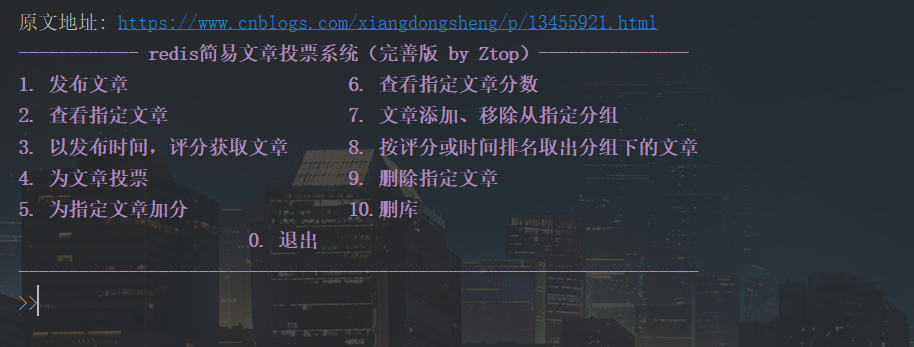
直接贴代码
# -*- coding: utf-8 -*-

# @Time : 2022/5/17 14:30

# @Author : Ztop

# @Email : top.zeker@gmail.com

# @Link: https://www.zeker.top

import redis

import time

try:

    ONE_WEEK_IN_SECONDS = 604800

    VOTE_SCORE = 240.00

    pool = redis.ConnectionPool(host="ip地址", port=6379, password='', db=0)

    redis = redis.Redis(connection_pool=pool)

except Exception as err:

    print(err)

# 发布文章

def post(articleData, redis=redis):

    articleId = str(redis.incr('article:'))  # 自增文章id

    # try:

    """保存文章"""

    article = 'article:' + articleId

    """hmset 新版本不维护"""

    # redis.hmset(article, articleData)  # redis.hmset('xx', {'k1':'v1', 'k2': 'v2'})

    for k, v in articleData.items():

        redis.hset(article, k, v)

    '#将文章与发布时间通过一个有序集合进行关联'

    post_time = time.time()

    # redis.zadd('time', dict(article=articleData['time']))           # r.zadd('xset1',{'m1':10,'m2':20})

    redis.zadd('time', {article: post_time})

    print("即将为自己投初始票!", articleData['poster'])

    '#为自己投初始票'

    vote(article, articleData['poster'], True)

    '修改文章评分'

    score(article, redis)

    return article

    # except Exception as err:

    #     print(err)

    #     return False

# 为文章投票

def vote(article, user, posting, redis=redis):

    global ONE_WEEK_IN_SECONDS

    '#投票,和用户绑定'

    voted = 'voted:' + article.partition(':')[-1]

    articleData = redis.hgetall(article)

    if not bool(articleData):

        print("%s该id无对应文章!!!%s\n" % (red, end))

        return False

    postTime = redis.zscore('time', article)

    # print(postTime)

    # 一周之前的文章不能投票

    tempTime = time.time() - ONE_WEEK_IN_SECONDS

    if postTime and postTime <= tempTime:

        print("%s一周之前的文章不能投票!!!%s\n" % (red, end))

        return False

    # 一个用户只能投一票,判断用户是否已经投过

    if (redis.sismember(voted, user)):

        print("%s你已投票过该文章!!!%s\n" % (red, end))

        return False

    # print(articleData)

    if posting:

        redis.sadd(voted, articleData[b'poster'])

    else:

        redis.sadd(voted, user)

        score(article)

        print("%s已成功为 %s 投票!%s\n" % (green, voted, end))

    redis.expire(voted, ONE_WEEK_IN_SECONDS)  # 设置超时时间

# 更新章的评分

def score(article, redis=redis):

    global VOTE_SCORE

    '#将文章与评分通过一个有序集合进行关联'

    redis.zincrby('score', VOTE_SCORE, article)

    redis.hincrby(article, 'votes', 1)

    aScore = redis.zscore('score', article)

    print("%s已成功为 %s 加分!当前分为 %s%s\n" % (green, article, int(aScore), end))

# 按特定的方式(发布时间,评分)降序取出文章

def get_articles(order, page=1, limit=25, redis=redis):

    start = (page - 1) * limit

    end = start + limit - 1

    articleIds = redis.zrange(order, start, end, desc=True)

    articleList = {};

    for id in articleIds:

        articleData = redis.hgetall(id)

        articleData['id'] = id

        articleList[id] = articleData

        return articleList

# 设置,移除文章分组

def add_remove_group(article, add=[], remove=[], redis=redis):

    if len(add) != 0:

        for group in add:

            groupKey = 'group:' + group

            redis.sadd(groupKey, article)

        print("%s已将该文章加入分组(%s)%s" % (green, add, end))

    else:

        for group in remove:

            groupKey = 'group:' + group

            redis.srem(groupKey, article)

        print("%s已将该文章移除分组(%s)%s" % (green, remove, end))

# 按评分或时间排名取出分组下的文章

def get_group_articles(group, order, page=25, limit=25, redis=redis):

    key = order + group

    if (not redis.exists(key)):

        redis.zinterstore(key, ['group:' + group, order], aggregate='max')

    redis.expire(key, 5)

    return get_articles(key, page, limit)

# 删除文章

def deleteArticle(article, redis=redis):

    id = article.partition(':')[-1]

    # 文章是hash

    if redis.exists(article):

        redis.delete(article)

    else:

        print("%s对应文章不存在%s" % (red, end))

    # 删除对应投票, voted 是 set 类型

    voted = "voted:" + id

    if redis.exists(voted):

        redis.delete(voted)

    else:

        print("%s对应投票不存在%s" % (red, end))

    # 删除对应时间,time 是 zset 类型

    redis.zrem("time", article)

    # 删除对应文章分数, zset

    redis.zrem("score", article)

    if redis.dbsize() == 1:

        redis.flushdb()

    print("%s已删除文章%s%s\n" % (green, article, end))

if __name__ == '__main__':

    global red, green, end

    red = '\033[1m\033[31m'

    green = '\033[1m\033[32m'

    end = "\033[0m"

    statement = "原文地址: https://www.cnblogs.com/xiangdongsheng/p/13455921.html"

    menu = """\033[1m\033[35m------------ redis简易文章投票系统(完善版 by Ztop)---------------

1. 发布文章                      6. 查看指定文章分数

2. 查看指定文章                  7. 文章添加、移除从指定分组

3. 以发布时间,评分获取文章      8. 按评分或时间排名取出分组下的文章

4. 为文章投票                    9. 删除指定文章

5. 为指定文章加分                10.删库

                       0. 退出

--------------------------------------------------------------------\033[0m"""

    print(statement)

    while True:

        print(menu)

        choice = int(input(">>"))

        if choice == 1:

            poster = input("发布人id(例001):")

            title = input("标题:")

            content = input("内容:")

            articleData = dict(poster="user:" + poster, title=title, content=content)

            print(articleData, type(articleData))

            # articleData 是字典

            article = post(articleData)

            if article:

                print('%s文章发布成功!%s\n' % (green, end))

            else:

                print('%s文章发布失败%s\n' % (red, end))

            # articleId = article.partition(':')[-1]

            # add_remove_group(article, add=['redis'])

        elif choice == 2:

            articleId = input("文章id(例1):")

            article = "article:" + articleId

            articleData = redis.hgetall(article)

            if not bool(articleData):

                print("%s该id无对应文章%s\n" % (red, end))

            else:

                print(articleData, "\n")

        elif choice == 3:  # 以发布时间,评分获取文章

            print("发布时间1 | 评分2")

            choice = int(input('>>'))

            if choice == 1:

                print(get_articles(order='time'))

            elif choice == 2:

                print(get_articles(order='score'))

        elif choice == 4:  # 为文章投票

            article = "article:" + input("文章id(例87):")

            userid = "user:" + input("你的id(例: 001):")

            vote(article, userid, False)

        elif choice == 5:  # 更新文章评分

            article = "article:" + input("文章id(例87):")

            score(article)

        elif choice == 6:  # 查看指定文章分数

            article = "article:" + input("文章id(例87):")

            aScore = redis.zscore('score', article)

            if score:

                print("%s文章 %s 的当前分数为 %s \n%s" % (green, article, int(aScore), end))

            else:

                print("%s无该文章信息,请检查是否正确!\n%s" % (red, end))

        elif choice == 7:  # 文章添加、移除从指定分组

            print("添加1 | 移除2")

            choice = int(input('>>'))

            if subChoice == 1:

                article = "article:" + input("文章id(例87):")

                group = input("分组名:")

                add_remove_group(article, add=[group])

            elif subChoice == 2:

                article = "article:" + input("文章id(例87):")

                group = input("分组名:")

                add_remove_group(article, remove=[group])

        elif choice == 8:  # 按评分或时间排名取出分组下的文章

            print("发布时间1 | 评分2")

            subChoice = int(input('>>'))

            group = input("分组名:")

            if subChoice == 1:

                get_group_articles(group=group, order='time')

            elif subChoice == 2:

                get_group_articles(group=group, order='score')

        elif choice == 9:

            article = "article:" + input("文章id(例87):")

            deleteArticle(article)

        elif choice == 10:

            print("%s是否进行删库跑路? 是y/否n%s"% (red, end), end=" ")

            subChoice = input().lower()

            if subChoice == 'y':

                redis.flushall()

                print("%s删库成功,祝君平安%s\n" % (green, end))

            else:

                print("%s已取消删库%s\n" % (green, end))

                continue

        else:

            exit()
云计算:基于Redis的文章投票系统(Python完整版)的更多相关文章
- 使用redis构建文章投票系统
首先,我得说明这篇博客基本上就是<<redis in action>>第一章内容的读书笔记. 需求 首先,说明一下,我们的需求 用户可以发表文章,发表时,自己就默认的给自己的文 ...
- 基于Redis的限流系统的设计
本文讲述基于Redis的限流系统的设计,主要会谈及限流系统中限流策略这个功能的设计:在实现方面,算法使用的是令牌桶算法来,访问Redis使用lua脚本. 1.概念 In computer netw ...
- 如何实现基于ssh框架的投票系统的的质量属性
如何实现基于ssh框架的投票系统的的质量属性: 项目 :网上考试系统 我做的是网上考试系统,因为标准化的考试越来越重要,而通过计算机进行标准化判卷,系统会自动判卷出成绩,组织考试的人不用组织人员打印试 ...
- Spring+Shiro搭建基于Redis的分布式权限系统(有实例)
摘要: 简单介绍使用Spring+Shiro搭建基于Redis的分布式权限系统. 这篇主要介绍Shiro如何与redis结合搭建分布式权限系统,至于如何使用和配置Shiro就不多说了.完整实例下载地址 ...
- 基于Opencv快速实现人脸识别(完整版)
无耻收藏网页链接: 基于OpenCV快速实现人脸识别:https://blog.csdn.net/beyond9305/article/details/92844258 基于Opencv快速实现人脸识 ...
- 使用Redis构建文章投票网站
涉及到的key: 1. article_time, 记录文章的发布时间,zset结构 2. article_score, 记录文章的得分, zset结构 得分 = 发布时间 + 投票用户数 X 432 ...
- Redis实现文章投票功能
Redis的具体操作这里就不说了,说一下需求和设计思路. 需求:自己实现一个文章投票的功能1.能够按照时间分页倒叙查看文章信息2.能够给文章投票,一个用户给一篇文章只能投票一次3.需要记录分值.每次投 ...
- 安装单机Hadoop系统(完整版)——Mac
在这个阴雨绵绵的下午,没有睡午觉的我带着一双惺忪的眼睛坐在了电脑前,泡上清茶,摸摸已是略显油光的额头(笑cry),,奋斗啊啊啊啊!!%>_<% 1.课程回顾. 1.1 Hadoop系统运行 ...
- php+redis 简易的实现文章发布系统(用户投票系统)
/** * @data 文章发布 * 文章详情散列表中递增ID,讲文章发布者ID写入投票用户集合中,设置投票时间为一周 * 讲文章内容写入文章散列中,讲文章写入文章评分有序集合和文章发布有序集合中 * ...
- Redis in Action 文章投票
原书用 Python 与 Redis 进行交互,我用 PHP 来实现. 环境:LNMP(CentOS 6.6 + Nginx 1.8.0 + MySQL 5.6.23 + PHP 5.6.9)+ Re ...
随机推荐
- 批量处理图片(resize;grayscale)以及重命名
批量处理图片(resize:grayscale)以及重命名 做深度学习,有大量图片需要做为训练集,为方便批量resize,rename,灰度化,制作python脚本. 先纪录一些函数: resize ...
- 算法金 | 详解过拟合和欠拟合!性感妩媚 VS 大杀四方
大侠幸会,在下全网同名「算法金」 0 基础转 AI 上岸,多个算法赛 Top 「日更万日,让更多人享受智能乐趣」 今天我们来战 过拟合和欠拟合,特别是令江湖侠客闻风丧胆的 过拟合,简称过儿, Emmm ...
- autojs拉人进群
/* 微信 version:8.0.1 语言:AutoJs [https://hyb1996.github.io/AutoJs-Docs/#/] @author:奔跑的前端猿 */ auto.wait ...
- bash: _get_comp_words_by_ref: command not found 报错
没有安装补全的包 错误信息 bash: _get_comp_words_by_ref: command not found 表明你的 shell 中可能存在补全功能的问题. 通常,这种错误发生在你的系 ...
- webpack externals忽略不打入的包
例如项目中使用从 CDN 引入 jQuery,而不是把它打包进来使用 import $ from 'jquery' webpack.config.js externals: { jquery: 'jQ ...
- 百度面试:如何用Redis实现限流?
高并发系统有三大特征:限流.缓存和熔断,所以限流已经成为当下系统开发中必备的功能了.那么,什么是限流?如何实现限流?使用 Redis 能不能实现限流?接下来我们一起来看. 1.什么是限流? 限流是指在 ...
- leetcode | 107. 二叉树的层序遍历 II | javascript实现 | c++实现
题目 给你二叉树的根节点 root ,返回其节点值 自底向上的层序遍历 . (即按从叶子节点所在层到根节点所在的层,逐层从左向右遍历) 思路 题目的要求相当于是求层序遍历数组的转置,我们只需利用js的 ...
- Linux特殊权限之SBIT
简单点,说话的方式简单点: 用于修饰目录 其他用户x位替换成t 作用:目录属主在该目录下创建的文件只有该属主能删除
- 一款.NET开源的i茅台自动预约小助手
前言 今天大姚给大家分享一款.NET开源.基于WPF实现的i茅台APP接口自动化每日自动预约(抢茅台)小助手:HyggeImaotai. 项目介绍 该项目通过接口自动化模拟i茅台APP实现每日自动预约 ...
- .NET 个人博客系统
前言 之前通过github学习了一个.net core的博客项目,最近也是完成了博客的备案,完善了一下.该项目是传统的MVC项目,可以进行主题的切换,采用Bootstrap进行前台页面的展示,有配套的 ...