
day02-Spring基本介绍02
Spring基本介绍02
5.简单模拟Spring基于XML配置的程序
5.1需求说明
自己写一个简单的Spring容器,通过读取beans.xml,获取第一个Javabean:Monster的对象,给该对象属性赋值,放入到容器中,并输出该对象信息
也就是说,不使用spring原生框架,我们自己简单模拟实现,目的是了解Spring容器的简单机制
5.2思路分析
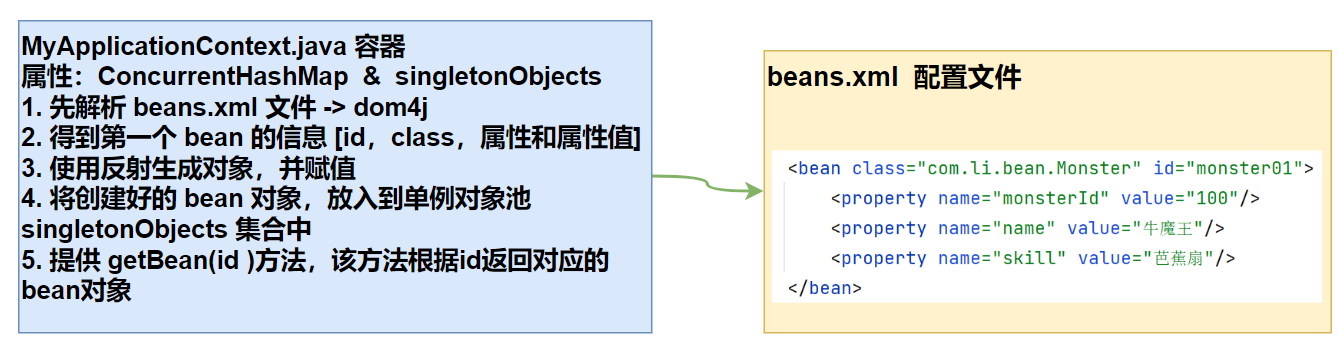
5.3代码实现
引入dom4j.jar包

MyApplicationContext.java:
package com.li.myapplicationcontext;

import com.li.bean.Monster;

import org.dom4j.Document;

import org.dom4j.Element;

import org.dom4j.io.SAXReader;

import java.io.File;

import java.lang.reflect.Method;

import java.util.List;

import java.util.concurrent.ConcurrentHashMap;

/**

 * @author 李

 * @version 1.0

 * 1. 这个程序用于实现Spring的一个简单容器机制

 * 2. 后面还会详细的实现

 * 3. 这里我们主要实现的是如何将beans.xml文件进行解析,并生成对象,放入容器中

 * 4. 然后提供一个getBean(id) 返回对应的对象

 */

public class MyApplicationContext {

    private ConcurrentHashMap<String, Object> singletonObjects

            = new ConcurrentHashMap<>();

    //构造器

    //接收一个容器的配置文件,如 beans.xml,默认路径在src下

    public MyApplicationContext(String iocBeanXMLFile) throws Exception {

        //1.得到配置文件的类加载路径

        String path = this.getClass().getResource("/").getPath();

        //2.创建 saxReader

        SAXReader saxReader = new SAXReader();

        //3.得到document对象

        Document document = saxReader.read(new File(path + iocBeanXMLFile));

        //4.得到rootDocument

        Element rootElement = document.getRootElement();

        //5.得到第一个bean-monster01

        Element bean = (Element) rootElement.elements("bean").get(0);

        //6.获取到第一个bean的相关属性(真实的情况下会把属性保存到beanDefinitionMap中)

        String id = bean.attributeValue("id");//bean的id

        String classFullPath = bean.attributeValue("class");//类的全路径

        List<Element> property = bean.elements("property");

        //原本是遍历,这里为了简化,就直接获取

        //property的value值

        Integer monsterId =

                Integer.parseInt(property.get(0).attributeValue("value"));

        String name = property.get(1).attributeValue("value");

        String skill = property.get(2).attributeValue("value");

        //7.反射创建对象

        Class<?> aClass = Class.forName(classFullPath);

        //这里的 o对象就是Monster对象

        Monster o = (Monster) aClass.newInstance();

        //给对象赋值-这里为了简化,直接赋值(真实情况下会使用反射)

        o.setMonsterId(monsterId);

        o.setName(name);

        o.setSkill(skill);

        //8.将创建好的对象放到singletonObjects单例对象池中

        singletonObjects.put(id, o);

    }

    public Object getBean(String id) {

        return singletonObjects.get(id);

    }

}
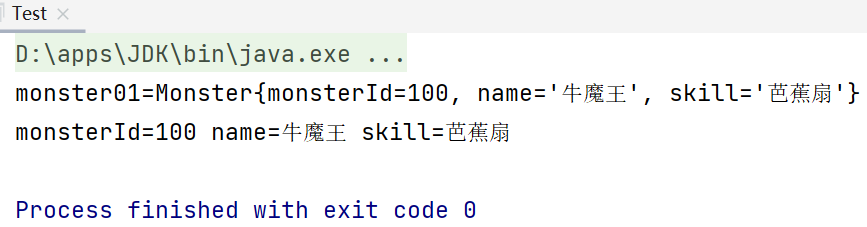
Test.java用于测试:
package com.li.myapplicationcontext;

import com.li.bean.Monster;

/**

 * @author 李

 * @version 1.0

 */

public class Test {

    public static void main(String[] args) throws Exception {

        MyApplicationContext ioc = new MyApplicationContext("beans.xml");

        Monster monster01 = (Monster) ioc.getBean("monster01");

        System.out.println("monster01=" + monster01);

        System.out.println("monsterId=" + monster01.getMonsterId() +

                " name=" + monster01.getName() +

                " skill=" + monster01.getSkill());

    }

}
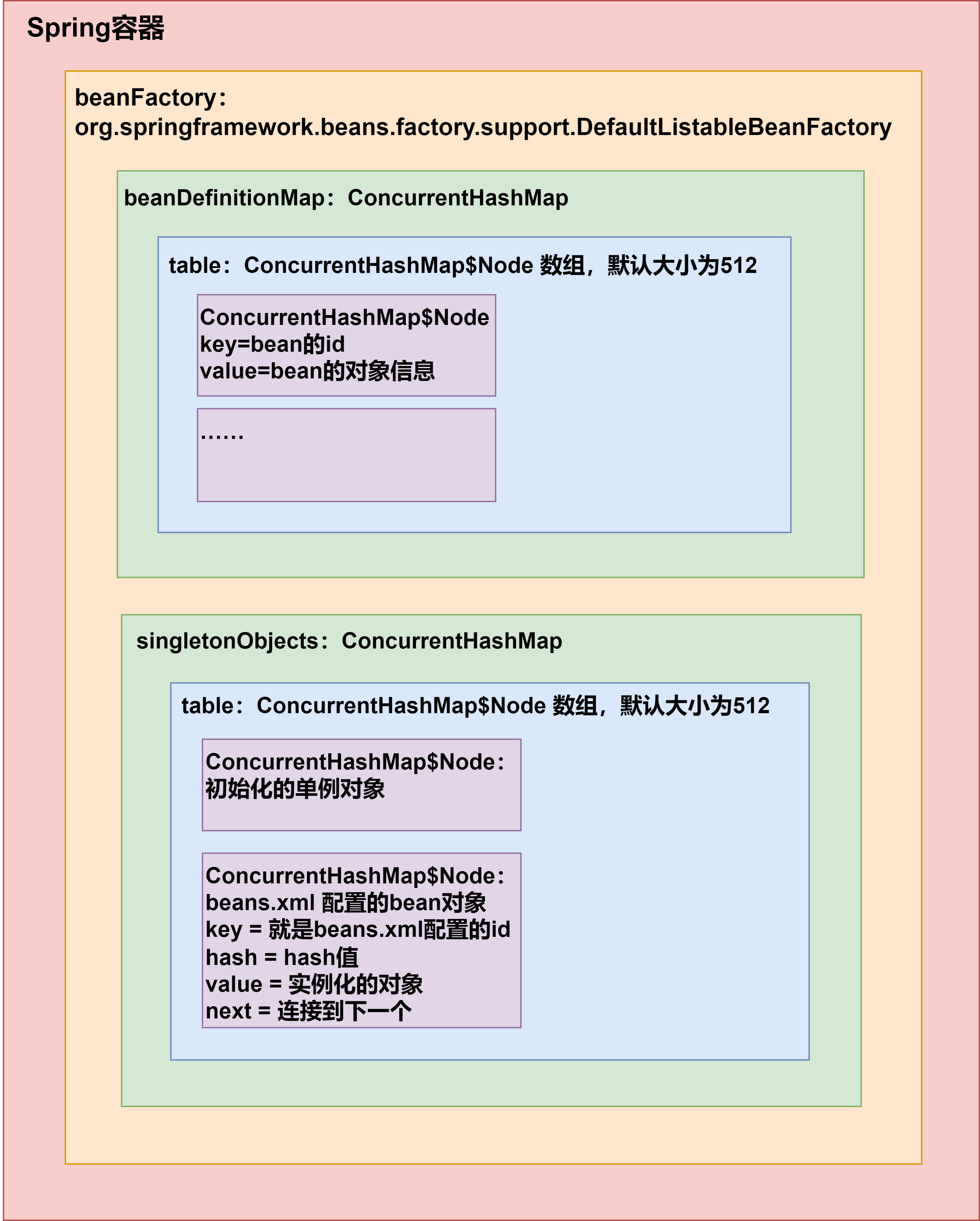
6.Spring原生容器底层结构梳理
我们之前在Spring基本介绍01--4.5Spring容器的结构/机制有一些基础的分析,现在来梳理一下:
7.练习
7.1关于bean的id
如下,在beans.xml中,我们注入2个Monster对象,但是不指定bean的id
<bean class="com.li.bean.Monster">

    <property name="monsterId" value="100"/>

    <property name="name" value="牛魔王"/>

    <property name="skill" value="芭蕉扇"/>

</bean>

<bean class="com.li.bean.Monster">

    <property name="monsterId" value="200"/>

    <property name="name" value="红孩儿"/>

    <property name="skill" value="三昧真火"/>

</bean>
问题1:运行会不会报错?
答:不会报错,可以正常运行。
问题2:如果不报错,你是否能找到分配的id并获取该对象?
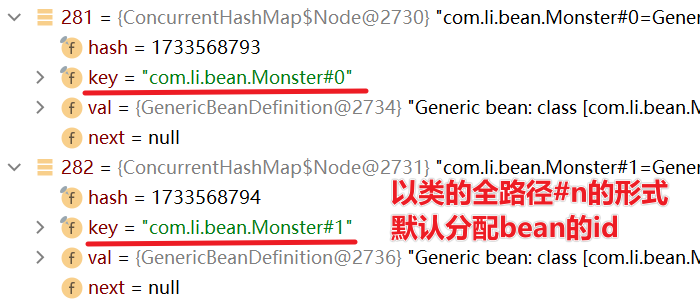
答:系统会默认分配id,分配id的规则是:全类名#0,全类名#1......全类名#n,这样的规则来分配id
我们可以通过debug的方式来查看:
beanFactory.beanDefinitionMap.table:
package com.li.homework;

import com.li.bean.Monster;

import org.springframework.context.ApplicationContext;

import org.springframework.context.support.ClassPathXmlApplicationContext;

import org.testng.annotations.Test;

/**

 * @author 李

 * @version 1.0

 */

public class Homework01 {

    @Test

    public void getMonster() {

        ApplicationContext ioc =

                new ClassPathXmlApplicationContext("beans.xml");

        Monster monster01 = ioc.getBean("com.li.bean.Monster#0", Monster.class);

        System.out.println("monster01=" + monster01);

        System.out.println("monsterId=" + monster01.getMonsterId());

        Monster monster02 = ioc.getBean("com.li.bean.Monster#1", Monster.class);

        System.out.println("monster02=" + monster02);

        System.out.println("monsterId=" + monster02.getMonsterId());

        System.out.println("ok~~");

    }

}
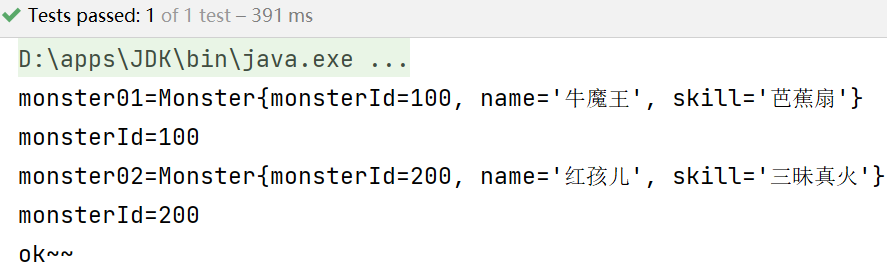
在实际开发中不会省略bean的id
7.2练习2
创建一个Car类(属性:id,name,price),具体要求如下:
- 创建ioc容器文件(即配置文件),并配置一个Car对象(bean)
- 通过java程序到ioc容器获取该bean对象,并输出
Car:
package com.li.bean;

/**

 * @author 李

 * @version 1.0

 */

public class Car {

    private Integer id;

    private String name;

    private Double price;

    public Car() {

    }

    public Car(Integer id, String name, Double price) {

        this.id = id;

        this.name = name;

        this.price = price;

    }

    public Integer getId() {

        return id;

    }

    public void setId(Integer id) {

        this.id = id;

    }

    public String getName() {

        return name;

    }

    public void setName(String name) {

        this.name = name;

    }

    public Double getPrice() {

        return price;

    }

    public void setPrice(Double price) {

        this.price = price;

    }

    @Override

    public String toString() {

        return "Car{" +

                "id=" + id +

                ", name='" + name + '\'' +

                ", price=" + price +

                '}';

    }

}
beans2.xml:
<?xml version="1.0" encoding="UTF-8"?>

<beans xmlns="http://www.springframework.org/schema/beans"

       xmlns:xsi="http://www.w3.org/2001/XMLSchema-instance"

       xsi:schemaLocation="http://www.springframework.org/schema/beans http://www.springframework.org/schema/beans/spring-beans.xsd">

    <bean class="com.li.bean.Car" id="car01">

        <property name="id" value="10001"/>

        <property name="name" value="宝马"/>

        <property name="price" value="1230000"/>

    </bean>

</beans>
Homework02:
package com.li.homework;

import com.li.bean.Car;

import org.springframework.context.ApplicationContext;

import org.springframework.context.support.ClassPathXmlApplicationContext;

import org.testng.annotations.Test;

/**

 * @author 李

 * @version 1.0

 */

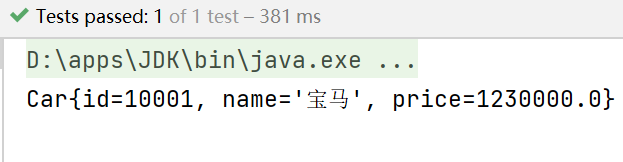
public class Homework02 {

    @Test

    public void getCart() {

        ApplicationContext ioc =

                new ClassPathXmlApplicationContext("beans2.xml");

        Car car = ioc.getBean("car01", Car.class);

        System.out.println(car);

    }

}
day02-Spring基本介绍02的更多相关文章
- 黑马_13 Spring Boot:01.spring boot 介绍&&02.spring boot 入门
13 Spring Boot: 01.spring boot 介绍&&02.spring boot 入门 04.spring boot 配置文件 SpringBoot基础 1.1 原有 ...
- Spring Security 介绍与Demo
一.Spring Security 介绍 Spring Security 是针对Spring项目的安全框架,也是Spring Boot底层安全模块的默认技术选型.我们仅需引入spring-boot-s ...
- Spring Batch 中文参考文档 V3.0.6 - 1 Spring Batch介绍
1 Spring Batch介绍 企业领域中许多应用系统需要采用批处理的方式在特定环境中运行业务操作任务.这种业务作业包括自动化,大量信息的复杂操作,他们不需要人工干预,并能高效运行.这些典型作业包括 ...
- [翻译]Spring框架参考文档(V4.3.3)-第二章Spring框架介绍 2.1 2.2 翻译--2.3待继续
英文链接:http://docs.spring.io/spring-framework/docs/current/spring-framework-reference/html/overview.ht ...
- Spring 的介绍和目标
1. Spring介绍 打开Spring 官网查看对 Spring 的介绍和目标 http://www.springsource.org/about We believe that: · J2EE s ...
- Spring的介绍与搭建
一.Spring的介绍 二.Spring的搭建 (1)导包 (2)创建一个对象 (3)书写配置注册对象到容器 (4)代码测试
- Spring Shell介绍
最近开发中在下遇到了spring-shell开发工具的项目,现在整理了相关文章,以供大家学习 本博客相关的文章均是在Spring Shell 1.2.0的基础上建立 Spring Shell介绍 ...
- Spring DevTools 介绍
Spring DevTools 介绍 Spring Boot包括一组额外的工具,可以使应用程序开发体验更加愉快. spring-boot-devtools模块可以包含在任何项目中,它可以节省大量的时间 ...
- 第1章—Spring之旅—Spring模块介绍
Spring模块介绍 Spring7大核心模块: 核心容器(Spring Core) 核心容器提供Spring框架的基本功能.Spring以bean的方式组织和管理Java应用中的各个组件及其关系.S ...
- 01.课程介绍 & 02.最小可行化产品MVP
01.课程介绍 02.最小可行化产品MVP 产品开发过程 最小化和可用之间找到一个平衡点
随机推荐
- Springboot创建项目、docker安装mysql及mybatis-plus调试
Springboot创建项目及测试 1️⃣ idea构建springboot项目 2️⃣ 测试类 hello 1. 代码 RestController是ResponseBody + controlle ...
- 教你用Java实现动态调色板
案例介绍 欢迎来到我的小院,我是霍大侠,恭喜你今天又要进步一点点了!我们来用Java编程实战案例,做一个动态调色板.案例界面会出现三个滑动组块以及对应的数值,通过移动滑块可以改变颜色区域的显示.通过实 ...
- Python学习之Pytorch
一.如何查看本机是否安装了Pytorch 在Python环境中查看是否安装了PyTorch可以通过几个简单的步骤来完成.这里有一些方法: 使用Python命令行: 打开你的命令行工具(比如Termin ...
- 机器学习基础01DAY
数据的特征抽取 现实世界中多数特征都不是连续变量,比如分类.文字.图像等,为了对非连续变量做特征表述,需要对这些特征做数学化表述,因此就用到了特征提取. sklearn.feature_extract ...
- 计网学习笔记四 Bridge && Switch
在前面的学习中,我们学习了MAC和LAN.在一个LAN里可以通信是很不错的,我们可以用一些东西让它变得更加不错!那就是我们接下来学习的网桥和交换机,其中包括了一点802.1D机制. Bridge 网桥 ...
- Educational Codeforces Round 136 (Rated for Div. 2) A-E
比赛链接 A 题解 知识点:模拟. 所有点都跑一遍即可. 另外可以不模拟, \(\geq 2*2\) 的情况都可以摆在 \((2,2)\) 这个点,其他摆在 \((1,1)\) . 时间复杂度 \(O ...
- NC13224 送外卖
题目链接 题目 题目描述 n 个小区排成一列,编号为从 0 到 n-1 .一开始,美团外卖员在第0号小区,目标为位于第 n-1 个小区的配送站. 给定两个整数数列 a[0]~a[n-1] 和 b[0] ...
- 微信小程序云开发项目-个人待办事项-02今日模块开发
上一篇: 微信小程序云开发项目-个人待办事项-01介绍 https://blog.csdn.net/IndexMan/article/details/124485626 模块开发步骤 本篇介绍今日模块 ...
- 《深入理解Java虚拟机》(六) 调优策略 -- 笔记
目录 一.操作文档类功能,大量大对象直接进入老年代 问题现象 解决方法 通过单一Java虚拟机管理大量的内存 同一台服务器上部署若干Java虚拟机 二.异步请求大量累积 三.排查问题 排查问题: 可能 ...
- 【Azure App Service】同一个App Service下创建多个测试站点的方式
问题描述 在一个App Service中,部署多个应用,每个应用相互独立,类似与IIS中在根目录下创建多个子应用的情况. 问题解答 可以的.通过App Service Configuration页面, ...