
【spring】ApplicationListener传递参数到页面(解决静态+动态资源路径+静态文件的缓存控制)
一.相对路径还是绝对路径的问题
前端页面加载资源或者请求的时候到底是使用相对路径还是绝对路径,想必大家都很清楚,用的是当然是相对路径,因为这样增加了项目的灵活性,不需要经常的改动。那既然是相对路径就需要在页面中小心使用了,一旦使用错误,讨厌的404就会来了,相当讨人厌。
二.相对路径的获取
相对路径的获取办法也有好多种
1. 一种是在jsp页面利用<%%>来拼凑路径,然后配置base路径,代码如下
<%

    String path = request.getContextPath();

    String basePath = request.getScheme()+"://"+request.getServeName()+":"+request.getServePort()+"/"+path+"/";

%>

<head>

<base href="<%basePath%>">

</head>
2.这里为大家介绍另一种办法就是通过spring的Applicationlistener接口来传递相对路径的参数,可以直接在页面中使用,同时可以通过此方法来解决静态文件更新后的缓存问题。框架【spring+springmvc】
步骤:
①.引入spring及其他的相关jar包,此处省略
②.配置相关配置文件
spring的配置文件ApplicationContext.xml
<beans xmlns:xsi="http://www.w3.org/2001/XMLSchema-instance"

       xmlns="http://www.springframework.org/schema/beans"

       xmlns:context="http://www.springframework.org/schema/context"

       xmlns:p="http://www.springframework.org/schema/p"

       xmlns:util="http://www.springframework.org/schema/util"

       xmlns:aop="http://www.springframework.org/schema/aop"

       xmlns:task="http://www.springframework.org/schema/task"

       xsi:schemaLocation="http://www.springframework.org/schema/beans http://www.springframework.org/schema/beans/spring-beans.xsd

            http://www.springframework.org/schema/context http://www.springframework.org/schema/context/spring-context.xsd

            http://www.springframework.org/schema/util http://www.springframework.org/schema/util/spring-util-4.1.xsd

            http://www.springframework.org/schema/aop http://www.springframework.org/schema/aop/spring-aop-4.1.xsd

            http://www.springframework.org/schema/task http://www.springframework.org/schema/task/spring-task-4.1.xsd">

    <context:component-scan base-package="com.raipeng.work.spring.model"/>

    <context:component-scan base-package="com.raipeng.work.spring.listener"/>

   <!--加载自定义的配置文件-->

    <context:property-placeholder location="classpath:config.properties"/>

</beans>
config.properties
git.version =1.0.0
web.xml
<!DOCTYPE web-app PUBLIC

 "-//Sun Microsystems, Inc.//DTD Web Application 2.3//EN"

 "http://java.sun.com/dtd/web-app_2_3.dtd" >

<web-app>

  <display-name>Archetype Created Web Application</display-name>

    <context-param>

        <param-name>contextConfigLocation</param-name>

        <param-value>classpath:applicationContext.xml</param-value>

    </context-param>

    <servlet>

        <servlet-name>test</servlet-name>

        <servlet-class>org.springframework.web.servlet.DispatcherServlet</servlet-class>

        <init-param>

            <param-name>contextConfigLocation</param-name>

            <param-value>classpath:test-servlet.xml</param-value>

        </init-param>

    </servlet>

    <servlet-mapping>

        <servlet-name>test</servlet-name>

        <url-pattern>/</url-pattern>

    </servlet-mapping>

    <listener>

      <listener-class>org.springframework.web.context.ContextLoaderListener</listener-class>

    </listener>

</web-app>
test.servlet.xml (spring mvc 配置文件)
<?xml version="1.0" encoding="UTF-8"?>

<beans xmlns="http://www.springframework.org/schema/beans"

       xmlns:xsi="http://www.w3.org/2001/XMLSchema-instance"

       xmlns:context="http://www.springframework.org/schema/context"

       xmlns:p="http://www.springframework.org/schema/p"

       xmlns:util="http://www.springframework.org/schema/util"

       xmlns:mvc="http://www.springframework.org/schema/mvc"

       xsi:schemaLocation="http://www.springframework.org/schema/beans http://www.springframework.org/schema/beans/spring-beans-4.1.xsd

        http://www.springframework.org/schema/context http://www.springframework.org/schema/context/spring-context-4.1.xsd

        http://www.springframework.org/schema/util http://www.springframework.org/schema/util/spring-util-4.1.xsd

        http://www.springframework.org/schema/mvc http://www.springframework.org/schema/mvc/spring-mvc-4.1.xsd">

    <context:component-scan base-package="com.xxx.work.spring.controller"/>

    <mvc:default-servlet-handler/>

   <mvc:annotation-driven/>

    <!--视图解析配置-->

    <bean class="org.springframework.web.servlet.view.InternalResourceViewResolver">

        <property name="prefix" value="/WEB-INF/jsp"></property>

        <property name="suffix" value=".jsp"></property>

    </bean>

</beans>
webConfig.java
package com.xxx.work.spring.model;

import org.springframework.beans.factory.annotation.Value;

import org.springframework.stereotype.Component;

/**

 * Created by 111 on 2015/11/24.

 */
//需要加入注解并扫描该文件,用于后期的自动注入

@Component

public class WebConfig {

    private String resource;//静态资源文件

    private String context;//WEB应用上下文

    private String revision;//CSS、js版本号,防止缓存的问题

    public String getResource() {

        return resource;

    }

    public void setResource(String resource) {

        this.resource = resource;

    }

    public String getContext() {

        return context;

    }

    public void setContext(String context) {

        this.context = context;

    }

    public String getRevision() {

        return revision;

    }


     //加载配置文件中的值

    @Value("${git.version}")

    public void setRevision(String revision) {

        this.revision = revision;

    }

}
WebApplicationContextListener.java
package com.xxx.work.spring.listener;

import com.raipeng.work.spring.model.WebConfig;

import org.apache.logging.log4j.LogManager;

import org.apache.logging.log4j.Logger;

import org.springframework.context.ApplicationContext;

import org.springframework.context.ApplicationListener;

import org.springframework.context.event.ContextRefreshedEvent;

import org.springframework.stereotype.Component;

import org.springframework.web.context.WebApplicationContext;

import javax.annotation.Resource;

import javax.servlet.ServletContext;

/**

 * Created by 111 on 2015/11/24.

 */

//需要注解,并扫描,在程序启动的时候就自动加载

@Component

public class WebApplicationListener implements ApplicationListener<ContextRefreshedEvent> {

    private Logger logger = LogManager.getLogger(WebApplicationListener.class);

    private WebConfig webConfig;

    //资源注入,也可以直接在变量上用autowired

    @Resource

    public void setWebConfig(WebConfig webConfig) {

        this.webConfig = webConfig;

    }

     //覆盖ApplicationListener的方法,重写自己的业务逻辑

    @Override

    public void onApplicationEvent(ContextRefreshedEvent event) {

        ApplicationContext applicationContext = event.getApplicationContext();

        WebApplicationContext webApplicationContext = (WebApplicationContext)applicationContext;

        ServletContext servletContext = webApplicationContext.getServletContext();

        webConfig.setContext(servletContext.getContextPath());

        webConfig.setResource(webConfig.getContext()+"/public");

        servletContext.setAttribute("context",webConfig.getContext());

        servletContext.setAttribute("resource",webConfig.getResource());

        servletContext.setAttribute("revision",webConfig.getRevision());

        logger.debug("context:{},resource:{},revision:{}",webConfig.getContext(),webConfig.getResource(),webConfig.getRevision());

    }

}
index.jsp
<%--

  Created by IntelliJ IDEA.

  User: 111

  Date: 2015/11/24

  Time: 15:51

  To change this template use File | Settings | File Templates.

--%>

<!--jsp有的版本默认el表达式关闭,如果遇到el表达式没解析,可以试试加上这个-->

<%@ page isELIgnored="false"%>

<%@ page contentType="text/html;charset=UTF-8" language="java" %>

<html>

<head>

    <link rel="stylesheet" href="${resource}/css/index.css?revision=${revision}">

    <title></title>

</head>

<body>

<img src="${resource}/image/image.png"/>

<a href="${context}/test/home">点击</a>

</body>

</html>
目录结构
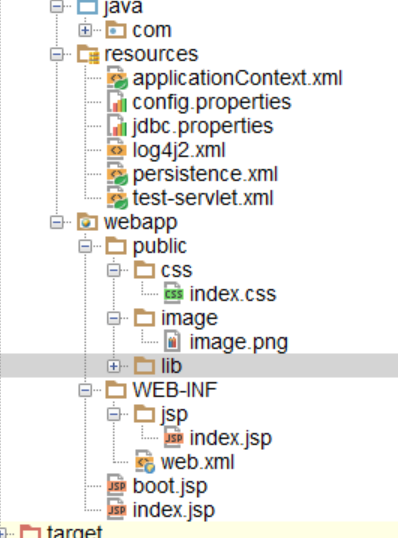 忽略boot.jsp
浏览器中的效果:
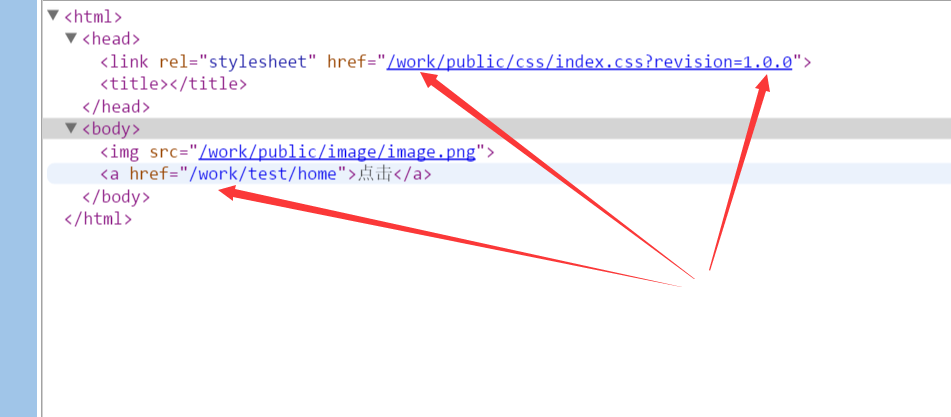
三.原理解析(暂略)
这里从spring的流程进行分析,
首先启动Tomcat服务器
——>根据web.xml中配置的contextLoaderListener初始化容器(ContextLoadListener.java 实现了ServletContextListener)
@Override

public void contextInitialized(ServletContextEvent event) {

    initWebApplicationContext(event.getServletContext());

}
——>实际上是在父类ContextLoader中初始化,在ContextLoader中为容器例示一个根webApplicationContext(Instantiate the root WebApplicationContext for this loader),方法为
if (this.context == null) {

      this.context = createWebApplicationContext(servletContext);

}
接着如果有父上下文加载父上下文(这里parentContext为空)
四.js页面的相对路径解决(使用tiles布局,定义在general.jsp的公共页面):
 <script type="text/javascript" src="${resource}/lib/amd/require.js"

            data-main="${resource}/lib/amd/config.js?revision=${revision}"

            data-app="${resource}/js/general.js,<tiles:insertAttribute name="app" ignore="true"/>"

            data-context="${context}" data-revision="${revision}" data-resource="${resource}" defer

            async="true"></script>
在config.js(amd的配置文件)中
(function () {

    var scripts = document.getElementsByTagName('script');

    for (var i = 0; i < scripts.length; i++) {

        if (scripts[i].getAttribute('data-main')) {

            var context = scripts[i].getAttribute('data-context');

            var revision = scripts[i].getAttribute('data-revision');

            var resource = scripts[i].getAttribute('data-resource');

            var config = {

                context: context,

                revision: revision,

                resource: resource

            };

            window.config = config;

            break;

        }

    }

})(window);
调用时使用:url:config.context 静态页面:config.resource+"/lib"+..
【spring】ApplicationListener传递参数到页面(解决静态+动态资源路径+静态文件的缓存控制)的更多相关文章
- 资料汇总--Ajax中Put和Delete请求传递参数无效的解决方法(Restful风格)【转】
开发环境:Tomcat9.0 在使用Ajax实现Restful的时候,有时候会出现无法Put.Delete请求参数无法传递到程序中的尴尬情况,此时我们可以有两种解决方案:1.使用地址重写的方法传递参数 ...
- Ajax中Put和Delete请求传递参数无效的解决方法(Restful风格)
本文装载自:http://blog.csdn.net/u012737182/article/details/52831008 感谢原文作者分享 开发环境:Tomcat9.0 在使用Ajax实现R ...
- Spring Mvc 传递参数要controller出现了400,日期参数全局处理,格式化yyyy-MM-dd 和yyyy-MM-dd HH:mm:ss
描述:今天做一个业务操作的时候,ajax传递参数要controller出现了400,前后台都没有报错. 问题:springmvc 在接收日期类型参数时,如不做特殊处理 会出现400语法格式错误 解决: ...
- router-link跳转页面传递参数及页面刷新方法
使用router-link传参: 第一种: 路径:http://localhost:8080/goodListP?id=2 跳转的页面获取参数: this.$route.query.id 第二种: 路 ...
- url传递参数带 + ,解决办法
修改客户端,将客户端带“+”的参数中的“+”全部替换为“%2B”,这样参数传到服务器端时就能得到“+”了.
- ajax 传递参数中文乱码解决办法
/********Start***********/ /*获取地址栏参数*/ function getRequest(){ var url = location.search; //获取url中&qu ...
- NodeJs学习记录(六)使用 res.locals 传递参数到页面
res.locals的生命周期是单次请求,有点类似于java servlet 里的 httpServletRequest.setAttribute("param1",1); 既然 ...
- vue - 路由传递参数
结构目录 1. 页面传值(不同之间的页面传值) 1.1 index.js配置 源码: // 引入vue框架 import Vue from 'vue' // 引入vue-router路由依赖 impo ...
- cli下的php(并传递参数)
传递参数有两种方式: 第一种使用文件操作,STDOUT作为标准输出,STDIN作为标准输入 使用fwrite($file,$string)作输出,使用fgets($file)作输入.这种应该算是继承自 ...
随机推荐
- C++一个类对象的大小计算
计算一个类对象的大小时的规律: 1.空类.单一继承的空类.多重继承的空类所占空间大小为:1(字节,下同): 2.一个类中,虚函数本身.成员函数(包括静态与非静态)和静态数据成员都是不占用类对象的存储空 ...
- linux su失败:无法设置用户ID:资源暂时不可用
环境 linux RHEP 7.+ su - user 提示 :无法设置用户ID,资源暂时不可用 检查 cat /etc/security/limits.d/90-nproc.conf * soft ...
- Anki 2.0 用户手册
Anki 2.0 用户手册 目录 Anki 2.0 用户手册 视频介绍 卡片和模板 Javascript Anki 2.0 用户手册 视频介绍 共享牌组和基础复习技巧 调换卡片正反面 卡片样式设计 亲 ...
- matplotlib函数理解
cumsum(),通常用于计算一个数组各行的累加值,函数用法是B = cumsum(A,dim),或B = cumsum(A). def cumsum(self, axis=0, *args, **k ...
- MDK5 设置project targents?如何实现的有知道的请共享一下谢谢感激不尽!!!!
就在刚刚阅读NRF51822相关的文档时遇到问题,官方给出了一份模板,我从我安装的example中找出了官方的列程,看到是soft config的方式配置的,于是根据列程的配置,自己新建了一个工程之后 ...
- Pytoch机器学习乱玩(一):数学建模作业,体重与心率
动物心率与体重的模型 动物消耗的能量p主要用于维持体温,而体内热量通过其表面积S散失,记动物体重为w,则\(P \propto S \propto w^{\alpha}\).又\(P\)正比于血流量\ ...
- P2733 家的范围 Home on the Range-弱DP
P2733 家的范围 Home on the Range 思路 :转化为以每个点为右下角的 最大正方形的边长 #include<bits/stdc++.h> using namespace ...
- python 日常错误整理
1.NameError: name 'raw_input' is not defined 问题原因:python 3 中raw_input已经被input 替代
- php 记录日志时 基础的日志格式
2019-02-19 11:29:56 /api/shop/shopManagements?shopId=undefined REQUEST:HTTP://mutest.drcloud.cn/mo ...
- PHP生成指定随机字符串的简单实现方法
/** * @param string $type * @param $length * @return string */ function randomString($type="num ...