
【spring】ApplicationListener传递参数到页面(解决静态+动态资源路径+静态文件的缓存控制)
一.相对路径还是绝对路径的问题
前端页面加载资源或者请求的时候到底是使用相对路径还是绝对路径,想必大家都很清楚,用的是当然是相对路径,因为这样增加了项目的灵活性,不需要经常的改动。那既然是相对路径就需要在页面中小心使用了,一旦使用错误,讨厌的404就会来了,相当讨人厌。
二.相对路径的获取
相对路径的获取办法也有好多种
1. 一种是在jsp页面利用<%%>来拼凑路径,然后配置base路径,代码如下
<%

    String path = request.getContextPath();

    String basePath = request.getScheme()+"://"+request.getServeName()+":"+request.getServePort()+"/"+path+"/";

%>

<head>

<base href="<%basePath%>">

</head>
2.这里为大家介绍另一种办法就是通过spring的Applicationlistener接口来传递相对路径的参数,可以直接在页面中使用,同时可以通过此方法来解决静态文件更新后的缓存问题。框架【spring+springmvc】
步骤:
①.引入spring及其他的相关jar包,此处省略
②.配置相关配置文件
spring的配置文件ApplicationContext.xml
<beans xmlns:xsi="http://www.w3.org/2001/XMLSchema-instance"

       xmlns="http://www.springframework.org/schema/beans"

       xmlns:context="http://www.springframework.org/schema/context"

       xmlns:p="http://www.springframework.org/schema/p"

       xmlns:util="http://www.springframework.org/schema/util"

       xmlns:aop="http://www.springframework.org/schema/aop"

       xmlns:task="http://www.springframework.org/schema/task"

       xsi:schemaLocation="http://www.springframework.org/schema/beans http://www.springframework.org/schema/beans/spring-beans.xsd

            http://www.springframework.org/schema/context http://www.springframework.org/schema/context/spring-context.xsd

            http://www.springframework.org/schema/util http://www.springframework.org/schema/util/spring-util-4.1.xsd

            http://www.springframework.org/schema/aop http://www.springframework.org/schema/aop/spring-aop-4.1.xsd

            http://www.springframework.org/schema/task http://www.springframework.org/schema/task/spring-task-4.1.xsd">

    <context:component-scan base-package="com.raipeng.work.spring.model"/>

    <context:component-scan base-package="com.raipeng.work.spring.listener"/>

   <!--加载自定义的配置文件-->

    <context:property-placeholder location="classpath:config.properties"/>

</beans>
config.properties
git.version =1.0.0
web.xml
<!DOCTYPE web-app PUBLIC

 "-//Sun Microsystems, Inc.//DTD Web Application 2.3//EN"

 "http://java.sun.com/dtd/web-app_2_3.dtd" >

<web-app>

  <display-name>Archetype Created Web Application</display-name>

    <context-param>

        <param-name>contextConfigLocation</param-name>

        <param-value>classpath:applicationContext.xml</param-value>

    </context-param>

    <servlet>

        <servlet-name>test</servlet-name>

        <servlet-class>org.springframework.web.servlet.DispatcherServlet</servlet-class>

        <init-param>

            <param-name>contextConfigLocation</param-name>

            <param-value>classpath:test-servlet.xml</param-value>

        </init-param>

    </servlet>

    <servlet-mapping>

        <servlet-name>test</servlet-name>

        <url-pattern>/</url-pattern>

    </servlet-mapping>

    <listener>

      <listener-class>org.springframework.web.context.ContextLoaderListener</listener-class>

    </listener>

</web-app>
test.servlet.xml (spring mvc 配置文件)
<?xml version="1.0" encoding="UTF-8"?>

<beans xmlns="http://www.springframework.org/schema/beans"

       xmlns:xsi="http://www.w3.org/2001/XMLSchema-instance"

       xmlns:context="http://www.springframework.org/schema/context"

       xmlns:p="http://www.springframework.org/schema/p"

       xmlns:util="http://www.springframework.org/schema/util"

       xmlns:mvc="http://www.springframework.org/schema/mvc"

       xsi:schemaLocation="http://www.springframework.org/schema/beans http://www.springframework.org/schema/beans/spring-beans-4.1.xsd

        http://www.springframework.org/schema/context http://www.springframework.org/schema/context/spring-context-4.1.xsd

        http://www.springframework.org/schema/util http://www.springframework.org/schema/util/spring-util-4.1.xsd

        http://www.springframework.org/schema/mvc http://www.springframework.org/schema/mvc/spring-mvc-4.1.xsd">

    <context:component-scan base-package="com.xxx.work.spring.controller"/>

    <mvc:default-servlet-handler/>

   <mvc:annotation-driven/>

    <!--视图解析配置-->

    <bean class="org.springframework.web.servlet.view.InternalResourceViewResolver">

        <property name="prefix" value="/WEB-INF/jsp"></property>

        <property name="suffix" value=".jsp"></property>

    </bean>

</beans>
webConfig.java
package com.xxx.work.spring.model;

import org.springframework.beans.factory.annotation.Value;

import org.springframework.stereotype.Component;

/**

 * Created by 111 on 2015/11/24.

 */
//需要加入注解并扫描该文件,用于后期的自动注入

@Component

public class WebConfig {

    private String resource;//静态资源文件

    private String context;//WEB应用上下文

    private String revision;//CSS、js版本号,防止缓存的问题

    public String getResource() {

        return resource;

    }

    public void setResource(String resource) {

        this.resource = resource;

    }

    public String getContext() {

        return context;

    }

    public void setContext(String context) {

        this.context = context;

    }

    public String getRevision() {

        return revision;

    }


     //加载配置文件中的值

    @Value("${git.version}")

    public void setRevision(String revision) {

        this.revision = revision;

    }

}
WebApplicationContextListener.java
package com.xxx.work.spring.listener;

import com.raipeng.work.spring.model.WebConfig;

import org.apache.logging.log4j.LogManager;

import org.apache.logging.log4j.Logger;

import org.springframework.context.ApplicationContext;

import org.springframework.context.ApplicationListener;

import org.springframework.context.event.ContextRefreshedEvent;

import org.springframework.stereotype.Component;

import org.springframework.web.context.WebApplicationContext;

import javax.annotation.Resource;

import javax.servlet.ServletContext;

/**

 * Created by 111 on 2015/11/24.

 */

//需要注解,并扫描,在程序启动的时候就自动加载

@Component

public class WebApplicationListener implements ApplicationListener<ContextRefreshedEvent> {

    private Logger logger = LogManager.getLogger(WebApplicationListener.class);

    private WebConfig webConfig;

    //资源注入,也可以直接在变量上用autowired

    @Resource

    public void setWebConfig(WebConfig webConfig) {

        this.webConfig = webConfig;

    }

     //覆盖ApplicationListener的方法,重写自己的业务逻辑

    @Override

    public void onApplicationEvent(ContextRefreshedEvent event) {

        ApplicationContext applicationContext = event.getApplicationContext();

        WebApplicationContext webApplicationContext = (WebApplicationContext)applicationContext;

        ServletContext servletContext = webApplicationContext.getServletContext();

        webConfig.setContext(servletContext.getContextPath());

        webConfig.setResource(webConfig.getContext()+"/public");

        servletContext.setAttribute("context",webConfig.getContext());

        servletContext.setAttribute("resource",webConfig.getResource());

        servletContext.setAttribute("revision",webConfig.getRevision());

        logger.debug("context:{},resource:{},revision:{}",webConfig.getContext(),webConfig.getResource(),webConfig.getRevision());

    }

}
index.jsp
<%--

  Created by IntelliJ IDEA.

  User: 111

  Date: 2015/11/24

  Time: 15:51

  To change this template use File | Settings | File Templates.

--%>

<!--jsp有的版本默认el表达式关闭,如果遇到el表达式没解析,可以试试加上这个-->

<%@ page isELIgnored="false"%>

<%@ page contentType="text/html;charset=UTF-8" language="java" %>

<html>

<head>

    <link rel="stylesheet" href="${resource}/css/index.css?revision=${revision}">

    <title></title>

</head>

<body>

<img src="${resource}/image/image.png"/>

<a href="${context}/test/home">点击</a>

</body>

</html>
目录结构
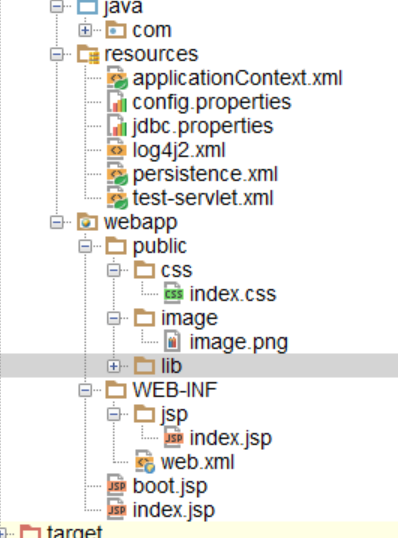 忽略boot.jsp
浏览器中的效果:
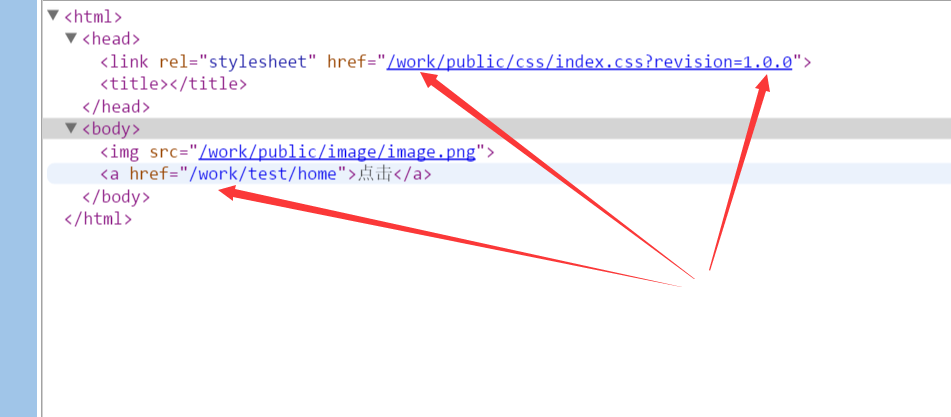
三.原理解析(暂略)
这里从spring的流程进行分析,
首先启动Tomcat服务器
——>根据web.xml中配置的contextLoaderListener初始化容器(ContextLoadListener.java 实现了ServletContextListener)
@Override

public void contextInitialized(ServletContextEvent event) {

    initWebApplicationContext(event.getServletContext());

}
——>实际上是在父类ContextLoader中初始化,在ContextLoader中为容器例示一个根webApplicationContext(Instantiate the root WebApplicationContext for this loader),方法为
if (this.context == null) {

      this.context = createWebApplicationContext(servletContext);

}
接着如果有父上下文加载父上下文(这里parentContext为空)
四.js页面的相对路径解决(使用tiles布局,定义在general.jsp的公共页面):
 <script type="text/javascript" src="${resource}/lib/amd/require.js"

            data-main="${resource}/lib/amd/config.js?revision=${revision}"

            data-app="${resource}/js/general.js,<tiles:insertAttribute name="app" ignore="true"/>"

            data-context="${context}" data-revision="${revision}" data-resource="${resource}" defer

            async="true"></script>
在config.js(amd的配置文件)中
(function () {

    var scripts = document.getElementsByTagName('script');

    for (var i = 0; i < scripts.length; i++) {

        if (scripts[i].getAttribute('data-main')) {

            var context = scripts[i].getAttribute('data-context');

            var revision = scripts[i].getAttribute('data-revision');

            var resource = scripts[i].getAttribute('data-resource');

            var config = {

                context: context,

                revision: revision,

                resource: resource

            };

            window.config = config;

            break;

        }

    }

})(window);
调用时使用:url:config.context 静态页面:config.resource+"/lib"+..
【spring】ApplicationListener传递参数到页面(解决静态+动态资源路径+静态文件的缓存控制)的更多相关文章
- 资料汇总--Ajax中Put和Delete请求传递参数无效的解决方法(Restful风格)【转】
开发环境:Tomcat9.0 在使用Ajax实现Restful的时候,有时候会出现无法Put.Delete请求参数无法传递到程序中的尴尬情况,此时我们可以有两种解决方案:1.使用地址重写的方法传递参数 ...
- Ajax中Put和Delete请求传递参数无效的解决方法(Restful风格)
本文装载自:http://blog.csdn.net/u012737182/article/details/52831008 感谢原文作者分享 开发环境:Tomcat9.0 在使用Ajax实现R ...
- Spring Mvc 传递参数要controller出现了400,日期参数全局处理,格式化yyyy-MM-dd 和yyyy-MM-dd HH:mm:ss
描述:今天做一个业务操作的时候,ajax传递参数要controller出现了400,前后台都没有报错. 问题:springmvc 在接收日期类型参数时,如不做特殊处理 会出现400语法格式错误 解决: ...
- router-link跳转页面传递参数及页面刷新方法
使用router-link传参: 第一种: 路径:http://localhost:8080/goodListP?id=2 跳转的页面获取参数: this.$route.query.id 第二种: 路 ...
- url传递参数带 + ,解决办法
修改客户端,将客户端带“+”的参数中的“+”全部替换为“%2B”,这样参数传到服务器端时就能得到“+”了.
- ajax 传递参数中文乱码解决办法
/********Start***********/ /*获取地址栏参数*/ function getRequest(){ var url = location.search; //获取url中&qu ...
- NodeJs学习记录(六)使用 res.locals 传递参数到页面
res.locals的生命周期是单次请求,有点类似于java servlet 里的 httpServletRequest.setAttribute("param1",1); 既然 ...
- vue - 路由传递参数
结构目录 1. 页面传值(不同之间的页面传值) 1.1 index.js配置 源码: // 引入vue框架 import Vue from 'vue' // 引入vue-router路由依赖 impo ...
- cli下的php(并传递参数)
传递参数有两种方式: 第一种使用文件操作,STDOUT作为标准输出,STDIN作为标准输入 使用fwrite($file,$string)作输出,使用fgets($file)作输入.这种应该算是继承自 ...
随机推荐
- SpringMVC源码分析-400异常处理流程及解决方法
本文涉及SpringMVC异常处理体系源码分析,SpringMVC异常处理相关类的设计模式,实际工作中异常处理的实践. 问题场景 假设我们的SpringMVC应用中有如下控制器: 代码示例-1 @Re ...
- [转] JavaScript中in操作符(for..in)、Object.keys()和Object.getOwnPropertyNames()的区别
ECMAScript将对象的属性分为两种:数据属性和访问器属性.每一种属性内部都有一些特性,这里我们只关注对象属性的[[Enumerable]]特征,它表示是否通过 for-in 循环返回属性,也可以 ...
- MVC View中获取action、controller、area名称、参数
获取控制器名称: ViewContext.RouteData.Values["controller"].ToString(); 获取Action名称: ViewContext.Ro ...
- 通过View.post()获取View的宽高
在Android里,获取View宽高的时机是个老生常谈的话题了.众所周知,在Oncreate里直接调用View.getWidth或者View.getMeasuredWidth返回都是0.所以获取宽高时 ...
- C++ 面向对象的三大特性和五个原则
1.三大特性: 封装:就是把客观事物封装成抽象的类,并且类可以把自己的数据和方法只让可信的类或者对象操作,对不可信的进行信息隐藏.一个类就是一个封装了数据以及操作这些数据的代码的逻辑实体.在一个对象内 ...
- 1.用代码演示String类中的以下方法的用法 (2018.08.09作业)
public class Test_001 { public static void main(String[] args) { String a = "德玛西亚!"; Strin ...
- unity skybox天空盒分享无需下载
大概有几十种还是100种,具体忘了 反正很多就是了(哈哈哈哈哈!!!!!!!!!!!!) 老铁们, 多谢支持,谢谢大家. 根据需要使用,下面会分享出下载链接: 链接:https://pan.baidu ...
- 分布式缓存技术之Redis_04Redis的应用实战
目录 1 Redis Java客户端的使用 Jedis 单点连接 Jedis sentinel连接哨兵集群 Jedis sentinel源码分析 Jedis Cluster分片环境连接 Jedis C ...
- Java类是如何默认继承Object的
前言 学过Java的人都知道,Object是所有类的父类.但是你有没有这样的疑问,我并没有写extends Object,它是怎么默认继承Object的呢? 那么今天我们就来看看像Java这种依赖于虚 ...
- dotnetcore Http服务器研究(一)
自从dotnet core 诞生以来,发展非常强势.我们总有些需要写一个独立的http服务器的需求,我想是时候忘记httplistener 了. dotnet framework 时代建一个小的htt ...