
Automated EBS Snapshots using AWS Lambda & CloudWatch
Overview
In this post, we'll cover how to automate EBS snapshots for your AWS infrastructure using Lambda and CloudWatch. We'll build a solution that creates nightly snapshots for volumes attached to EC2 instances and deletes any snapshots older than 10 days. This will work across all AWS regions.
Lambda offers the ability to execute "serverless" code which means that AWS will provide the run-time platform for us. It currently supports the following languages: Node.js, Java, C# and Python. We'll be using Python to write our functions in this article.
We'll use a CloudWatch rule to trigger the execution of the Lambda functions based on a cron expression.
Create IAM Role
Before we write any code, we need to create an IAM role that has permissions to do the following:
- Retrieve information about volumes and snapshots from EC2
- Take new snapshots using the CreateSnapshot API call
- Delete snapshots using the DeleteSnapshot API call
- Write logs to CloudWatch for debugging
In the AWS management console, we'll go to IAM > Roles > Create New Role. We name our role "ebs-snapshots-role".
For Role Type, we select AWS Lambda. This will grant the Lambda service permissions to assume the role.
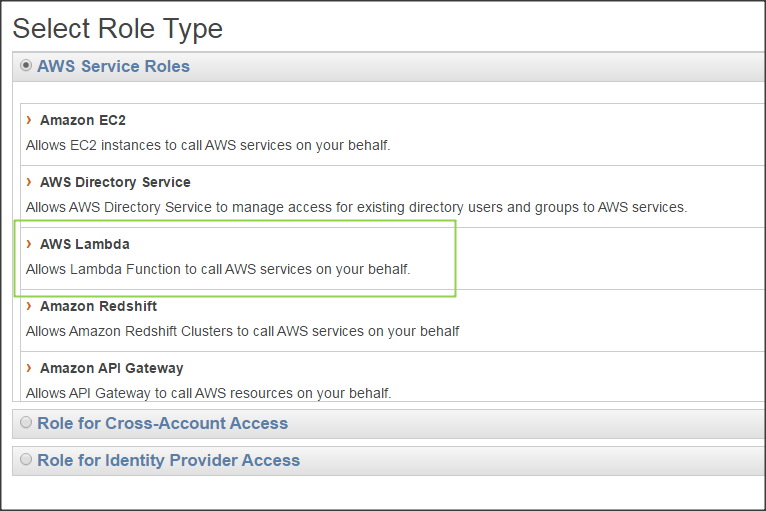
On the next page, we won't select any of the managed policies so move on to Next Step.
Go back to the Roles page and select the newly created role. Under the Permissions tab, you'll find a link to create a custom inline policy.
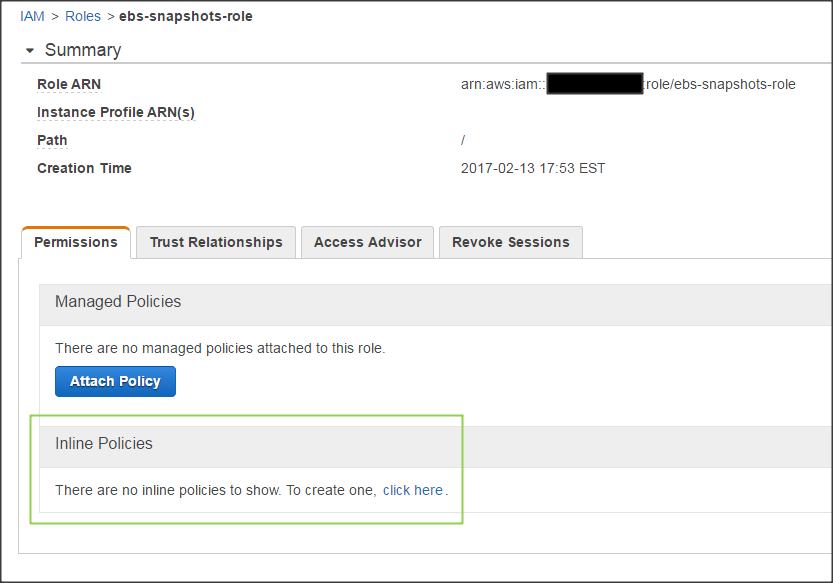
Paste the JSON below for the policy:
{

    "Version": "2012-10-17",

    "Statement": [

        {

            "Effect": "Allow",

            "Action": [

                "logs:*"

            ],

            "Resource": "arn:aws:logs:*:*:*"

        },

        {

            "Effect": "Allow",

            "Action": "ec2:Describe*",

            "Resource": "*"

        },

        {

            "Effect": "Allow",

            "Action": [

                "ec2:CreateSnapshot",

                "ec2:DeleteSnapshot",

                "ec2:CreateTags",

                "ec2:ModifySnapshotAttribute",

                "ec2:ResetSnapshotAttribute"

            ],

            "Resource": [

                "*"

            ]

        }

    ]

}
Create Snapshots Function in Lambda
Now, we can move on to writing the code to create snapshots. In the Lambda console, go to Functions > Create a Lambda Function -> Configure function and use the following parameters:
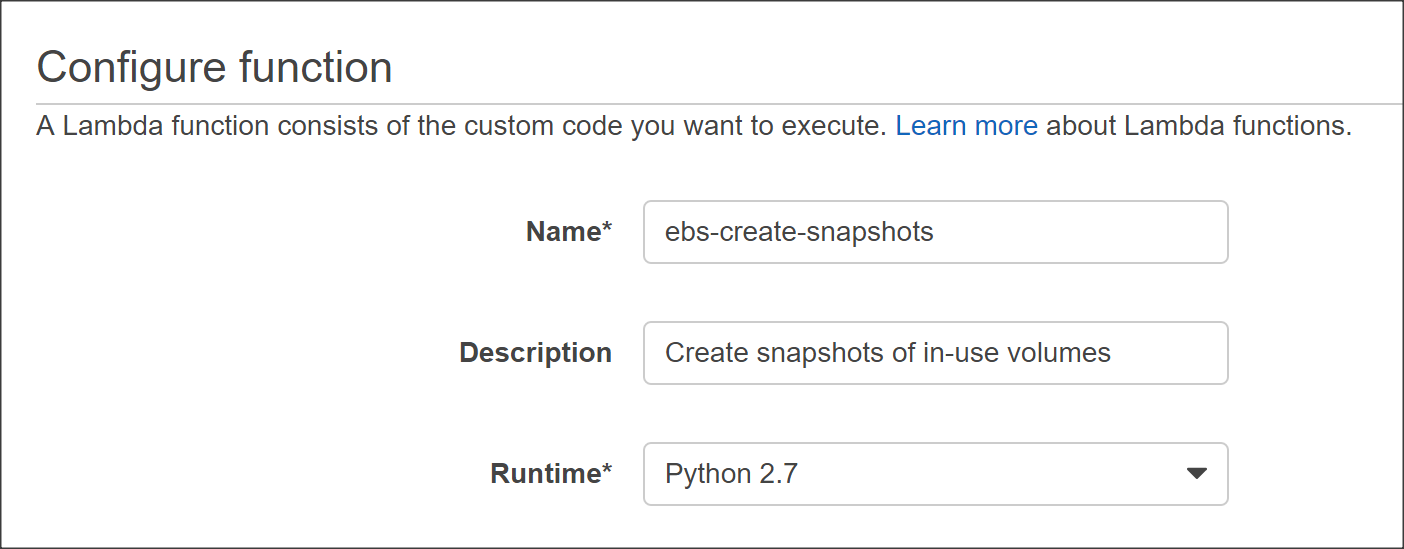
In our code, we'll be using Boto library which is the AWS SDK for Python.
Paste the code below into the code pane:
# Backup all in-use volumes in all regions

import boto3

def lambda_handler(event, context):

    ec2 = boto3.client('ec2')

    # Get list of regions

    regions = ec2.describe_regions().get('Regions',[] )

    # Iterate over regions

    for region in regions:

        print "Checking region %s " % region['RegionName']

        reg=region['RegionName']

        # Connect to region

        ec2 = boto3.client('ec2', region_name=reg)

        # Get all in-use volumes in all regions

        result = ec2.describe_volumes( Filters=[{'Name': 'status', 'Values': ['in-use']}])

        for volume in result['Volumes']:

            print "Backing up %s in %s" % (volume['VolumeId'], volume['AvailabilityZone'])

            # Create snapshot

            result = ec2.create_snapshot(VolumeId=volume['VolumeId'],Description='Created by Lambda backup function ebs-snapshots')

            # Get snapshot resource

            ec2resource = boto3.resource('ec2', region_name=reg)

            snapshot = ec2resource.Snapshot(result['SnapshotId'])

            volumename = 'N/A'

            # Find name tag for volume if it exists

            if 'Tags' in volume:

                for tags in volume['Tags']:

                    if tags["Key"] == 'Name':

                        volumename = tags["Value"]

            # Add volume name to snapshot for easier identification

            snapshot.create_tags(Tags=[{'Key': 'Name','Value': volumename}])
The code will create snapshots for any in-use volumes across all regions. It will also add the name of the volume to the snapshot name tag so it's easier for us to identify whenever we view the list of snapshots.
Next, select the role we created in the Lamba function handler and role section.
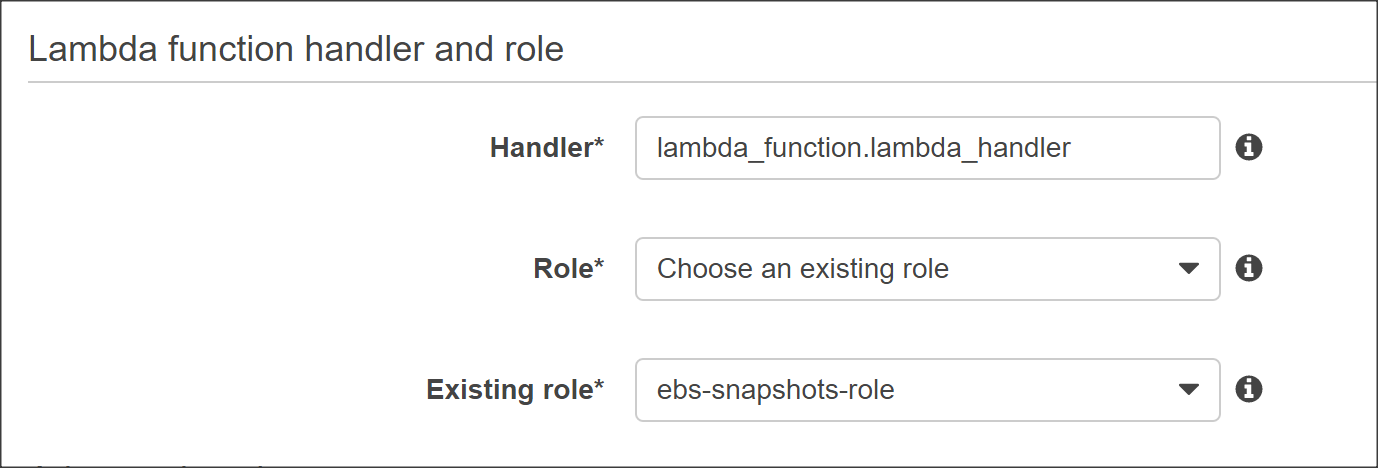
The default timeout for Lambda functions is 3 seconds, which is too short for our task. Let's increase the timeout to 1 minute under Advanced Settings. This will give our function enough time to kick off the snapshot process for each volume.
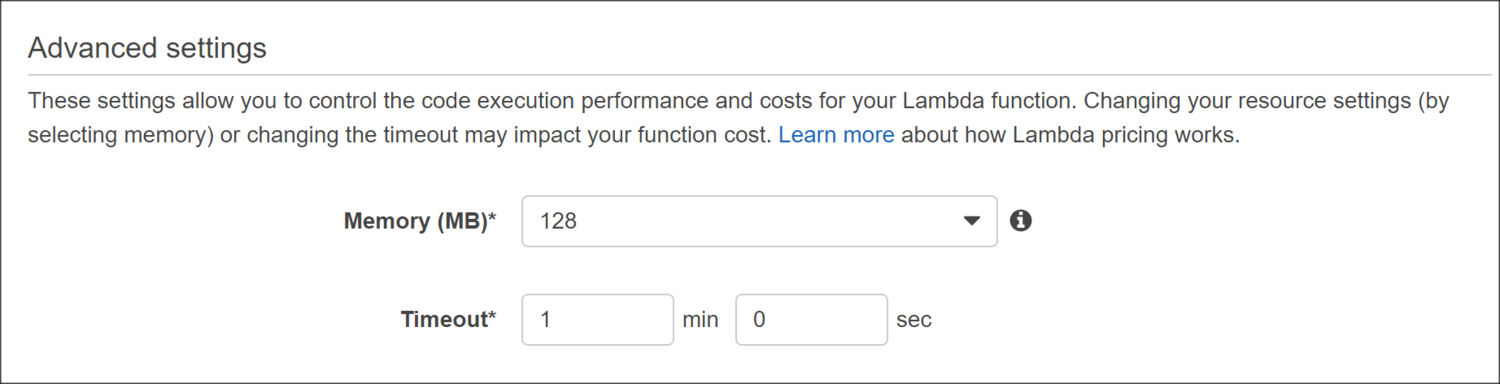
Click Next then Create Function in the review page to finish.
Schedule Trigger as CloudWatch Rule
Navigate to the Triggers tab and click on Add Trigger which brings up the following window:
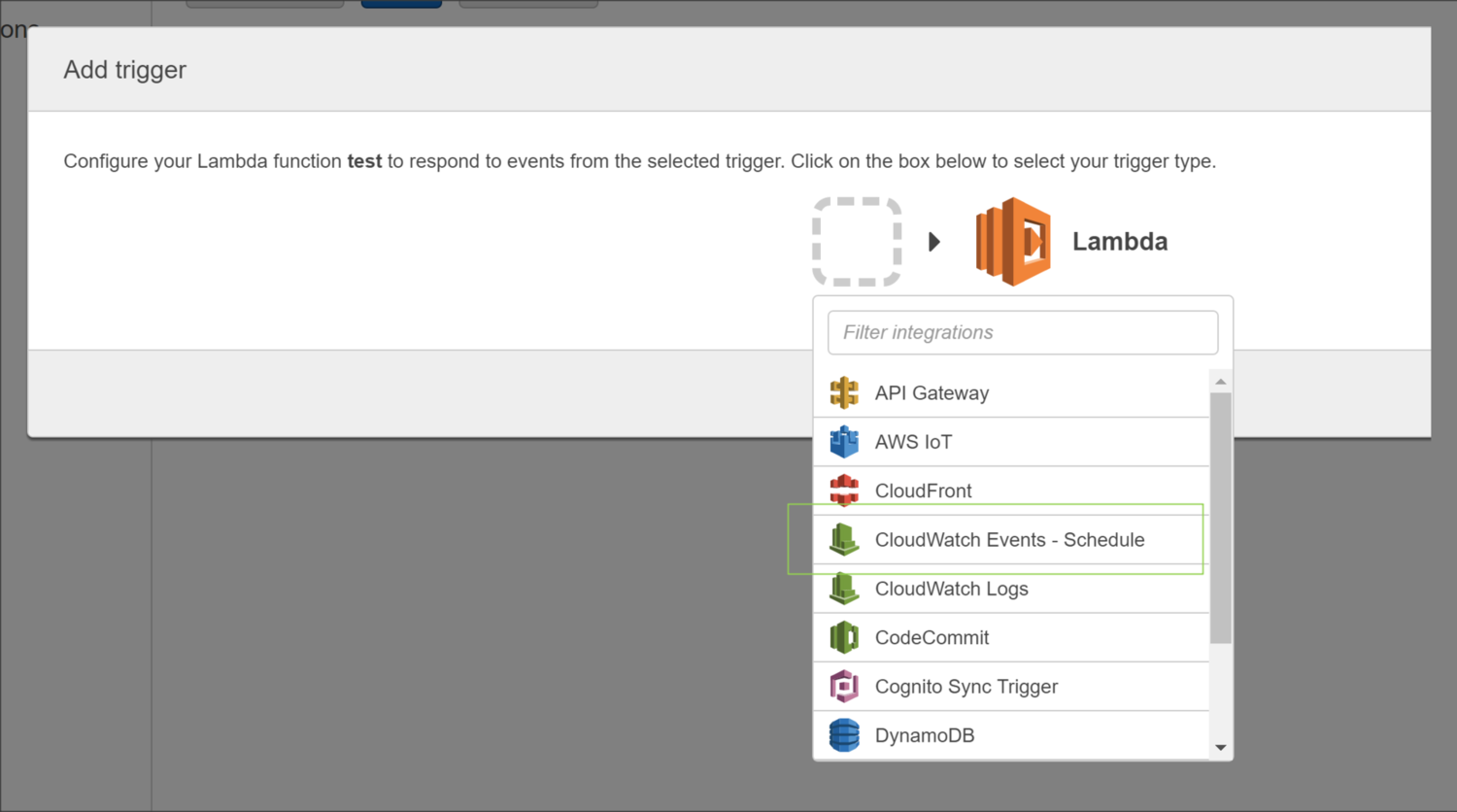
Selecting CloudWatch Event - Schedule from the dropdown list allows us to configure a rule based on a schedule. It's important to note that the times listed in the cron entry are in UTC.
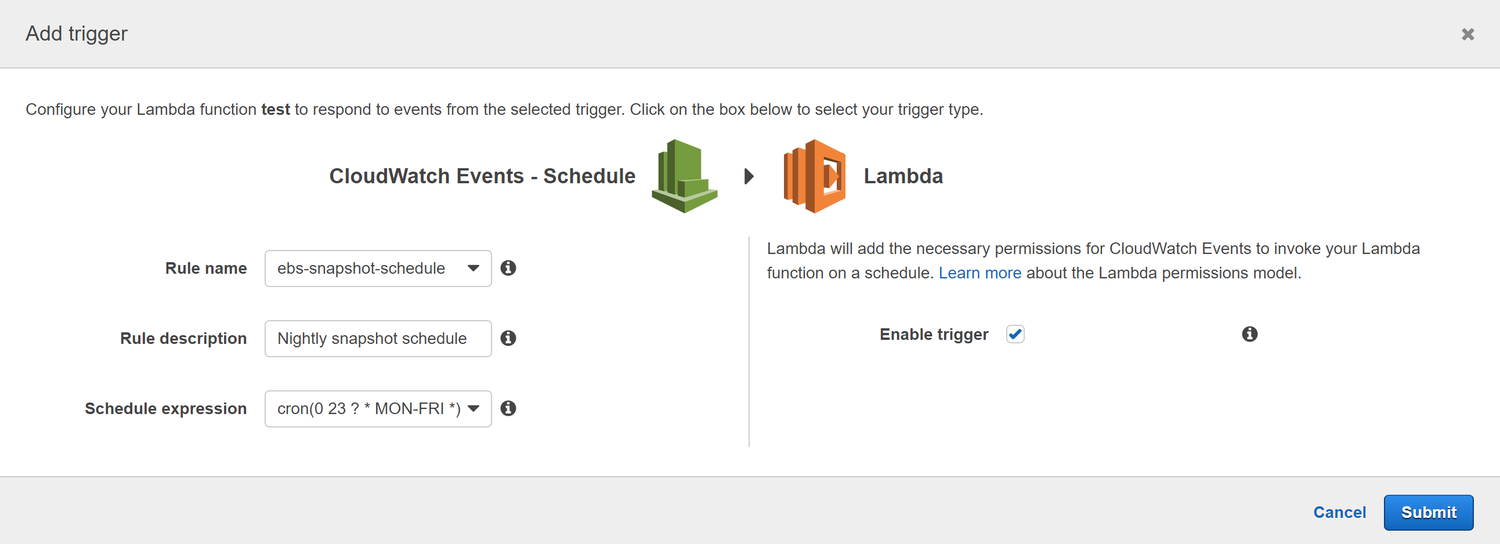
You'll be prompted to enter a name, description, and schedule for the rule.
It's important to note that the times listed for the cron expression are in UTC. In the example below, we are scheduling the Lambda function to run each weeknight at 11pm UTC.
Testing
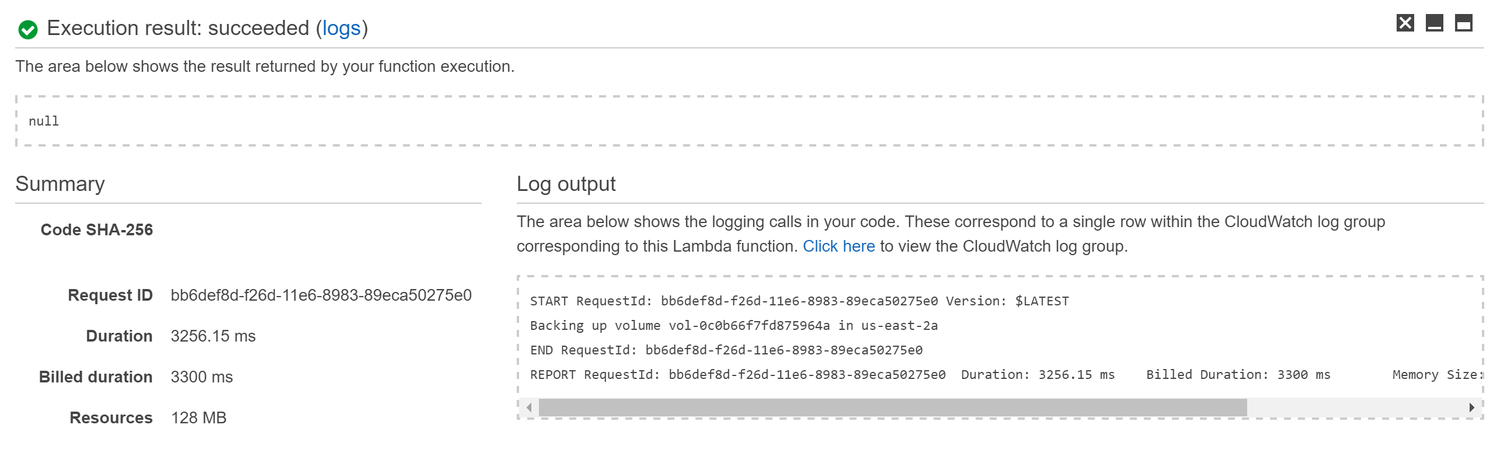
We can test our function immediately by click on the Save and Test button in the function page. This will execute the function and show the results in the console at the bottom of the page.
Logging
After verifying that the function runs successfully, we can take a look at the CloudWatch logs by clicking on the link shown in the Log Output section.
You'll notice a Log Group was created with the name /aws/lambda/ebs-create-snapshots. Select the most recent Log Stream to view individual messages:
11:00:19  START RequestId: bb6def8d-f26d-11e6-8983-89eca50275e0 Version: $LATEST

11:00:21  Backing up volume vol-0c0b66f7fd875964a in us-east-2a

11:00:22  END RequestId: bb6def8d-f26d-11e6-8983-89eca50275e0

11:00:22  REPORT RequestId: bb6def8d-f26d-11e6-8983-89eca50275e0 Duration: 3256.15 ms Billed Duration: 3300 ms Memory Size: 128 MB Max Memory Used: 40 MB
Delete Snapshots Function in Lambda
Let's take a look at how we can delete snapshots older than the retention period which we'll say is 10 days.
Before using the code below, you'll want to replace account_id with your AWS account number and adjust retention_days according to your needs.
# Delete snapshots older than retention period

import boto3

from botocore.exceptions import ClientError

from datetime import datetime,timedelta

def delete_snapshot(snapshot_id, reg):

    print "Deleting snapshot %s " % (snapshot_id)

    try:

        ec2resource = boto3.resource('ec2', region_name=reg)

        snapshot = ec2resource.Snapshot(snapshot_id)

        snapshot.delete()

    except ClientError as e:

        print "Caught exception: %s" % e

    return

def lambda_handler(event, context):

    # Get current timestamp in UTC

    now = datetime.now()

    # AWS Account ID

    account_id = ''

    # Define retention period in days

    retention_days = 10

    # Create EC2 client

    ec2 = boto3.client('ec2')

    # Get list of regions

    regions = ec2.describe_regions().get('Regions',[] )

    # Iterate over regions

    for region in regions:

        print "Checking region %s " % region['RegionName']

        reg=region['RegionName']

        # Connect to region

        ec2 = boto3.client('ec2', region_name=reg)

        # Filtering by snapshot timestamp comparison is not supported

        # So we grab all snapshot id's

        result = ec2.describe_snapshots( OwnerIds=[account_id] )

        for snapshot in result['Snapshots']:

            print "Checking snapshot %s which was created on %s" % (snapshot['SnapshotId'],snapshot['StartTime'])

            # Remove timezone info from snapshot in order for comparison to work below

            snapshot_time = snapshot['StartTime'].replace(tzinfo=None)

            # Subtract snapshot time from now returns a timedelta

            # Check if the timedelta is greater than retention days

            if (now - snapshot_time) > timedelta(retention_days):

                print "Snapshot is older than configured retention of %d days" % (retention_days)

                delete_snapshot(snapshot['SnapshotId'], reg)

            else:

                print "Snapshot is newer than configured retention of %d days so we keep it" % (retention_days)
FAQ
How do I include or exclude certain volumes from the create snapshots function?
The function we wrote for creating snapshots used a filter when calling ec2.describe_volumes that looked for status of in-use:
result = ec2.describe_volumes( Filters=[{'Name': 'status', 'Values': ['in-use']}])
Including Volumes using Tags
We can also create tags on volumes and filter by tag.
Suppose we wanted to backup only the volumes that had a specific tag named "Backup" with a value of "Yes".
First, we create a tag for each volume by right-clicking on the volume and selecting Add/Edit Tags
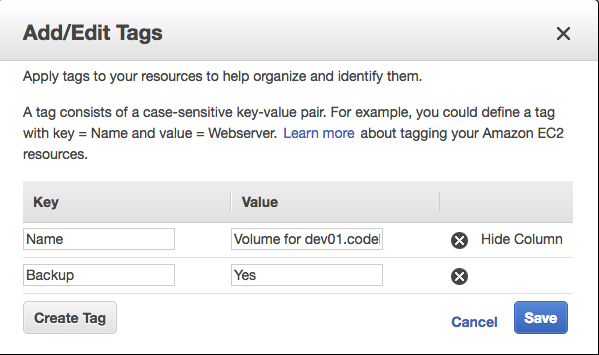
Next, we modify the script and use the following line for describe_volumes:
result = ec2.describe_volumes( Filters=[{'Name':'tag:Backup', 'Values':['Yes']}] )
Excluding Volumes using Tags
Excluding certain volumes using tags is a bit different. The Filters parameter of describe_volumes is for inclusion only. So we cannot use that to tell the script to exclude specific volumes.
Suppose we wanted to backup all volumes EXCEPT ones with a tag named "Backup" with a value of "No".
First, we create a tag for each volume by right-clicking on the volume and selecting Add/Edit Tags

Next, we modify the script and manually filter the volumes inside the loop:
# Backup all volumes all regions

# Skip those volumes with tag of Backup=No

import boto3

def lambda_handler(event, context):

    ec2 = boto3.client('ec2')

    # Get list of regions

    regions = ec2.describe_regions().get('Regions',[] )

    # Iterate over regions

    for region in regions:

        print "Checking region %s " % region['RegionName']

        reg=region['RegionName']

        # Connect to region

        ec2 = boto3.client('ec2', region_name=reg)

        # Get all volumes in all regions

        result = ec2.describe_volumes()

        for volume in result['Volumes']:

            backup = 'Yes'

            # Get volume tag of Backup if it exists

            for tag in volume['Tags']:

                if tag['Key'] == 'Backup':

                    backup = tag.get('Value')

            # Skip volume if Backup tag is No

            if backup == 'No':

                break

            print "Backing up %s in %s" % (volume['VolumeId'], volume['AvailabilityZone'])

            # Create snapshot

            result = ec2.create_snapshot(VolumeId=volume['VolumeId'],Description='Created by Lambda backup function ebs-snapshots')

            # Get snapshot resource

            ec2resource = boto3.resource('ec2', region_name=reg)

            snapshot = ec2resource.Snapshot(result['SnapshotId'])

            instance_name = 'N/A'

            # Fetch instance ID

            instance_id = volume['Attachments'][0]['InstanceId']

            # Get instance object using ID

            result = ec2.describe_instances(InstanceIds=[instance_id])

            instance = result['Reservations'][0]['Instances'][0]

            print instance

             # Find name tag for instance

            if 'Tags' in instance:

                for tags in instance['Tags']:

                    if tags["Key"] == 'Name':

                        instance_name = tags["Value"]

            # Add volume name to snapshot for easier identification

            snapshot.create_tags(Tags=[{'Key': 'Name','Value': instance_name}])
Automated EBS Snapshots using AWS Lambda & CloudWatch的更多相关文章
- 什么是AWS Lambda?——事件驱动的函数执行环境
AWS CTO Werner Vogels在AWS re:Invent 2014大会的第二场主题演讲上公布了两个新服务和一系列新的实例,两个新服务都相当令人瞩目:第一个宣布的新服务是Amazon EC ...
- Qwiklab'实验-API Gateway, AWS Lambda'
title: AWS之Qwiklab subtitle: 2. Qwiklab'实验-API Gateway, AWS Lambda' date: 2018-09-20 17:29:20 --- In ...
- AWS Lambda 借助 Serverless Framework,迅速起飞
前言 微服务架构有别于传统的单体式应用方案,我们可将单体应用拆分成多个核心功能.每个功能都被称为一项服务,可以单独构建和部署,这意味着各项服务在工作时不会互相影响 这种设计理念被进一步应用,就变成了无 ...
- AWS Lambda
AWS Lambda 知识点总结 参考资料:Amazon 名词解释: 事件驱动型计算服务:通过事件来触发的计算服务 Amazon S3存储桶:一项面向Internet的存储服务,可以通过S3 随时在W ...
- [翻译] 比较 Node.js,Python,Java,C# 和 Go 的 AWS Lambda 性能
[翻译] 比较 Node.js,Python,Java,C# 和 Go 的 AWS Lambda 性能 原文: Comparing AWS Lambda performance of Node.js, ...
- How to return plain text from AWS Lambda & API Gateway
With limited experience in AWS Lambda & API Gateway, it's struggling to find the correct way to ...
- [AWS] Lambda by Python
当前统治数据分析的语言还是Python,还是暂时走:Python + GPU的常规路线好了. numba, pyculib (分装了cublas) Ref: 使用 Python 构建 Lambda 函 ...
- 使用AWS Lambda,API Gateway和S3 Storage快速调整图片大小
https://www.obytes.com/blog/2019/image-resizing-on-the-fly-with-aws-lambda,-api-gateway,-and-s3-stor ...
- 本地运行aws lambda credential 配置 (missing credential config error)
参照这篇文章 http://docs.aws.amazon.com/sdk-for-javascript/v2/developer-guide/loading-node-credentials-sha ...
随机推荐
- ASP.NET MVC4应用程序配置跨域访问
开发框架是使用webapi做后台,HTML5做前台,通过ajax调用webapi后台,返回json结果. 用的编译器是visual Studio2013,下面是配置方法 1.web.config文件 ...
- vue项目中,使用vue-awesome-swiper插件实现轮播图
一.安装 npm install vue-awesome-swiper 二.项目中引入 import 'swiper/dist/css/swiper.css'import {swiper,swiper ...
- Hacklab综合关
没有注入到底能不能绕过登录 分值: 350 不是SQL注入 通关地址 不是注入,就先扫一下后台,发现在robots.txt后面有 访问一下,发现要先登陆,用burpsuit爆了好久都没有成功,最后 ...
- 细数本地连阿里云上mysql8遇到的坑
最近两个月忙成狗,给了自己一个冠冕堂皇的不记录博客的借口,今天咬牙记录一篇本地连阿里云mysql遇到的各种坑; 昨天利用妹妹的学生身份买了台廉价的阿里ECS,购买成功后的第一反应当然是把本地的mysq ...
- 自学python之路(day1)
1. 下载和安装Pycharm文本编辑器,解释器Python3 2. 了解python2和python3的不同 如输出中文时,python2需要在代码前加 # -*- encoding:utf-8 - ...
- Python第四章(北理国家精品课 嵩天等)
一.程序的分支结构 二.身体质量指数BMI #CalBIv1.py height,weight = eval((input("请输入身高(米)和体重\(公斤)[逗号隔开]:"))) ...
- python命令行运行py文件找不到模块的解决办法
问题: 新建了一个项目,目录结构如下: 然后在pycharm中运行glovar是没有问题的,但是在命令行中运行就会提示找不到init模块 这是因为在pycharm中运行的时候,pycharm会自动将项 ...
- 如何使用HTML5的WebSocket实现网页与服务器的双工通信(一)
本系列服务端双工通信包括两种实现方式:一.使用Socket构建:二.使用WCF构建.本文为使用Socket构建服务端的双工通信,客户端同样使用Html5的WebSocket技术进行调用. 一.网页客户 ...
- CSS效果:checkbox点选效果
HTML: <html lang="en"> <head> <meta charset="UTF-8"> <meta ...
- python 解方程
[怪毛匠子=整理] SymPy 库 安装 sudo pip install sympy x = Symbol('x') 解方程 solve([2 * x - y - 3, 3 * x + y - 7] ...