
Vue基础语法
一、挂载点,模版和实例
二、Vue实例中的数据,事件和方法
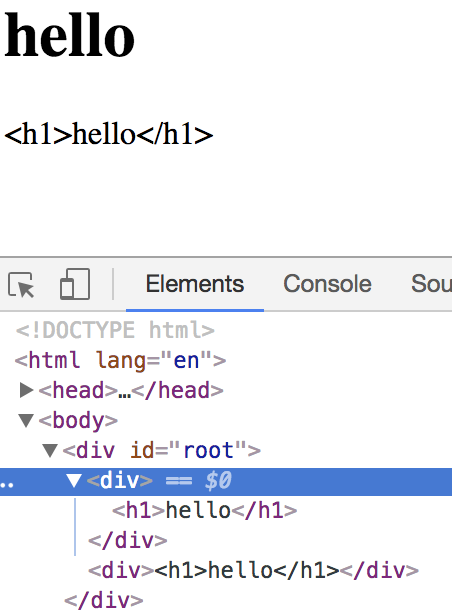
1、v-html指令和v-text指令
v-html :不转义
v-text :转义过后的内容
    <div id="root">

        <div v-html="content"></div>

        <div v-text="content"></div>

    </div>

    <script>

    new Vue({

        el:"#root",

        data:{

            content:"<h1>hello</h1>"

        }

    })

    </script>
2、v-on指令
<div v-on:click="()=>{alert(123)}">

{{content}}

</div>
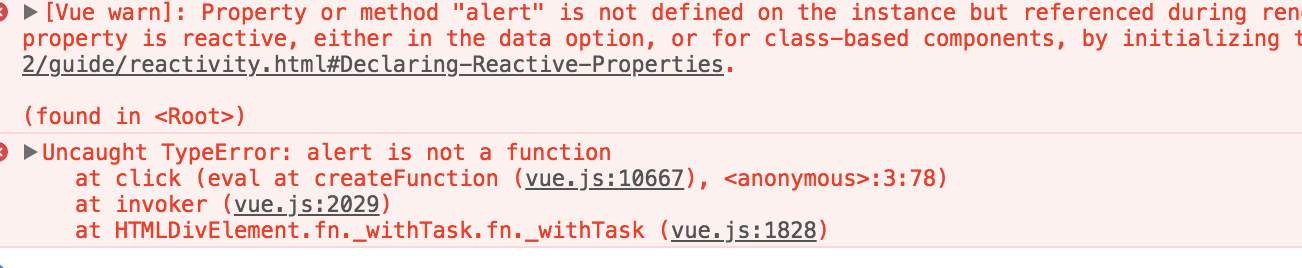
正确做法:
        <div v-on:click="handleClick">

            {{content}}

        </div>

    </div>

    <script>

    new Vue({

        el:"#root",

        data:{

            content:"hello",

        },

        methods:{

            handleClick:function(){

                alert(123);

            }

        }

    })

    </script>
<div id="root">

        <div v-on:click="handleClick">

            {{content}}

        </div>

    </div>

    <script>

    new Vue({

        el:"#root",

        data:{

            content:"hello",

        },

        methods:{

            handleClick:function(){

                this.content="world" //面向数据编程

            }

        }

    })

    </script>
三、Vue中的属性绑定和双向数据绑定
1、属性绑定v-bind:title简写:bind
    <div id="root">

        <div v-bind:title="title">helloworld</div>

        <div :title="title">缩写</div>

    </div>

    <script>

    new Vue({

        el:"#root",

        data:{

            title:"this is hello world"

        }

    })

    </script>
2、双向数据绑定v-model
<div id="root">

        <div>{{content}}</div>

        <input type="text" v-model="content">

    </div>

    <script>

    new Vue({

        el:"#root",

        data:{

            content:"this is content"

        }

    })

    </script>
四、Vue中的计算属性和侦听器
1、计算属性 computed

和react中的reselect特别像
好处:firstName,lastName都没改变,fullName会取上一次的缓存值,性能高。
<div id="root">

        姓:<input type="text" v-model="lastName">

        名:<input type="text" v-model="firstName">

        <div>{{firstName}}{{lastName}}</div>

        <div>{{fullName}}</div>

    </div>

    <script>

    new Vue({

        el:"#root",

        data:{

            firstName:'starof',

            lastName:'liu'

        },

        computed:{

            fullName:function(){

                return this.firstName+this.lastName;

            }

        }

    })

    </script>
2、侦听器 watch
监听数据的变化
监听fistName和lastName,每次变化加一。
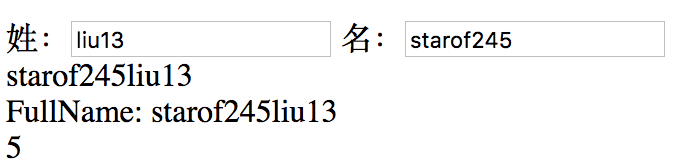
<div id="root">

        姓:<input type="text" v-model="lastName">

        名:<input type="text" v-model="firstName">

        <div>{{firstName}}{{lastName}}</div>

        FullName: <span>{{fullName}}</span>

        <div>{{count}}</div>

    </div>

    <script>

    new Vue({

        el:"#root",

        data:{

            firstName:'starof',

            lastName:'liu',

            count:0

        },

        computed:{

            fullName:function(){

                return this.firstName+this.lastName;

            }

        },

        watch:{

            firstName:function(){

                this.count++

            },

            lastName:function(){

                this.count++

            }

        }

    })

    </script>
监听计算属性的改变
new Vue({

        el:"#root",

        data:{

            firstName:'starof',

            lastName:'liu',

            count:0

        },

        computed:{

            fullName:function(){

                return this.firstName+this.lastName;

            }

        },

        watch:{

            fullName:function(){

                this.count++

            }

        }

    })
五、v-if、v-show和v-for指令
1、v-if
值为false直接从DOM中移除。
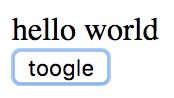
<div id="root">

        <div v-if="showHello">hello world</div>

        <button @click="handleToogle">toogle</button>

    </div>

    <script>

    new Vue({

        el:"#root",

        data:{

            showHello:true

        },

        methods:{

            handleToogle:function(){

                this.showHello=!this.showHello;

            }

        }

    })

    </script>
2、v-show
处理上例这种频繁显示隐藏使用v-show更好。
<div id="root">

        <div v-show="showHello">hello world</div>

        <button @click="handleToogle">toogle</button>

    </div>

    <script>

    new Vue({

        el:"#root",

        data:{

            showHello:true

        },

        methods:{

            handleToogle:function(){

                this.showHello=!this.showHello;

            }

        }

    })

    </script>
3、v-for
<div id="root">

        <ul>

            <li v-for="item of list">{{item}}</li>

        </ul>

    </div>

    <script>

    new Vue({

        el:"#root",

        data:{

            list:[1,2,3]

        }

    })

    </script>
循环时候使用:key可以提高效率。key值不能重复。
<li v-for="item of list" :key="item">{{item}}</li>
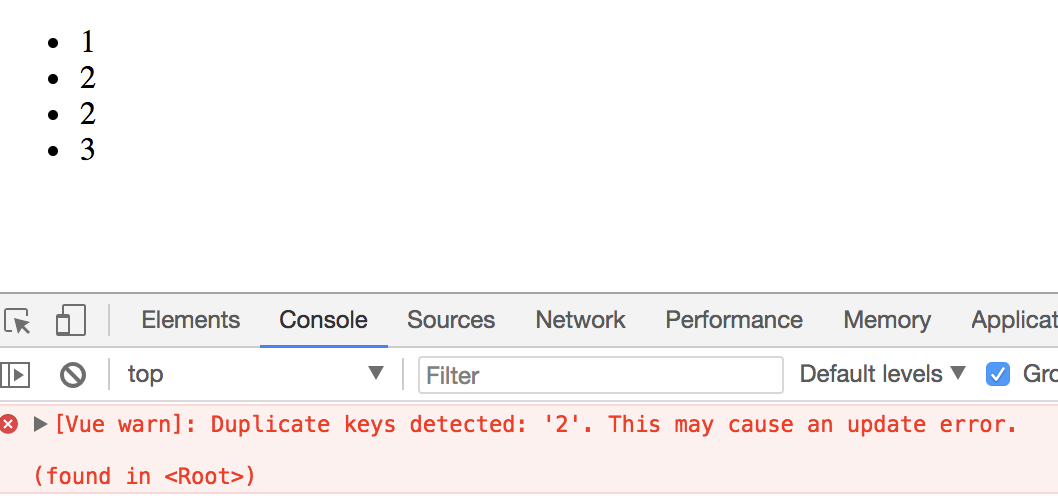
可以这么写:
<div id="root">

        <ul>

            <li v-for="(item,index) of list" :key="index">{{item}}</li>

        </ul>

    </div>

    <script>

    new Vue({

        el:"#root",

        data:{

            list:[1,2,2,3]

        }

    })

    </script>
但是频繁对列表进行变更,排序等操作时,index作为key值是有问题的。
本文作者starof,因知识本身在变化,作者也在不断学习成长,文章内容也不定时更新,为避免误导读者,方便追根溯源,请诸位转载注明出处:http://www.cnblogs.com/starof/p/9061617.html 有问题欢迎与我讨论,共同进步。
Vue基础语法的更多相关文章
- python 全栈开发,Day89(sorted面试题,Pycharm配置支持vue语法,Vue基础语法,小清单练习)
一.sorted面试题 面试题: [11, 33, 4, 2, 11, 4, 9, 2] 去重并保持原来的顺序 答案1: list1 = [11, 33, 4, 2, 11, 4, 9, 2] ret ...
- 2-5 vue基础语法
一.vue基础语法 语法: {{msg}} html赋值: v-html="" 绑定属性: v-bind:id="" 使用表达式: {{ok? "ye ...
- 一、vue基础语法(轻松入门vue)
轻松入门vue系列 Vue基础语法 一.HelloWord 二.MVVM设计思想 三.指令 1. v-cloak 2. v-text 3. v-html 4. v-show 4. v-pre 5. v ...
- Vue基础语法-数据绑定、事件处理和扩展组件等知识详解(案例分析,简单易懂,附源码)
前言: 本篇文章主要讲解了Vue实例对象的创建.常用内置指令的使用.自定义组件的创建.生命周期(钩子函数)等.以及个人的心得体会,汇集成本篇文章,作为自己对Vue基础知识入门级的总结与笔记. 其中介绍 ...
- Vue 1-- ES6 快速入门、vue的基本语法、vue应用示例,vue基础语法
一.ES6快速入门 let和const let ES6新增了let命令,用于声明变量.其用法类似var,但是声明的变量只在let命令所在的代码块内有效. { let x = 10; var y = 2 ...
- Vue(1)- es6的语法、vue的基本语法、vue应用示例,vue基础语法
一.es6的语法 1.let与var的区别 ES6 新增了let命令,用来声明变量.它的用法类似于var(ES5),但是所声明的变量,只在let命令所在的代码块内有效.如下代码: { let a = ...
- 一、vue基础--语法
用到的前台编程工具是Visual Studio Code,暂时是官网下载vue.js到本地使用 一.Visual Studio Code需要安装的插件: jshint :js代码规范检查 Beau ...
- Vue 基础语法入门(转载)
使用vue.js原文介绍:Vue.js是一个构建数据驱动的web界面库.Vue.js的目标是通过尽可能简单的API实现响应式数据绑定和组合的视图组件.vue.js上手非常简单,先看看几个例子: 例一: ...
- 2. Vue基础语法
模板语法: Mustache语法: {{}} Html赋值: v-html="" 绑定属性: v-bind:id="" 使用表达式: {{ok?'Yes': ...
- Vue基础语法与指令
项目初始化 用vscode打开终端,输入npm init -y生成package.json 然后安装vue npm install vue 需要注意的是,我遇到了这个问题 出现原因:文件夹名和生成的p ...
随机推荐
- iOS 后台调用apns推送
1.java调用apns推送 2.php 调用apns 推送,可借助终端
- virtualbox虚拟机使用的是桥接网络无法连接外网
virtualbox虚拟机使用的是桥接网络,获取到的DHCP,无法和外界通信 查看路由表发现有两个默认路由,优先级高的路由指向了,仅主机网络的网关 删除第一个默认路由
- pm2自动部署
配置pm2自动部署前,请确保已经能够ssh免密登录服务器. 一.创建ecosystem.json { "apps" : [{ "name" : "HT ...
- Hbase 元数据一致性检查(转)
最近在学习HBase先关的知识,顺便做一下笔记,以加深知识的了解和掌握. Hbase常用工具 文件检测修复工具 hbase hbck -help 常用选项: -details 显示所有region检查 ...
- ArcMap修改粘滞移动容差防止要素在选择时无意拖动移动
粘滞移动容差将设置一个最小像素数,鼠标指针必须在屏幕上移动了此最小距离时,所选要素才会实际发生移动. 设置粘滞移动容差的结果是延迟移动所选要素,直到指针至少移动了这段距离.此方法可用于在使用“编辑”工 ...
- 前端面试题整理—jQuery篇
1.为什么使用jquery,他有哪些好处? 1)轻量级.代码简洁 2)强大的选择器,出色的DOM操作封装 3)有可靠的事件处理机制 4)浏览器兼容性好 5)支持链式操作 6)支持丰富的插件 2.jqu ...
- django - 总结 - 跨域请求
script ->jsonp跨域 浏览器的同源策略:不能跨越网站请求信息: XMLHttpRequests遵循这个规定. 因此ajax等基于XML的都不能进行跨站请求 而我们知道img,ifra ...
- Pandas时间处理的一些小方法
一.以下有两种方式可以创建一个Timestamp对象: 1. Timestamp()的构造方法 import pandas as pd from datetime import datetime as ...
- 后台挂载/卸载程序[Linux/Windows]
后台挂载应用程序 即使关闭掉控制台窗口,该程序的进程也将会一直运行下去 #Windows 1.编写bat命令文件[形如:a.bat] 2.cmd执行:start /b a.bat #Linux noh ...
- luogu P5289 [十二省联考2019]皮配
传送门 首先考虑一个正常的dp,设\(f_{i,j,k}\)为前\(i\)个学校,\(j\)人在\(\color{#0000FF}{蓝阵营}\),\(k\)人在\(\color{#654321}{吔} ...