
docker1
Docker笔记
1,
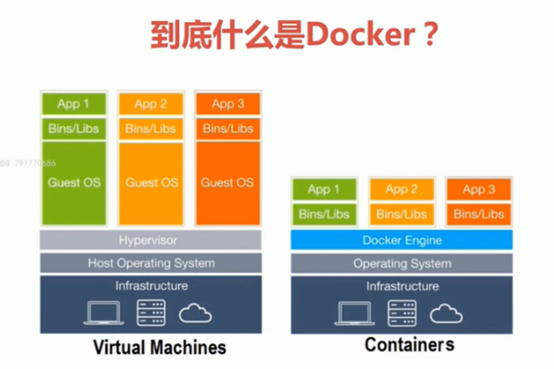
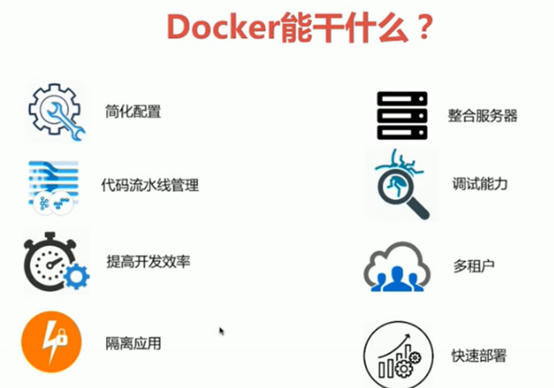
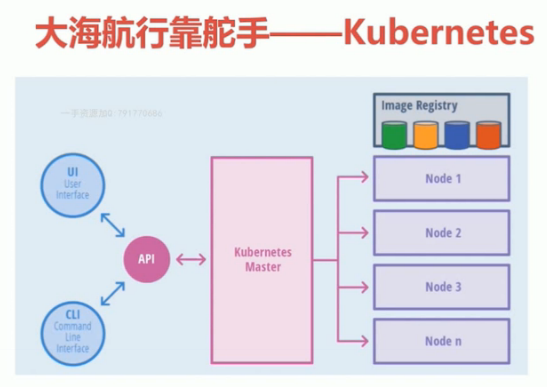
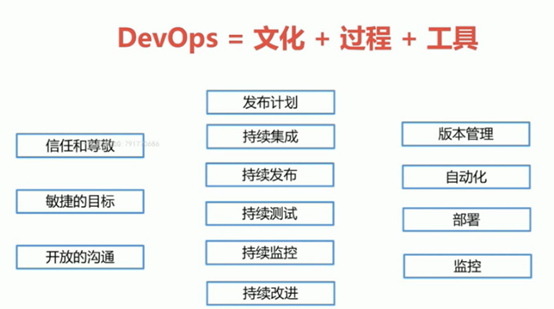
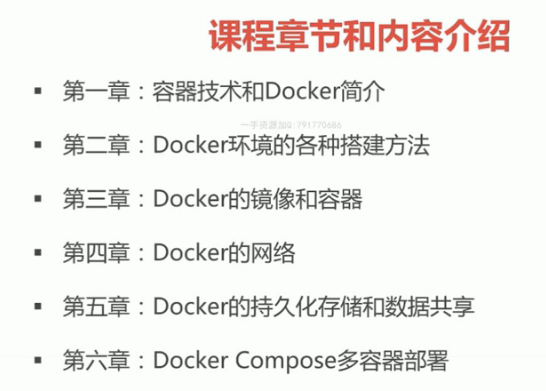

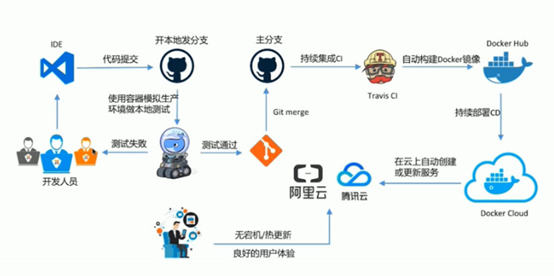
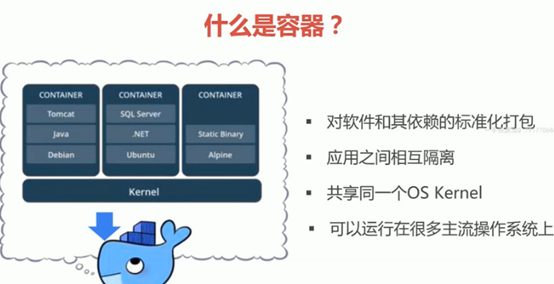
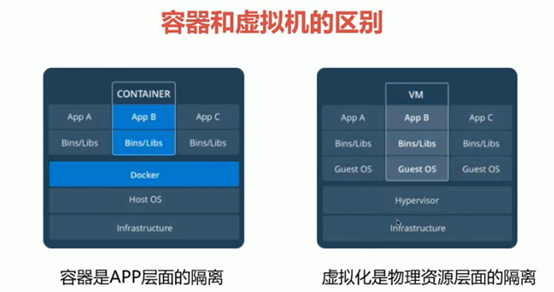
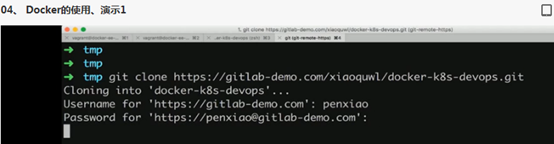
https://gitlab-demo.com
Docker官网:https://docs.docker.com/install/overview/
有两个版本:
Docker is available in two editions:
- Community Edition (CE) 是免费的版本
- Enterprise Edition (EE) 是收费的版本
vagrant 安装 centos 7
vagrant + virtualBOX 安装
https://my.oschina.net/cxgphper/blog/1940644
安装Docker
系统centos7
https://docs.docker.com/install/linux/docker-ce/centos/
也可以在vagrantfile中添加安装docker shell
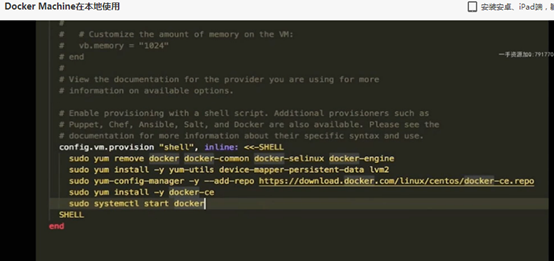
Vagrant up
Docker machine 在本地使用
#docker-machine create demo
Docker-machine ls
Docker-machine ssh demo 进入虚机demo
Docker-machine stop demo1
Docer-machine env demo #print出dome虚机的env
#eval $(docker-machine env demo)
#docker version #可以看到demo的虚机docker版本
搜索docker playground
https://labs.play-with-docker.com/
在 https://www.docker.com/
Docker for windows7/windows10安装 以及Docker id注册
https://blog.csdn.net/xzxedu/article/details/82012297
参考docker
https://www.jianshu.com/p/38649ff222ac
引导入门:
https://blog.csdn.net/sD7O95O/article/details/80193587
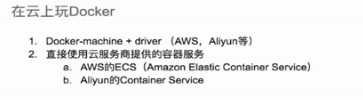
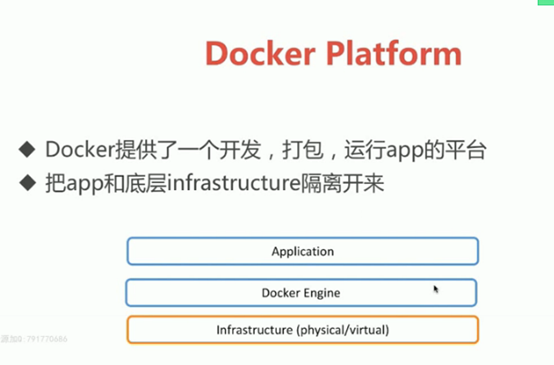
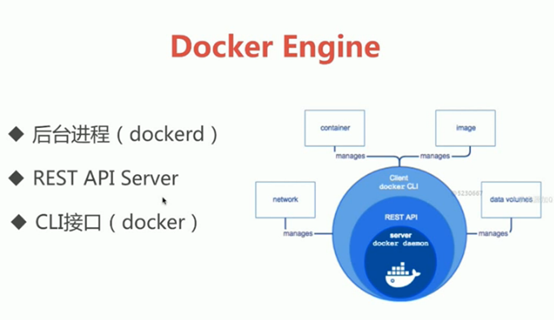
[root@zizhen02 ~]# ps -ef |grep docker
root 7661 1 0 14:49 ? 00:00:03 /usr/bin/dockerd -H fd:// --containerd=/run/containerd/containerd.sock
root 9829 9790 0 16:32 pts/1 00:00:00 grep --color=auto docker
[root@zizhen02 ~]#
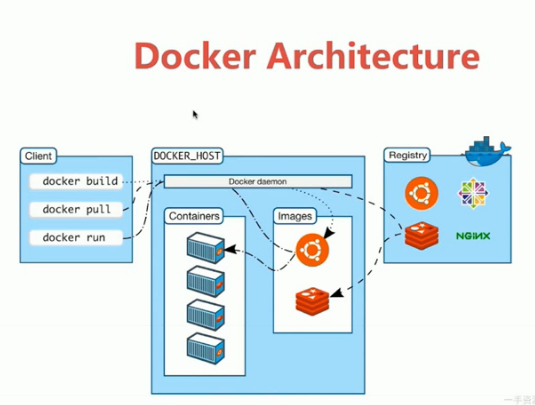
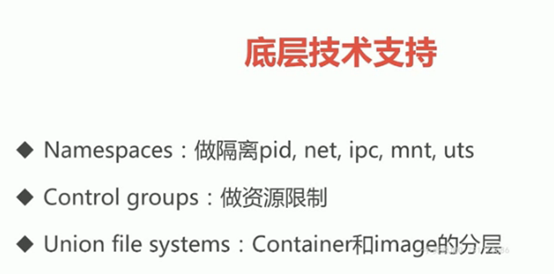
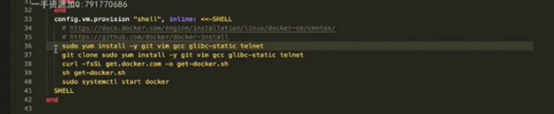
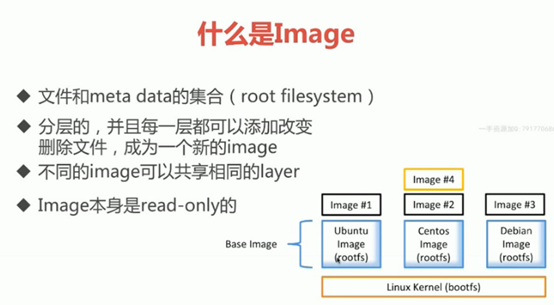
#sudo docker image ls
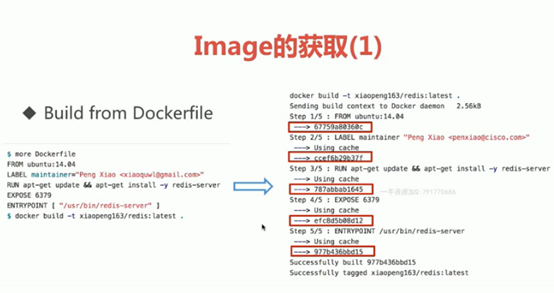
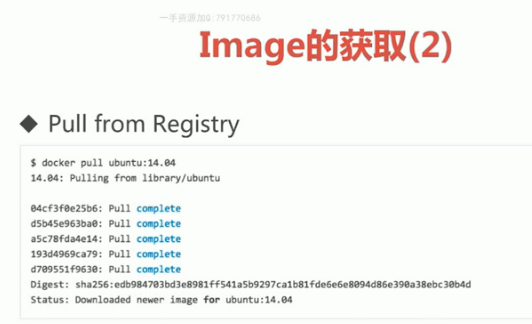
官方给出image获取的 Docker Hub
https://hub.docker.com/search?q=&type=image
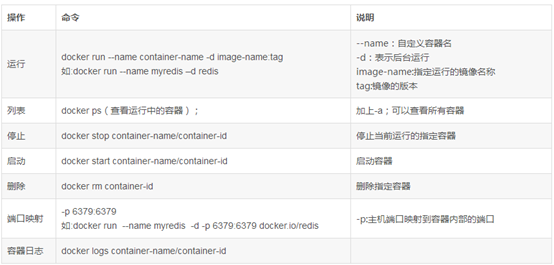
去掉sudo:
把vagrant 添加到组docker 里
#sudo groupadd docker
#sudo gpasswd -a vagrant docker
#docker version 权限还是拒绝
#sudo service docker restart 重启docker服务
#docker version
退出重新登。
#docker image ls
#docker pull hello-world 获取hello-world镜像
#docker run hello-world 运行
#mkdir hello-world
#cd hello-world
#vim hello.c
-----
#include<stdio.h>
int main()
{
printf("hello docker\n");
}
-----
#yum install gcc glibc-static
# gcc -static hello.c -o hello
[root@zizhen02 hello-world]# ls
hello hello.c
# cat Dockerfile
FROM scratch
ADD hello /
CMD ['/hello']
[root@zizhen02 hello-world]# docker build -t xiaoli163/hello-world .
Sending build context to Docker daemon 860.7kB
Step 1/3 : FROM scratch
--->
Step 2/3 : ADD hello /
---> d3ce8749b11d
Step 3/3 : CMD ['/hello']
---> Running in 4d72aa29e7a3
Removing intermediate container 4d72aa29e7a3
---> a821094d0306
Successfully built a821094d0306
Successfully tagged xiaoli163/hello-world:latest
[root@zizhen02 hello-world]#
# docker image ls
REPOSITORY TAG IMAGE ID CREATED SIZE
xiaoli163/hello-world latest a821094d0306 37 seconds ago 857kB
ubuntu 14.04 5dbc3f318ea5 6 weeks ago 188MB
hello-world latest fce289e99eb9 2 months ago 1.84kB
centos latest 1e1148e4cc2c 3 months ago 202MB
[root@zizhen02 hello-world]#
[root@zizhen02 hello-world]# ls -lh
total 848K
-rw-r--r-- 1 root root 40 Mar 11 23:02 Dockerfile
-rwxr-xr-x 1 root root 837K Mar 11 22:55 hello
-rw-r--r-- 1 root root 64 Mar 11 22:48 hello.c
[root@zizhen02 hello-world]#
#查看docker的分层
[root@zizhen02 hello-world]# docker history a821094d0306
IMAGE CREATED CREATED BY SIZE COMMENT
a821094d0306 4 minutes ago /bin/sh -c #(nop) CMD ["/bin/sh" "-c" "['/h… 0B
d3ce8749b11d 4 minutes ago /bin/sh -c #(nop) ADD file:68a0159a95ced5415… 857kB
[root@zizhen02 hello-world]#
报错:
[root@zizhen02 hello-world]# docker run xiaoli163/hello-world
docker: Error response from daemon: OCI runtime create failed: container_linux.go:344: starting container process caused "exec: \"/bin/sh\": stat /bin/sh: no such file or directory": unknown.
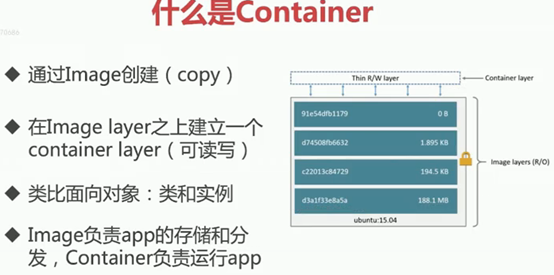
Docker组件container
[root@zizhen02 ~]# docker container ls
CONTAINER ID IMAGE COMMAND CREATED STATUS PORTS NAMES
97b6ec615252 nginx "nginx -g 'daemon of…" About an hour ago Up About an hour 0.0.0.0:443->443/tcp, 0.0.0.0:8001->80/tcp nginxv2
5cb5e2fb6d11 nginx "nginx -g 'daemon of…" About an hour ago Up About an hour 192.168.1.107:8000->80/tcp mynginx
2ce4f13ed654 nginx "nginx -g 'daemon of…" About an hour ago Up About an hour 0.0.0.0:32768->80/tcp condescending_wilbur
[root@zizhen02 ~]# docker images
REPOSITORY TAG IMAGE ID CREATED SIZE
xiaoli163/hello-world latest a821094d0306 18 hours ago 857kB
nginx latest 881bd08c0b08 7 days ago 109MB
ubuntu 14.04 5dbc3f318ea5 6 weeks ago 188MB
hello-world latest fce289e99eb9 2 months ago 1.84kB
centos latest 1e1148e4cc2c 3 months ago 202MB
[root@zizhen02 ~]# docker container ls -a
CONTAINER ID IMAGE COMMAND CREATED STATUS PORTS NAMES
97b6ec615252 nginx "nginx -g 'daemon of…" About an hour ago Up About an hour 0.0.0.0:443->443/tcp, 0.0.0.0:8001->80/tcp nginxv2
5cb5e2fb6d11 nginx "nginx -g 'daemon of…" About an hour ago Up About an hour 192.168.1.107:8000->80/tcp mynginx
2ce4f13ed654 nginx "nginx -g 'daemon of…" About an hour ago Up About an hour 0.0.0.0:32768->80/tcp condescending_wilbur
058aa0c78e3d xiaoli163/hello-world "/bin/sh -c ['/hello…" 18 hours ago Created goofy_gagarin
2383acd50abe xiaoli163/hello-world "/bin/sh -c ['/hello…" 18 hours ago Created loving_franklin
3dcf3c566c78 xiaoli163/hello-world "/bin/sh -c ['/hello…" 18 hours ago Created inspiring_antonelli
4a62f05f9141 hello-world "/hello" 20 hours ago Exited (0) 20 hours ago flamboyant_ellis
7327630800a1 hello-world "/hello" 2 days ago Exited (0) 2 days ago infallible_chatelet
[root@zizhen02 ~]#
[root@zizhen02 ~]# docker run -it centos
[root@db568adf5c1f /]#
[root@db568adf5c1f /]#
[root@db568adf5c1f /]# ip a
bash: ip: command not found
[root@db568adf5c1f /]# ip add li
bash: ip: command not found
[root@db568adf5c1f /]# ip link show
bash: ip: command not found
[root@db568adf5c1f /]# ip
bash: ip: command not found
[root@db568adf5c1f /]# ifconfig
bash: ifconfig: command not found
[root@db568adf5c1f /]# ls
anaconda-post.log bin dev etc home lib lib64 media mnt opt proc root run sbin srv sys tmp usr var
[root@db568adf5c1f /]# vim
bash: vim: command not found
[root@db568adf5c1f /]# vi
[root@zizhen02 ~]# docker container ls
CONTAINER ID IMAGE COMMAND CREATED STATUS PORTS NAMES
db568adf5c1f centos "/bin/bash" About a minute ago Up About a minute amazing_herschel
97b6ec615252 nginx "nginx -g 'daemon of…" About an hour ago Up About an hour 0.0.0.0:443->443/tcp, 0.0.0.0:8001->80/tcp nginxv2
5cb5e2fb6d11 nginx "nginx -g 'daemon of…" About an hour ago Up About an hour 192.168.1.107:8000->80/tcp mynginx
2ce4f13ed654 nginx "nginx -g 'daemon of…" 2 hours ago Up 2 hours 0.0.0.0:32768->80/tcp condescending_wilbur
[root@zizhen02 ~]# docker container ls -a
CONTAINER ID IMAGE COMMAND CREATED STATUS PORTS NAMES
db568adf5c1f centos "/bin/bash" About a minute ago Up About a minute amazing_herschel
97b6ec615252 nginx "nginx -g 'daemon of…" About an hour ago Up About an hour 0.0.0.0:443->443/tcp, 0.0.0.0:8001->80/tcp nginxv2
5cb5e2fb6d11 nginx "nginx -g 'daemon of…" About an hour ago Up About an hour 192.168.1.107:8000->80/tcp mynginx
2ce4f13ed654 nginx "nginx -g 'daemon of…" 2 hours ago Up 2 hours 0.0.0.0:32768->80/tcp condescending_wilbur
058aa0c78e3d xiaoli163/hello-world "/bin/sh -c ['/hello…" 18 hours ago Created goofy_gagarin
2383acd50abe xiaoli163/hello-world "/bin/sh -c ['/hello…" 18 hours ago Created loving_franklin
3dcf3c566c78 xiaoli163/hello-world "/bin/sh -c ['/hello…" 18 hours ago Created inspiring_antonelli
4a62f05f9141 hello-world "/hello" 20 hours ago Exited (0) 20 hours ago flamboyant_ellis
7327630800a1 hello-world "/hello" 2 days ago Exited (0) 2 days ago infallible_chatelet
[root@zizhen02 ~]#
Docker退出,容器退出
[root@db568adf5c1f /]# exit
exit
[root@zizhen02 ~]# docker container ls -a
CONTAINER ID IMAGE COMMAND CREATED STATUS PORTS NAMES
db568adf5c1f centos "/bin/bash" 8 minutes ago Exited (1) 29 seconds ago amazing_herschel
删除退出未运行的容器;删除运行的容器会报错;
[root@zizhen02 ~]# docker container ls -a
CONTAINER ID IMAGE COMMAND CREATED STATUS PORTS NAMES
db568adf5c1f centos "/bin/bash" 13 minutes ago Exited (1) 5 minutes ago amazing_herschel
97b6ec615252 nginx "nginx -g 'daemon of…" About an hour ago Up About an hour 0.0.0.0:443->443/tcp, 0.0.0.0:8001->80/tcp nginxv2
5cb5e2fb6d11 nginx "nginx -g 'daemon of…" About an hour ago Up About an hour 192.168.1.107:8000->80/tcp mynginx
2ce4f13ed654 nginx "nginx -g 'daemon of…" 2 hours ago Up 2 hours 0.0.0.0:32768->80/tcp condescending_wilbur
058aa0c78e3d xiaoli163/hello-world "/bin/sh -c ['/hello…" 18 hours ago Created goofy_gagarin
2383acd50abe xiaoli163/hello-world "/bin/sh -c ['/hello…" 18 hours ago Created loving_franklin
3dcf3c566c78 xiaoli163/hello-world "/bin/sh -c ['/hello…" 18 hours ago Created inspiring_antonelli
4a62f05f9141 hello-world "/hello" 20 hours ago Exited (0) 20 hours ago flamboyant_ellis
7327630800a1 hello-world "/hello" 2 days ago Exited (0) 2 days ago infallible_chatelet
[root@zizhen02 ~]# docker rm 4a
4a
[root@zizhen02 ~]# docker container ls -a
CONTAINER ID IMAGE COMMAND CREATED STATUS PORTS NAMES
db568adf5c1f centos "/bin/bash" 13 minutes ago Exited (1) 5 minutes ago amazing_herschel
97b6ec615252 nginx "nginx -g 'daemon of…" About an hour ago Up About an hour 0.0.0.0:443->443/tcp, 0.0.0.0:8001->80/tcp nginxv2
5cb5e2fb6d11 nginx "nginx -g 'daemon of…" About an hour ago Up About an hour 192.168.1.107:8000->80/tcp mynginx
2ce4f13ed654 nginx "nginx -g 'daemon of…" 2 hours ago Up 2 hours 0.0.0.0:32768->80/tcp condescending_wilbur
058aa0c78e3d xiaoli163/hello-world "/bin/sh -c ['/hello…" 18 hours ago Created goofy_gagarin
2383acd50abe xiaoli163/hello-world "/bin/sh -c ['/hello…" 18 hours ago Created loving_franklin
3dcf3c566c78 xiaoli163/hello-world "/bin/sh -c ['/hello…" 18 hours ago Created inspiring_antonelli
7327630800a1 hello-world "/hello" 2 days ago Exited (0) 2 days ago infallible_chatelet
[root@zizhen02 ~]# docker rm 7327
7327
[root@zizhen02 ~]#
#docker rm [container] 删除container
#docker rmi [image] 删除image
[root@zizhen02 ~]# docker image ls
REPOSITORY TAG IMAGE ID CREATED SIZE
xiaoli163/hello-world latest a821094d0306 19 hours ago 857kB
nginx latest 881bd08c0b08 7 days ago 109MB
ubuntu 14.04 5dbc3f318ea5 6 weeks ago 188MB
hello-world latest fce289e99eb9 2 months ago 1.84kB
centos latest 1e1148e4cc2c 3 months ago 202MB
[root@zizhen02 ~]# docker rmi fce289e99eb9
Untagged: hello-world:latest
Untagged: hello-world@sha256:2557e3c07ed1e38f26e389462d03ed943586f744621577a99efb77324b0fe535
Deleted: sha256:fce289e99eb9bca977dae136fbe2a82b6b7d4c372474c9235adc1741675f587e
Deleted: sha256:af0b15c8625bb1938f1d7b17081031f649fd14e6b233688eea3c5483994a66a3
[root@zizhen02 ~]# docker images
REPOSITORY TAG IMAGE ID CREATED SIZE
xiaoli163/hello-world latest a821094d0306 19 hours ago 857kB
nginx latest 881bd08c0b08 7 days ago 109MB
ubuntu 14.04 5dbc3f318ea5 6 weeks ago 188MB
centos latest 1e1148e4cc2c 3 months ago 202MB
[root@zizhen02 ~]#
运行中的container 先#docker container stop [id] 停止; 再删除image
[root@zizhen02 ~]# docker container
Usage: docker container COMMAND
Manage containers
Commands:
attach Attach local standard input, output, and error streams to a running container
commit Create a new image from a container's changes
cp Copy files/folders between a container and the local filesystem
create Create a new container
diff Inspect changes to files or directories on a container's filesystem
exec Run a command in a running container
export Export a container's filesystem as a tar archive
inspect Display detailed information on one or more containers
kill Kill one or more running containers
logs Fetch the logs of a container
ls List containers
pause Pause all processes within one or more containers
port List port mappings or a specific mapping for the container
prune Remove all stopped containers
rename Rename a container
restart Restart one or more containers
rm Remove one or more containers
run Run a command in a new container
start Start one or more stopped containers
stats Display a live stream of container(s) resource usage statistics
stop Stop one or more running containers
top Display the running processes of a container
unpause Unpause all processes within one or more containers
update Update configuration of one or more containers
wait Block until one or more containers stop, then print their exit codes
Run 'docker container COMMAND --help' for more information on a command.
[root@zizhen02 ~]# docker ps
CONTAINER ID IMAGE COMMAND CREATED STATUS PORTS NAMES
97b6ec615252 nginx "nginx -g 'daemon of…" About an hour ago Up About an hour 0.0.0.0:443->443/tcp, 0.0.0.0:8001->80/tcp nginxv2
5cb5e2fb6d11 nginx "nginx -g 'daemon of…" 2 hours ago Up 2 hours 192.168.1.107:8000->80/tcp mynginx
2ce4f13ed654 nginx "nginx -g 'daemon of…" 2 hours ago Up 2 hours 0.0.0.0:32768->80/tcp condescending_wilbur
[root@zizhen02 ~]# docker container stop 97b6ec615252
97b6ec615252
[root@zizhen02 ~]# docker container ls
CONTAINER ID IMAGE COMMAND CREATED STATUS PORTS NAMES
5cb5e2fb6d11 nginx "nginx -g 'daemon of…" 2 hours ago Up 2 hours 192.168.1.107:8000->80/tcp mynginx
2ce4f13ed654 nginx "nginx -g 'daemon of…" 2 hours ago Up 2 hours 0.0.0.0:32768->80/tcp condescending_wilbur
[root@zizhen02 ~]# docker container stop 5c 2c
5c
2c
[root@zizhen02 ~]# docker container ls
CONTAINER ID IMAGE COMMAND CREATED STATUS PORTS NAMES
[root@zizhen02 ~]#
批量删除container
[root@zizhen02 ~]# docker container ls -a
CONTAINER ID IMAGE COMMAND CREATED STATUS PORTS NAMES
db568adf5c1f centos "/bin/bash" 29 minutes ago Exited (1) 21 minutes ago amazing_herschel
97b6ec615252 nginx "nginx -g 'daemon of…" 2 hours ago Exited (0) 5 minutes ago nginxv2
5cb5e2fb6d11 nginx "nginx -g 'daemon of…" 2 hours ago Exited (0) 5 minutes ago mynginx
2ce4f13ed654 nginx "nginx -g 'daemon of…" 2 hours ago Exited (0) 5 minutes ago condescending_wilbur
[root@zizhen02 ~]# docker container ls -aq
db568adf5c1f
97b6ec615252
5cb5e2fb6d11
2ce4f13ed654
[root@zizhen02 ~]# docker container ls -a| awk {'print $1'}
CONTAINER
db568adf5c1f
97b6ec615252
5cb5e2fb6d11
2ce4f13ed654
[root@zizhen02 ~]# docker rm $(docker container ls -aq)
db568adf5c1f
97b6ec615252
5cb5e2fb6d11
2ce4f13ed654
[root@zizhen02 ~]# docker container ls -a
CONTAINER ID IMAGE COMMAND CREATED STATUS PORTS NAMES
[root@zizhen02 ~]#
比较复杂的删除container
[root@zizhen02 ~]# docker container ls -a
CONTAINER ID IMAGE COMMAND CREATED STATUS PORTS NAMES
e58877cb380a nginx "nginx -g 'daemon of…" 30 seconds ago Exited (0) 11 seconds ago agitated_bartik
[root@zizhen02 ~]# docker container ls
CONTAINER ID IMAGE COMMAND CREATED STATUS PORTS NAMES
[root@zizhen02 ~]# docker container ls -f "status=exited"
CONTAINER ID IMAGE COMMAND CREATED STATUS PORTS NAMES
e58877cb380a nginx "nginx -g 'daemon of…" About a minute ago Exited (0) About a minute ago agitated_bartik
[root@zizhen02 ~]# docker container ls -f "status=exited" -q
e58877cb380a
[root@zizhen02 ~]# docker rm $(docker container ls -f "status=exited" -q)
e58877cb380a
[root@zizhen02 ~]# docker container ls
CONTAINER ID IMAGE COMMAND CREATED STATUS PORTS NAMES
[root@zizhen02 ~]# docker container ls -a
CONTAINER ID IMAGE COMMAND CREATED STATUS PORTS NAMES
[root@zizhen02 ~]#
docker1的更多相关文章
- cAdvisor0.24.1+InfluxDB0.13+Grafana4.0.2搭建Docker1.12.3 Swarm集群性能监控平台
目录 [TOC] 1.基本概念 既然是对Docker的容器进行监控,我们就不自己单独搭建cAdvisor.InfluxDB.Grarana了,本文中这三个实例,主要以Docker容器方式运行. 本 ...
- Centos7的安装、Docker1.12.3的安装,以及Docker Swarm集群的简单实例
目录 [TOC] 1.环境准备 本文中的案例会有四台机器,他们的Host和IP地址如下 c1 -> 10.0.0.31 c2 -> 10.0.0.32 c3 -> 10.0.0. ...
- Docker1.12 新增swarm集群
在Docker1.12新版本中,一个新增加的功能点是swarm集群,通过docker命令可以直接实现docker-engine相互发现,并组建成为一个容器集群.有关集群的docker命令如下: (1) ...
- Centos6.7安装docker1.7.1
Docker当前发布的最新版本已经到了1.11,其官网上针对Centos的的安装需求如下: Docker requires a -bit installation regardless of your ...
- docker1.12 安装pxc(Percona XtraDB Cluster )测试
docker1.12 安装pxc(Percona XtraDB Cluster )测试
- docker1.12 安装redis第三方集群方案 codis
docker1.12 安装redis第三方集群方案 codis
- docker1.12在cento7里的跨多主机容器网络
docker1.12在cento7里的跨多主机容器网络
- centos7 docker1.12 私有仓库
docker1.12私有仓库 参考:http://www.cnblogs.com/xcloudbiz/articles/5497037.html 参考:http://www.07net01.com/2 ...
- docker1.13.1的安装与卸载及mysql5.5安装实例
docker中国官方地址:https://www.docker-cn.com/ 您可以使用以下命令直接从该镜像加速地址进行拉取: $ docker pull registry.docker-cn.co ...
- 【k8s】centos上安装kubernetes,报错Error:docker-ce-cli conflicts with 2:docker-1.13.1-94.gitb2f74b2.el7.centos.x86_64
使用命令: yum install kubernetes 报错: Error: docker-ce-cli conflicts with :docker--.git07f3374.el7.centos ...
随机推荐
- 微信小程序页面跳转导航wx.navigateTo和wx.redirectTo
}) wx.redirectTo(OBJECT) 关闭当前页面,跳转到应用内的某个页面. 还是用上面的三张图示作为例子,当使用wx.redirctTo接口跳转页面时,原来的页面将被删除掉,当然,这是小 ...
- 20175212童皓桢 《Java程序设计》第六周学习总结
20175212童皓桢 <Java程序设计>第六周学习总结 教材学习内容总结 第七章 内部类与异常类 1.内部类 Java支持在一个类中定义另一个类,这样的类称作内部类,包含内部类的类称为 ...
- Cannot Connect to Database Server
好久没登数据库了,今天登陆时忽然要输入密码,然后一登结果就报了下图的错. 之前也发生过这种情况,但是重启服务就好了,这次重启后依然不行. 后来密码用root居然就登进去了,可是真不记得有改过密码 不知 ...
- hdu1856
Mr Wang wants some boys to help him with a project. Because the project is rather complex, the more ...
- 数组的常用方法concat,join,slice和splice的区别,map,foreach,reduce
1.concat()和join() concat()是连对两个或两个数组的方法,直接可以将数组以参数的形式放入 join()是将数组中的所有元素放入一个字符串中,通俗点讲就是可以将数组转换成字符串 2 ...
- js 取一定范围内的整数
function selectNum(lowNum,upNum) { var num = upNum-lowNum+1; // Math.floor() 向下取整 return Math.floor( ...
- JsonP的实现原理?
动态创建script标签,通过script标签中的src跨域属性,连接对方接口,并将回调函数通过接口传递给对方,对方服务器在准备好数据后再通过调用回调函数并以传递参数的方式将数据返回来.
- 活代码LINQ——06
一.模块代码 ' Fig. 9.4: LINQWithArrayOfObjects.vb ' LINQ to Objects using an array of Employee objects. M ...
- sticky
最近有点忘了position几个取值的内容,在这里简单总结一下. position的含义是指定位类型,取值类型可以有:static.relative.absolute.fixed.inherit和st ...
- hive lock命令的使用
1.hive锁表命令 hive> lock table t1 exclusive;锁表后不能对表进行操作 2.hive表解锁: hive> unlock table t1; 3.查看被锁的 ...