
基于vue 、vue-router 、firebase的todolist小项目
第一次写博客,都不知道改怎么写的好。
本着一颗学习的心,也希望一段时间后再回来在看看自己写的代码,会不会让自己有种不忍直视的念头 *-*
还是先上图吧~
这是首页,主要是展示所有的列表页面,可以通过输入框进行模糊查询
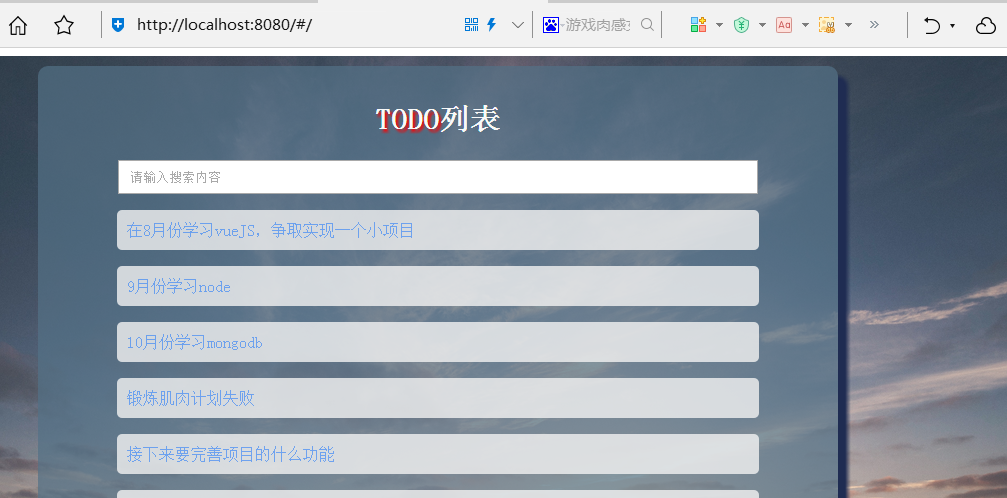
代码如下:
<template>

  <div class="list">

    <h2><span class="title">TODO</span>列表</h2>

    <div class="search">

      <input type="text" v-model="search" placeholder="请输入搜索内容">

    </div>

    <div class="list-item" v-for="item in filterItem">

      <router-link v-bind:to="'/list/' + item.id">

        <p>{{item.name}}</p>

      </router-link>

    </div>

    <div class="addList">

      <router-link v-bind:to="'/add'">

        <button>添加计划</button>

      </router-link>

    </div>

    <!-- <div class="button">

      <button @click.prevent="upPage">上一页</button>

      <button @click.prevent="nextPage">下一页</button>

    </div> -->

  </div>

</template>

<script>

export default {

  name: 'index',

  data () {

    return {

      items : [],

      search : '',

      pageFlag : false

    }

  },

  created () {

    this.$http.get('https://my-first-vue.firebaseio.com/add.json')

    .then((data) => {

      console.log(data.json())

      return data.json()

    })

    .then(data => {

      let arr = []

      for(let key in data){

        //console.log(key)

        //console.log(data[key])

        data[key].id = key

        arr.push(data[key])

      }

      this.items = arr

      if(this.items.length > 10){

        this.pageFlag = true;

        this.items.slice(0, 10)

      }

    })

  },

  methods : {

    upPage : () =>{

    },

    nextPage : () => {

    }

  },

  computed : {

    //filterItem : () => this.items.filter(item => item.name.match(this.search))

    filterItem : function(){

      return this.items.filter((item) =>{

        return item.name.match(this.search);

      })

    }

  }

}

</script>

<!-- Add "scoped" attribute to limit CSS to this component only -->

<style scoped>

.list{

  box-sizing: border-box;

  max-width: 800px;

  min-height: 700px;

  margin: 0 auto;

  padding-top: 10px;

  border-radius: 10px;

  background-color: rgba(83,113,134,.7);

  box-shadow: 10px 10px 5px #1F2C52;

}

input{

  width: 77%;

  height: 30px;

  padding: 0 10px;

}

.list-item{

  width: 79%;

  background-color: rgba(243,243,243,.8);

  margin: 10px auto;

  min-height: 40px;

  line-height: 40px;

  padding-left: 10px;

  border-radius: 5px;

}

.list-item > p{

  line-height: 40px;

  text-indent: 2em;

}

.search{

  text-align: center;

}

h2{

  color: #f9f9f9;

  font-size: 30px;

}

h2,h3{

  text-align: center;

}

.title{

  text-shadow: 3px 3px 3px #FF0000;

}

.button{

  /*margin: 0 auto;*/

  text-align: center;

}

a{

  text-decoration: none;

  color: rgba(0,102,255,.49);

}

button{

  border: 0;

  background-color: #3A97BB;

  width: 80px;

  height: 30px;

  border-radius: 4px;

  font-size: 14px;

  color: #fff;

}

button:hover{

  background-color: #D06B66;

}

.addList{

  margin-top: 10px;

  text-align: center;

}

</style>
这是添加页面,可以对列表进行新增~
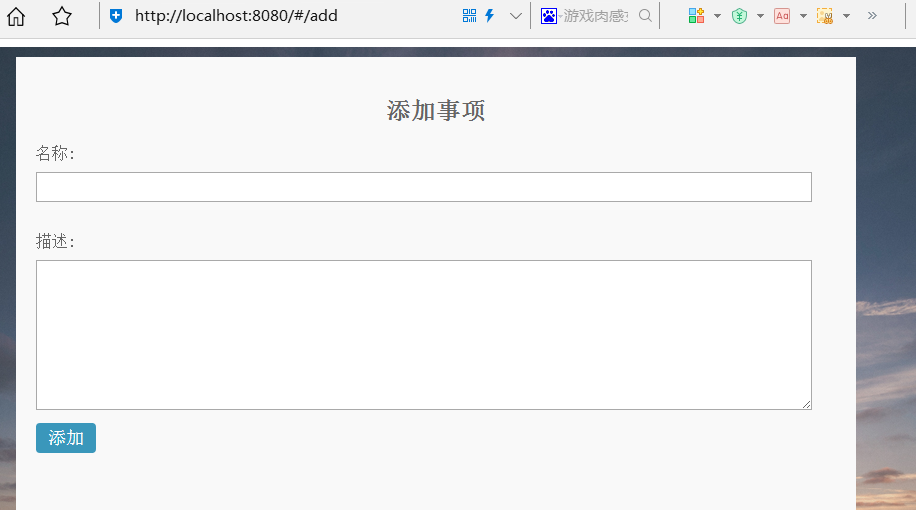
don't talk to me ,show me the code
<template>

  <div class="add">

    <h2>添加事项</h2>

    <div class="name">

      <label>名称:</label>

      <input type="text" v-model="add.name">

    </div>

    <div class="content">

      <label>描述:</label>

      <textarea v-model="add.content"></textarea>

    </div>

    <button @click="post">添加</button>

    <!-- <router-link v-bind:to="'/'">

        <button @click="post">添加</button>

    </router-link> -->

  </div>

</template>

<script>

export default {

  name: 'add',

  data () {

    return {

      add : {

        name : '',

        content : ''

      }

    }

  },

  methods : {

    post : function(){

      console.log(this.add.name)

      if(this.add.name){

        this.$http.post('https://my-first-vue.firebaseio.com/add.json',this.add)

        .then(function(data){

          console.log(data)

          console.log(this.$router.push({path:'/'}))

          this.add.name = ''

          this.add.content = ''

          this.$router.push({path:'/'})

        })

      }else{

        alert('你没有填写要输入的值')

      }

    }

  }

}

</script>

<!-- Add "scoped" attribute to limit CSS to this component only -->

<style scoped>

.add *{

  box-sizing: border-box;

}

.add{

  max-width: 800px;

  min-height: 700px;

  margin: 0 auto;

  padding: 20px;

  background-color: #f9f9f9;

  color: #666;

}

.name{

  margin: 10px 0 20px 0;

}

h2{

  text-align: center;

}

input,textarea{

  width: 97%;

  height: 30px;

  margin-top: 10px;

  margin-bottom: 10px;

  padding-left: 10px;

}

textarea{

  height: 150px;

}

button{

  border: 0;

  background-color: #3A97BB;

  width: 60px;

  height: 30px;

  border-radius: 4px;

  font-size: 18px;

  color: #fff;

}

</style>
最后当然是显示列表页面咯,主要是显示每个todolist的具体内容~
在列表页面具有删除功能~ ~
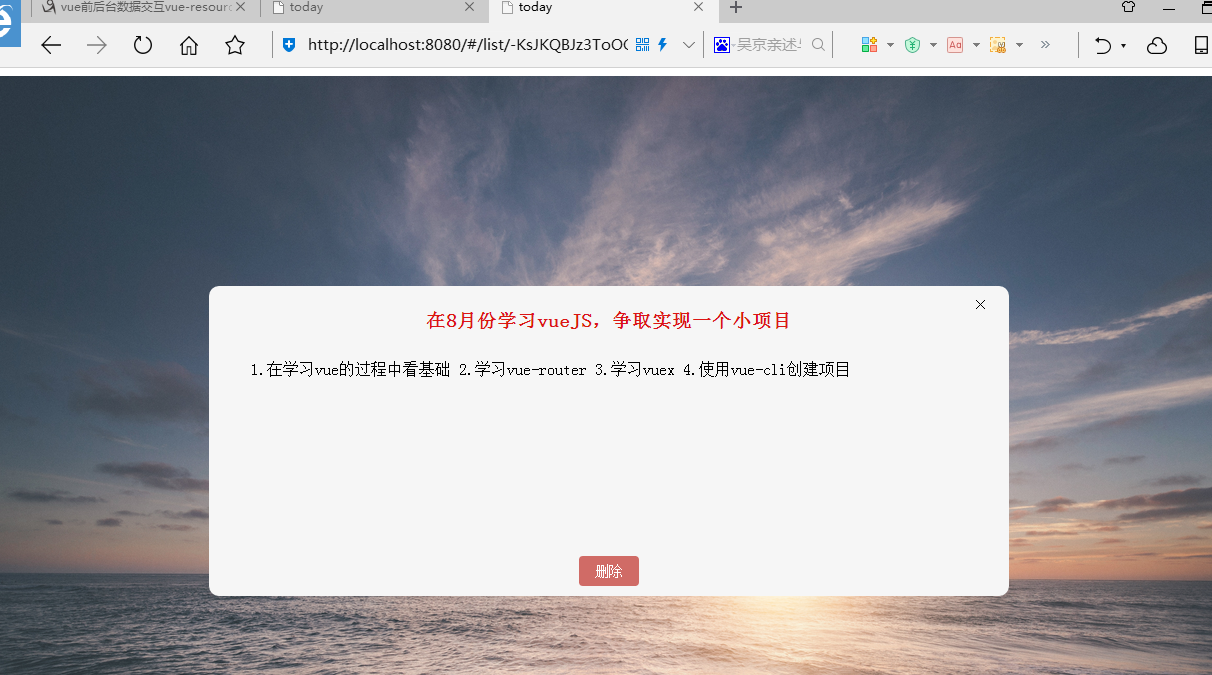
还是上代码吧~~
<template>

  <div class="item">

     <h3>{{list.name}}</h3>

    <p>{{list.content}}</p>

    <span class="delete" @click.prevent="closeList">×</span>

    <button @click.prevent="deleteList">删除</button>

  </div>

</template>

<script>

export default {

  name: 'list',

  data(){

      return{

        id:this.$route.params.id,

        list:{}

      }

    },

    methods : {

      deleteList : function(){

        this.$http.delete('https://my-first-vue.firebaseio.com/add/' + this.id + ".json")

        .then((data) => {

          console.log(data)

          this.$router.push({path:'/'})

        })

      },

      closeList : function(){

        this.$router.push({path:'/'})

      }

    },

    created(){

      this.$http.get('https://my-first-vue.firebaseio.com/add/' + this.id + ".json")

        .then(function(data){

          console.log(data);

          return data.json();

          // this.blog = data.body;

        })

        .then(function(data){

          this.list = data

          console.log(this.id)

          console.log(data.name)

        })

    }

  }

</script>

<!-- Add "scoped" attribute to limit CSS to this component only -->

<style scoped>

.item{

  position: relative;

  margin: 200px auto;

  max-width: 800px;

  min-height: 300px;

  background-color: #f6f6f6;

  padding: 5px 0;

  border-radius: 10px;

}

.delete{

  position: absolute;

  display: block;

  top: 10px;

  right: 20px;

  cursor: pointer;

}

.delete:hover{

  background-color: rgba(0,0,0,.3);

}

h3{

  text-align: center;

  color: #DC1515;

}

p{

  padding: 10px;

  text-indent: 2em;

}

button{

  display: block;

  position: absolute;

  width: 60px;

  height: 30px;

  bottom: 10px;

  left: 50%;

  margin-left: -30px;

  border : 0;

  background-color: #D06B66;

  border-radius: 4px;

  font-size: 14px;

  color: #fff;

}

button:hover{

  background-color: red;

}

</style>
这个小项目一共分为三个页面,数据库是基于firebase(谷歌的产品,需要翻墙才能连接)。
代码在这:https://github.com/BENcorry/TODO/
注 : 因为数据库需要翻墙,所以想要拿到数据请自行准备~
由于LZ也只是一个刚毕业了两个月的小菜鸟,工作上也没用到关于Vue的知识(俺们用的是knockoutJS =。=),所以可能会存在一些问题,望指正~
基于vue 、vue-router 、firebase的todolist小项目的更多相关文章
- express+mongoDB(mLab)做一个todolist小项目
这是在网课上学习的,先建立一个express-todolist文件夹作为项目跟目录 另外,我们直接把项目上用到的css文件和js文件下载下来放在项目里 这里直接贴出来 先建立一个public文件夹,放 ...
- vue小项目---管理系统
在上一篇文章中我们已经学习了vue的基本语法,常用属性,了解了vue的基本使用,现在让我们用vue配合Bootstrap来完成一个小项目. 首先导入Bootstap文件. <link rel=& ...
- 一个vue练手的小项目
编程路上的菜鸟一枚 : 最近接触了vue 然后写了一个练手的项目 使用vue-cli脚手架来搭建了的项目 技术: vue2 + vue-router + ES6 + axios 框架有 mint- ...
- Vue.js基础篇实战--一个ToDoList小应用
距离开始学Vue已经过去一个多月了,总想把学到的东西柔和在一起,做点东西出来,于是有了这个Todolist小应用. 使用vuex 纯粹基础,没有用到web pack,vuex,npm,下次把它改造一下 ...
- Vue编写的todolist小例子
Vue编写的todolist小例子 本篇博客主要包含一个内容: 1.第一个内容:使用Vue编写todolist例子,包含的主要知识是v-model,v-for,el表达式,以及Vue中使用method ...
- 基于 Webpack & Vue & Vue-Router 的 SPA 初体验
基于 Webpack & Vue & Vue-Router 的 SPA 初体验 本文来自于腾讯bugly开发者社区,非经作者同意,请勿转载,原文地址:http://dev.qq.com ...
- Vue小项目二手书商城:(一)准备工作、组件和路由
本项目基于vue2.5.2,与低版本部分不同之处会在(五)参考资料中提出 完整程序:https://github.com/M-M-Monica/bukesi 实现内容: 资源准备(mock数据) 组件 ...
- Vue + WebApi 小项目:构造自己的在线 Markdown 笔记本应用
Vue + WebApi 小项目:构造自己的在线 Markdown 笔记本应用 目录 概要 知识点 完整示例图 代码与资源文件 流程步骤 概要 基于 MVP 最小可行性产品设计理念,我们先完成一个可以 ...
- 一个 Vue & Node 的全栈小项目
约学 - 可以寻找一起自习的小伙伴的Web APP 一个基于 Vue & Node 的移动端全栈小项目 在线演示(请使用移动端查看效果) 源码地址: https://github.com/G- ...
随机推荐
- jenkins centos slave起不来报错The SSH key presented by the remote host does not match the key saved in the Known Hosts file against this host. Connections to this host will be denied until the two keys mat
场景:我的centos-204是一台centos的机器,本来用https://www.cnblogs.com/zndxall/p/8297356.html 的centos slave方式搭建ok的,一 ...
- 在C#中,Windows Console控制台 设置控制台标题、禁用关闭按钮、关闭快速编辑模式、插入模式
设置控制台标题 禁用关闭按钮 关闭快速编辑模式 关闭插入模式 设置控制台标题.禁用关闭按钮 #region 设置控制台标题 禁用关闭按钮 [DllImport("user32.dll&quo ...
- 与图论的邂逅03:Lengauer-Tarjan
回想一下,当我们在肝无向图连通性时,我们会遇到一个神奇的点——它叫割点.假设现在有一个无向图,它有一个割点,也就是说把割点删了之后图会分成两个联通块A,B.设点u∈A,v∈B,在原图中他们能够互相到达 ...
- 【Maven Jenkins】No resource to compile 还有多少坑要踩。。。LongTimeNoSee
[INFO] --- maven-compiler-plugin:3.1:compile (default-compile) @ toptown-webservice-vcrs ---[INFO] N ...
- python安装pip的步骤记录
因为重新装了系统,所以python所有的环境都要重新走一遍. 首先去python官网下载python最新版本.如果python没有自动加入环境变量的话就需要你自己手动加入.这个一般在安装python的 ...
- idea用到的快捷键
之前一直用的eclipse,早就听说idea更智能,更便捷,于是,下载了idea,然后再破解,现在就慢慢抛弃eclipse,平时就用idea进行编码. idea的快捷键与eclipse还是有较大不同, ...
- office全系列激活脚本-改良版.cmd
@ECHO OFFTITLE office 全版本系统激活@echo offfor /l %%a in (8,1,16) do (for /f "tokens=*" %%i in ...
- Unity 让物体朝摄像机观察方向移动,已摇杆方向转向
using System.Collections;using System.Collections.Generic;using UnityEngine; [RequireComponent(typeo ...
- JQuery选择器,动画,事件和DOM操作
JQuery是由JS封装的一些方法,供我们调用,可以快速的实现某些JS功能,实际是JS编写的方法包 将JQuery文件放到JS文件夹下,然后引用到<head></head>中 ...
- go 语言
go语言(或 Golang)是Google在 2007 年开发的一种开源编程语言,于2009年11月开源,2012年发布go稳定版 go是非常年轻的一门语言,它的主要目标是“兼具Python 等动态语 ...