
使用PowerDesigner 15进行逆向工程生成数据库图表时,列的注释问题
上一章讲了对数据库进行逆向工程生成图表操作,可能会遇到无法生成注释的问题:
一、解决PowerDesigner逆向工程没有列注释
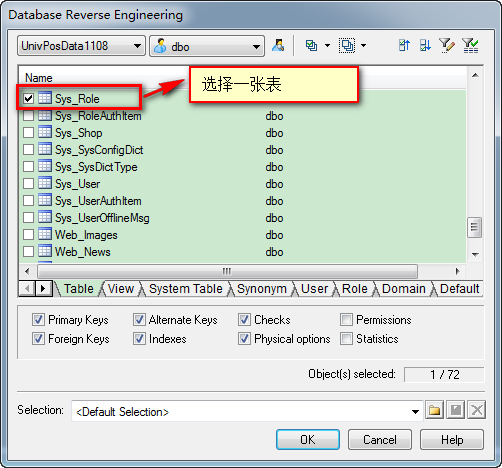
1、打开PowerDesigner 15,选择菜单:File→Reverse Engineer→Database 对数据库进行逆向工程生成PDM图表,选择一张表生成:
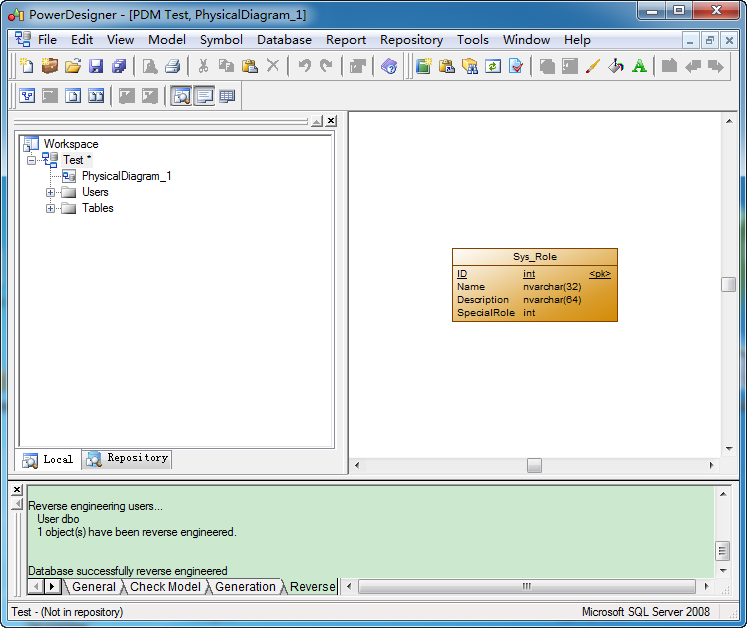
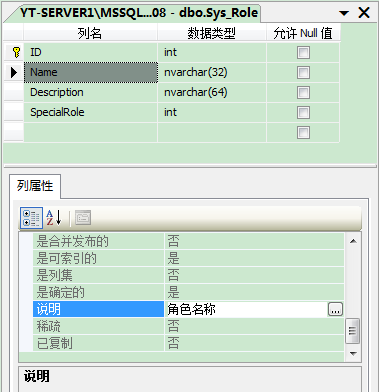
生成后双击图表,打开表属性,选择Columns选项,可以看到注释却是空的,而数据库里的表是有注释的

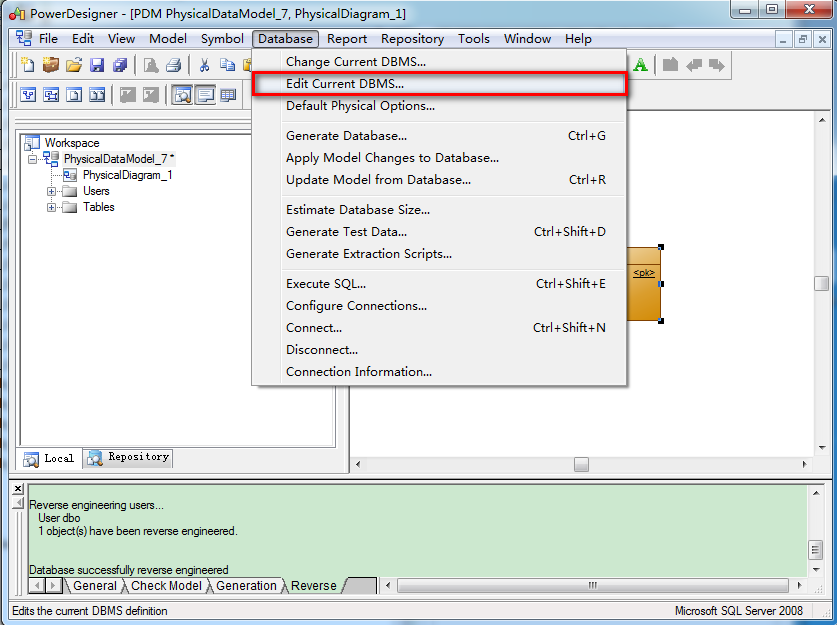
2、选择菜单:Database→Edit Current DBMS,弹出DBMS Properties对话框,选择Script\Objects\Column\SqlListQuery
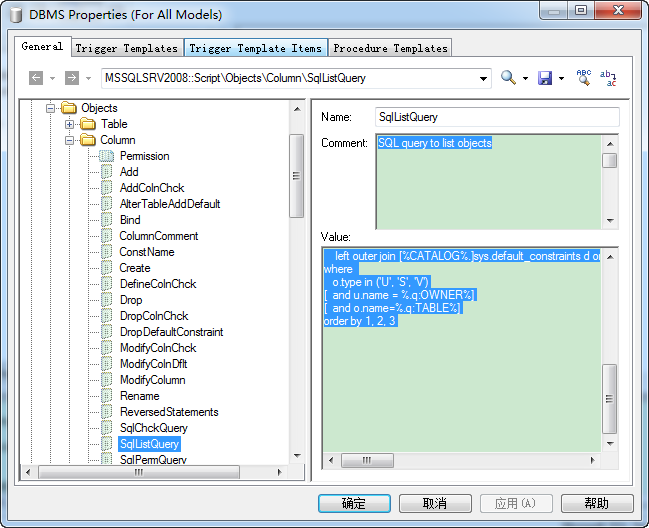
3、可以看到其Value为:
{OWNER, TABLE, S, COLUMN, DTTPCODE, LENGTH, SIZE, PREC, COMPUTE, NOTNULL, IDENTITY, DOMAIN, DEFAULT, ExtIdentitySeedInc, COMMENT, ExtCollation, ExtIdtNotForReplication, ExtDeftConstName, Sparse, FileStream, ExtRowGuidCol}

select

    u.name,

    o.name,

    c.column_id,

    c.name,

    case when c.system_type_id in (165, 167, 231) and c.max_length = -1 then t.name + '(Max)' else t.name end,

    c.precision,

    case (c.max_length) when -1 then 0 else case when c.system_type_id in (99, 231, 239) then (c.max_length/2) else (c.max_length) end end as colnA,

    c.scale,

    case(c.is_computed) when 1 then convert(varchar(8000), (select z.definition from [%CATALOG%.]sys.computed_columns z where z.object_id = c.object_id and z.column_id = c.column_id)) else '' end as colnB,

    case(c.is_nullable) when 1 then 'NULL' else 'NOTNULL' end,

    case(c.is_identity) when 1 then 'identity' else '' end,

    case when(c.user_type_id <> c.system_type_id) then (select d.name from [%CATALOG%.]sys.types d where d.user_type_id = c.user_type_id) else '' end as colnC,

    convert(varchar(8000), d.definition),

    case (c.is_identity) when 1 then convert(varchar, i.seed_value) + ', ' + convert(varchar, i.increment_value) else '' end as colnD,

    (select convert(varchar(8000), value) from ::fn_listextendedproperty(NULL, 'user', u.name, 'table', o.name, 'column', c.name) where name = 'MS_Description') as colnE,

    c.collation_name,

    case (i.is_not_for_replication) when 1 then 'true' else 'false' end,

    d.name,

    case(c.is_sparse) when 1 then 'true' else 'false' end,

    case(c.is_filestream) when 1 then 'true' else 'false' end,

    case(c.is_rowguidcol) when 1 then 'true' else 'false' end

from

    [%CATALOG%.]sys.columns      c

    join [%CATALOG%.]sys.objects o on (o.object_id = c.object_id)

    join [%CATALOG%.]sys.schemas u on (u.schema_id = o.schema_id)

    join [%CATALOG%.]sys.types   t on (t.user_type_id = c.system_type_id)

    left outer join [%CATALOG%.]sys.identity_columns i on (i.object_id = c.object_id and i.column_id = c.column_id)

    left outer join [%CATALOG%.]sys.default_constraints d on (d.object_id = c.default_object_id)

where

   o.type in ('U', 'S', 'V')

[  and u.name = %.q:OWNER%]

[  and o.name=%.q:TABLE%]

order by 1, 2, 3
原脚本
将其修改一下就可以了。
{OWNER, TABLE, S, COLUMN, DTTPCODE, LENGTH, SIZE, PREC, COMPUTE, NOTNULL, IDENTITY, DOMAIN, DEFAULT, ExtIdentitySeedInc,COMMENT, ExtCollation, ExtIdtNotForReplication, ExtDeftConstName, Sparse, FileStream, ExtRowGuidCol}

select

    u.name,

    o.name,

    c.column_id,

    c.name,

    case when c.system_type_id in (165, 167, 231) and c.max_length = -1 then t.name + '(Max)' else t.name end,

    c.precision,

    case (c.max_length) when -1 then 0 else case when c.system_type_id in (99, 231, 239) then (c.max_length/2) else (c.max_length) end end as colnA,

    c.scale,

    case(c.is_computed) when 1 then convert(varchar(8000), (select z.definition from [%CATALOG%.]sys.computed_columns z where z.object_id = c.object_id and z.column_id = c.column_id)) else '' end as colnB,

    case(c.is_nullable) when 1 then 'NULL' else 'NOTNULL' end,

    case(c.is_identity) when 1 then 'identity' else '' end,

    case when(c.user_type_id <> c.system_type_id) then (select d.name from [%CATALOG%.]sys.types d where d.user_type_id = c.user_type_id) else '' end as colnC,

    convert(varchar(8000), d.definition),

    case (c.is_identity) when 1 then convert(varchar, i.seed_value) + ', ' + convert(varchar, i.increment_value) else '' end as colnD,

    convert(varchar(8000), e.value) as colnE,

    c.collation_name,

    case (i.is_not_for_replication) when 1 then 'true' else 'false' end,

    d.name,

    case(c.is_sparse) when 1 then 'true' else 'false' end,

    case(c.is_filestream) when 1 then 'true' else 'false' end,

    case(c.is_rowguidcol) when 1 then 'true' else 'false' end

from

    [%CATALOG%.]sys.columns      c

    join [%CATALOG%.]sys.objects o on (o.object_id = c.object_id)

    join [%CATALOG%.]sys.schemas u on (u.schema_id = o.schema_id)

    join [%CATALOG%.]sys.types   t on (t.user_type_id = c.system_type_id)

    left outer join [%CATALOG%.]sys.identity_columns i on (i.object_id = c.object_id and i.column_id = c.column_id)

    left outer join [%CATALOG%.]sys.default_constraints d on (d.object_id = c.default_object_id)

    left outer join [%CATALOG%.]sys.extended_properties e on (e.class=u.schema_id and e.major_id=o.object_id and e.minor_id = c.column_id and e.name=N'MS_Description')

where

   o.type in ('U', 'S', 'V')

[  and u.name = %.q:OWNER%]

[  and o.name=%.q:TABLE%]

order by 1, 2, 3
新脚本

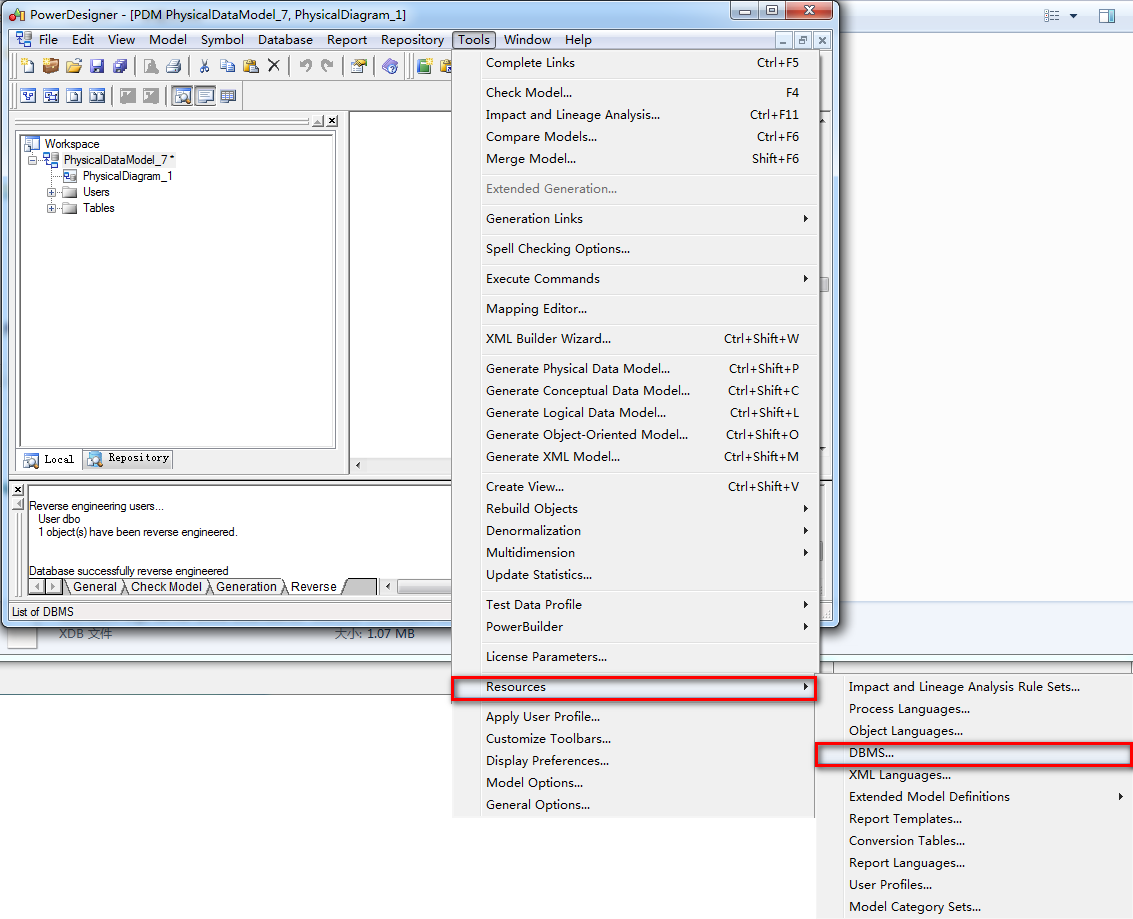
4、这里我为了以后还可以使用原先的脚本DBMS(也就是自带的Microsoft SQL Server 2008),我新建一个自定义的“My Microsoft SQL Server 2008”:选择菜单,Tools→Resources→DBMS,弹出List Of DBMS对话框,选择新建,弹出新建对话框,填写名称为“My Microsoft SQL Server 2008”,选择“Microsoft SQL Server 2008”从此复制,Ok,保存。


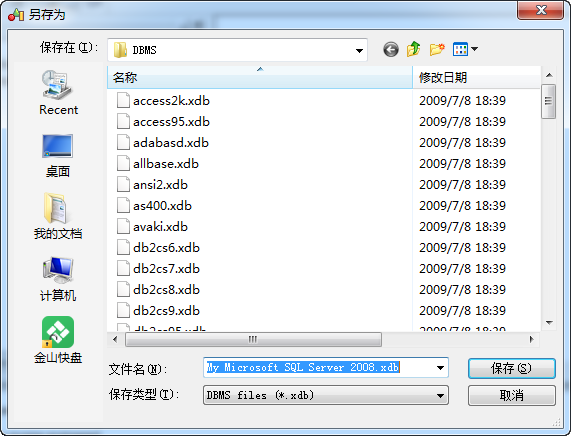
5、保存后,弹出DBMS Properties对话框,选择Script\Objects\Column\SqlListQuery,修改其Value就可以了,Value的值就是上面的“新脚本”的值。
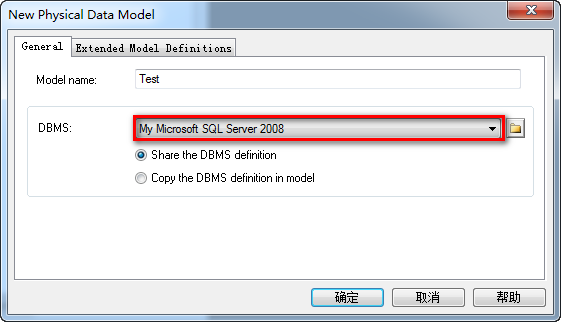
6、选择File→Reverse Engineer→Database 对数据库进行逆向工程,DBMS选择刚才新建的“My Microsoft SQL Server 2008”,这样生成的表就有注释了。
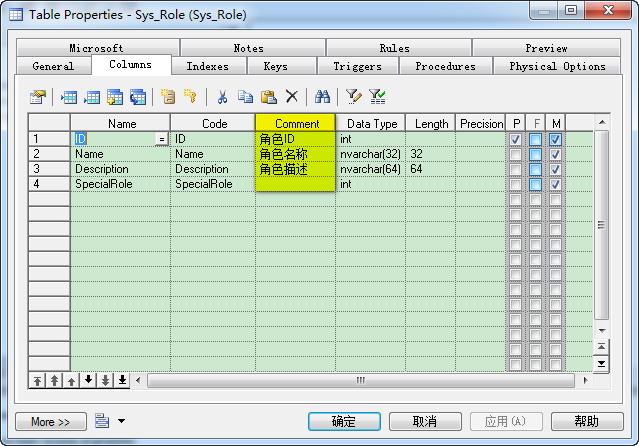
二、让列的Name自动设为为Comment的中文意思:
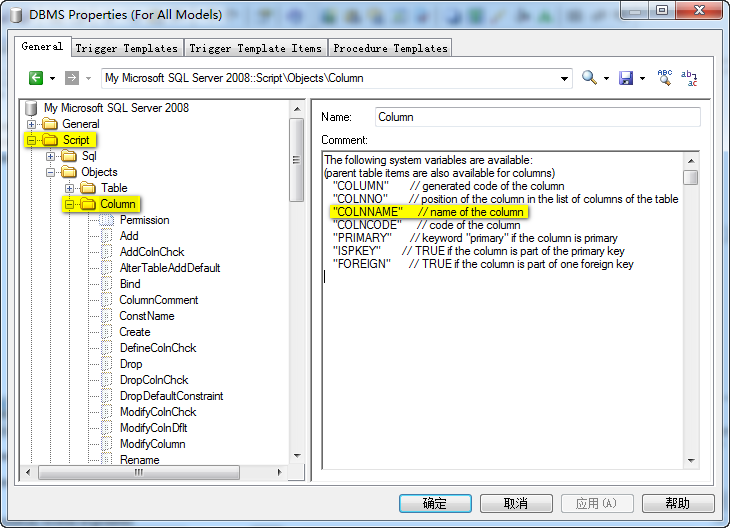
1、在刚才新建的“My Microsoft SQL Server 2008”的Script\Objects\Column中可以看到这么一段:
The following system variables are available:

(parent table items are also available for columns)

   "COLUMN"       // generated code of the column

   "COLNNO"       // position of the column in the list of columns of the table

   "COLNNAME"     // name of the column

   "COLNCODE"     // code of the column

   "PRIMARY"      // keyword "primary" if the column is primary

   "ISPKEY"       // TRUE if the column is part of the primary key

   "FOREIGN"      // TRUE if the column is part of one foreign key
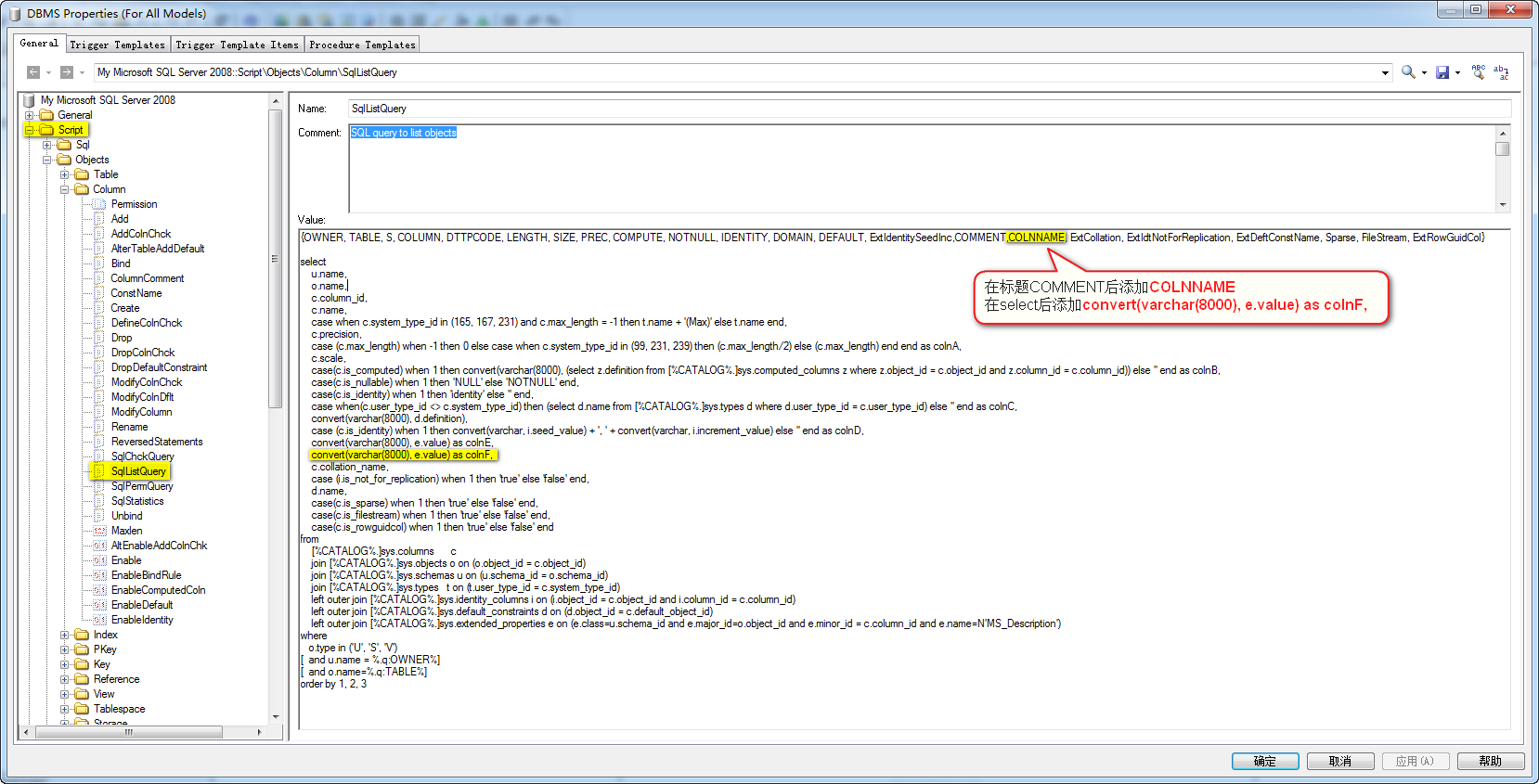
2、将COLNNAME添加到Script\Objects\Column\SqlListQuery的Value中,{OWNER, TABLE, S, COLUMN, DTTPCODE, LENGTH, SIZE, PREC, COMPUTE, NOTNULL, IDENTITY, DOMAIN, DEFAULT, ExtIdentitySeedInc,COMMENT,COLNNAME, ExtCollation, ExtIdtNotForReplication, ExtDeftConstName, Sparse, FileStream, ExtRowGuidCol},再把Comment的值给它
现在生成效果就很好了:
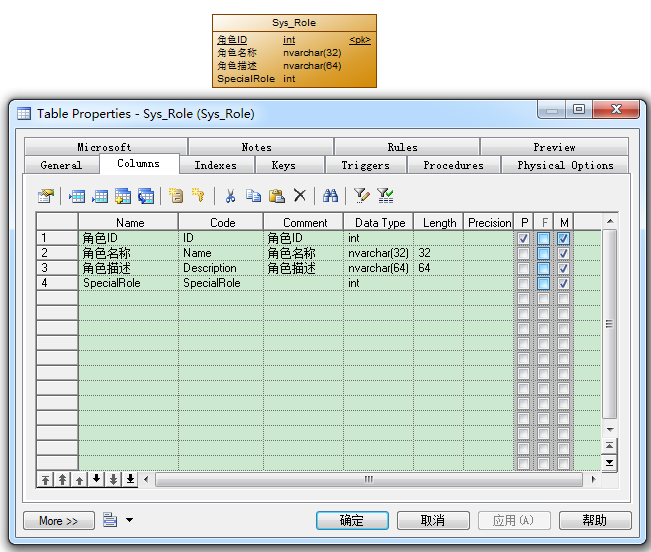
3、也可以不用这种方式来完成Name自动设为Comment,可以利用vbs脚本完成
'******************************************************************************

'* File:     comment2name.vbs

'* Purpose:  在PowerDesigner的PDM图形窗口中显示数据列的中文注释

'* Title:    将字段的comment赋值到字段的name中

'* Category: 打开物理模型,运行本脚本(Ctrl+Shift+X)

'* Copyright:foxzz@163.com,2006/07/25 .

'* Author:   foxzz

'* Created:

'* Modified:

'* Version:  1.0

'* Comment:  遍历物理模型中的所有表,将字段的comment赋值到字段的name中。

'            在将name置换为comment过程中,需要考虑的问题

'            1、name必须唯一,而comment有可能不唯一。

'               处理办法是如果字段的comment重复,则字段的name=comment+1、2、3...

'            2、comment值有可能为空,这种情况下对字段的name不处理。

'               针对oracle数据库,将comment on column 字段名称 is '';添加到C:/pdcomment.txt文件中。

'               在补充comment完毕后,便于在数据库中执行

'******************************************************************************

Option Explicit

ValidationMode = True

InteractiveMode = im_Batch

Dim system, file

Set system = CreateObject("Scripting.FileSystemObject")

Dim ForReading, ForWriting, ForAppending   '打开文件选项

ForReading   =  ' 只读

ForWriting   =  ' 可写

ForAppending =  ' 可写并追加

'打开文本文件

Set file = system.OpenTextFile("C:/pdcomment.txt", ForWriting, true)

'判断当前model是否物理数据模型

Dim mdl

Set mdl = ActiveModel

If (mdl Is Nothing) Then

   MsgBox "处理对象无模型"

ElseIf Not mdl.IsKindOf(PdPDM.cls_Model) Then

   MsgBox "当前模型不是物理数据模型"

Else

   ProcessFolder mdl,file

End If

file.Close

'******************************************************************************

Private sub ProcessFolder(folder,file)

Dim i,j,k

i=:j=:k=

'列数组,记录字段里不重复的comment

Dim ColumnComment()

Dim ColumnCommentNumber()

ReDim Preserve ColumnComment(i)

ReDim Preserve ColumnCommentNumber(i)

Dim tbl   '当前表

Dim col   '当前字段

dim curComment  '当前字段comment

'处理模型中的表

for each tbl in folder.tables

    if not tbl.isShortcut then

       if len(trim(tbl.comment))<> then

          '可以在这里显示table的comment

          'tbl.name = tbl.name+"("+trim(tbl.comment)+")"

       end if

       '处理表中的列

       for each col in tbl.columns

           k =

           curComment = trim(col.comment)

           if len(curComment)<> then

              '遍历相异的comment数组

              for j =  to i

                  if ColumnComment(j) = curComment then

                     '如果找到相同的comment,则相关计数器加1

                     ColumnCommentNumber(j) = ColumnCommentNumber(j) +

                     k = j

                  end if

              Next

              '如果没有相同的comment,则k=0,此时ColumnCommentNumber(0)也为0

              '否则ColumnCommentNumber(k)不为0

              if ColumnCommentNumber(k) <>  then

                 col.name = curComment & cstr(ColumnCommentNumber(k))

              else

                 col.name  = curComment

                 'ColumnComment(0)、ColumnCommentNumber(0)永远为空

                 '将相异的comment记录添加到数组中

                 i = i +

                 ReDim Preserve ColumnComment(i)

                 ReDim Preserve ColumnCommentNumber(i)

                 ColumnComment(i) = curComment

                 ColumnCommentNumber(i) =

              end if

           else

              '写入文件中

              file.WriteLine "comment on column "+ tbl.name+"."+col.code+" is '';"

           end if

       next

    end if

    '由于不同表的name允许相同,因此此时重新初始化。

    '因为ColumnComment(0)、ColumnCommentNumber(0)为空,可以保留

    ReDim Preserve ColumnComment()

    ReDim Preserve ColumnCommentNumber()

    i=:j=:k=

next

Dim view  '当前视图

for each view in folder.Views

    if not view.isShortcut then

       '可以在这里显示view的comment

       'view.name =  view.comment

    end if

next

'对子目录进行递归

Dim subpackage 'folder

For Each subpackage In folder.Packages

    if not subpackage.IsShortcut then

       ProcessFolder subpackage , file

    end if

Next

end sub
Comment2Name
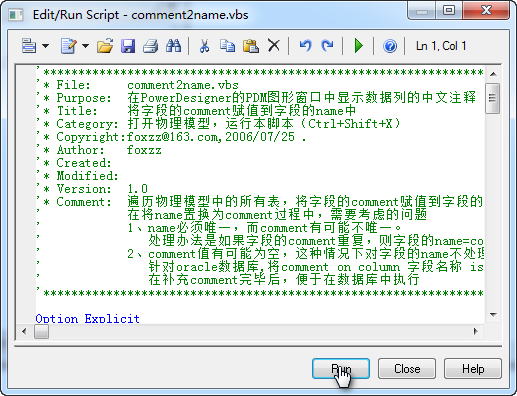
选择菜单:Tools→Execute Commands→Edit/Run Script,Run运行vbs脚本即可。

4、将Name的值设给Comment
'把pd中那么name想自动添加到comment里面

'如果comment为空,则填入name;如果不为空,则保留不变,这样可以避免已有的注释丢失.

Option Explicit

ValidationMode = True

InteractiveMode = im_Batch

Dim mdl ' the current model

' get the current active model

Set mdl = ActiveModel

If (mdl Is Nothing) Then

 MsgBox "There is no current Model "

ElseIf Not mdl.IsKindOf(PdPDM.cls_Model) Then

 MsgBox "The current model is not an Physical Data model. "

Else

 ProcessFolder mdl

End If

' This routine copy name into comment for each table, each column and each view

' of the current folder

Private sub ProcessFolder(folder)

 Dim Tab 'running   table

 for each Tab in folder.tables

  if not tab.isShortcut then

    if trim(tab.comment)="" then '如果有表的注释,则不改变它.如果没有表注释.则把name添加到注释里面.

       tab.comment = tab.name

    end if

 Dim col ' running column

 for each col in tab.columns

  if trim(col.comment)="" then '如果col的comment为空,则填入name,如果已有注释,则不添加;这样可以避免已有注释丢失.

   col.comment= col.name

  end if

 next

  end if

 next

 Dim view 'running view

 for each view in folder.Views

  if not view.isShortcut and trim(view.comment)=""  then

 view.comment = view.name

  end if

 next

 ' go into the sub-packages

 Dim f ' running folder

 For Each f In folder.Packages

  if not f.IsShortcut then

 ProcessFolder f

  end if

 Next

end sub
Name2Comment
使用PowerDesigner 15进行逆向工程生成数据库图表时,列的注释问题的更多相关文章
- PowerDesigner 15进行逆向工程生成数据库图表时,注释的comment的生成,解决PowerDesigner逆向工程没有列注释
使用PowerDesigner默认配置逆向工程是没有注释(name列为英文,comment列是空的),这样的不方便查看字段具体是什么意义,将注释一同导出,方便查看字段具体的意义,如下图 注释列导出步骤 ...
- 使用SchemaSpy逆向工程生成数据库依赖关系使用SchemaSpy工具可以快速的从数据库中得到
使用SchemaSpy逆向工程生成数据库依赖关系 使用SchemaSpy工具可以快速的从数据库中得到表的依赖关系,同时生成一个生动的“表图”结合的报告.方便快速了解数据库中的数据库对象间关系,类 ...
- Mybatis Generator生成数据库自带的中文注释
1.相关jar包 <!-- mybatis生成 jar包 --> <dependency> <groupId>org.mybatis.generator</g ...
- powerdesigner 15.1 逆向工程 sqlserver2008 、sqlserver2005 带注释
第一种方法:在第一个网址里面的代码可以直接赋值到对应位置即可 http://wjqe.blog.163.com/blog/static/19938452011612536439/ 第二种方法:可塑性较 ...
- EntityFramework Core 2.x (ef core) 在迁移中自动生成数据库表和列说明
在项目开发中有没有用过拼音首字母做列名或者接手这样的项目? 看见xmspsqb(项目审批申请表)这种表名时是否有一种无法抑制的想肛了取名的老兄的冲动? 更坑爹的是这种数据库没有文档(或者文档老旧不堪早 ...
- Django 生成数据库表时的报错TypeError: __init__() missing 1 required positional argument: 'on_delete'
原因及解决办法: https://www.cnblogs.com/phyger/p/8035253.html
- idea 中使用Mybatis Generator逆向工程生成代码
通过MAVEN完成 Mybatis 逆向工程 1. POM文件中添加插件 在 pom 文件的build 标签中 添加 plugin 插件和 数据库连接 jdbc 的依赖. <build> ...
- 使用PowerDesign15反向生成数据库
在Pd15中建立物理模型后,可以通过反向工程直接生成数据库的表结构.主要有以下几个步骤: 1. 首先设置一下数据库配置,选择对应要使用的数据库(此处选择Sql Server 2008 R ...
- FusionCharts生成Flash图表常见问题FAQ
本文主要汇总了FusionCharts生成Flash图表时的一些常见问题(FAQ)以及解决方法/调试方法,欢迎交流! 问题描述:利用FusionCharts创建Flash图表时,能否直接从数组或rec ...
随机推荐
- vue 安装及使用
一, vue.js 2.0 1, cnpm install vue-cli -g 全局安装 2, 运行vue查看安装是否成功(创建vue-cli目录: vue init webpack demo) ...
- 移动端滑动效果 swiper 4.0.7
<!DOCTYPE html><html lang="en"><head> <meta charset="utf-8" ...
- [LeetCode] Minimize Max Distance to Gas Station 最小化去加油站的最大距离
On a horizontal number line, we have gas stations at positions stations[0], stations[1], ..., statio ...
- java实现文章敏感词过滤检测
SensitivewordFilter.java import java.util.HashSet; import java.util.Iterator; import java.util.Map; ...
- tomcat端口冲突,关闭端口方法
CMD打开控制台 输入:netstat -ano | findstr 8080 //最后一行的进程号PID 输入:taskkill /F /PID 所要关闭的PID号 如图所示 之后会补充
- python 中的类
1.1 类里面包括:类的属性.方法 OO的特征(Object Oriented) 封装:信息隐蔽技术 继承:继承是子类自动共享父类之间数据和方法的机制 >>> class MyCla ...
- qmake: could not exec '/usr/lib/x86_64-linux-gnu/qt4/bin/qmake': No such file or directory
执行 qmake -v 出现错误:qmake: could not exec ‘/usr/lib/x86_64-linux-gnu/qt4/bin/qmake’: No such file or di ...
- 1.7Oob封装 继承 访问修饰符 静态和构造方法的执行顺序
1:访问修饰符 private 同类中 默认 同类 同包 protect 同类 同包 子类 public 同类 ...
- Android的SQlite的使用
Android系统集成了一个轻量级的数据库:SQlite.SQlite不像Oracle.MySQl数据库那样需要安装.启动服务器进程,SQLite数据库只是一个文件 实例1:向数据库里插入数据 主界面 ...
- linux软件安装方式
先插句题外话,快捷键 Ctrl+s 的功能是停止输入,Ctrl+q 恢复输入; 正题,在linux的应用软件安装有三种: 1,tar包 2,rpm包 3,dpkg包 以下介绍三种包的安装和卸载方式 1 ...