
KendoUI 自定义CheckBoxList
不多说直接上代码
CSS完整代码:
     .e-selectboxs-container {

         display: table;

     }

     .e-selectbox {

         min-width: 100px;

         height: 30px;

         margin-top: 5px;

         margin-right: 10px;

         margin-bottom: 5px;

         display: inline-block;

     }

         .e-selectbox input.e-selectbox-input {

             display: none;

             margin: 3px 3px 3px 4px;

             box-sizing: border-box;

             padding:;

         }

             .e-selectbox input.e-selectbox-input + label.e-selectbox-label {

                 position: relative;

                 width: 100%;

                 height: 100%;

                 background-color: #9c9c9c;

                 border-radius: 5px;

                 color: #fdfdfd;

                 text-align: center;

                 cursor: pointer;

                 font-weight: normal;

                 font-size: 14px;

                 line-height: 30px;

             }

             .e-selectbox input.e-selectbox-input:hover + label.e-selectbox-label-Level1 {

                 background-color: #FF6666 !important;

             }

            .e-selectbox input.e-selectbox-input:checked + label.e-selectbox-label-Level1 {

                 background-color:#FF6666 !important;

             }

             .e-selectbox input.e-selectbox-input:hover + label.e-selectbox-label-Level2 {

                 background-color: #FF9933 !important;

             }

            .e-selectbox input.e-selectbox-input:checked + label.e-selectbox-label-Level2 {

                 background-color:#FF9933 !important;

             }

             .e-selectbox input.e-selectbox-input:hover + label.e-selectbox-label-Level3 {

                 background-color: #FFCC33 !important;

             }

            .e-selectbox input.e-selectbox-input:checked + label.e-selectbox-label-Level3 {

                 background-color:#FFCC33 !important;

             }

            .e-selectbox input.e-selectbox-input:hover + label.e-selectbox-label {

                 background-color: #607ecb;

             }

             .e-selectbox input.e-selectbox-input:checked + label.e-selectbox-label {

                 background-color: #607ecb;

             }

         .e-selectbox label.e-selectbox-label::before {

             content: attr(data-content);

             display: inline-block;

         }

         /*.e-selectbox input.e-selectbox-input:checked + label {

             background-color: #607ecb;

         }*/

     .msglevelitems .e-selectbox label.e-selectbox-label {

         min-width: 240px;

     }

     .e-selectbox .top-left-symbol {

         display: inline-block !important;

         position: absolute;

         top: 0px;

         left: 0px;

         float: left;

         margin-bottom: 0px;

         z-index:;

         font-size: 17px;

         min-width: 10px;

         height: 30px;

         background-color: #9c9c9c;

         border-top-left-radius: 5px;

         border-bottom-left-radius: 5px;

     }

     .e-selectbox .top-right-symbol {

         display: inline-block !important;

         border-top: 30px solid #777;

         border-left: 30px solid rgba(255,255,255,0);

         position: absolute;

         top: 0px;

         right: 0px;

         float: right;

         margin-bottom: -40px;

         z-index:;

     }

     .e-selectbox .bottom-right-symbol {

         display: inline-block !important;

         border-bottom: 30px solid #777;

         border-left: 30px solid rgba(255,255,255,0);

         position: absolute;

         bottom: 0px;

         right: 0px;

         float: right;

         z-index:;

     }

     .e-selectbox input.e-selectbox-input:checked + label.e-selectbox-label .top-right-symbol {

         border-top: 21px solid #5246e2 !important;

     }

     .e-selectbox input.e-selectbox-input:checked + label.e-selectbox-label .bottom-right-symbol {

         border-bottom: 21px solid #5246e2 !important;

     }

     .e-selectbox input.e-selectbox-input:checked + label.e-selectbox-label .top-left-symbol {

         background-color: #607ecb !important;

     }

     .e-selectbox input.e-selectbox-input:hover + label.e-selectbox-label .top-right-symbol {

         border-top: 21px solid #5246e2 !important;

     }

     .e-selectbox input.e-selectbox-input:hover + label.e-selectbox-label .bottom-right-symbol {

         border-bottom: 21px solid #5246e2 !important;

     }

     .e-selectbox input.e-selectbox-input:hover + label.e-selectbox-label .top-left-symbol {

         background-color: #607ecb !important;

     }

     .e-selectbox .top-right-symbol-content :hover {

         font-size: 20px;

     }

     .bottom-right-symbol[hasselect="1"] {

         border-bottom: 21px solid #5246e2 !important;

     }

         .bottom-right-symbol[hasselect="1"] + span.top-right-symbol {

             border-top: 21px solid #5246e2 !important;

         }

             .bottom-right-symbol[hasselect="1"] + span.top-right-symbol + span.top-left-symbol {

                 background-color: #5246e2 !important;

             }

     /*.e-selectbox input.e-selectbox-input:hover + label.e-selectbox-label .bottom-right-symbol {

         border-bottom: 21px solid #5246e2 !important;

     }*/

     .e-selectbox .bottom-right-symbol-content :hover {

         font-size: 20px;

     }

     .e-selectbox .top-right-symbol-content {

         display: inline-block !important;

         width: 15px;

         height: 15px;

         position: absolute;

         top: 0px;

         right: 0px;

         float: right;

         margin-top: -8px;

         z-index:;

         font-size: 12px;

         color: #eee;

     }

     .e-selectbox .bottom-right-symbol-content {

         display: inline-block !important;

         width: 15px;

         height: 15px;

         position: absolute;

         bottom: 0px;

         right: 0px;

         float: right;

         z-index:;

         font-size: 12px;

         color: #eee;

         margin-bottom: 6px;

     }
自定义组件JS代码:
 (function () {

     var kendo = window.kendo,

         ui = kendo.ui,

         Widget = ui.Widget,

         CHANGE = "change";

     var ESelectBoxs = Widget.extend({

         init: function (element, options) {

             var that = this;

             kendo.ui.Widget.fn.init.call(that, element, options);

             $(element).addClass('e-selectboxs-container');

             that._dataSource();

             that._userdialogBind();

         },

         options: {

             name: "ESelectBoxs",

             inputType: "checkbox",

             dataTextField: "",

             dataValueField: "",

             selectedFunc: function (datas) {

             },

             selectBoxCss:"",

             boxName:'selectBoxName',

             autoBind: true,

             template: "",

             value: null,

             drawTile: function (container) {

             },

             lableClick: function (dom,data,target) {

             }

         },

         value: function (value) {

             var that = this;

             if (value === undefined) {

                 return that._value;

             }

             that._update(value);

             that._old = that._value;

         },

         refresh: function () {

             var that = this,

                 view = that.dataSource.view();

             that.element.html("");

             $.each(view, function (i, item) {

                 that.element.append(that._drawOrg(item,i));

             })

             ;

         },

         draw: function () {

             var that = this;

         },

         setData: function (data) {

             var that = this;

             that.dataSource = kendo.data.DataSource.create(data);

             that.dataSource.read();

             that.refresh();

         },

         _dataSource: function () {

             var that = this;

             that.dataSource = kendo.data.DataSource.create(that.options.dataSource);

             that.dataSource.bind(CHANGE, function () {

                 that.refresh();

             });

             if (that.options.autoBind) {

                 that.dataSource.fetch();

             }

         },

         _drawOrg: function (item,index) {

             var that = this;

             var container = $('<div class="e-selectbox" data-id="' + (that.options.dataValueField ? item[that.options.dataValueField] : index) +'"></div>');

             container.data("item", item);

             var id = that.options.boxName + ( that.options.dataValueField ? item[that.options.dataValueField] : index);

             var cont = '<input class="e-selectbox-input" type="' + that.options.inputType + '" id="' + id + '" name="' + that.options.boxName + '" />\

                 <label class="e-selectbox-label ' + (typeof(that.options.selectBoxCss)=="function"?that.options.selectBoxCss(item, index) :  that.options.selectBoxCss) + '" for= "' + id + '" data-content= "' + item[that.options.dataTextField] + '"></label>';

             container.html(cont);

             that.options.drawTile(container);

             return container;

         },

         _userdialogBind: function () {

             var that = this;

             $(that.element).on("click", '.e-selectbox', function (e) {

                 var dataitem = $(this).data("item");

                 var domcontainer = $(this);

                 if ($(e.target).hasClass('e-selectbox-label')) {

                     that.options.lableClick(domcontainer, dataitem, e.target);

                 } else if ($(e.target).hasClass('e-selectbox-input')) {

                 }

                 else {

                     e.cancelBubble = true;

                     e.stopPropagation();

                     return false

                 }

             });

         }

     });

     kendo.ui.plugin(ESelectBoxs);

 })(jQuery);
组件使用:
 $(_ViewName + " .msglevel").kendoESelectBoxs({

                         dataSource:d.Data,

                         inputType: "radio",

                         dataTextField: "LevelName",

                         dataValueField: "Level",

                         selectedFunc: function (datas) {

                         },

                         selectBoxCss: function(item,index){

                             switch(item.Level){

                                 case 1:return "e-selectbox-label-Level1";

                                     break;

                                 case 2:return "e-selectbox-label-Level2";

                                     break;

                                 case 3:return "e-selectbox-label-Level3";

                                     break;

                                 case 4:return "";

                                     break;

                             }

                         },

                         boxName: 'msglevel',

                         autoBind: true,

                         template: "",

                         value: null,

                         drawTile: function (container) {

                         },

                         lableClick: function (dom, data, target) {

                             $(_ViewName + ' .msglevelitemsdiv').show();

                             $(_ViewName + " .msglevelitems").kendoESelectBoxs({

                                 dataSource: data.Items,

                                 inputType: "radio",

                                 dataTextField: "EventName",

                                 dataValueField: "ID",

                                 selectedFunc: function (datas) {

                                 },

                                 selectBoxCss: function(item,index){

                                     switch(item.Level){

                                         case 1:return "e-selectbox-label-Level1";

                                             break;

                                         case 2:return "e-selectbox-label-Level2";

                                             break;

                                         case 3:return "e-selectbox-label-Level3";

                                             break;

                                         case 4:return "";

                                             break;

                                     }

                                 },

                                 boxName: 'msglevelitems',

                                 autoBind: true,

                                 template: "",

                                 value: null,

                                 drawTile: function (container) {

                                     var data = $(container).data("item");

                                     $(container).data('Category',data.Category);

                                 },

                                 lableClick: function (dom, data, target) {

                                     $.each(EmergencyEventUserLimit,function(i,val){

                                         var EventData= $('label[data-content='+val.DepartMent+']').parent().data('item');

                                         if(EventData!=null){

                                             EventData.SelcetedCount= 0;

                                             $('label[data-content='+val.DepartMent+']').parent().data('item',EventData);

                                             $('label[data-content='+val.DepartMent+']').parent().find('.bottom-right-symbol').attr("hasselect", 0);

                                             $('label[data-content='+val.DepartMent+']').parent().find('input[name^="Departments"]').prop("checked", false);

                                             $('label[data-content='+val.DepartMent+']').parent().find('.bottom-right-symbol-content').text(EventData.SelcetedCount);

                                             if(val.Event==data.EventName){//当前事件该部门全选中人

                                                 var EventData= $('label[data-content='+val.DepartMent+']').parent().data('item');

                                                 EventData.SelcetedCount= EventData.AllUserCount;

                                                 $('label[data-content='+val.DepartMent+']').parent().data('item',EventData);

                                                 $('label[data-content='+val.DepartMent+']').parent().find('.bottom-right-symbol').attr("hasselect", 1);

                                                 $('label[data-content='+val.DepartMent+']').parent().find('input[name^="Departments"]').prop("checked", true);

                                                 $('label[data-content='+val.DepartMent+']').parent().find('.bottom-right-symbol-content').text(EventData.SelcetedCount);

                                             }}

                                     });

                                     _calcSelectedUser();

                                 }

                             }).data("kendoESelectBoxs");

                             _setMsgTemplate(data.Level);

                             _setCheckedUser(data.Level);

                         }

                     }).data("kendoESelectBoxs");
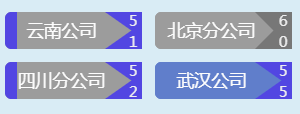
代码实现效果:

KendoUI 自定义CheckBoxList的更多相关文章
- KendoUI 自定义验证:
Html: <label>@LogicNameAttribute.GetLogicName(typeof(Reward).GetProperty("ExtraRewardMone ...
- Yii提供的Htmler助手checkboxList可自定义Checkbox输出格式
foreach($catetags as $cate){ echo Html::checkboxList('category_id','',$cate,['item'=>'customCheck ...
- KendoUI系列:Window
1.基本使用 <link href="@Url.Content("~/Content/kendo/2014.1.318/kendo.common.min.css") ...
- CheckBoxList控件
主要介绍:自定义数据.绑定数据库数据.全选,取消全选. 这种方法是绑定已经给定(自定义)的字段(这种方法是绑定给定的值,就是在编写控件时给Text赋的值): 前台代码: <asp:CheckBo ...
- JAVAEE——struts2_04:自定义拦截器、struts2标签、登陆功能和校验登陆拦截器的实现
一.自定义拦截器 1.架构 2.拦截器创建 //拦截器:第一种创建方式 //拦截器生命周期:随项目的启动而创建,随项目关闭而销毁 public class MyInterceptor implemen ...
- [ SSH框架 ] Struts2框架学习之四(自定义拦截器)
一.Struts2的拦截器 1.1 拦截器概述 拦截器,在AOP( Aspect-Oriented Programming)中用于在某个方法或字段被访问之前,进行拦截然后在之前或之后加入某些操作.拦截 ...
- KendoUi 学习笔记(二) Grid
Kendo.ui.Grid Kendo Ui Grid控件,继承至Widget. 一.构造 allowCopy Boolen|Object (默认:false) 当他设置true, ...
- KendoUi 学习笔记一
本系列主要是记录KendoUI的学习过程. KendoUi的特点有以下特点: 1. 70+UI控件 控件有DataGrids,DropDowns,Menus和Buttons,还有一些商业的控件,比如C ...
- 开发kendo-ui弹窗组件
摘要: kendo-ui中只是提供了windwo插件,并没有提供页内弹窗插件.现在分享项目中自己定制的基于window组件的弹窗插件,如果你的项目也是用的kendo-ui,只需要将组件代码引到项目中即 ...
随机推荐
- 四、Linux的常用命令
linux常用命令可以参考这位前辈的:https://www.cnblogs.com/gaojun/p/3359355.html 这篇博文介绍的比较详细!
- [数]昨天欠下的一道立体几何题HDU-4741
并没有做到这道题,后来听学长说了题意,总之就是立体几何嗯 看了好几份题解,是的我知道是异面线段的距离了,可是看码完全不明orz. 这时候出现了一份清晰易懂甚至给出了公式来源的blog╰(*°▽°*)╯ ...
- C#连接Access数据库
OleDbConnection con = new OleDbConnection(@"Provider=Microsoft.Jet.OLEDB.4.0;Data Source=XX/XXX ...
- CAT部署安装文档
多数软件都在/root/project/codebase/3rdpart redhat7用firewalld取代了iptables,遇到问题请添加redhat7关键字搜索,详情请参见Common ad ...
- apk的api级别不要低于26
谷歌要求 api级别 最低26, 在用 xbuliber打包app的时候,可以在 manifest.json增加下面的代码. "plus": { "distribute& ...
- java 的重写(覆盖) 和重载的区别
方法的的重写(覆盖) 在类继承中,子类可以修改从父类继承来的行为,也就是说子类能创建一个与父类方法有不同功能的方法,但具有相同的:名称.返回类型.参数列表.如果在子类中定义一个方法,其方法名称.返回值 ...
- 【转载】IL指令集
转载自:http://www.cnblogs.com/knowledgesea/p/5461040.html 名称 说明 Add 将两个值相加并将结果推送到计算堆栈上. Add.Ovf 将两个整数相加 ...
- 循环输出ViewBag集合
<tr> <td> 权限分配: </td> <td> ...
- 20175224 2018-2019-2 《Java程序设计》第六周学习总结
教材学习内容总结 第七章:内部类与异常类 内部类:java支持在类中定义另一个类,这个类为内部类,包含内部类的类称为外嵌类. 理解内部类与外嵌类. Java编译器生成的内部类的字节码文件为“外嵌类名$ ...
- ionic3 对android包进行签名
在已经生成签名文件的前提下 对android包进行签名 如果还未生成签名文件 请参考链接 https://jingyan.baidu.com/article/642c9d34eaeeda644a46f ...