
.net core+Spring Cloud学习之路 二
前言:
原本计划这次写一下搭建eureka群集。但是发现上次写的只是服务的注册,忘了写服务的发现,所以这次先把服务发现补上去。
- 我们基于上篇文章,再新建两个.net core web api项目,分别起名为order_one,order_two, 作为两个订单服务。我们以order_one为例。
- 同理先使用nuget添加Pivotal.Discovery.ClientCore库。
- Startup.cs 中添加
 public void ConfigureServices(IServiceCollection services)

         {

             // services.AddDiscoveryClient(Configuration);

             services.AddDiscoveryClient(Configuration);

             services.AddMvc().SetCompatibilityVersion(CompatibilityVersion.Version_2_1);

         }
public void Configure(IApplicationBuilder app, IHostingEnvironment env,ILoggerFactory loggerFactory)
{
loggerFactory.AddConsole(Configuration.GetSection("Logging"));
loggerFactory.AddDebug();
if (env.IsDevelopment())
{
app.UseDeveloperExceptionPage();
}
else
{
app.UseHsts();
}
app.UseDiscoveryClient();
app.UseHttpsRedirection();
app.UseMvc();
}需要using Pivotal.Discovery.Client;
- appsettings.json 添加eureka服务配置
{

  "Logging": {

    "IncludeScopes": false,

    "Debug": {

      "LogLevel": {

        "Default": "Warning"

      }

    },

    "Console": {

      "LogLevel": {

        "Default": "Warning"

      }

    }

  },

  "spring": {

    "application": {

      "name": "order"

    }

  },

  "eureka": {

    "client": {

      "serviceUrl": "http://localhost:8888/eureka/",

      "shouldFetchRegistry": true

    },

    "instance": {

      "port": ,

      "hostName": "localhost"

    }

  }

} - 修改launchSettings.json 端口改为5001
{

  "iisSettings": {

    "windowsAuthentication": false,

    "anonymousAuthentication": true,

    "iisExpress": {

      "applicationUrl": "http://localhost:5001/",

      "sslPort":

    }

  },

  "profiles": {

    "IIS Express": {

      "commandName": "IISExpress",

      "launchBrowser": true,

      "launchUrl": "api/values",

      "environmentVariables": {

        "ASPNETCORE_ENVIRONMENT": "Development"

      }

    },

    "Order_One": {

      "commandName": "Project",

      "launchBrowser": true,

      "launchUrl": "api/order",

      "environmentVariables": {

        "ASPNETCORE_ENVIRONMENT": "Development"

      },

      "applicationUrl": "http://localhost:5001/"

    }

  }

} - 添加一个控制器,返回order one
[Route("api")]

    public class ValuesController : Controller

    {

        // GET api/values

        [HttpGet("value")]

        public string Get()

        {

            return "Order One";

        }

} - 再建一个同样的项目,order_two
- 上述项目创建完成后,我们先启动spring cloud项目。然后同时启动三个.net core项目。这个时候我们刷新一下spring cloud页面。
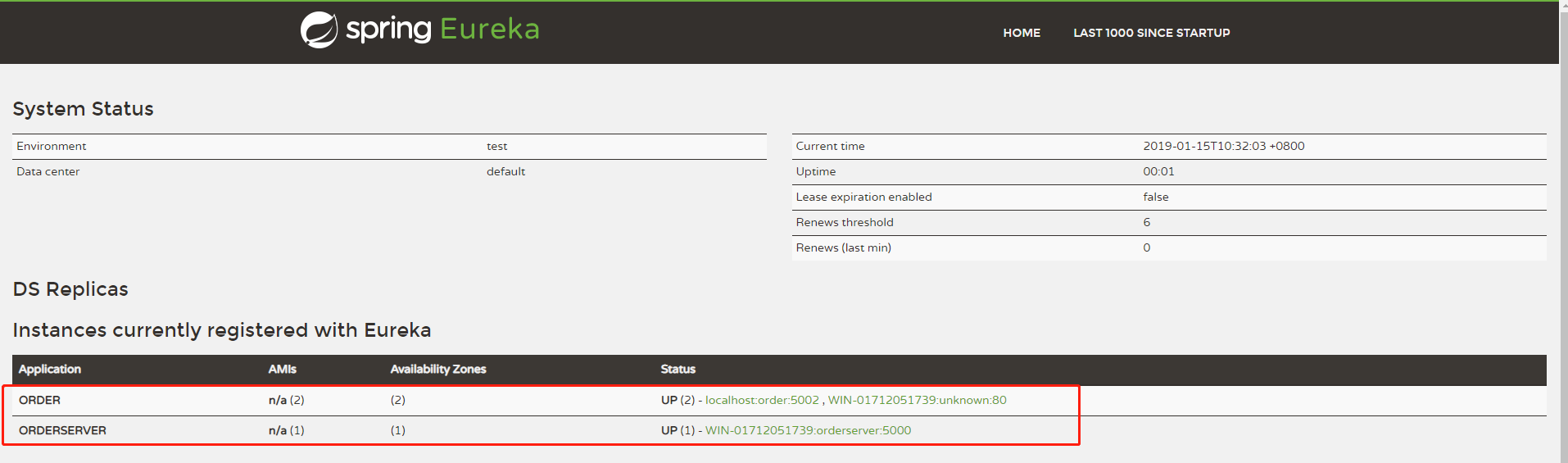
这个时候发现名为order的有两个服务。
- 修改一下orderserver的控制器代码
[Route("api")]

    public class ValuesController : Controller

    {

        DiscoveryHttpClientHandler _handler;

        private const string GET_SERVICES_URL = "http://order/api/value";

        private ILogger<ValuesController> _logger;

        public ValuesController(IDiscoveryClient client, ILoggerFactory logFactory = null)

        {

            _handler = new DiscoveryHttpClientHandler(client);

            _logger = logFactory?.CreateLogger<ValuesController>();

        }

        [HttpGet("order")]

        public async Task<string> GetServices()

        {

            _logger?.LogInformation("GetServices");

            var client = GetClient();

            return await client.GetStringAsync(GET_SERVICES_URL);

        }

        private HttpClient GetClient()

        {

            var client = new HttpClient(_handler, false);

            return client;

        }

    }
然后再次启动这三个.net core项目,并访问http://localhost:5000/api/order,如图,他成功返回了order two,多刷新几次会发现返回的order One 和 order two是来回变的。


说明eureka服务中心帮我们实现了负载均衡。
- 这个时候,我们可以把order_one 或者 order_two关掉一个。我们再次访问http://localhost:5000/api/order会出现一次错误,然后eureka会自动把有问题的服务踢掉(时间可配置),再次访问不再有问题。
参考资料:
总结
现在网络上类似这样的文章很多,自己再单独写一份就是为了做个笔记,跟各位大牛交流一下,自己也学习学习。
.net core+Spring Cloud学习之路 二的更多相关文章
- .net core+Spring Cloud学习之路 一
文章开头唠叨两句. 2019年了,而自己参加工作也两年有余了,用一个词来概括这两年多的生活,就是:“碌碌无为”. 也不能说一点收获都没有,但是很少.2019来了,我立志要打破现状,改变自己,突破自我. ...
- Spring Cloud进阶之路 | 二:服务提供者(discovery)
1 创建父项目 以前文所述,以spring boot 2.1.7.RELEASE为基,spring cloud版本为Greenwich.SR2,spring cloud alibaba版本为2.1.0 ...
- Spring Cloud 学习笔记(二)——Netflix
4 Spring Cloud Netflix Spring Cloud 通过自动配置和绑定到Spring环境和其他Spring编程模型惯例,为Spring Boot应用程序提供Netflix OSS集 ...
- Spring Boot 学习之路二 配置文件 application.yml
一.创建配置文件 如图所示,我们在resources文件夹中新建配置文件application.yml 结构图 二.一些基本配置 server: port: 8090 //配置端口 session ...
- Spring Cloud学习笔记【二】Eureka 服务提供者/服务消费者(ribbon)
Ribbon 是 Netflix 发布的开源项目,主要功能是为 REST 客户端实现负载均衡.它主要包括六个组件: ServerList,负载均衡使用的服务器列表.这个列表会缓存在负载均衡器中,并定期 ...
- Spring Cloud gateway 网关服务二 断言、过滤器
微服务当前这么火爆的程度,如果不能学会一种微服务框架技术.怎么能升职加薪,增加简历的筹码?spring cloud 和 Dubbo 需要单独学习.说没有时间?没有精力?要学俩个框架?而Spring C ...
- spring cloud 学习(9) - turbine stream无法在eureka注册的解决办法
turbine是啥就不多解释了,初次接触的可以移步spring cloud 学习(4) - hystrix 服务熔断处理 拉到最后看一下,turbine stream默认情况下启动成功后,eureka ...
- Spring框架学习之IOC(二)
Spring框架学习之IOC(二) 接着上一篇的内容,下面开始IOC基于注解装配相关的内容 在 classpath 中扫描组件 <context:component-scan> 特定组件包 ...
- 搭建高可用服务注册中心-Spring Cloud学习第一天(非原创)
文章大纲 一.Spring Cloud基础知识介绍二.创建单一的服务注册中心三.创建一个服务提供者四.搭建高可用服务注册中心五.项目源码与参考资料下载六.参考文章 一.Spring Cloud基础 ...
随机推荐
- elment重置表格行高,hover效果
来源网络,做个笔记.表头行高.el-table__header tr, .el-table__header th { padding: 0; height: 50px; }表体行高 .el-table ...
- typescript 属性默认值使用箭头函数 this指向问题
今天注意到前端小伙伴用react 定义component class的方法的时候是通过箭头函数的方式,表示好奇. class Test extends React.Component { public ...
- 常用类-API文档-Integer
package IntegerTest;import java.util.Base64.Decoder; public class test01 { /** * 包装类的基本数据类型 * int =& ...
- Visual Studio+VAssistX自动添加注释,函数头注释,文件头注释
转载:http://blog.csdn.net/xzytl60937234/article/details/70455777 在VAssistX中为C++提供了比较规范注释模板,用这个注释模板为编写的 ...
- IIS7.5修改asp的文件上传限制方法
第一.IIS7.5修改asp的文件上传限制方法 1.打开IIS 2.打开面板中的应用程序开发 asp 3.找到最后的限制属性 4.修改其中的最大请求实体主体限制的值:默认为200000字节,等于195 ...
- JS之代理模式
<!DOCTYPE html> <html lang="en"> <head> <meta charset="UTF-8&quo ...
- Python数据库连接池---DBUtils
Python数据库连接池DBUtils DBUtils是Python的一个用于实现数据库连接池的模块. 此连接池有两种连接模式: 模式一:为每个线程创建一个连接,线程即使调用了close方法,也不 ...
- shell练习题2
需求如下: 写一个shell脚本,检查指定的shell脚本是否有语法错误,若有错误,首先显示错误信息,然后提示用户输入q或Q退出脚本, 输入其他内容则直接用vim打开该shell脚本. 参考解答如下 ...
- cdh集群认证命令
1.集群认证命令 kinit -kt csliyb.keytab csliyb 2.查看认证有效期命令 klist命令 3.延长认证有效期命令 kinit -R 4.手动认证失效命令 kdestroy
- Unable to correct problems, you have held broken packages
Use aptitude instead of apt-get. It is more intelligent. It not only will handle downgrading conflic ...