
WPF中如何在文本外面加虚线外框
昨天突然被问到如何在wpf里面给一段文本加个虚线外框,由于有一段时间没玩wpf了,一时还真没想出来,虽然大概有个思路,但是也不保证正确。今天回到家,闲着没事情也就随便试验了一下。
首先来个框:
    <Grid>

<Border HorizontalAlignment="Center" VerticalAlignment="Center"

Width="60" Height="30" CornerRadius="5"

BorderBrush="Blue" BorderThickness="3">

<TextBlock Text="aaa" HorizontalAlignment="Center" VerticalAlignment="Center"/>

</Border>

</Grid>
看看效果:
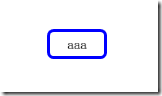
一个中规中矩的实线框,如何改造成我们想要的虚线框哪?
第一个想到的就是修改Border的Brush,来看看这样的xaml:
    <Grid>

<Border HorizontalAlignment="Center" VerticalAlignment="Center"

Width="60" Height="30" CornerRadius="5"

BorderThickness="3">

<Border.BorderBrush>

<LinearGradientBrush SpreadMethod="Repeat" StartPoint="0,5" EndPoint="5,0" MappingMode="Absolute">

<LinearGradientBrush.GradientStops>

<GradientStop Color="Blue" Offset="0"/>

<GradientStop Color="Blue" Offset="0.2"/>

<GradientStop Color="Transparent" Offset="0.4"/>

<GradientStop Color="Transparent" Offset="0.6"/>

<GradientStop Color="Blue" Offset="0.8"/>

<GradientStop Color="Blue" Offset="1"/>

</LinearGradientBrush.GradientStops>

</LinearGradientBrush>

</Border.BorderBrush>

<TextBlock Text="aaa" HorizontalAlignment="Center" VerticalAlignment="Center"/>

</Border>

</Grid>
看看效果图:
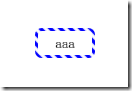
因为把Brush修改成斜线的渐变色(蓝色->透明->蓝色),因此总体上看起来就是个虚线,但是在圆角的效果取有些不怎么如意。
再换个思路,更换为使用DrawingBrush:
    <Grid>

<Border HorizontalAlignment="Center" VerticalAlignment="Center"

Width="60" Height="30" CornerRadius="5"

BorderThickness="3">

<Border.BorderBrush>

<DrawingBrush>

<DrawingBrush.Drawing>

<GeometryDrawing>

<GeometryDrawing.Pen>

<Pen Brush="Blue" Thickness="3">

<Pen.DashStyle>

<DashStyle Dashes="3,2,0,2"/>

</Pen.DashStyle>

</Pen>

</GeometryDrawing.Pen>

<GeometryDrawing.Geometry>

<RectangleGeometry Rect="0,0,60,30" RadiusX="3" RadiusY="3"/>

</GeometryDrawing.Geometry>

</GeometryDrawing>

</DrawingBrush.Drawing>

</DrawingBrush>

</Border.BorderBrush>

<TextBlock Text="aaa" HorizontalAlignment="Center" VerticalAlignment="Center"/>

</Border>

</Grid>
看看效果图:
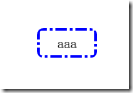
利用Pen的DashStyle可以轻易的实现点划的虚线图,当然也可以轻易实现点点划的虚线,DashStyle的规则为:实线长度,空线长度,实线长度,空线长度…,而实现长度如果为0,就代表点。
不过细看这张图的话,还是会发现一些不和谐的东西,圆角从外侧看,确实是圆的,但是仔细看内侧的话,发现其内侧竟然是个直角。。。
好吧,换个思路,放弃Border了,直接用Canvas,加Rectange:
    <Grid>

<Grid HorizontalAlignment="Center" VerticalAlignment="Center" Width="60" Height="30">

<Canvas>

<Rectangle RadiusX="5" RadiusY="5" Width="60" Height="30"

Stroke="Blue" StrokeDashArray="5,2,1,2" StrokeThickness="2"/>

</Canvas>

<TextBlock Text="aaa" HorizontalAlignment="Center" VerticalAlignment="Center"/>

</Grid>

</Grid>
看看效果图:
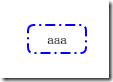
看起来还不错,确实是圆角的,不过这后面两个方案也有个明显的缺点,就是无法随着文本框内容的增长而动态的绘制。当然可以用Binding来进一步消除这个问题:
    <Grid>

<Grid HorizontalAlignment="Center" VerticalAlignment="Center" Width="60" Height="30" x:Name="g">

<Canvas>

<Rectangle RadiusX="5" RadiusY="5"

Width="{Binding ElementName=g, Path=Width}"

Height="{Binding ElementName=g, Path=Height}"

Stroke="Blue" StrokeDashArray="5,2,1,2" StrokeThickness="2"/>

</Canvas>

<TextBlock Text="aaa" HorizontalAlignment="Center" VerticalAlignment="Center"/>

</Grid>

</Grid>
效果图:
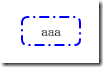
看起来还不错,不过这个方案还是存在问题的,如果容器Grid本身是自增长的,那么杯具就开始了:
    <Grid>

<Grid HorizontalAlignment="Center" VerticalAlignment="Center" x:Name="g">

<Canvas>

<Rectangle RadiusX="5" RadiusY="5"

Width="{Binding ElementName=g, Path=Width}"

Height="{Binding ElementName=g, Path=Height}"

Stroke="Blue" StrokeDashArray="5,2,1,2" StrokeThickness="2"/>

</Canvas>

<TextBlock Text="aaa" HorizontalAlignment="Center" VerticalAlignment="Center"/>

</Grid>

</Grid>
效果图:

可以发现,Grid使用了自增长的方式,Binding也只能获得错误的Width和Height,也就是0,不过别担心,WPF还提供了ActualWidth和ActualHeight:
    <Grid>

<Grid HorizontalAlignment="Center" VerticalAlignment="Center" x:Name="g">

<Canvas>

<Rectangle RadiusX="5" RadiusY="5"

Width="{Binding ElementName=g, Path=ActualWidth}"

Height="{Binding ElementName=g, Path=ActualHeight}"

Stroke="Blue" StrokeDashArray="5,2,1,2" StrokeThickness="2"/>

</Canvas>

<TextBlock Margin="10,7,10,7" Text="aaa" HorizontalAlignment="Center" VerticalAlignment="Center"/>

</Grid>

</Grid>
效果图:

哈哈,圆满达成目标。
WPF中如何在文本外面加虚线外框的更多相关文章
- WPF中添加一个文本输入框,按Enter回车,执行绑定的Command
在WPF+WMMV模式中使用键盘和鼠标事件的绑定代码如下: <TextBox x:Name="SearchBox" Text="{Binding SearchTex ...
- C#,WPF中使用多文本显示数据,并对其数据进行关键字高亮等操作
需求:针对多文本信息显示,我们需要对其内容中的某些关键字或者某行进行高亮显示,并用不同颜色显示. 分析:在C#中,首先要进行多文本信息显示,可以RichTextBox(不要使用TextBox)控件,该 ...
- WPF中的文本度量
关于WPF中的文本度量,需要了解以下几个问题: WPF中支持一些常用的度量单位:px(device independent pixels).in(inches).cm(centimeters).pt( ...
- WPF中加载高分辨率图片性能优化
在最近的项目中,遇到一个关于WPF中同时加载多张图片时,内存占用非常高的问题. 问题背景: 在一个ListView中同时加载多张图片,注意:我们需要加载的图片分辨率非常高. 代码: XAML: < ...
- WPF中动态更新TextBlock文字中的超链接,文本
1.------------------------------------------------------------------------- 修改超链接的文本文字: <TextBloc ...
- WPF 中的 Pack URI地(资源文件加载)
参考资源网http://msdn.microsoft.com/zh-cn/library/aa970069.aspx#Absolute_vs_Relative_Pack_URIs 在 Windows ...
- WPF防止界面卡死并显示加载中效果
原文:WPF防止界面卡死并显示加载中效果 网上貌似没有完整的WPF正在加载的例子,所以自己写了一个,希望能帮到有需要的同学 前台: <Window x:Class="WpfApplic ...
- WPF中动态加载XAML中的控件
原文:WPF中动态加载XAML中的控件 using System; using System.Collections.Generic; using System.Linq; using System. ...
- WPF中,怎样将XAML代码加载为相应的对象?
原文:WPF中,怎样将XAML代码加载为相应的对象? 在前面"在WPF中,如何得到任何Object对象的XAML代码?"一文中,我介绍了使用System.Windows.Marku ...
随机推荐
- LR回放https协议脚本失败:[GENERAL_MSG_CAT_SSL_ERROR]connect to host "XXX" failed:[10054] Connection reset by peer [MsgId:MERR-27780]
最近做一个负载均衡项目的性能测试,使用LR录制脚本协议为https协议,回放脚本时出现报错: [GENERAL_MSG_CAT_SSL_ERROR]connect to host "XXX& ...
- css选择器的权重
权重会叠加!
- 【题解】CF611H New Year and Forgotten Tree
[题解]CF611H New Year and Forgotten Tree 神题了... 题目描述 给定你一棵树,可是每个节点上的编号看不清了,只能辨别它的长度.现在用问号的个数代表每个节点编号那个 ...
- app开发需求文档怎么写
我们在开发app前都会做需求分析,这个app开发需求文档怎么写呢?一般可以从这几点入手:确定APP方案的目标,APP方案的受众分析,APP开发方案功能设计,APP的操作系统说明方案,APP是是否是原生 ...
- LATEX教程(二)
插入图片 \documentclass{article} \usepackage{graphicx} \usepackage{Ctex} \title{插入图片} \author{yif} \begi ...
- Mybatis参数总结(转载)
转载自: MyBatis传入多个参数的问题 mybatis传递参数总结 一.单个参数 1.基本数据类型 (1)直接使用 List<ChargeRuleDO> tests(long id); ...
- boost之实用工具
1.noncopyable用于禁止复制和拷贝的类继承.声明拷贝和赋值函数为私有,将运行时的错误转化为编译期的错误. #include <iostream> #include <boo ...
- Java中的异常和处理详解(转发:https://www.cnblogs.com/lulipro/p/7504267.html)
简介 程序运行时,发生的不被期望的事件,它阻止了程序按照程序员的预期正常执行,这就是异常.异常发生时,是任程序自生自灭,立刻退出终止,还是输出错误给用户?或者用C语言风格:用函数返回值作为执行状态?. ...
- django-admin 设计User外键,设计model
设置外键 class profile_user(AbstractBaseUser, PermissionsMixin): company = models.ForeignKey(Company, de ...
- PHP领域类型Java中ibatis的API
最近公司技术调整,要把java用php换掉,其中java主要的工作就是查询数据库,并返回json,ORM用的是ibatis,主要用到了Object映射和动态SQL,组员们用的都挺6,转到PHP后,发现 ...