
[转]Load ASP.NET MVC Partial Views Dynamically Using jQuery
本文转自:http://www.binaryintellect.net/articles/218ca630-ba50-48fe-af6e-6f754b5894aa.aspx
Most of the times ASP.NET MVC views are rendered as a result of user navigating to some action. For example, when a user navigates to /home/index in the browser (either through address bar or through a hyperlink), ASP.NET MVC executes the action method and usually returns a view to the browser. This means each view is rendered as a result of a full GET or POST request. At times, however, you may want to load views dynamically through Ajax. This way you can render contents of a view without full page refresh.
Consider the following page:
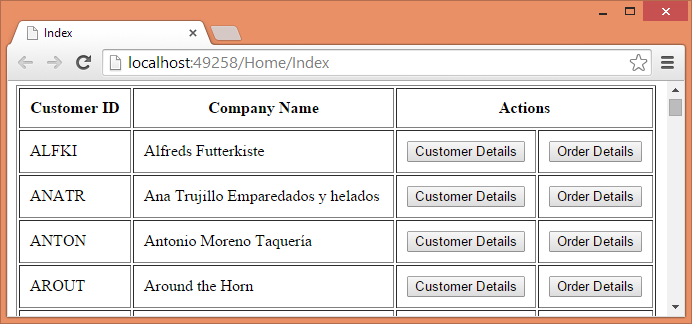
The above page consists of a table that lists customers from the Customers table of Northwind database. Each customer row has two buttons - Customer Details and Order Details. Clicking on the respective button should display customer details and order details from the database. Without Ajax you would have submitted the page back to the server and then returned a view with the corresponding details. Using Ajax you can display the details without causing any postback to the server. This is shown below:
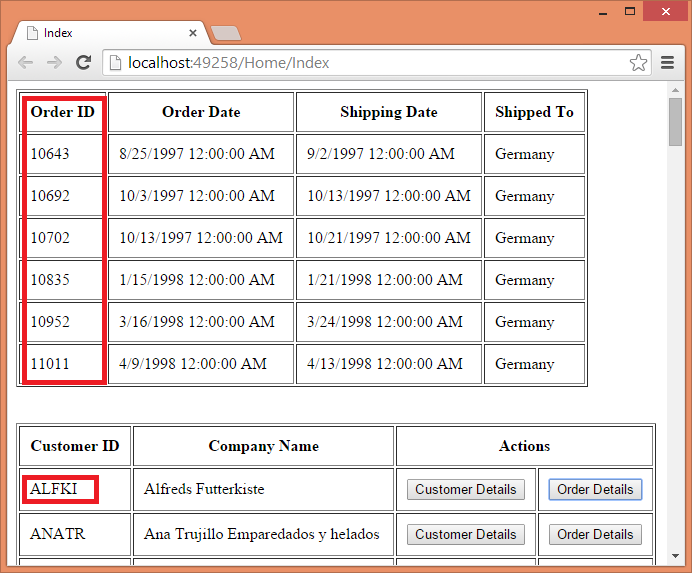
As you can see the above figure shows order details for CustomerID ALFKI above the customers table. These details are fetched via Ajax request.
While displaying data through Ajax request you have two options:
- Fetch raw data from the server and embed it in HTML markup on the client side
- Fetch HTML markup with data embedded from the server
Although the choice of the approach depends on a situation, it can be said that the former approach is suitable to make calls to Web API or when HTML display is dynamically decided by the client script. The later approach is suitable when ASP.NET MVC strongly typed views (or partial views) are being used to render the UI. In this example we will be using the later approach.
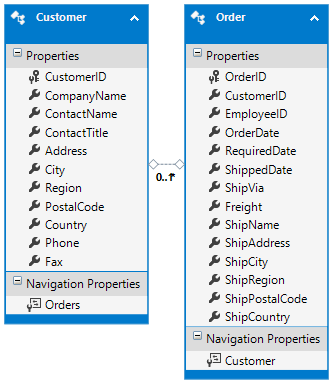
To develop this example, create a new ASP.NET MVC application based on the Empty template. Then add ADO.NET Entity Data Model for Customers and Orders tables of Northwind database. The Customer and Order entities are shown below:
Next, add HomeController and write the Index() action method as shown below:
public ActionResult Index()

{

    using (NorthwindEntities db = new NorthwindEntities())

    {

        List<Customer> model = db.Customers.ToList();

        return View(model);

    }

}
The Index() action simply retrieves all the Customer entities from the Customers DbSet and passes them to the Index view.
Now, add another action method - GetView() - to the HomeController as shown below:
public ActionResult GetView(string customerID,string viewName)

{

    object model = null;

    if(viewName=="CustomerDetails")

    {

        using(NorthwindEntities db=new NorthwindEntities())

        {

            model = db.Customers.Find(customerID);

        }

    }

    if (viewName == "OrderDetails")

    {

        using (NorthwindEntities db = new NorthwindEntities())

        {

            model = db.Orders.Where(o => o.CustomerID == customerID)

                      .OrderBy(o => o.OrderID).ToList();

        }

    }

    return PartialView(viewName,model);

}
The GetView() action method accepts two parameters - customerID and viewName. These two parameters are passed through an Ajax request. Depending on the viewName parameter either CustomerDetails partial view is returned to the caller or OrderDetails partial view is returned. These two view need model in the form of a Customer object and a List of Order entities respectively. That's why model variable is declared as object. Once model variable is populated the partial view name and the model is passed to the PartialView() method. Here, we used partial views because the HTML output is to be inserted in an existing page through Ajax.
Next, add one view (Index.cshtml) and two partial views (CustomerDetails.cshtml and OrderDetails.cshtml) to the Home sub-folder of Views folder.
Add the following markup to the CustomerDetails.cshtml partial view:
@model MVCViewsThroughAjax.Models.Customer

<table border="1" cellpadding="10">

    <tr>

        <td>Customer ID :</td>

        <td>@Model.CustomerID</td>

    </tr>

    <tr>

        <td>Company Name :</td>

        <td>@Model.CompanyName</td>

    </tr>

    <tr>

        <td>Contact Name :</td>

        <td>@Model.ContactName</td>

    </tr>

    <tr>

        <td>Country :</td>

        <td>@Model.Country</td>

    </tr>

</table>
The above markup is quite straightforward. The CustomerDetails partial view simply displays CustomerID, CompanyName, ContactName and Country of a Customer in a table.
Now add the following markup to the OrderDetails.cshtml partial page:
@model List<MVCViewsThroughAjax.Models.Order>

<table border="1" cellpadding="10">

    <tr>

        <th>Order ID</th>

        <th>Order Date</th>

        <th>Shipping Date</th>

        <th>Shipped To</th>

    </tr>

    @foreach(var item in Model)

    {

        <tr>

            <td>@item.OrderID</td>

            <td>@item.OrderDate</td>

            <td>@item.ShippedDate</td>

            <td>@item.ShipCountry</td>

        </tr>

    }

</table>
The above markup iterates through the List of Order entities and renders a table with four columns - OrderID, OrderDate, ShippedDate and ShipCountry.
Now, add the following markup to the Index view:
@model List<MVCViewsThroughAjax.Models.Customer>

...

<html>

<head>

...

</head>

<body>

    <div id="viewPlaceHolder"></div>

    <br /><br />

    <table border="1" cellpadding="10">

        <tr>

            <th>Customer ID</th>

            <th>Company Name</th>

            <th colspan="2">Actions</th>

        </tr>

        @foreach(var item in Model)

        {

            <tr>

                <td>@item.CustomerID</td>

                <td>@item.CompanyName</td>

                <td><input type="button" class="customerDetails"

                           value="Customer Details" /></td>

                <td><input type="button" class="orderDetails"

                           value="Order Details" /></td>

            </tr>

        }

    </table>

</body>

</html>
The Index view receives a List of Customer entities as its model and renders a table with CustomerID, CompanyName and two buttons - Customer Details and Order Details.
Now comes the important part - making Ajax calls to display customer details and order details. Noticed the <div> at the beginning of the body section? The viewPlaceHolder is where the output of CustomerDetails.cshtml and OrderDetails.cshtml will be loaded. To do so we will use load() method of jQuery. Here is how that can be done:
$(document).ready(function () {

    $(".customerDetails").click(function (evt) {

        var cell=$(evt.target).closest("tr").children().first();

        var custID=cell.text();

        $("#viewPlaceHolder").load("/home/getview",

            { customerID: custID, viewName: "CustomerDetails" });

    });

    $(".orderDetails").click(function (evt) {

        var cell = $(evt.target).closest("tr").children().first();

        var custID = cell.text();

        $("#viewPlaceHolder").load("/home/getview",

           { customerID: custID, viewName: "OrderDetails" });

    });

});
Recollect that Customer Details and Order Details buttons have assigned CSS class of customerDetails and orderDetails respectively. The above jQuery code uses class selector to wire click event handlers to the respective buttons. Inside the click event handler of Customer Details button, the code retrieves the CustomerID from the table row. This is done using closest(), children() and first() methods. The CustomerID is stored in custID variable. Then load() method is called on viewPlaceHolder <div>. The first parameter of the load() method is the URL that will be requested through an Ajax request. The second parameter is a JavaScript object that supplies the data needed by the requested URL. In our example, GetView() action method needs two parameters - customerID and viewName. Hence the object has customerID and viewName properties. The customerID property is set to custID variable and viewName is set to CustomerDetails.
The click event handler of Order Details is similar but loads OrderDetails partial view.
That's it! You can now run the application and try clicking on both the buttons. The following figure shows customer details loaded successfully.
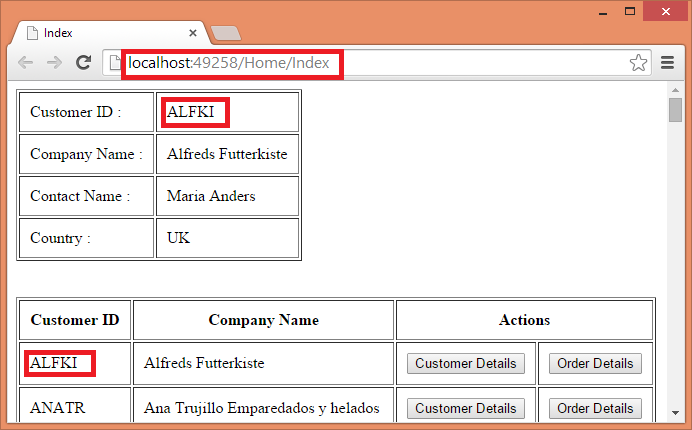
Notice that through out the application run the URL shown in the browser address bar remains unchanged indicating that Ajax requests are being made to display customer details and order details.
In the above example Ajax requests were made to /home/getview action. A user can also enter this URL in the browser's address bar producing undesirable results. As a precaution you can check the customerID and viewName parameters inside the GetView() action method (not shown in the above code). If these parameters are empty or contain invalid values you can throw an exception.
[转]Load ASP.NET MVC Partial Views Dynamically Using jQuery的更多相关文章
- 【番外篇】ASP.NET MVC快速入门之免费jQuery控件库(MVC5+EF6)
目录 [第一篇]ASP.NET MVC快速入门之数据库操作(MVC5+EF6) [第二篇]ASP.NET MVC快速入门之数据注解(MVC5+EF6) [第三篇]ASP.NET MVC快速入门之安全策 ...
- ASP.NET MVC的客户端验证:jQuery的验证
之前我们一直讨论的Model验证仅限于服务端验证,即在Web服务器根据相应的规则对请求数据实施验证.如果我们能够在客户端(浏览器)对用户输入的数据先进行验证,这样会减少针对服务器请求的频率,从而缓解W ...
- 使用RazorEngine对ASP.NET MVC的Views进行UnitTest
有的时候我们需要对Razor最后生产的文本(HTML OR XML OR..)进行单元测试. 使用Nuget安装RazorEngine. 新建一个ASP.NET MVC项目,并且带有测试项目. 修改I ...
- asp.net mvc Partial OutputCache 在SpaceBuilder中的应用实践
最近给SpaceBuilder增加OutputCache 时发现了一些问题,贴在这做个备忘,也方便遇到类似问题的朋友查阅. 目前SpaceBuilder表现层使用是asp.net mvc v1.0,使 ...
- ASP.NET MVC 4 (十一) Bundles和显示模式--asp.net mvc中 @Scripts.Render("~/bundles/jquery")是什么意思? 在布局文件中使用Scripts.Render()输出脚本包,Styles.Render()输出风格包:
ASP.NET MVC 4 (十一) Bundles和显示模式 ASP.NET MVC 4 引入的js打包压缩功能.打包压缩jquery目录下的文件,在布局文件中使用Scripts.Render()输 ...
- ASP.NET MVC的客户端验证:jQuery验证在Model验证中的实现
在简单了解了Unobtrusive JavaScript形式的验证在jQuery中的编程方式之后,我们来介绍ASP.NET MVC是如何利用它实现客户端验证的.服务端验证最终实现在相应的ModelVa ...
- ASP.NET MVC Partial页输出JS
很多情况Partial是需要引用到JS的,通常做法是吧JS在引用Partial的页面中加入JS文件或者JS代码. 前阵子网上看到一段代码可以在Partial页面中添加JS,输出道引用页面. publi ...
- [ASP.NET MVC]@Partial 和@RenderPartial的区别
@Partial 和@RenderPartial的区别 Html.partial和RenderPartial的用法与区别 Html.partial和RenderPartial都是输出html片段,区别 ...
- ASP.NET MVC中,怎么使用jquery/ajaxForm上传文件
ajaxForm插件最好选择:jquery forms plugin. 以下为示例: Ajax.BeginForm @using (Ajax.BeginForm("YourAction&qu ...
随机推荐
- python3关于date和time的标准库
python3中关于日期和时间的标准库datetime和time,之前都是用的时候随用随查,今天系统的看一下用这两个库可以做些什么. 1.time标准库 #首先添加一个time对象,看一下该对象的属性 ...
- easyui打开dialog后给弹出框内输入框赋值问题
在写一个弹出页面的时候,里面有一些输入框,需要在弹出的时候从数据库取值并且赋值,刚开始在弹出的时候使用$(id).val(value),结果赋值失败,为空当时纠结了一会,然后突然想到在easyui打开 ...
- pg_basebackup命令解析
pg_basebackup命令首先解析输入的参数,再调用BaseBackup()函数进行备份处理. 在BaseBackup()函数内部,会首先传送WAL日志(如果指定了-x选项的话).随后依次遍历所有 ...
- JS 命名规范
JS的命名规则和规范 规则 - 必须遵守的,不遵守会报错 由字母.数字.下划线.$符号组成,不能以数字开头 不能是关键字和保留字,例如:for.while. 区分大小写 规范 - 建议遵守的,不遵守不 ...
- php Apache No input file
RewriteRule ^(.*)$ index.php/$1 [QSA,PT,L] 变为 RewriteRule ^(.*)$ index.php?/$1 [QSA,PT,L]
- bzoj1934 Vote 善意的投票 最小割(最大匹配)
题目传送门 题目大意:很多小朋友,每个小朋友都有自己的立场,赞成或者反对,如果投了和自己立场不同的票会得到一个能量.又有很多朋友关系,如果一个人和他的一个朋友投的票不同,也会得到一个能量,现在问,通过 ...
- Hadoop 使用基础
[摘录自] https://www.yiibai.com/hadoop/hadoop_hdfs_operations.html#article-start 一.HDFS 使用基础 格式化配置HDFS文 ...
- 网络那点事之socket队列
1.socket 在内核中是怎么表示的,怎么与文件系统建立关系 2.socket在什么时候创建了接收队列,接收队列的长度是怎么确定的 3.接收到一个数据包根据怎么找到到接收队列的 使用hash算法,分 ...
- drf(djangorestframework)
一.django restful_framework 核心思想: 缩减编写api接口的代码 Django REST framework是一个建立在Django基础之上的Web 应用开发框架,可以快速的 ...
- hdu1286 找新朋友 欧拉函数模板
首先这一题用的是欧拉函数!!函数!!不是什么欧拉公式!! 欧拉函数求的就是题目要求的数. 关于欧拉函数的模板网上百度一下到处都是,原理也容易找,这里要介绍一下另一个强势模板. 在这一题的讨论里看到的. ...