
可折叠的listview 之ExpandableListView基本使用
先看效果
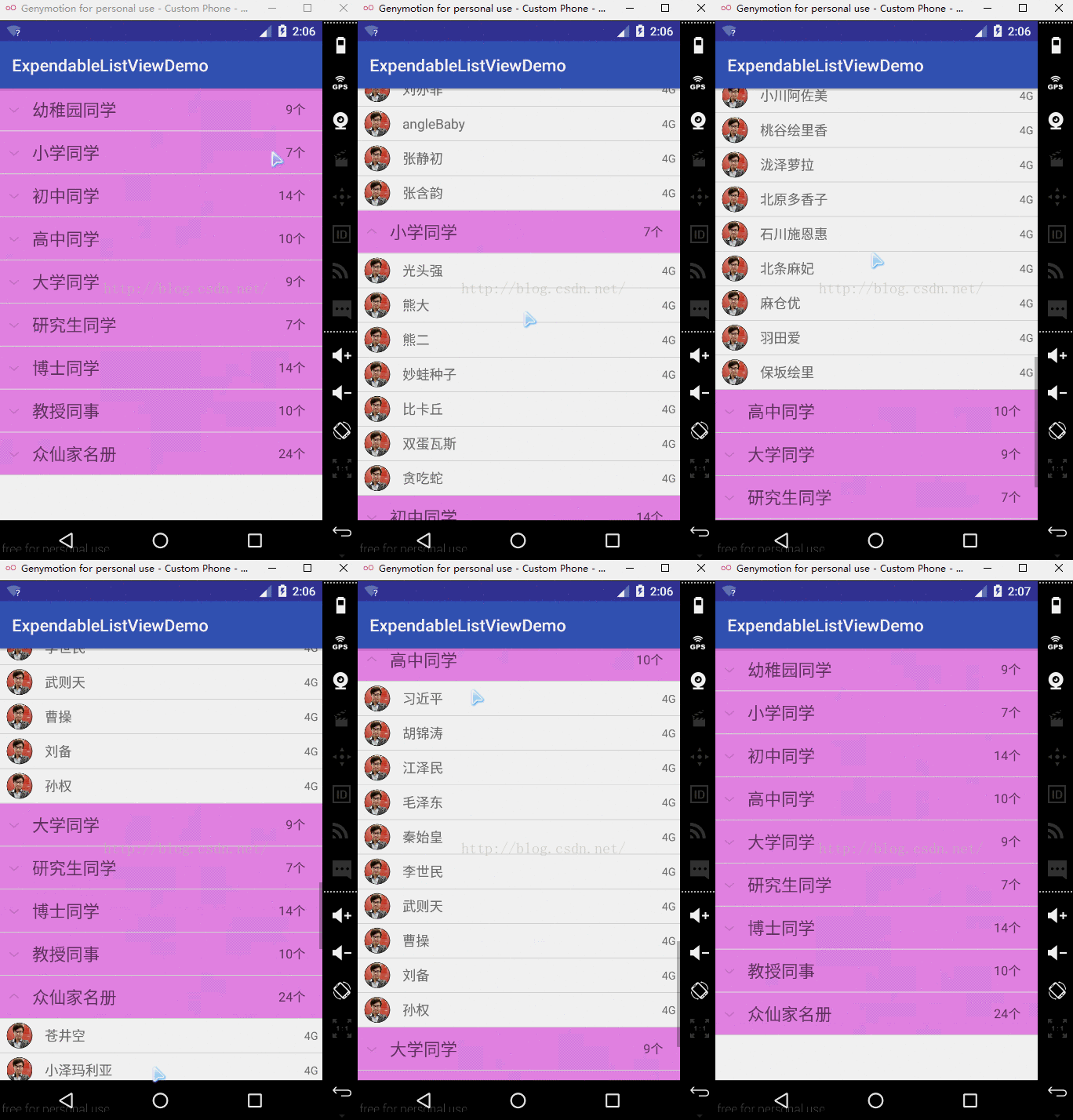
demo实现
其他的方法和ListView的方法一样,下面来看看具体demo的实现
首先布局文件很简单,就一个控件为:
<?xml version="1.0" encoding="utf-8"?>

<RelativeLayout xmlns:android="http://schemas.android.com/apk/res/android"

    xmlns:tools="http://schemas.android.com/tools"

    android:layout_width="match_parent"

    android:layout_height="match_parent"

    tools:context="com.duanlian.expendablelistviewdemo.MainActivity">

    <ExpandableListView

        android:id="@+id/expendablelistview"

        android:layout_width="match_parent"

        android:layout_height="match_parent" />

</RelativeLayout>
Activity的代码和用ListView的是一样的,创建一个adapter和两个 数据源,然后绑定,具体如下:
package com.duanlian.expendablelistviewdemo;

import android.support.v7.app.AppCompatActivity;

import android.os.Bundle;

import android.widget.ExpandableListView;

import com.duanlian.expendablelistviewdemo.adapter.MyAdapter;

import java.util.ArrayList;

import java.util.List;

public class MainActivity extends AppCompatActivity {

    private ExpandableListView expandableListView;

    private MyAdapter myAdapter;

    private List<String> groupList;

    private List<List<String>> childList;

    @Override

    protected void onCreate(Bundle savedInstanceState) {

        super.onCreate(savedInstanceState);

        setContentView(R.layout.activity_main);

        initView();

    }

    private void initView() {

        expandableListView = (ExpandableListView) findViewById(R.id.expendablelistview);

        groupList = new ArrayList<>();

        childList = new ArrayList<>();

        addData("幼稚园同学",new String[]{"周杰伦","江一燕 ","佟丽娅","高圆圆","刘诗诗","刘亦菲","angleBaby","张静初","张含韵",});

        addData("小学同学",new String[]{"光头强","熊大","熊二","妙蛙种子","比卡丘","双蛋瓦斯","贪吃蛇"});

        addData("初中同学",new String[]{"苍井空","小泽玛利亚","吉泽明步","波多野结衣","爱川美里菜","小川阿佐美","桃谷绘里香","泷泽萝拉","北原多香子","石川施恩惠","北条麻妃","麻仓优","羽田爱","保坂绘里"});

        addData("高中同学",new String[]{"秦始皇","李世民","武则天","曹操","刘备","孙权"});

        addData("大学同学",new String[]{"周杰伦","江一燕 ","佟丽娅","高圆圆","刘诗诗","刘亦菲","angleBaby","张静初","张含韵",});

        addData("研究生同学",new String[]{"光头强","熊大","熊二","妙蛙种子","比卡丘","双蛋瓦斯","贪吃蛇"});

        addData("博士同学",new String[]{"苍井空","小泽玛利亚","吉泽明步","波多野结衣","爱川美里菜","小川阿佐美","桃谷绘里香","泷泽萝拉","北原多香子","石川施恩惠","北条麻妃","麻仓优","羽田爱","保坂绘里"});

        addData("教授同事",new String[]{"秦始皇","李世民","武则天","曹操","刘备","孙权"});

        addData("众仙家名册",new String[]{"苍井空","小泽玛利亚","吉泽明步","波多野结衣","爱川美里菜","小川阿佐美","桃谷绘里香","泷泽萝拉","北原多香子","石川施恩惠","北条麻妃","麻仓优","羽田爱","保坂绘里","秦始皇","李世民","武则天","曹操","刘备","孙权"});

        myAdapter = new MyAdapter(this,groupList,childList);

        expandableListView.setAdapter(myAdapter);

    }

    /**

     * 用来添加数据的方法

     */

    private void addData(String group, String[] friend) {

        groupList.add(group);

        //每一个item打开又是一个不同的list集合

        List<String> childitem = new ArrayList<>();

        for (int i = 0; i < friend.length; i++) {

            childitem.add(friend[i]);

        }

        childList.add(childitem);

    }

}
然后Adapter里面需要2个item布局文件:
外层的item:
<?xml version="1.0" encoding="utf-8"?>

<RelativeLayout xmlns:android="http://schemas.android.com/apk/res/android"

    xmlns:tools="http://schemas.android.com/tools"

    android:layout_width="match_parent"

    android:layout_height="match_parent"

    android:background="#ed88ed"

    tools:context="com.duanlian.expendablelistviewdemo.MainActivity">

    <TextView

        android:id="@+id/group_textview"

        android:layout_width="wrap_content"

        android:layout_height="50dp"

        android:gravity="center_vertical"

        android:layout_marginLeft="40dp"

        android:textSize="20sp"

        android:text="我的好友"/>

    <TextView

        android:id="@+id/group_number"

        android:layout_width="wrap_content"

        android:layout_height="50dp"

        android:gravity="center_vertical"

        android:layout_marginRight="20dp"

        android:textSize="15sp"

        android:layout_alignParentRight="true"

        android:text="20"/>

</RelativeLayout>
里面那层item布局:
<?xml version="1.0" encoding="utf-8"?>

<RelativeLayout xmlns:android="http://schemas.android.com/apk/res/android"

    xmlns:tools="http://schemas.android.com/tools"

    android:layout_width="match_parent"

    android:layout_height="40dp"

    tools:context="com.duanlian.expendablelistviewdemo.MainActivity">

    <com.duanlian.expendablelistviewdemo.CircleImageView

        android:id="@+id/child_img"

        android:layout_width="30dp"

        android:layout_height="30dp"

        android:layout_marginLeft="10dp"

        android:layout_centerVertical="true"

        android:src="@mipmap/duanlian"/>

    <TextView

        android:id="@+id/child_name"

        android:layout_height="40dp"

        android:layout_width="wrap_content"

        android:layout_toRightOf="@+id/child_img"

        android:layout_marginLeft="15dp"

        android:textSize="16sp"

        android:gravity="center_vertical"

        android:text="吉泽明步"/>

    <TextView

        android:id="@+id/child_model"

        android:layout_width="wrap_content"

        android:layout_height="40dp"

        android:gravity="center_vertical"

        android:layout_alignParentRight="true"

        android:layout_marginRight="5dp"

        android:textSize="13sp"

        android:text="4G"/>

</RelativeLayout>
最总要的还是在Adapter里面,他和ListView一样,也有simpleAdapter和ArrayAdapter,和BaseAdapter,我这里用的是BaseAdapter,他的adapter继承的是BaseExpandableListAdapter:
package com.example.wxpandablelistviewdemo;

import android.content.Context;

import android.view.View;

import android.view.ViewGroup;

import android.widget.BaseExpandableListAdapter;

import android.widget.TextView;

import java.util.List;

/**

 * Created by duanlian on 2016/9/12.

 */

public class MyAdapter extends BaseExpandableListAdapter {

    private List<String> groupList;//外层的数据源

    private List<List<String>> childList;//里层的数据源

    private Context context;

    public MyAdapter(Context context, List<String> groupList,List<List<String>> childList ){

        this.context = context;

        this.groupList = groupList;

        this.childList = childList;

    }

    @Override

    public int getGroupCount() {

        return groupList.size();

    }

    /**

     * 这个返回的一定要是对应外层的item里面的List集合的size

     * @param groupPosition

     * @return

     */

    @Override

    public int getChildrenCount(int groupPosition) {

        return childList.get(groupPosition).size();

    }

    @Override

    public Object getGroup(int groupPosition) {

        return groupPosition;

    }

    @Override

    public Object getChild(int groupPosition, int childPosition) {

        return childList.get(groupPosition).get(childPosition);

    }

    @Override

    public long getGroupId(int groupPosition) {

        return groupPosition;

    }

    @Override

    public long getChildId(int groupPosition, int childPosition) {

        return childPosition;

    }

    @Override

    public boolean hasStableIds() {

        return true;

    }

    @Override

    public View getGroupView(int groupPosition, boolean isExpanded, View convertView, ViewGroup parent) {

        convertView = View.inflate(context, R.layout.item_group, null);

        //分组名字

        TextView textView = (TextView) convertView.findViewById(R.id.group_textview);

        //子元素的个数

        TextView number = (TextView) convertView.findViewById(R.id.group_number);

        number.setText(childList.get(groupPosition).size()+"个");

        textView.setText(groupList.get(groupPosition));

        return convertView;

    }

    @Override

    public View getChildView(int groupPosition, int childPosition, boolean isLastChild, View view, ViewGroup viewGroup) {

        view = View.inflate(context, R.layout.item_child, null);

        TextView textView = (TextView) view.findViewById(R.id.child_name);

        //外层的分组名字

        textView.setText(childList.get(groupPosition).get(childPosition));

        return view;

    }

    @Override

    public boolean isChildSelectable(int groupPosition, int childPosition) {

        return true;

    }

}
demo地址:https://download.csdn.net/download/heishuai123/10941739
原博客地址:https://blog.csdn.net/dl10210950/article/details/52525492
可折叠的listview 之ExpandableListView基本使用的更多相关文章
- ExpandableListView简单应用及listview模拟ExpandableListView
首先我们还是来看一些案例,还是拿搜狐新闻客户端,因为我天天上下班没事爱看这个东东,上班又没时间看新闻,上下班路途之余浏览下新闻打发时间嘛. 看这个效果挺棒吧,其实实现起来也不难,我 ...
- Android ListView与ExpandableListView设置分割线divider
listview设置分割线需要以下操作: lv.setDivider(getResources().getDrawable(R.drawable.diyline)); ExpandableListVi ...
- 53、listview、expandableListview如何选中时保持高亮?
一.listView被选中后保持高亮 70down voteaccepted To hold the color of listview item when you press it, include ...
- Android 关于ExpandableListView刷新的解决办法
正文 首先是最基础的 ExpandableListView vList = (ExpandableListView) this.findViewById(R.id.list); EListAdapte ...
- Android 使用PullToRefresh实现下拉刷新和上拉加载(ExpandableListView)
PullToRefresh是一套实现非常好的下拉刷新库,它支持: 1.ListView 2.ExpandableListView 3.GridView 4.WebView 等多种常用的需要刷新的Vie ...
- android ListView上拉加载更多 下拉刷新功能实现(采用pull-to-refresh)
Android实现上拉加载更多功能以及下拉刷新功能, 采用了目前比较火的PullToRefresh,他是目前实现比较好的下拉刷新的类库. 目前他支持的控件有:ListView, ExpandableL ...
- Android 开发自己的网络收音机3——电台分类(ExpandableListView)
上一篇文章说了使用SlidingMenu开源项目实现侧滑栏,今天主要是讲解多级列表ExpandableListView的使用,以及如何使用它实现电台分类管理.ExpandableListView是An ...
- android--------ListView和ExpandableListView的侧滑删除操作
本案例主要实现了ListView和ExpandableListView的侧滑删除操作功能 效果图: ListView的Adapter类 private class SlideAdapter exten ...
- android 的 ExpandableListView Example Tutorial
https://www.journaldev.com/9942/android-expandablelistview-example-tutorial Welcome to Android Expan ...
随机推荐
- hdu 3500 Fling (dfs)
Fling Time Limit: 6000/3000 MS (Java/Others) Memory Limit: 65535/65535 K (Java/Others)Total Submi ...
- Visual Studio调试之断点技巧篇补遗
原文链接地址:http://blog.csdn.net/Donjuan/article/details/4649372 讲完Visual Studio调试之断点技巧篇以后,翻翻以前看得一些资料和自己写 ...
- 洛谷 P2486 [SDOI2011]染色/bzoj 2243: [SDOI2011]染色 解题报告
[SDOI2011]染色 题目描述 给定一棵有n个节点的无根树和m个操作,操作有2类: 1.将节点a到节点b路径上所有点都染成颜色c: 2.询问节点a到节点b路径上的颜色段数量(连续相同颜色被认为是同 ...
- C&C++——段错误(Segmentation fault)
C/C++中的段错误(Segmentation fault) Segment fault 之所以能够流行于世,是与Glibc库中基本所有的函数都默认型参指针为非空有着密切关系的.来自:http://o ...
- JavaScript使用数组拼接字符串性能如何?
传统上,字符串连接一直是js中性能最低的操作之一. view source print? 1 var text="Hello"; 2 text+=" World!&q ...
- last_query_cost
The total cost of the last compiled query as computed by the query optimizer. This is useful for com ...
- vue文件使用stylus报错问题
先npm install stylus --save然后安装你少的page.json中依赖:npm install stylus-loader css-loader style-loader --sa ...
- CSS盒模型之margin解析
原文链接:http://www.jianshu.com/p/ccb534e9b588 文章分为: margin的使用 margin的叠压现象 margin的子债父偿现象 一.margin的使用 HTM ...
- javascript中Date使用总结(转)
//全局函数 Date //Date 类的静态方法 Date.parse Date.UTC //Date 对象的建立方法 new Date() new Date(毫秒数) new Date(标准时间格 ...
- Substrings(hdu 4455)
题意: 给定一个序列ai,个数为n.再给出一系列w:对于每个w,求序列中,所有长度为w的连续子串中的权值和,子串权值为子串中不同数的个数. /* dp[i]表示长度为i的序列不同元素个数之和. 考虑从 ...