
Windows.form增删改查
主界面

using System;
using System.Collections.Generic;
using System.ComponentModel;
using System.Data;
using System.Drawing;
using System.Linq;
using System.Text;
using System.Threading.Tasks;
using System.Windows.Forms;
namespace WindowsFormsApplication2
{
public partial class Form1 : Form
{
public static int bs = 0;
public Form1()
{
InitializeComponent();
}
private void Form1_Load(object sender, EventArgs e)
{
carDA da = new carDA();
dataGridView1.DataSource = da.select();
dataGridView1.ClearSelection();
brandDA bbb = new brandDA();
comboBox1.DataSource = bbb.Select();
comboBox1.DisplayMember = "Brand_name";
comboBox1.ValueMember = "Brand_code";
}
private void button2_Click(object sender, EventArgs e)
{
MessageBoxButtons btn = MessageBoxButtons.YesNoCancel;
if (MessageBox.Show("确定要删除么?", "删除数据", btn) == DialogResult.Yes)
{
car data = dataGridView1.SelectedRows[0].DataBoundItem as car;
carDA da = new carDA();
da.delete(data.Code);
dataGridView1.DataSource = da.select();
}
}
private void button3_Click(object sender, EventArgs e)
{
if (dataGridView1.SelectedRows.Count > 0)
{
//carDA da = new carDA();
car data = dataGridView1.SelectedRows[0].DataBoundItem as car;
xiugai xg = xiugai.NewXiuGai(data.Code);
xg.Show();
xg.Focus();
//dataGridView1.DataSource = da.select();
}
else
{
MessageBox.Show("没有选中任何项!");
}
}
private void button1_Click(object sender, EventArgs e)
{
tianjia tj = tianjia.Newtianjia();
tj.Show();
tj.Focus();
}
private void timer1_Tick(object sender, EventArgs e)
{
if (bs == 1)
{
carDA da = new carDA();
dataGridView1.DataSource = da.select();
bs = 0;
}
}
private void button4_Click(object sender, EventArgs e)
{
string name = textBox1.Text;
string brand=comboBox1.SelectedValue.ToString();
carDA da = new carDA();
dataGridView1.DataSource = da.Select(name,brand);
dataGridView1.AutoGenerateColumns = false;
}
}
}
连接类
using System;
using System.Collections.Generic;
using System.Linq;
using System.Text;
using System.Threading.Tasks;
using System.Data.SqlClient;
namespace WindowsFormsApplication2
{
public class DBconnect
{
private static string connstring="server=.;database=mydb;user=sa;pwd=1023823348";
public static SqlConnection Conn
{
get
{
return new SqlConnection(connstring);
}
}
}
}
实体类
using System;
using System.Collections.Generic;
using System.Linq;
using System.Text;
using System.Threading.Tasks;
namespace WindowsFormsApplication2
{
public class car
{
private string code;
public string Code
{
get { return code; }
set { code = value; }
}
private string name;
public string Name
{
get { return name; }
set { name = value; }
}
private string brand;
public string Brand
{
get { return brand; }
set { brand = value; }
}
private DateTime time;
public DateTime Time
{
get { return time; }
set { time = value; }
}
private decimal oil;
public decimal Oil
{
get { return oil; }
set { oil = value; }
}
private int powers;
public int Powers
{
get { return powers; }
set { powers = value; }
}
private int exhaust;
public int Exhaust
{
get { return exhaust; }
set { exhaust = value; }
}
private decimal price;
public decimal Price
{
get { return price; }
set { price = value; }
}
private string pic;
public string Pic
{
get { return pic; }
set { pic = value; }
}
}
}
操作类
using System;
using System.Collections.Generic;
using System.Linq;
using System.Text;
using System.Threading.Tasks;
using System.Data.SqlClient;
namespace WindowsFormsApplication2
{
public class carDA
{
private SqlConnection _conn;
private SqlCommand _cmd;
private SqlDataReader _dr;
public carDA()
{
_conn = DBconnect.Conn;
_cmd = _conn.CreateCommand();
}
public List<car> select()
{
List<car> list = new List<car>();
_cmd.CommandText = "select * from car ";
_conn.Open();
_dr = _cmd.ExecuteReader();
if (_dr.HasRows)
{
while (_dr.Read())
{
car data = new car();
data.Code = _dr[0].ToString();
data.Name = _dr[1].ToString();
data.Brand = _dr[2].ToString();
data.Time = Convert.ToDateTime(_dr[3]);
data.Oil = Convert.ToDecimal(_dr[4]);
data.Powers = Convert.ToInt32(_dr[5]);
data.Exhaust = Convert.ToInt32(_dr[6]);
data.Price = Convert.ToDecimal(_dr[7]);
data.Pic = _dr[8].ToString();
list.Add(data);
}
}
_conn.Close();
return list;
}
public car select(string code)
{
_cmd.CommandText = "select * from car where Code=@code";
_cmd.Parameters.Clear();
_cmd.Parameters.AddWithValue("@code", code);
_conn.Open();
_dr = _cmd.ExecuteReader();
car data = new car();
if (_dr.HasRows)
{
_dr.Read();
data.Code = _dr[0].ToString();
data.Name = _dr[1].ToString();
data.Brand = _dr[2].ToString();
data.Time = Convert.ToDateTime(_dr[3]);
data.Oil = Convert.ToDecimal(_dr[4]);
data.Powers = Convert.ToInt32(_dr[5]);
data.Exhaust = Convert.ToInt32(_dr[6]);
data.Price = Convert.ToDecimal(_dr[7]);
data.Pic = _dr[8].ToString();
}
_conn.Close();
return data;
}
public void delete(string code)
{
_cmd.CommandText = "delete from car where Code=@code";
_cmd.Parameters.Clear();
_cmd.Parameters.AddWithValue("@code", code);
_conn.Open();
_cmd.ExecuteNonQuery();
_conn.Close();
}
public void update(string code, string name, string brand, DateTime time, decimal oil, int powers, int exhaust, decimal price, string pic)
{
_cmd.CommandText = "update car set Name=@name,Brand=@brand,Time=@time,Oil=@oil,Powers=@powers,Exhaust=@exhaust,Price=@price,Pic=@pic where Code = @code";
_cmd.Parameters.Clear();
_cmd.Parameters.AddWithValue("@code", code);
_cmd.Parameters.AddWithValue("@name", name);
_cmd.Parameters.AddWithValue("@brand", brand);
_cmd.Parameters.AddWithValue("@time", time);
_cmd.Parameters.AddWithValue("@oil", oil);
_cmd.Parameters.AddWithValue("@powers", powers);
_cmd.Parameters.AddWithValue("@exhaust", exhaust);
_cmd.Parameters.AddWithValue("@price", price);
_cmd.Parameters.AddWithValue("@pic", pic);
_conn.Open();
_cmd.ExecuteNonQuery();
_conn.Close();
}
public void insert(string code, string name, string brand, DateTime time, decimal oil, int powers, int exhaust, decimal price, string pic)
{
_cmd.CommandText = "insert into car values(@code, @name,@brand,@time,@oil,@powers,@exhaust,@price,@pic) ";
_cmd.Parameters.Clear();
_cmd.Parameters.AddWithValue("@code", code);
_cmd.Parameters.AddWithValue("@name", name);
_cmd.Parameters.AddWithValue("@brand", brand);
_cmd.Parameters.AddWithValue("@time", time);
_cmd.Parameters.AddWithValue("@oil", oil);
_cmd.Parameters.AddWithValue("@powers", powers);
_cmd.Parameters.AddWithValue("@exhaust", exhaust);
_cmd.Parameters.AddWithValue("@price", price);
_cmd.Parameters.AddWithValue("@pic", pic);
_conn.Open();
_cmd.ExecuteNonQuery();
_conn.Close();
}
public List<car> Select(string name, string brand)
{
string tj1 = " 1=1 ";
string tj2 = " 1=1 ";
if (name != "")
{
tj1 = " Name like @name ";
}
if (brand != "")
{
tj2 = " brand = @brand ";
}
string ztj = " where " + tj1 + " and " + tj2;
List<car> list = new List<car>();
_cmd.CommandText = "select * from car " + ztj;
_cmd.Parameters.Clear();
_cmd.Parameters.AddWithValue("@name", "%" + name + "%");
_cmd.Parameters.AddWithValue("@brand", brand);
_conn.Open();
_dr = _cmd.ExecuteReader();
if (_dr.HasRows)
{
while (_dr.Read())
{
car data = new car();
data.Code = _dr[0].ToString();
data.Name = _dr[1].ToString();
data.Brand = _dr[2].ToString();
data.Time = Convert.ToDateTime(_dr[3]);
data.Oil = Convert.ToDecimal(_dr[4]);
data.Powers = Convert.ToInt32(_dr[5]);
data.Exhaust = Convert.ToInt32(_dr[6]);
data.Price = Convert.ToDecimal(_dr[7]);
data.Pic = _dr[8].ToString();
list.Add(data);
}
}
_conn.Close();
return list;
}
}
}
添加页面

using System;
using System.Collections.Generic;
using System.ComponentModel;
using System.Data;
using System.Drawing;
using System.Linq;
using System.Text;
using System.Threading.Tasks;
using System.Windows.Forms;
namespace WindowsFormsApplication2
{
public partial class tianjia : Form
{
private static tianjia tj = null;
public tianjia()
{
InitializeComponent();
}
private void tianjia_Load(object sender, EventArgs e)
{
carDA da = new carDA();
textBox1.Text = "";
textBox2.Text = "";
textBox3.Text = "";
textBox4.Text = "";
textBox5.Text = "";
textBox6.Text = "";
textBox7.Text = "";
textBox8.Text = "";
textBox9.Text = "";
}
public static tianjia Newtianjia()
{
if (tj == null || tj.IsDisposed)
{
tj = new tianjia();
}
return tj;
}
private void button1_Click_1(object sender, EventArgs e)
{
string _code = textBox1.Text;
string _name = textBox2.Text;
string _brand = textBox3.Text;
DateTime _time = Convert.ToDateTime(textBox4.Text);
decimal _oil = Convert.ToDecimal(textBox5.Text);
int _powers = Convert.ToInt32(textBox6.Text);
int _exhaust = Convert.ToInt32(textBox7.Text);
decimal _price = Convert.ToDecimal(textBox8.Text);
string _pic = textBox9.Text;
carDA aaa = new carDA();
aaa.insert(_code, _name, _brand, _time, _oil, _powers, _exhaust, _price, _pic);
Form1.bs = 1;
this.Close();
}
}
}
修改页面
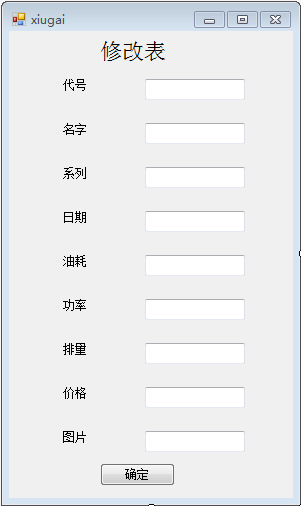
using System;
using System.Collections.Generic;
using System.ComponentModel;
using System.Data;
using System.Drawing;
using System.Linq;
using System.Text;
using System.Threading.Tasks;
using System.Windows.Forms;
namespace WindowsFormsApplication2
{
public partial class xiugai : Form
{
private string Code = "";
private static xiugai xg = null;
public xiugai()
{
InitializeComponent();
}
public xiugai(string code)
{
InitializeComponent();
this.Code = code;
}
private void xiugai_Load(object sender, EventArgs e)
{
carDA da = new carDA();
car data = da.select(Code);
textBox1.Text = data.Code;
textBox2.Text = data.Name;
textBox3.Text=data.Brand;
textBox4.Text = data.Time.ToString("yyyy-MM-dd HH:mm:ss");
textBox5.Text=data.Oil.ToString();
textBox6.Text=data.Powers.ToString();
textBox7.Text=data.Exhaust.ToString();
textBox8.Text=data.Price.ToString();
textBox9.Text = data.Pic;
}
public static xiugai NewXiuGai(string code)
{
if (xg == null || xg.IsDisposed)
{
xg = new xiugai(code);
}
return xg;
}
private void button1_Click(object sender, EventArgs e)
{
string _code = textBox1.Text;
string _name = textBox2.Text;
string _brand = textBox3.Text;
DateTime _time =Convert.ToDateTime(textBox4.Text);
decimal _oil = Convert.ToDecimal(textBox5.Text);
int _powers = Convert.ToInt32(textBox6.Text);
int _exhaust = Convert.ToInt32(textBox7.Text);
decimal _price = Convert.ToDecimal(textBox8.Text);
string _pic = textBox9.Text;
carDA aaa = new carDA();
aaa.update(_code, _name, _brand, _time, _oil, _powers, _exhaust, _price, _pic);
Form1.bs = 1;
this.Close();
}
}
}
brand系列
using System;
using System.Collections.Generic;
using System.Linq;
using System.Text;
using System.Threading.Tasks;
namespace WindowsFormsApplication2
{
public class brand
{
private string brand_code;
public string Brand_code
{
get { return brand_code; }
set { brand_code = value; }
}
private string brand_name;
public string Brand_name
{
get { return brand_name; }
set { brand_name = value; }
}
}
}
using System;
using System.Collections.Generic;
using System.Linq;
using System.Text;
using System.Threading.Tasks;
using System.Data.SqlClient;
namespace WindowsFormsApplication2
{
public class brandDA
{
private SqlConnection _conn;
private SqlCommand _cmd;
private SqlDataReader _dr;
public brandDA()
{
_conn = DBconnect.Conn;
_cmd = _conn.CreateCommand();
}
public List<brand> Select()
{
_cmd.CommandText = "select * from Brand";
_conn.Open();
_dr = _cmd.ExecuteReader();
List<brand> list = new List<brand>();
if (_dr.HasRows)
{
while (_dr.Read())
{
brand data = new brand();
data.Brand_code = _dr[0].ToString();
data.Brand_name= _dr[1].ToString();
list.Add(data);
}
}
_conn.Close();
return list;
}
public string BrandName(string code)
{
string name = "";
_cmd.CommandText = "select Brand_Name from Brand where Brand_Code=@code";
_cmd.Parameters.AddWithValue("@code", code);
_conn.Open();
_dr = _cmd.ExecuteReader();
if (_dr.HasRows)
{
_dr.Read();
name = _dr[0].ToString();
}
_conn.Close();
return name;
}
}
}
Windows.form增删改查的更多相关文章
- window.form增删改查
效果展示: 查询: 可以查询姓名:民族:姓名+民族:都是空的查询全部 取值取得是姓名: 删除: 修改: 先选中查询之后修改: 添加: 代码部分: 第一张表: 第二张表:主表,民族代码加名称 natio ...
- Zend Framework1 框架入门(针对Windows,包含安装配置与数据库增删改查)
最近公司接的项目需要用到Zend Framework框架,本来需要用的是ZendFramework2 ,但是由于原有代码使用了ZendFramework1 框架,所以顺带学习了.现将一些基础入门记录一 ...
- mongodb windows的安装方法和添加到任务管理器中、检测是否成功、增删改查命令
转: mongodb安装方法: https://blog.csdn.net/heshushun/article/details/77776706 mongodb检测安装成功 .以及增删改 ...
- python开发mysql:mysql安装(windows)&密码找回&存储引擎简介&库表的增删改查
一,mysql安装 下载地址 https://dev.mysql.com/downloads/file/?id=471342 解压后,将目录C:\mysql-5.7.19-winx64\bin添加到计 ...
- Django框架之第二篇--app注册、静态文件配置、form表单提交、pycharm连接数据库、django使用mysql数据库、表字段的增删改查、表数据的增删改查
本节知识点大致为:静态文件配置.form表单提交数据后端如何获取.request方法.pycharm连接数据库,django使用mysql数据库.表字段的增删改查.表数据的增删改查 一.创建app,创 ...
- GZFramwork数据库层《一》普通表增删改查
运行结果: 使用代码生成器(GZCodeGenerate)生成tb_MyUser的Model 生成器源代码下载地址: https://github.com/GarsonZhang/GZCode ...
- 浅谈dataGridView使用,以及画面布局使用属性,对datagridview进行增删改查操作,以及委托使用技巧
通过几天的努力后,对datagridview使用作一些简要的介绍,该实例主要运用与通过对datagridview操作.对数据进行增删改查操作时,进行逻辑判断执行相关操作.简单的使用委托功能,实 ...
- C#winform窗口登录和数据的增删改查
工具:VS2013 数据库SqlServer2008 两张表,一个用户登录表,一个资料表用于增删改查 .先把表建好.可以根据我发的图建立,这样下面的代码修改的就少. 资料部分SQL CREATE TA ...
- c#操作数据库的增删改查语句及DataGridView简单使用
下面是要用户名和密码连接数据库的操作: 一.定义连接字符串,用来链接SQL Server string str_con = "server=.(服务器名称一般为 . );database=W ...
随机推荐
- 打印不同的数 Exercise07_05
import java.util.Scanner; /** * @author 冰樱梦 * 时间:2018年下半年 * 题目:打印不同的数 * */ public class Exercise07_0 ...
- 通读《STL源码剖析》之后的一点读书笔记
直接逼入正题. Standard Template Library简称STL.STL可分为容器(containers).迭代器(iterators).空间配置器(allocator).配接器(adap ...
- 【MySQL笔记】数据定义语言DDL
1.创建基本表 create table <表名> (<列名><数据类型>[列级完整性约束条件] ...
- linux-文件中行按照出现次数多少排序
cat sorttest | sort | uniq -c | sort -k1 sorttest内容如下:
- [转] matlab获取时间日期
原文:EmanLee, Eman Lee's Space (blog, website) 在MATLAB中得到系统当前日期.时间也是经常用到的内容,由以下函数实现. 1.生成指定格式日期和时间 dat ...
- Less 简介
什么是LESSCSS LESSCSS是一种动态样式语言,属于CSS预处理语言的一种,它使用类似CSS的语法,为CSS的赋予了动态语言的特性,如变量.继承.运算.函数等,更方便CSS的编写和维护. LE ...
- Laravel 5 系列教程三:视图变量传递和Blade
免费视频教程地址https://laravist.com/series/laravel-5-basic 上一篇我们简单地说了Router,Views和Controllers的工作流程,这一次我就按照上 ...
- Druid对比Vertica
怎么比较Druid和Vertica? Vertica 类似与之前介绍的ParAccel/Redshift(Druid-vs-Redshift). 不是实时注入数据: 提供SQL的全部语法支持 另外一个 ...
- Eclipse user library位置
原因: 转自:http://happycoolyp.iteye.com/blog/1853135 user libraries的记录文件%eclipse_workspace%\.metadata\.p ...
- nmap小技巧[1] 探测大网络空间中的存活主机
url: nmap是所有安全爱好者应该熟练掌握的扫描工具,本篇介绍其在扫描大网络空间时的用法. 为什么要扫描大网络空间呢? 有这样的情形: 内网渗透 攻击者单点突破,进入内网后,需进一步扩大成果, ...