
ESP32 LyraT音频开发板试玩(二):播放音乐
我是卓波,很高兴你来看我的博客。
系列文章:
本文延续上一篇博客
将D:\msys32\home\user\esp\esp-adf\examples\get-started目录下的play_mp3工程直接拷贝到esp目录下

看一下代码,代码量也不多,核心是创建一个mp3元素和一个i2s元素,然后将两个元素链接到管道中。
形成了mp3元素拿数据给i2s元素播放的关系。
/* Play mp3 file by audio pipeline

   This example code is in the Public Domain (or CC0 licensed, at your option.)

   Unless required by applicable law or agreed to in writing, this

   software is distributed on an "AS IS" BASIS, WITHOUT WARRANTIES OR

   CONDITIONS OF ANY KIND, either express or implied.

*/

#include <string.h>

#include "freertos/FreeRTOS.h"

#include "freertos/task.h"

#include "esp_log.h"

#include "audio_element.h"

#include "audio_pipeline.h"

#include "audio_event_iface.h"

#include "audio_mem.h"

#include "audio_common.h"

#include "i2s_stream.h"

#include "mp3_decoder.h"

#include "audio_hal.h"

static const char *TAG = "PLAY_MP3_FLASH";

/*

   To embed it in the app binary, the mp3 file is named

   in the component.mk COMPONENT_EMBED_TXTFILES variable.

*/

extern const uint8_t adf_music_mp3_start[] asm("_binary_adf_music_mp3_start");

extern const uint8_t adf_music_mp3_end[]   asm("_binary_adf_music_mp3_end");

int mp3_music_read_cb(audio_element_handle_t el, char *buf, int len, TickType_t wait_time, void *ctx)

{

    static int mp3_pos;

    int read_size = adf_music_mp3_end - adf_music_mp3_start - mp3_pos;

    if (read_size == ) {

        return AEL_IO_DONE;

    } else if (len < read_size) {

        read_size = len;

    }

    memcpy(buf, adf_music_mp3_start + mp3_pos, read_size);

    mp3_pos += read_size;

    return read_size;

}

void app_main(void)

{

    audio_pipeline_handle_t pipeline;

    audio_element_handle_t i2s_stream_writer, mp3_decoder;

    esp_log_level_set("*", ESP_LOG_WARN);

    esp_log_level_set(TAG, ESP_LOG_INFO);

    ESP_LOGI(TAG, "[ 1 ] Start audio codec chip");

    audio_hal_codec_config_t audio_hal_codec_cfg =  AUDIO_HAL_ES8388_DEFAULT();

    audio_hal_handle_t hal = audio_hal_init(&audio_hal_codec_cfg, );

    audio_hal_ctrl_codec(hal, AUDIO_HAL_CODEC_MODE_DECODE, AUDIO_HAL_CTRL_START);

    ESP_LOGI(TAG, "[ 2 ] Create audio pipeline, add all elements to pipeline, and subscribe pipeline event");

    audio_pipeline_cfg_t pipeline_cfg = DEFAULT_AUDIO_PIPELINE_CONFIG();

    pipeline = audio_pipeline_init(&pipeline_cfg);

    mem_assert(pipeline);

    ESP_LOGI(TAG, "[2.1] Create mp3 decoder to decode mp3 file and set custom read callback");

    mp3_decoder_cfg_t mp3_cfg = DEFAULT_MP3_DECODER_CONFIG();

    mp3_decoder = mp3_decoder_init(&mp3_cfg);

    audio_element_set_read_cb(mp3_decoder, mp3_music_read_cb, NULL);

    ESP_LOGI(TAG, "[2.2] Create i2s stream to write data to codec chip");

    i2s_stream_cfg_t i2s_cfg = I2S_STREAM_CFG_DEFAULT();

    i2s_cfg.type = AUDIO_STREAM_WRITER;

    i2s_stream_writer = i2s_stream_init(&i2s_cfg);

    ESP_LOGI(TAG, "[2.3] Register all elements to audio pipeline");

    audio_pipeline_register(pipeline, mp3_decoder, "mp3");

    audio_pipeline_register(pipeline, i2s_stream_writer, "i2s");

    ESP_LOGI(TAG, "[2.4] Link it together [mp3_music_read_cb]-->mp3_decoder-->i2s_stream-->[codec_chip]");

    audio_pipeline_link(pipeline, (const char *[]) {"mp3", "i2s"}, );

    ESP_LOGI(TAG, "[ 3 ] Setup event listener");

    audio_event_iface_cfg_t evt_cfg = AUDIO_EVENT_IFACE_DEFAULT_CFG();

    audio_event_iface_handle_t evt = audio_event_iface_init(&evt_cfg);

    ESP_LOGI(TAG, "[3.1] Listening event from all elements of pipeline");

    audio_pipeline_set_listener(pipeline, evt);

    ESP_LOGI(TAG, "[ 4 ] Start audio_pipeline");

    audio_pipeline_run(pipeline);

    while () {

        audio_event_iface_msg_t msg;

        esp_err_t ret = audio_event_iface_listen(evt, &msg, portMAX_DELAY);

        if (ret != ESP_OK) {

            ESP_LOGE(TAG, "[ * ] Event interface error : %d", ret);

            continue;

        }

        if (msg.source_type == AUDIO_ELEMENT_TYPE_ELEMENT && msg.source == (void *) mp3_decoder

            && msg.cmd == AEL_MSG_CMD_REPORT_MUSIC_INFO) {

            audio_element_info_t music_info = {};

            audio_element_getinfo(mp3_decoder, &music_info);

            ESP_LOGI(TAG, "[ * ] Receive music info from mp3 decoder, sample_rates=%d, bits=%d, ch=%d",

                music_info.sample_rates, music_info.bits, music_info.channels);

            audio_element_setinfo(i2s_stream_writer, &music_info);

            i2s_stream_set_clk(i2s_stream_writer, music_info.sample_rates, music_info.bits, music_info.channels);

            continue;

        }

        /* Stop when the last pipeline element (i2s_stream_writer in this case) receives stop event */

        if (msg.source_type == AUDIO_ELEMENT_TYPE_ELEMENT && msg.source == (void *) i2s_stream_writer

                && msg.cmd == AEL_MSG_CMD_REPORT_STATUS && (int) msg.data == AEL_STATUS_STATE_STOPPED) {

            break;

        }

    }

    ESP_LOGI(TAG, "[ 5 ] Stop audio_pipeline");

    audio_pipeline_terminate(pipeline);

    /* Terminate the pipeline before removing the listener */

    audio_pipeline_remove_listener(pipeline);

    /* Make sure audio_pipeline_remove_listener is called before destroying event_iface */

    audio_event_iface_destroy(evt);

    /* Release all resources */

    audio_pipeline_deinit(pipeline);

    audio_element_deinit(i2s_stream_writer);

    audio_element_deinit(mp3_decoder);

}
然后根据上一篇介绍的方法编译和下载
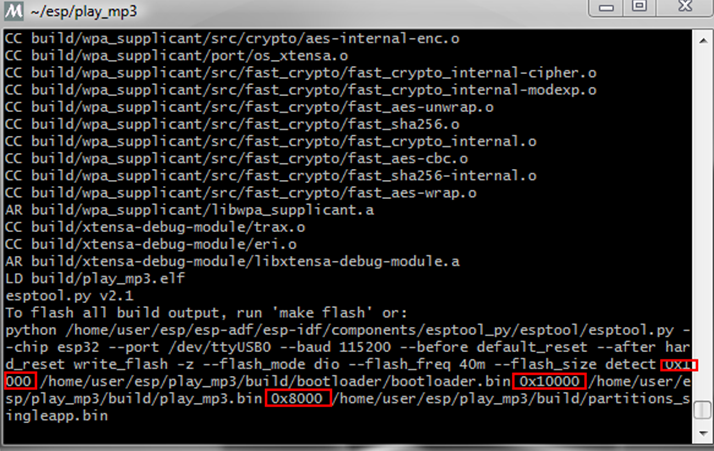
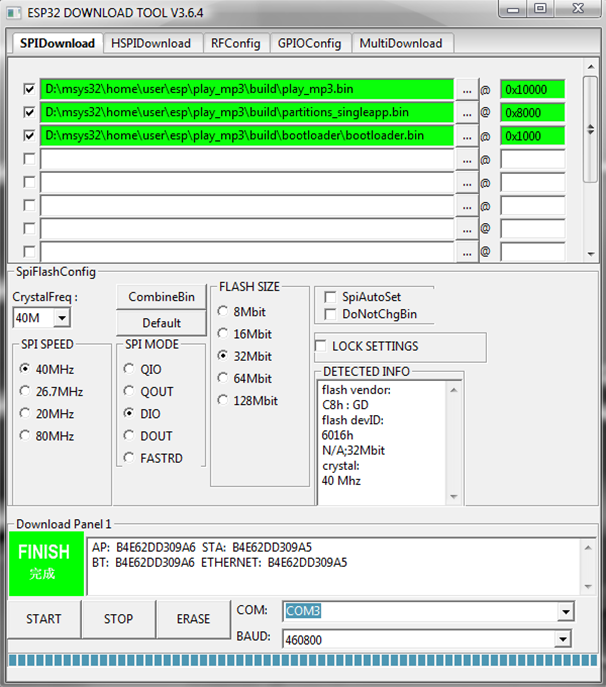
运行后在串口调试助手输出
ets Jun    ::

rst:0x1 (POWERON_RESET),boot:0x3f (SPI_FAST_FLASH_BOOT)

flash read err,

ets_main.c

ets Jun    ::

rst:0x10 (RTCWDT_RTC_RESET),boot:0x3f (SPI_FAST_FLASH_BOOT)

configsip: , SPIWP:0xee

clk_drv:0x00,q_drv:0x00,d_drv:0x00,cs0_drv:0x00,hd_drv:0x00,wp_drv:0x00

mode:DIO, clock div:

load:0x3fff0018,len:

load:0x3fff001c,len:

load:0x40078000,len:

ho  tail  room

load:0x40078000,len:

entry 0x40078fb4

[;32mI () boot: ESP-IDF v3.0.1 2nd stage bootloader[0m

[;32mI () boot: compile time ::[0m

[;32mI () boot: Enabling RNG early entropy source...[0m

[;32mI () boot: SPI Speed      : 40MHz[0m

[;32mI () boot: SPI Mode       : DIO[0m

[;32mI () boot: SPI Flash Size : 4MB[0m

[;32mI () boot: Partition Table:[0m

[;32mI () boot: ## Label            Usage          Type ST Offset   Length[0m

[;32mI () boot:   nvs              WiFi data           [0m

[;32mI () boot:   phy_init         RF data            0000f000 [0m

[;32mI () boot:   factory          factory app         [0m

[;32mI () boot: End of partition table[0m

[;32mI () esp_image: segment : paddr=0x00010020 vaddr=0x3f400020 size=0x1f468 () map[0m

[;32mI () esp_image: segment : paddr=0x0002f490 vaddr=0x3ffb0000 size=0x00b80 (  ) load[0m

[;32mI () esp_image: segment : paddr=0x00030018 vaddr=0x400d0018 size=0x21604 () map[0m

[;32mI () esp_image: segment : paddr=0x00051624 vaddr=0x3ffb0b80 size=0x0169c (  ) load[0m

[;32mI () esp_image: segment : paddr=0x00052cc8 vaddr=0x40080000 size=0x00400 (  ) load[0m

[;32mI () esp_image: segment : paddr=0x000530d0 vaddr=0x40080400 size=0x09e80 ( ) load[0m

[;32mI () esp_image: segment : paddr=0x0005cf58 vaddr=0x400c0000 size=0x00000 (     ) load[0m

[;32mI () boot: Loaded app from partition at offset 0x10000[0m

[;32mI () boot: Disabling RNG early entropy source...[0m

[;32mI () cpu_start: Pro cpu up.[0m

[;32mI () cpu_start: Starting app cpu, entry point is 0x40080ee4[0m

[;32mI () cpu_start: App cpu up.[0m

[;32mI () heap_init: Initializing. RAM available for dynamic allocation:[0m

[;32mI () heap_init: At 3FFAE6E0 len  ( KiB): DRAM[0m

[;32mI () heap_init: At 3FFB2A48 len 0002D5B8 ( KiB): DRAM[0m

[;32mI () heap_init: At 3FFE0440 len 00003BC0 ( KiB): D/IRAM[0m

[;32mI () heap_init: At 3FFE4350 len 0001BCB0 ( KiB): D/IRAM[0m

[;32mI () heap_init: At 4008A280 len 00015D80 ( KiB): IRAM[0m

[;32mI () cpu_start: Pro cpu start user code[0m

[;32mI () cpu_start: Starting scheduler on PRO CPU.[0m

[;32mI () cpu_start: Starting scheduler on APP CPU.[0m

[;32mI () PLAY_MP3_FLASH: [  ] Start audio codec chip[0m

[;32mI () PLAY_MP3_FLASH: [  ] Create audio pipeline, add all elements to pipeline, and subscribe pipeline event[0m

[;32mI () PLAY_MP3_FLASH: [2.1] Create mp3 decoder to decode mp3 file and set custom read callback[0m

[;32mI () PLAY_MP3_FLASH: [2.2] Create i2s stream to write data to codec chip[0m

[;32mI () PLAY_MP3_FLASH: [2.3] Register all elements to audio pipeline[0m

[;32mI () PLAY_MP3_FLASH: [2.4] Link it together [mp3_music_read_cb]-->mp3_decoder-->i2s_stream-->[codec_chip][0m

[;32mI () PLAY_MP3_FLASH: [  ] Setup event listener[0m

[;32mI () PLAY_MP3_FLASH: [3.1] Listening event from all elements of pipeline[0m

[;32mI () PLAY_MP3_FLASH: [  ] Start audio_pipeline[0m

[;32mI () PLAY_MP3_FLASH: [ * ] Receive music info from mp3 decoder, sample_rates=, bits=, ch=[0m

[;32mI () PLAY_MP3_FLASH: [  ] Stop audio_pipeline[0m

[;33mW () AUDIO_PIPELINE: There are no listener registered[0m
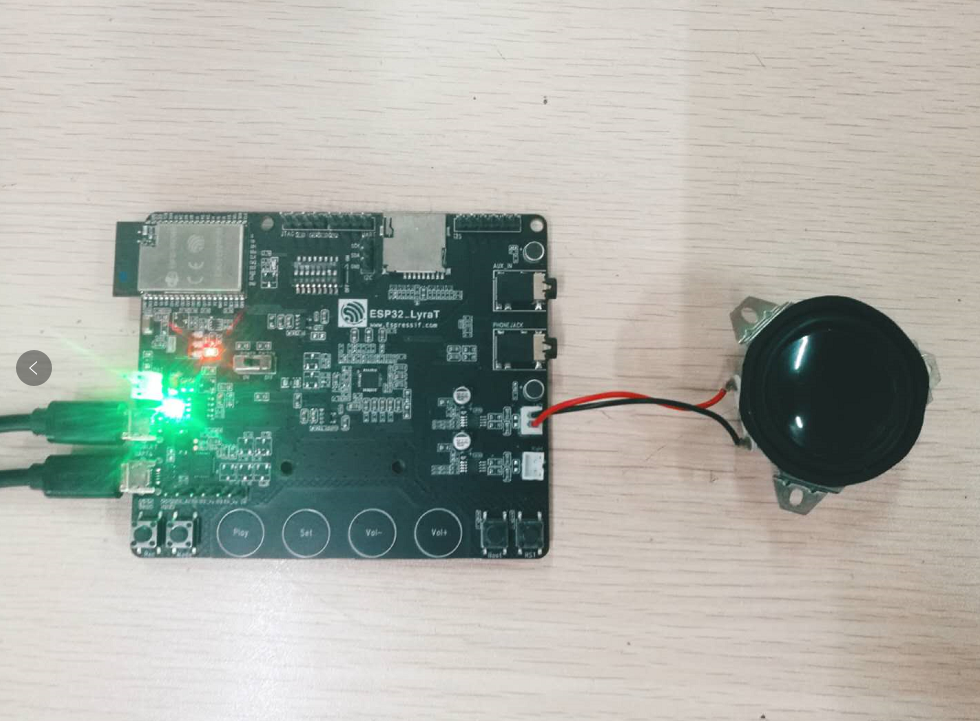
接上喇叭,就可以听到音乐
关于idf和adf的api用法,官方有相关教程链接:
IDF: https://docs.espressif.com/projects/esp-idf/en/latest/
ADF: https://docs.espressif.com/projects/esp-adf/en/latest/
最后
本文主要介绍了运行adf的mp3播放例子的方法,在adf的examples文件夹下还有很多例子,亲们可以去研究研究。
版权所有,转载请打赏哟
如果你喜欢我的文章,可以通过微信扫一扫给我打赏哟

ESP32 LyraT音频开发板试玩(二):播放音乐的更多相关文章
- ESP32 LyraT音频开发板试玩(一):搭建开发环境
我是卓波,很高兴你来看我的博客. 系列文章: ESP32 LyraT音频开发板试玩(一):搭建开发环境 ESP32 LyraT音频开发板试玩(二):播放音乐 关于ESP32的开发环境搭建,官方有教程, ...
- MicroPython开发板:TPYBoard v102 播放音乐实例
0x00前言 前段时间看到TPYBoard的技术交流群(群号:157816561,)里有人问关于TPYBoard播放音乐的问题.最近抽空看了一下文档介绍,着手做了个实验.更多MicroPython的教 ...
- 【Android开发VR实战】二.播放360°全景视频
转载请注明出处:http://blog.csdn.net/linglongxin24/article/details/53924006 本文出自[DylanAndroid的博客] [Android开发 ...
- ESP32音频开发板ESP32-Korvo V1.1踩坑
电池供电ESP32-Korvo V1.1开发板供电电压低于3.9V不断复位: 报错->Brownout detector was triggered 断电探测器触发复位 根据同行资料发现,禁用断 ...
- QEMU让你无需开发板即可玩溜RT-Thread~
1.1 本文的目的和背景 嵌入式软件开发离不开开发板,在没有物理开发板的情况下,可以使用QEMU等类似的虚拟机来模拟开发板.QEMU是一个支持跨平台虚拟化的虚拟机,它可以虚拟很多开发板.为了方便大家在 ...
- 基于Basys2开发板的简易电子琴和音乐播放器设计
背景:华中科技大学 电测综合实验 主要功能:Basys2开发板外接一个扬声器(或无源蜂鸣器也可)实现电子琴和音乐播放器的功能.其中由于开发板上只有4个按键,所以电子琴功能只做了4个音调,分别对应于4个 ...
- swift开发:试玩 Apple 站点的 playground
https://developer.apple.com/library/prerelease/ios/documentation/swift/conceptual/swift_programming_ ...
- 用Java开发的【智能语音开发板MEGA ESP32AI】
有点激动 ~ ~ ~ 新鲜出炉,用视频看看效果哦 我们新研发出世的语音开发板MEGA ESP32AI,来看看吧,有点腻害哦!!!先演示下功能语音控制开关等.播报天气 戳下面链接看视频哦? MEGA E ...
- ESP32 ADF windows开发环境搭建 适配ADF到ESP32A1S(转)
搭建ESP32A1S的ADF开发环境 一,获取IDF和IDF-TOOL adf是乐鑫的音频开发框架,里面有许多乐鑫的音频开发API,同时ADF是基于IDF的.这一部分可以按照官网的教程一步一步来.官网 ...
随机推荐
- vue v-on 带参事件
1.js代码 var list=[ //定义一个数组 {title:} ] var box=new Vue({ el:'.box', data:{ list:list }, methods:{ //d ...
- Oracle 查看session级别信息
1. 查看活动会话信息[sql] view plain copySELECT * FROM V$SESSION WHERE USERNAME IS NOT NULL AND STAT ...
- 使用sqlloader向oracle导入文本数据
文本文件如下,注意文件名必须有后缀,文本行首也需要|分隔符:[oracle@ycr test]$ more person.txt|aaa|123|m|aaa|123|m|aaa|123|m|aaa|1 ...
- Qt socket制作一个简单的文件传输系统
服务器 用qt designer设计出服务器界面: 上代码: Server.pro #------------------------------------------------- # # Pro ...
- ZT C++ 重载、覆盖和隐藏的区别
重载.覆盖和隐藏的区别 分类: C++ 学习笔记 学习心得与方法 2013-09-26 11:21 50人阅读 评论(0) 收藏 举报 概念区分 “overload”翻译过来就是:超载,过载,重载,超 ...
- Jerry的WebClient UI 42篇原创文章合集
我要感谢CRM On Premise, 因为在这个产品上做开发让我得以使用WebClient UI框架.有些朋友觉得这个SAP自己发明的基于HTML+ABAP的MVC框架,和现在流行的三驾马车(Ang ...
- OC 构造方法
#import <Foundation/Foundation.h> @interface Student : NSObject { int _age; int _no; } - (void ...
- NodeJS服务器端平台实践记录
[2015 node.js learning notes]by lijun 01-note Nodejs是服务器端的javascript,是一种单线程.异步I/O.事件驱动型的javascript:其 ...
- HDU 4944 逆序数对
题目链接:http://acm.hdu.edu.cn/showproblem.php?pid=4911 题意: 给出一个序列,可以相邻的交换k次,求 k 次之后,逆序数对最少是多少: 分析: 可以发现 ...
- 程序的优化(PHP)
有些小细节往往容易被人忽视.有时候常常说优化代码优化代码,但是实际操作的时候,最容易被忽视的如下所示: echo 比 print 快. 使用echo的多重参数代替字符串连接. 在执行for循环之前确定 ...