
linux查漏补缺-linux命令行安装mysql
apt安装
sudo apt-get update
sudo apt-get install mysql-server
root@192:/sys/fs/cgroup# apt-get install mysql-server

Reading package lists... Done

Building dependency tree

Reading state information... Done

The following additional packages will be installed:

  libaio1 libcgi-fast-perl libcgi-pm-perl libencode-locale-perl libevent-core-2.0-5 libfcgi-perl libhtml-parser-perl libhtml-tagset-perl libhtml-template-perl libhttp-date-perl

  libhttp-message-perl libio-html-perl liblwp-mediatypes-perl libtimedate-perl liburi-perl mysql-client-5.7 mysql-client-core-5.7 mysql-common mysql-server-5.7

  mysql-server-core-5.7

Suggested packages:

  libdata-dump-perl libipc-sharedcache-perl libwww-perl mailx tinyca

The following NEW packages will be installed:

  libaio1 libcgi-fast-perl libcgi-pm-perl libencode-locale-perl libevent-core-2.0-5 libfcgi-perl libhtml-parser-perl libhtml-tagset-perl libhtml-template-perl libhttp-date-perl

  libhttp-message-perl libio-html-perl liblwp-mediatypes-perl libtimedate-perl liburi-perl mysql-client-5.7 mysql-client-core-5.7 mysql-common mysql-server mysql-server-5.7

  mysql-server-core-5.7

0 upgraded, 21 newly installed, 0 to remove and 139 not upgraded.

Need to get 18.3 MB of archives.

After this operation, 157 MB of additional disk space will be used.

Do you want to continue? [Y/n] y

Get:1 http://us.archive.ubuntu.com/ubuntu xenial-updates/main amd64 mysql-common all 5.7.28-0ubuntu0.16.04.2 [14.7 kB]

Get:2 http://us.archive.ubuntu.com/ubuntu xenial/main amd64 libaio1 amd64 0.3.110-2 [6356 B]

Get:3 http://us.archive.ubuntu.com/ubuntu xenial-updates/main amd64 mysql-client-core-5.7 amd64 5.7.28-0ubuntu0.16.04.2 [6575 kB]

Get:4 http://us.archive.ubuntu.com/ubuntu xenial-updates/main amd64 mysql-client-5.7 amd64 5.7.28-0ubuntu0.16.04.2 [1476 kB]

Get:5 http://us.archive.ubuntu.com/ubuntu xenial-updates/main amd64 mysql-server-core-5.7 amd64 5.7.28-0ubuntu0.16.04.2 [7091 kB]

Get:6 http://us.archive.ubuntu.com/ubuntu xenial-updates/main amd64 libevent-core-2.0-5 amd64 2.0.21-stable-2ubuntu0.16.04.1 [70.6 kB]

Get:7 http://us.archive.ubuntu.com/ubuntu xenial-updates/main amd64 mysql-server-5.7 amd64 5.7.28-0ubuntu0.16.04.2 [2420 kB]

Get:8 http://us.archive.ubuntu.com/ubuntu xenial/main amd64 libhtml-tagset-perl all 3.20-2 [13.5 kB]

Get:9 http://us.archive.ubuntu.com/ubuntu xenial/main amd64 liburi-perl all 1.71-1 [76.9 kB]

Get:10 http://us.archive.ubuntu.com/ubuntu xenial/main amd64 libhtml-parser-perl amd64 3.72-1 [86.1 kB]

Get:11 http://us.archive.ubuntu.com/ubuntu xenial/main amd64 libcgi-pm-perl all 4.26-1 [185 kB]

Get:12 http://us.archive.ubuntu.com/ubuntu xenial/main amd64 libfcgi-perl amd64 0.77-1build1 [32.3 kB]

Get:13 http://us.archive.ubuntu.com/ubuntu xenial/main amd64 libcgi-fast-perl all 1:2.10-1 [10.2 kB]

Get:14 http://us.archive.ubuntu.com/ubuntu xenial/main amd64 libencode-locale-perl all 1.05-1 [12.3 kB]

Get:15 http://us.archive.ubuntu.com/ubuntu xenial/main amd64 libhtml-template-perl all 2.95-2 [60.4 kB]

Get:16 http://us.archive.ubuntu.com/ubuntu xenial/main amd64 libtimedate-perl all 2.3000-2 [37.5 kB]

Get:17 http://us.archive.ubuntu.com/ubuntu xenial/main amd64 libhttp-date-perl all 6.02-1 [10.4 kB]

Get:18 http://us.archive.ubuntu.com/ubuntu xenial/main amd64 libio-html-perl all 1.001-1 [14.9 kB]

Get:19 http://us.archive.ubuntu.com/ubuntu xenial/main amd64 liblwp-mediatypes-perl all 6.02-1 [21.7 kB]

Get:20 http://us.archive.ubuntu.com/ubuntu xenial/main amd64 libhttp-message-perl all 6.11-1 [74.3 kB]

Get:21 http://us.archive.ubuntu.com/ubuntu xenial-updates/main amd64 mysql-server all 5.7.28-0ubuntu0.16.04.2 [10.2 kB]

Fetched 18.3 MB in 6s (2930 kB/s)

perl: warning: Setting locale failed.

perl: warning: Please check that your locale settings:

	LANGUAGE = "en_US:",

	LC_ALL = (unset),

	LC_CTYPE = "UTF-8",

	LANG = "en_US.UTF-8"

    are supported and installed on your system.

perl: warning: Falling back to a fallback locale ("en_US.UTF-8").

locale: Cannot set LC_CTYPE to default locale: No such file or directory

locale: Cannot set LC_ALL to default locale: No such file or directory

Preconfiguring packages ...

/usr/bin/locale: Cannot set LC_CTYPE to default locale: No such file or directory

/usr/bin/locale: Cannot set LC_ALL to default locale: No such file or directory

Selecting previously unselected package mysql-common.

(Reading database ... 78087 files and directories currently installed.)

Preparing to unpack .../mysql-common_5.7.28-0ubuntu0.16.04.2_all.deb ...

Unpacking mysql-common (5.7.28-0ubuntu0.16.04.2) ...

Selecting previously unselected package libaio1:amd64.

Preparing to unpack .../libaio1_0.3.110-2_amd64.deb ...

Unpacking libaio1:amd64 (0.3.110-2) ...

Selecting previously unselected package mysql-client-core-5.7.

Preparing to unpack .../mysql-client-core-5.7_5.7.28-0ubuntu0.16.04.2_amd64.deb ...

Unpacking mysql-client-core-5.7 (5.7.28-0ubuntu0.16.04.2) ...

Selecting previously unselected package mysql-client-5.7.

Preparing to unpack .../mysql-client-5.7_5.7.28-0ubuntu0.16.04.2_amd64.deb ...

Unpacking mysql-client-5.7 (5.7.28-0ubuntu0.16.04.2) ...

Selecting previously unselected package mysql-server-core-5.7.

Preparing to unpack .../mysql-server-core-5.7_5.7.28-0ubuntu0.16.04.2_amd64.deb ...

Unpacking mysql-server-core-5.7 (5.7.28-0ubuntu0.16.04.2) ...

Selecting previously unselected package libevent-core-2.0-5:amd64.

Preparing to unpack .../libevent-core-2.0-5_2.0.21-stable-2ubuntu0.16.04.1_amd64.deb ...

Unpacking libevent-core-2.0-5:amd64 (2.0.21-stable-2ubuntu0.16.04.1) ...

Processing triggers for libc-bin (2.23-0ubuntu10) ...

Processing triggers for man-db (2.7.5-1) ...

Setting up mysql-common (5.7.28-0ubuntu0.16.04.2) ...

update-alternatives: using /etc/mysql/my.cnf.fallback to provide /etc/mysql/my.cnf (my.cnf) in auto mode

Selecting previously unselected package mysql-server-5.7.

(Reading database ... 78255 files and directories currently installed.)

Preparing to unpack .../mysql-server-5.7_5.7.28-0ubuntu0.16.04.2_amd64.deb ...

locale: Cannot set LC_CTYPE to default locale: No such file or directory

locale: Cannot set LC_ALL to default locale: No such file or directory

Unpacking mysql-server-5.7 (5.7.28-0ubuntu0.16.04.2) ...

Selecting previously unselected package libhtml-tagset-perl.

Preparing to unpack .../libhtml-tagset-perl_3.20-2_all.deb ...

Unpacking libhtml-tagset-perl (3.20-2) ...

Selecting previously unselected package liburi-perl.

Preparing to unpack .../liburi-perl_1.71-1_all.deb ...

Unpacking liburi-perl (1.71-1) ...

Selecting previously unselected package libhtml-parser-perl.

Preparing to unpack .../libhtml-parser-perl_3.72-1_amd64.deb ...

Unpacking libhtml-parser-perl (3.72-1) ...

Selecting previously unselected package libcgi-pm-perl.

Preparing to unpack .../libcgi-pm-perl_4.26-1_all.deb ...

Unpacking libcgi-pm-perl (4.26-1) ...

Selecting previously unselected package libfcgi-perl.

Preparing to unpack .../libfcgi-perl_0.77-1build1_amd64.deb ...

Unpacking libfcgi-perl (0.77-1build1) ...

Selecting previously unselected package libcgi-fast-perl.

Preparing to unpack .../libcgi-fast-perl_1%3a2.10-1_all.deb ...

Unpacking libcgi-fast-perl (1:2.10-1) ...

Selecting previously unselected package libencode-locale-perl.

Preparing to unpack .../libencode-locale-perl_1.05-1_all.deb ...

Unpacking libencode-locale-perl (1.05-1) ...

Selecting previously unselected package libhtml-template-perl.

Preparing to unpack .../libhtml-template-perl_2.95-2_all.deb ...

Unpacking libhtml-template-perl (2.95-2) ...

Selecting previously unselected package libtimedate-perl.

Preparing to unpack .../libtimedate-perl_2.3000-2_all.deb ...

Unpacking libtimedate-perl (2.3000-2) ...

Selecting previously unselected package libhttp-date-perl.

Preparing to unpack .../libhttp-date-perl_6.02-1_all.deb ...

Unpacking libhttp-date-perl (6.02-1) ...

Selecting previously unselected package libio-html-perl.

Preparing to unpack .../libio-html-perl_1.001-1_all.deb ...

Unpacking libio-html-perl (1.001-1) ...

Selecting previously unselected package liblwp-mediatypes-perl.

Preparing to unpack .../liblwp-mediatypes-perl_6.02-1_all.deb ...

Unpacking liblwp-mediatypes-perl (6.02-1) ...

Selecting previously unselected package libhttp-message-perl.

Preparing to unpack .../libhttp-message-perl_6.11-1_all.deb ...

Unpacking libhttp-message-perl (6.11-1) ...

Selecting previously unselected package mysql-server.

Preparing to unpack .../mysql-server_5.7.28-0ubuntu0.16.04.2_all.deb ...

Unpacking mysql-server (5.7.28-0ubuntu0.16.04.2) ...

Processing triggers for ureadahead (0.100.0-19) ...

Processing triggers for systemd (229-4ubuntu21.1) ...

Processing triggers for man-db (2.7.5-1) ...

Setting up libaio1:amd64 (0.3.110-2) ...

Setting up mysql-client-core-5.7 (5.7.28-0ubuntu0.16.04.2) ...

Setting up mysql-client-5.7 (5.7.28-0ubuntu0.16.04.2) ...

Setting up mysql-server-core-5.7 (5.7.28-0ubuntu0.16.04.2) ...

Setting up libevent-core-2.0-5:amd64 (2.0.21-stable-2ubuntu0.16.04.1) ...

Setting up mysql-server-5.7 (5.7.28-0ubuntu0.16.04.2) ...

locale: Cannot set LC_CTYPE to default locale: No such file or directory

locale: Cannot set LC_ALL to default locale: No such file or directory

update-alternatives: using /etc/mysql/mysql.cnf to provide /etc/mysql/my.cnf (my.cnf) in auto mode

Renaming removed key_buffer and myisam-recover options (if present)

Setting up libhtml-tagset-perl (3.20-2) ...

Setting up liburi-perl (1.71-1) ...

Setting up libhtml-parser-perl (3.72-1) ...

Setting up libcgi-pm-perl (4.26-1) ...

Setting up libfcgi-perl (0.77-1build1) ...

Setting up libcgi-fast-perl (1:2.10-1) ...

Setting up libencode-locale-perl (1.05-1) ...

Setting up libhtml-template-perl (2.95-2) ...

Setting up libtimedate-perl (2.3000-2) ...

Setting up libhttp-date-perl (6.02-1) ...

Setting up libio-html-perl (1.001-1) ...

Setting up liblwp-mediatypes-perl (6.02-1) ...

Setting up libhttp-message-perl (6.11-1) ...

Setting up mysql-server (5.7.28-0ubuntu0.16.04.2) ...

Processing triggers for libc-bin (2.23-0ubuntu10) ...

Processing triggers for systemd (229-4ubuntu21.1) ...

Processing triggers for ureadahead (0.100.0-19) ...
- 安装完成后,查看
/lib/systemd/system目录,多了一个mysql后台服务

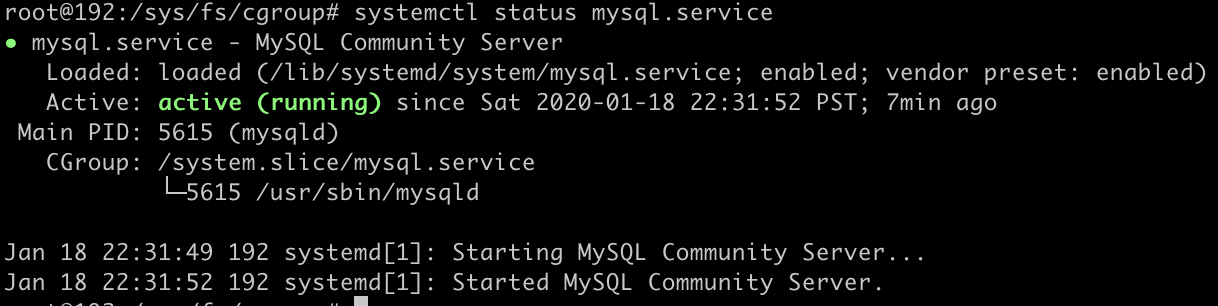
- 查看mysql后台服务状态
systemctl status mysql.service
其他
/lib/systemd/system目录
存放各种后台运行服务的配置文件。mysql以后台服务形式运行,开机即启动。
例如在 Ubuntu 中,我们可以通过 apt-get install mysql-server 的方式安装 MySQL,然 后通过命令systemctl start mysql启动 MySQL,通过systemctl enable mysql设置开机启 动。
之所以成为服务并且能够开机启动,是因为在 /lib/systemd/system 目录下会创建一 个 XXX.service 的配置文件,里面定义了如何启动、如何关闭。/etc/apt/sources.list配置文件
定义apt命令去哪里下载ubuntn的软件
root@192:/# cat /etc/apt/sources.list |grep '^deb'

deb cdrom:[Ubuntu-Server 16.04.4 LTS _Xenial Xerus_ - Release amd64 (20180228)]/ xenial main restricted

deb http://us.archive.ubuntu.com/ubuntu/ xenial main restricted

deb http://us.archive.ubuntu.com/ubuntu/ xenial-updates main restricted

deb http://us.archive.ubuntu.com/ubuntu/ xenial universe

deb http://us.archive.ubuntu.com/ubuntu/ xenial-updates universe

deb http://us.archive.ubuntu.com/ubuntu/ xenial multiverse

deb http://us.archive.ubuntu.com/ubuntu/ xenial-updates multiverse

deb http://us.archive.ubuntu.com/ubuntu/ xenial-backports main restricted universe multiverse

deb http://security.ubuntu.com/ubuntu xenial-security main restricted

deb http://security.ubuntu.com/ubuntu xenial-security universe

deb http://security.ubuntu.com/ubuntu xenial-security multiverse
References
How To Install MySQL on Ubuntu 16.04*
linux查漏补缺-linux命令行安装mysql的更多相关文章
- linux查漏补缺-Linux文件目录结构一览表
FHS 标准 FHS(Filesystem Hierarchy Standard),文件系统层次化标准,该标准规定了 Linux 系统中所有一级目录以及部分二级目录(/usr 和 /var)的用途. ...
- Ubuntu18.04命令行安装mysql未提示输入密码,修改mysql默认密码
Ubuntu18.04命令行安装mysql未提示输入密码,修改mysql默认密码 mysql默认密码为空 但是使用mysql -uroot -p 命令连接mysql时,报错ERROR 1045 (28 ...
- centos命令行安装mysql随机密码查看方法(遇到问题及其解决办法)
mysql初次命令行安装登录时报错: 未输入密码:ERROR 1045 (28000): Access denied for user 'root'@'localhost' (using passwo ...
- Mac 命令行安装mysql homebrew 安装mysql后,如何配置mysql
非常好 强力推荐 这个是我最新并且一直推崇的方法:1.安装:sunyichaodeMacBook-Pro:~ sunyichao$ brew install mysql2.开启mysql:mysql. ...
- Linux下命令行安装weblogic10.3.6
Linux下命令行安装weblogic10.3.6 一.安装前准备工作: 1.创建用户useradd weblogic;创建用户成功linux系统会自动创建一个和用户名相同的分组,并将该用户分到改组中 ...
- VMware10中的CentOS6.5命令行安装VMwaretools工具启用windows与虚拟机中Linux系统的共享目录
VMware10中的CentOS6.5命令行安装VMwaretools工具启用windows与虚拟机中Linux系统的共享目录 一.描述 系统描述:win7旗舰版64位系统+VMware Workst ...
- Linux系统--命令行安装weblogic10.3.6
Linux下命令行安装weblogic10.3.6 一.安装前准备工作: 1.创建用户useradd weblogic;创建用户成功linux系统会自动创建一个和用户名相同的分组,并将该用户分到改组中 ...
- KingbaseFlySync V1R6 管控平台Linux命令行安装
关键字: KingbaseFlySync.KingbaseES.Linux.x86_64.mips64el.aarch64.Java 管控平台: Web管控平台(Manager.Console.Com ...
- 监控Linux性能的18个命令行工具
监控 Linux 性能的 18 个命令行工具 对于系统和网络管理员来说每天监控和调试Linux系统的性能问题是一项繁重的工作.在IT领域作为一名Linux系统的管理员工作5年后,我逐渐 认识到监控和保 ...
随机推荐
- OO Byebye
一.架构设计 1.第一次作业 首先做的就是把所有的Element全部存起来,我把UmlClass和UmlInterface重新用两个新的类来记录了一下,用于更快地找到他们的关联.其实总体思路还是比较简 ...
- 【PAT甲级】1069 The Black Hole of Numbers (20 分)
题意: 输入一个四位的正整数N,输出每位数字降序排序后的四位数字减去升序排序后的四位数字等于的四位数字,如果数字全部相同或者结果为6174(黑洞循环数字)则停止. trick: 这道题一反常态的输入的 ...
- 拥抱高通的联想,真的能靠5G突围?
编辑 | 于斌 出品 | 于见(mpyujian) 2016年,对于常年自我标榜为"民族企业"的联想来说是品牌口碑的"转折之年".它在这一年的5G信道编码标准方 ...
- 关于idea2019.2.3版本中文控制台乱码问题
出现乱码后根据网上找的方法全都试过后还是显示乱码 更改VM Options为 -Dfile.encoding=UTF-8 添加备选字体 更改这两个文件 更改编码格式 以上这些方法全部设置 ...
- Java 多线程学习笔记(一)
一.进程和线程 (1)进程概念的引入 为了能使程序并发执行,并且可以对并发执行的程序加以描述和控制,人们引入了“进程”的概念.---摘之计算机操作系统(第四版)汤小丹编著 (2)进程概念 进程(Pro ...
- ROS学习资源
1.ROS机器人操作系统自主学习实践环境 https://www.shiyanlou.com/courses/854 2.ROS官方网站 http://wiki.ros.org/ ROS中文官方网站 ...
- 201771010135杨蓉庆 《面对对象程序设计(java)》第九周学习总结
第7章 异常.日志.断言和调试 1.实验目的与要求 (1) 掌握java异常处理技术: (2) 了解断言的用法: (3) 了解日志的用途: (4) 掌握程序基础调试技巧: 一.理论知识 1.异常:在程 ...
- 关于雷达(Radar)信道
有些时候,我们在实际的无线网络中,会遇到无线信道一致flapping的情况,即便我们自定义了信道的,发现也会出现flapping.如果这种情况,可能需要确认是否你使用的信道上检测到了雷达. 这里记录一 ...
- VUE组件 单独文件封装
https://www.cnblogs.com/SamWeb/p/6391373.html vuejs 单文件组件.vue 文件 vuejs 自定义了一种.vue文件,可以把html, css, ...
- Leetcode 12,452,455-贪心算法
Leetcode第12题,整数转罗马数字,难度中等 整个题目比较好理解,难度也不大,就算不过脑子,用一串if也基本上可以解决问题,比如 /** 执行用时:6ms,在所有 Java 提交中击败了52.6 ...