
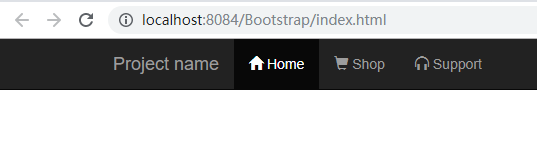
吴裕雄 Bootstrap 前端框架开发——Bootstrap 字体图标(Glyphicons):带有字体图标的导航栏
<!DOCTYPE html>

<html>

    <head>

        <meta charset="utf-8">

        <title>导航栏的字形图标</title>

        <meta name="viewport" content="width=device-width, initial-scale=1.0">

        <!-- Bootstrap -->

        <link rel="stylesheet" href="https://cdn.staticfile.org/twitter-bootstrap/3.3.7/css/bootstrap.min.css">

        <style>

            body {

                padding-top: 50px;

                padding-left: 50px;

            }

        </style>

        <!--[if lt IE 9]>

                <script src="https://apps.bdimg.com/libs/html5shiv/3.7/html5shiv.min.js"></script>

        <![endif]-->

    </head>

    <body>

        <div class="navbar navbar-fixed-top navbar-inverse" role="navigation">

            <div class="container">

                <div class="navbar-header">

                    <button type="button" class="navbar-toggle" data-toggle="collapse" data-target=".navbar-collapse">

                        <span class="sr-only">Toggle navigation</span>

                        <span class="icon-bar"></span>

                        <span class="icon-bar"></span>

                        <span class="icon-bar"></span>

                    </button>

                    <a class="navbar-brand" href="#">Project name</a>

                </div>

                <div class="collapse navbar-collapse">

                    <ul class="nav navbar-nav">

                        <li class="active"><a href="#"><span class="glyphicon glyphicon-home"></span> Home</a></li>

                        <li><a href="#shop"><span class="glyphicon glyphicon-shopping-cart"></span> Shop</a></li>

                        <li><a href="#support"><span class="glyphicon glyphicon-headphones"></span> Support</a></li>

                    </ul>

                </div><!-- /.nav-collapse -->

            </div><!-- /.container -->

        </div>

        <!-- jQuery (Bootstrap 插件需要引入) -->

        <script src="https://cdn.staticfile.org/jquery/2.1.1/jquery.min.js"></script>

        <!-- 包含了所有编译插件 -->

        <script src="https://cdn.staticfile.org/twitter-bootstrap/3.3.7/js/bootstrap.min.js"></script>

    </body>

</html>
吴裕雄 Bootstrap 前端框架开发——Bootstrap 字体图标(Glyphicons):带有字体图标的导航栏的更多相关文章
- 吴裕雄 Bootstrap 前端框架开发——Bootstrap 排版:显示在 <abbr> 元素中的文本以小号字体展示,且可以将小写字母转换为大写字母
<!DOCTYPE html> <html> <head> <title>菜鸟教程(runoob.com)</title> <meta ...
- 吴裕雄 Bootstrap 前端框架开发——Bootstrap 字体图标(Glyphicons):glyphicon glyphicon-envelope
<!DOCTYPE html> <html> <head> <meta charset="utf-8"> <meta name ...
- 吴裕雄 Bootstrap 前端框架开发——Bootstrap 字体图标(Glyphicons):glyphicon glyphicon-cloud
<!DOCTYPE html> <html> <head> <meta charset="utf-8"> <meta name ...
- 吴裕雄 Bootstrap 前端框架开发——Bootstrap 字体图标(Glyphicons):glyphicon glyphicon-euro
<!DOCTYPE html> <html> <head> <meta charset="utf-8"> <meta name ...
- 吴裕雄 Bootstrap 前端框架开发——Bootstrap 字体图标(Glyphicons):glyphicon glyphicon-minus
<!DOCTYPE html> <html> <head> <meta charset="utf-8"> <meta name ...
- 吴裕雄 Bootstrap 前端框架开发——Bootstrap 字体图标(Glyphicons):glyphicon glyphicon-plus
<!DOCTYPE html> <html> <head> <meta charset="utf-8"> <meta name ...
- 吴裕雄 Bootstrap 前端框架开发——Bootstrap 字体图标(Glyphicons):glyphicon glyphicon-asterisk
<!DOCTYPE html> <html> <head> <meta charset="utf-8"> <meta name ...
- 吴裕雄 Bootstrap 前端框架开发——Bootstrap 字体图标(Glyphicons)
<!DOCTYPE html> <html> <head> <meta charset="utf-8"> <title> ...
- 吴裕雄 Bootstrap 前端框架开发——Bootstrap 字体图标(Glyphicons):glyphicon glyphicon-play-circle
<!DOCTYPE html> <html> <head> <meta charset="utf-8"> <meta name ...
随机推荐
- 基于Modelsim的视频流仿真
一.前言 最近在看牟新刚写的<基于FPGA的数字图像处理原理及应用>,书中关于FPGA数字图像处理的原理的原理写的非常透彻,在网上寻找了很久都没有找到完整的源代码工程,因此尝试自己做了补充 ...
- STM32新MCU
G0的出现完美的替换自家目前的F0系列而且有更好的性能和价格优势; STM32WL世界上首款LoRa Soc单片机嵌入了基于Semtech SX126x的经过特殊设计的无线电,该无线电提供两种功率输出 ...
- Fiddler抓包(基本使用方法、web+app端抓包、篡改数据、模拟低速)
1.HTTP代理原理图 http服务器代理:既是web服务器,又是web客户端 接口vs端口: 接口:包含地址和端口 端口:类似于USB接口 地址:127.0.0.1,端口默认:8888 ...
- Electromagnetic
1. 电磁辐射 2. 电磁频谱 3. 可见光 4. 微波 5. 更多相关链接 1. 电磁辐射 https://en.wikipedia.org/wiki/Electromagnetic_radiati ...
- SICP题解
这里用Common Lisp.Haskell等函数式语言. 1.2.请将下面表达式变换为前缀形式: $$ \frac{5 + 4 + (2 - (3 - (6 + \frac{4}{5})))}{3( ...
- node.js是什么,node.js创建应用
简单的说 Node.js 就是运行在服务端的 JavaScript.Node.js 是一个基于Chrome JavaScript 运行时建立的一个平台.Node.js是一个事件驱动I/O服务端Java ...
- pytorch中tensor张量数据基础入门
pytorch张量数据类型入门1.对于pytorch的深度学习框架,其基本的数据类型属于张量数据类型,即Tensor数据类型,对于python里面的int,float,int array,flaot ...
- Caffe2官方使用手册翻译
详细教程见点击这里 http://www.jianshu.com/c/cf07b31bb5f2
- Linux之网络配置
Linux系统网络设备配置文件在/etc/sysconfig/network-scripts/目录中,可使用Vim编辑器编辑网卡配置文件,来配置网络服务,在RHEL7中,网卡配置文件以前缀ifcfg开 ...
- 如何反编译MIPS64伪代码?用Ghidra
在分析固件时,碰到MIPS64架构的程序会很头疼,虽然用IDA能够反编译出汇编代码,但是没办法F5一键反编译成伪代码,如果单看汇编,看久了脑壳痛. 后来Google到了一个好工具,Ghidra,发音和 ...