
vue基础入门(3)
3.组件基础
3.1.什么是组件?
3.1.1.理解组件
前端组件化开发是目前非常流行的方式,什么是前端组件化开发呢?就是将页面的某一部分独立出来,将这一部分的数据、视图、以及一些控制逻辑封装到一个组件内部,暴露一些开箱即用的函数或者属性供外部组件调用。这种组织代码的开发方式我们称为组件化开发。通俗的说,我们需要把一个页面拆分成若干的小单元,每个小单元就是一个小组件,例如,一个网页,我们可以做如下拆分
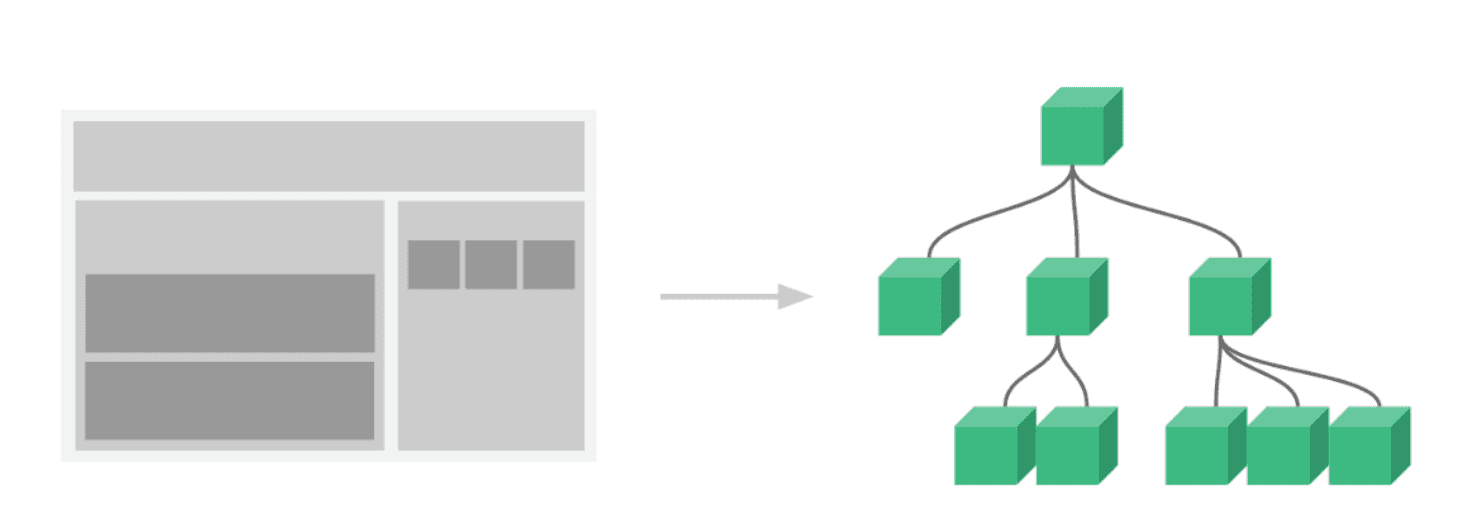
组件开发的好处就是可以复用代码,下面是组件库举例
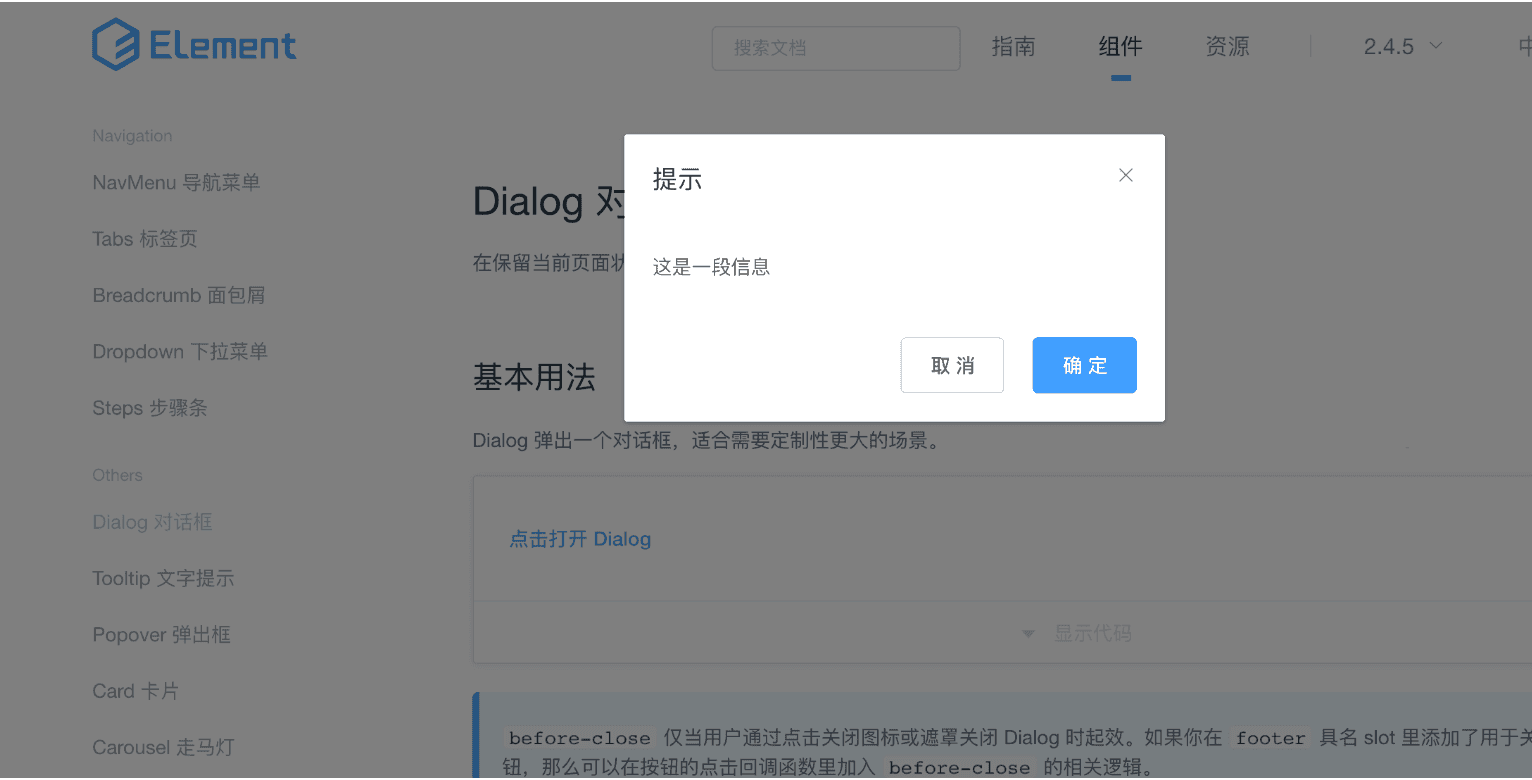
点击查看,Element UI
3.1.2.vue中的组件
在vue中,所有的 Vue 组件同时也都是 Vue 的实例,所以可接受相同的选项对象 (除了一些根级特有的选项) 并提供相同的生命周期钩子。Vue组件带有一个名字,在根实例中,组件被定义为元素使用,下面我们来定义一个button计数器组件
<!doctype html>

<html lang="en">

<head>

    <meta charset="UTF-8">

    <meta name="viewport"

          content="width=device-width, user-scalable=no, initial-scale=1.0, maximum-scale=1.0, minimum-scale=1.0">

    <meta http-equiv="X-UA-Compatible" content="ie=edge">

    <title>Document</title>

</head>

<body>

<div id="app">

    <button-counter></button-counter>

    <button-counter></button-counter>

    <button-counter></button-counter>

    <button-counter></button-counter>

    <button-counter></button-counter>

</div>

<script src="node_modules/vue/dist/vue.js"></script>

<script>

    Vue.component('button-counter',{

        data(){

           return {

               num: 0

           }

        },

        methods:{

            fn(){

               this.num++

            }

        },

        template:'<button @click="fn">点击我,自己加1:{{num}}</button>'

    });

    let vm = new Vue({

        el: '#app'

    });

</script>

</body>

</html>
注意:组件中的data必须写成函数的形式,如果不写成函数的形式,组件间数据改变会相互影响
3.1.3.组件定义实例
<!doctype html>

<html lang="en">

<head>

    <meta charset="UTF-8">

    <meta name="viewport"

          content="width=device-width, user-scalable=no, initial-scale=1.0, maximum-scale=1.0, minimum-scale=1.0">

    <meta http-equiv="X-UA-Compatible" content="ie=edge">

    <title>Document</title>

    <style>

        body {

            margin: 0;

        }

    </style>

</head>

<body>

<div id="app">

    <header-component></header-component>

    <main-component></main-component>

    <footer-component></footer-component>

</div>

<script src="node_modules/vue/dist/vue.js"></script>

<script>

    //头部组件

    Vue.component('header-component', {

        template: "<div :style='styles'>这里是头部区域</div>",

        computed: {

            styles() {

                return {

                    width: '100%',

                    height: '100px',

                    backgroundColor: 'black',

                    color: 'white',

                    textAlign: 'center',

                    lineHeight: '100px',

                    fontSize: '30px'

                }

            }

        }

    });

    Vue.component('main-component', {

        template: `<div :style="styles">

                    <mainleft-component></mainleft-component>

                    <mainright-component></mainright-component>

                    </div>`,

        computed: {

            styles() {

                return {

                    width: '100%',

                    height: '500px',

                    backgroundColor: 'orangered',

                    paddingTop: '50px'

                }

            }

        }

    });

    Vue.component('mainleft-component', {

        template: '<div :style="styles"></div>',

        computed: {

            styles() {

                return {

                    width: '35%',

                    height: '400px',

                    backgroundColor: 'green',

                    float: 'left'

                }

            }

        }

    });

    Vue.component('mainright-component', {

        template: '<div :style="styles"></div>',

        computed: {

            styles() {

                return {

                    width: '60%',

                    height: '400px',

                    backgroundColor: 'blue',

                    float: 'right'

                }

            }

        }

    });

    Vue.component('footer-component', {

        template: '<div :style="styles">这里是底部区域</div>',

        computed: {

            styles() {

                return {

                    width: '100%',

                    height: '150px',

                    backgroundColor: 'black',

                    color: 'white',

                    textAlign: 'center',

                    lineHeight: '150px',

                    fontSize: '30px'

                }

            }

        }

    });

    let vm = new Vue({

        el: '#app'

    });

</script>

</body>

</html>
3.1.4.组件的父子关系
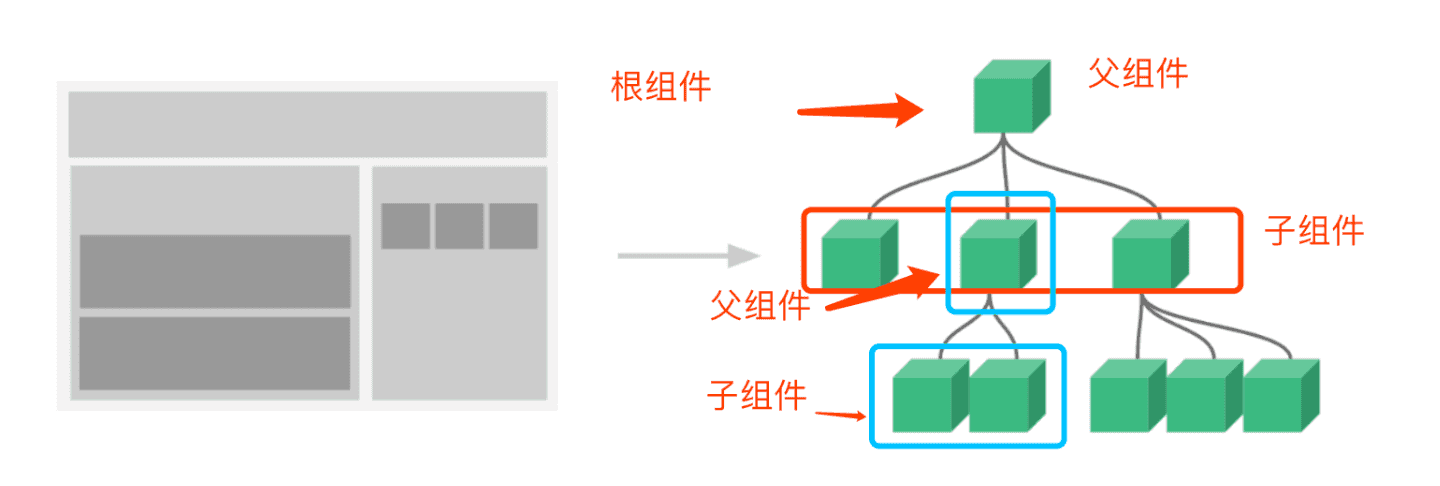
3.2.父组件向子组件传数据
组件有自己的作用域,并且相互之间是相互独立的,这样就涉及到组件间的通信问题,在子组件中是不能直接使用父组件中的数据的,要在子组件中使用父组件的数据,可以在子组件注册的时候用props选项来声明一个自定义属性,然后在使用组件的时候,通过这个自定义属性来绑定数据
<!doctype html>

<html lang="en">

<head>

    <meta charset="UTF-8">

    <meta name="viewport"

          content="width=device-width, user-scalable=no, initial-scale=1.0, maximum-scale=1.0, minimum-scale=1.0">

    <meta http-equiv="X-UA-Compatible" content="ie=edge">

    <title>Document</title>

</head>

<body>

<div id="app">

    <button @click="showLogin">登录</button>

    <button @click="showRegister">注册</button>

    <template v-if="flagLogin">

        <dialog-component :title="loginTitle"></dialog-component>

    </template>

    <template v-if="flagRegister">

        <dialog-component :title="registerTitle"></dialog-component>

    </template>

</div>

<script src="node_modules/vue/dist/vue.js"></script>

<script>

    Vue.component('dialog-component', {

        template: '<div :style="box"><div :style="boxTitle">{{title}}</div></div>',

        computed: {

            box() {

                return {

                    width: '300px',

                    height: '300px',

                    border: '1px solid black'

                }

            },

            boxTitle() {

                return {

                    backgroundColor: 'green',

                    textAlign: 'center',

                    height: '30px',

                    lineHeight: '30px',

                    color: 'white'

                }

            }

        },

        props:['title']

    });

    let vm = new Vue({

        el: '#app',

        data: {

            flagLogin: false,

            flagRegister: false,

            loginTitle: '登录',

            registerTitle: '注册'

        },

        methods: {

            showLogin() {

                this.flagLogin = true

            },

            showRegister(){

                this.flagRegister = true

            }

        }

    });

</script>

</body>

</html>
实例2: 新闻列表渲染
<!doctype html>

<html lang="en">

<head>

    <meta charset="UTF-8">

    <meta name="viewport"

          content="width=device-width, user-scalable=no, initial-scale=1.0, maximum-scale=1.0, minimum-scale=1.0">

    <meta http-equiv="X-UA-Compatible" content="ie=edge">

    <title>Document</title>

</head>

<body>

<div id="app">

    <news-component :newsdata="newsdata"  :newstype="newstype"></news-component>

</div>

<script src="node_modules/vue/dist/vue.js"></script>

<script>

    Vue.component('news-component', {

        template: `<div :style="wrap">

                        <div :style="wrapTitle">{{newstype}}</div>

                        <div :style="content">

                            <ul v-for="item in newsdata">

                                 <li>{{item.title}}</li>

                            </ul>

                        </div>

                    </div>`,

        computed: {

            wrap() {

                return {

                    width: '300px',

                    height: '400px',

                    border: '1px solid black',

                }

            },

            wrapTitle() {

                return {

                    padding: '15px',

                    width: '100%',

                    borderBottom: '1px solid black',

                    boxSizing: 'border-box'

                }

            },

            content(){

                return {

                    padding: '10px'

                }

            }

        },

        props:['newsdata', 'newstype']

    });

    let vm = new Vue({

        el: '#app',

        data: {

            newstype: '国内新闻',

            newsdata: [

                {'title': '国家药监局:武汉生物百白破疫苗不合格属偶发'},

                {'title': '下月起 这部分人群的抚恤补助标准将再次提高'},

                {'title': '85岁老人40万买保健品 身无分文流落街头称继续买'}

            ]

        }

    });

</script>

</body>

</html>
进一步拆分组件
Vue.component('news-component', {

        template: `<div :style="wrap">

                        <div :style="wrapTitle">{{newstype}}</div>

                        <div :style="content">

                            <news-list :news="newsdata"></news-list>

                        </div>

                    </div>`,

        computed: {

            wrap() {

                return {

                    width: '300px',

                    height: '400px',

                    border: '1px solid black',

                }

            },

            wrapTitle() {

                return {

                    padding: '15px',

                    width: '100%',

                    borderBottom: '1px solid black',

                    boxSizing: 'border-box'

                }

            },

            content() {

                return {

                    padding: '10px'

                }

            }

        },

        props: ['newsdata', 'newstype']

    });

    Vue.component('news-list', {

        template: `<ul>

                        <template v-for="item in news">

                            <li>{{item.title}}</li>

                        </template>

                   </ul>`,

        props:['news']

    });

    let vm = new Vue({

        el: '#app',

        data: {

            newstype: '国内新闻',

            newsdata: [

                {'title': '国家药监局:武汉生物百白破疫苗不合格属偶发'},

                {'title': '下月起 这部分人群的抚恤补助标准将再次提高'},

                {'title': '85岁老人40万买保健品 身无分文流落街头称继续买'}

            ]

        }

    });
3.3.子组件向父组件传数据
3.3.1.自定义事件
<!DOCTYPE html>

<html lang="en">

<head>

    <meta charset="UTF-8">

    <title>Title</title>

</head>

<body>

<div id="app"><button-component v-on:myevent="sayhi"></button-component></div>

<script src="node_modules/vue/dist/vue.js"></script>

<script>

    Vue.component('button-component', {

        template: `<button @click="$emit('myevent', 'nodeing')">点击</button>`

    });

    new Vue({

        el: '#app',

        methods: {

            sayhi(name){

                alert('hi,' + name)

            }

        }

    })

</script>

</body>

</html>
注意: v-on 事件监听器在 DOM 模板中会被自动转换为全小写 (因为 HTML 是大小写不敏感的),因此,在定义事件名字的时候就不要用大写了,例如: myEvent,如果定义的名字为myEvent,在绑定事件的时候,v-on:myEvent会转成 v-on:myevent,这样就不会触发事件了
3.3.2.实例
<!DOCTYPE html>

<html lang="en">

<head>

    <meta charset="UTF-8">

    <title>Title</title>

</head>

<body>

<div id="app">

    <input type="text" v-model="inputValue">

    <button @click="add">增加</button>

    <ul >

        <list-item

                v-for="(todo,index) in todos"

                :key="index"

                :todo="todo"

                v-on:del="del_todo"

        ></list-item>

    </ul>

</div>

<script src="node_modules/vue/dist/vue.js"></script>

<script>

    Vue.component('list-item', {

        template: `<li @click="$emit('del',todo)">{{todo}}</li>`,

        props: ['todos', 'todo']

    });

    new Vue({

        el: '#app',

        data: {

            inputValue: '',

            todos: []

        },

        methods: {

            add(){

                this.todos.push(this.inputValue);

                this.inputValue = ''

            },

            del_todo(todo){

                this.todos = this.todos.filter((item)=>{

                    return item !== todo

                })

            }

        }

    })

</script>

</body>

</html>
螺钉课堂视频课程地址:http://edu.nodeing.com
vue基础入门(3)的更多相关文章
- vue基础入门(2.1)
2.vue基础用法 2.1.事件处理 2.1.1.监听事件 使用v-on:事件名称 = '事件处理函数'的形式来监听事件,事件处理函数要写在methods后面的对象中 <!DOCTYPE htm ...
- vue基础入门
Hello World <body> <!-- 在angularJS中用ng-model --> <!-- {{mseeage?message:11}}支持三元表达式 ...
- vue基础入门(4)
4.综合实例 4.1.基于数据驱动的选项卡 4.1.1.需求 需求说明: 1. 被选中的选项按钮颜色成橙色 2. 完成被选中选项下的数据列表渲染 3. 完成选项切换 4.1.2.代码实现 <!D ...
- vue基础入门(2.3)
2.3.样式绑定 2.3.1.绑定class样式 1.绑定单个class <!DOCTYPE html> <html lang="en"> <head ...
- vue基础入门(2.2)
2.2.基础指令 2.2.1.什么是指令 指令 (Directives) 是带有 v- 前缀的特殊特性,指令特性的值预期是单个 JavaScript 表达式,指令的职责是,当表达式的值改变时,将其产生 ...
- Vue学习笔记-Vue基础入门
此篇文章是本人在学习Vue是做的部分笔记的一个整理,内容不是很全面,希望能对阅读文章的同学有点帮助. 什么是Vue? Vue.js (读音 /vjuː/,类似于 view) 是一套构建用户界面的渐进式 ...
- Vue基础入门笔记
不是面向DOM进行编程,而是面向数据去编程.当数据发生改变,页面就会随着改变. 属性绑定(v-bind)和双向数据绑定(v-model) 模板指令(v-bind:)后面跟的内容不再是字符串而是: js ...
- vue基础入门(1)
1.vue初体验 1.1.vue简介 1.1.1.vue是什么? Vue (读音 /vjuː/,类似于 view) 是一套用于构建用户界面的渐进式框架,什么叫做渐进式呢?通俗的讲就是一层一层的,一步一 ...
- vue 基础入门(一)
app-1 :声明式渲染 app-2 :绑定元素特性 v-bind 特性被称为指令.指令带有前缀 v-,以表示它们是 Vue 提供的特殊特性. app-3 app-4 :条件与循环 app-5 ,ap ...
随机推荐
- Java实现 LeetCode 773 滑动谜题(BFS)
773. 滑动谜题 在一个 2 x 3 的板上(board)有 5 块砖瓦,用数字 1~5 来表示, 以及一块空缺用 0 来表示. 一次移动定义为选择 0 与一个相邻的数字(上下左右)进行交换. 最终 ...
- Java实现 蓝桥杯VIP 算法训练 薪水计算
算法训练 薪水计算 时间限制:1.0s 内存限制:512.0MB 提交此题 问题描述 编写一个程序,计算员工的周薪.薪水的计算是以小时为单位,如果在一周的时间内,员工工作的时间不超过40 个小时,那么 ...
- Java实现 LeetCode 309 最佳买卖股票时机含冷冻期
309. 最佳买卖股票时机含冷冻期 给定一个整数数组,其中第 i 个元素代表了第 i 天的股票价格 . 设计一个算法计算出最大利润.在满足以下约束条件下,你可以尽可能地完成更多的交易(多次买卖一支股 ...
- Java实现 LeetCode 206 反转链表
206. 反转链表 反转一个单链表. 示例: 输入: 1->2->3->4->5->NULL 输出: 5->4->3->2->1->NULL ...
- 「MoreThanJava」Java发展史及起航新世界
「MoreThanJava」 宣扬的是 「学习,不止 CODE」,本系列 Java 基础教程是自己在结合各方面的知识之后,对 Java 基础的一个总回顾,旨在 「帮助新朋友快速高质量的学习」. 当然 ...
- 基于ABP做一个简单的系统——实战篇:2.代码生成器
上一篇正说着呢,代码生成器就来了. 1.适用于ABP官网的Startup Template V3.x的包含了登录.用户等页面的MPA应用模板2.当前view仅支持文本框生成,远期规划根据字段类型生成不 ...
- Spyder汉化教程
汉化包下载地址:https://www.lizenghai.com/archives/523.html 1.解压汉化包 2. 3.1.运行汉化补丁PS C:\WINDOWS\system32> ...
- window.open打开新的独立页面
如下所示的代码: window.open('xxxxx.html', '_blank', 'height=100, width=400, top=0, left=0, toolbar=no, menu ...
- iOS/swift 单选框和复选框
/** 复选框 */ import UIKit class LYBmutipleSelectView: UIView { var selectindexs:[Int]=[]//选中的 //标题数组 v ...
- windows环境下tensorflow安装过程详解
写在最前: 在安装过程中遇到很多坑,一开始自己从官网下载了Python3.6.3或者Python3.6.5或者Python3.7.1等多个版本,然后直接pip install tensorflow或者 ...