
正式学习MVC 03
1、View -> Controller的数据通信
1) 通过url查询字符串
        public ActionResult Index(string user)

        {

            return Content(user);

        }
2)通过post方式传递
     ViewBag.Title = "ShowForm";

 }

 <h2>ShowForm</h2>

 <p>your form data will be deliver to Index</p>

 <form action="/Demo/Index" method="post">

     <input type="text" name="user" value="" />

     <input type="submit" name="" value="提交" />

 </form>
        public ActionResult Index(string user)

        {

            return Content(user);

        }
         public ActionResult Index(string user)

         {

             return Content(user);

         }

         public ActionResult ShowForm(string user)

         {

             return View();

         }
如果需要指定请求方式,可通过设置属性来指定
        [HttpGet]

        public ActionResult Index(string user)

        {

            return Content(user);

        }
将无法响应post请求
建议不用参数列表,直接将所需参数整合为一个类作为参数
       public ActionResult Index(Models.Student model)

        {

            // code

        }
推荐这么写的原因还有可以设置Model属性
需要引用:
using System.ComponentModel.DataAnnotations;
using System.ComponentModel.DataAnnotations;

namespace MVCStudy.Models

{

    public class Student

    {

        [Required]

        public int Id { get; set; }

        [Required,StringLength(maximumLength:,MinimumLength = )]

        public string Name { get; set; }

    }

}
并在controller进行校验
        public ActionResult Index(Models.Student model)

        {

            if (!ModelState.IsValid)

            {

                return Content("your data is not right");

            }

            return Content(model.Name);

        }
如果想在视图页面进行提示。可以右键Controller内的相应方法新建视图:

设置好模型类,将会自动生成前端校验的视图(强类型视图)
此时分别编写get和post请求的controller:
        [HttpGet]

        public ActionResult Index()

        {

            return View();

        }

        // GET: Demo

        [HttpPost]

        public ActionResult Index(Models.Student model)

        {

            if (!ModelState.IsValid)

            {

                return Content("your data is not right");

            }

            return Content(model.Name);

        }
2、讲解上述自动生成的视图页面
1)BeginForm
类似form标签,默认的Action为当前页面
@model MVCStudy.Models.Animal

@{

    ViewBag.Title = "Index";

}

<h2>Index</h2>

@using (Html.BeginForm())

{

    @Html.AntiForgeryToken()

    <div class="form-horizontal">

        <h4>Animal</h4>

        <hr />

        @Html.ValidationSummary(true, "", new { @class = "text-danger" })

        <div class="form-group">

            @Html.LabelFor(model => model.Name, htmlAttributes: new { @class = "control-label col-md-2" })

            <div class="col-md-10">

                @Html.EditorFor(model => model.Name, new { htmlAttributes = new { @class = "form-control" } })

                @Html.ValidationMessageFor(model => model.Name, "", new { @class = "text-danger" })

            </div>

        </div>

        <div class="form-group">

            @Html.LabelFor(model => model.Sex, htmlAttributes: new { @class = "control-label col-md-2" })

            <div class="col-md-10">

                @Html.EditorFor(model => model.Sex, new { htmlAttributes = new { @class = "form-control" } })

                @Html.ValidationMessageFor(model => model.Sex, "", new { @class = "text-danger" })

            </div>

        </div>

        <div class="form-group">

            <div class="col-md-offset-2 col-md-10">

                <input type="submit" value="Create" class="btn btn-default" />

            </div>

        </div>

    </div>

}

<div>

    @Html.ActionLink("Back to List", "Index")

</div>

@section Scripts {

    @Scripts.Render("~/bundles/jqueryval")

}
①
BeginForm方法参数
actionName 方法名
controllerName 上述action对应的控制器名
routeValues 路由值
FormMethod 提交时请求方式
htmlAttribute html标签内的属性
Label EditorFor
LabelFor 文字的修改,在Model内可以修改
设置数据的显示方式(DataType)
    public class Animal

    {

        [Required]
      [DataType(DataType.Password)]

        [Display(Name = "动物名称")]

        public string Name { get; set; }

        [Required]

        [Display(Name = "性别")]

        public string Sex { get; set; }

    }
[EmailAddress] 邮箱校验
自定义字段输入错误信息:[EmailAddress(ErrorMessage="XXXXX")] ()
登录一般使用create的模板
②AntiForgeryToken
防止页面被改造,表现为一个Inpuit的隐藏域,
被改造或伪造的页面无法提交数据,使用时还要在controller里写
       [HttpPost]

        [ValidateAntiForgeryToken]

        public ActionResult Index(Models.Animal model)

        {

            if (!ModelState.IsValid)

            {

                return Content("your data is not right");

            }

            return Content(model.Name);

        }
③ ValidationSummary
呈现错误信息:
在Controller内设置
       [HttpPost]

        [ValidateAntiForgeryToken]

        public ActionResult Index(Models.Animal model)

        {

            if (!ModelState.IsValid)

            {

                ModelState.AddModelError(key:"",errorMessage:"wrong data")

            }

            return Content(model.Name);

        }
Controller内设置AddModelError并返回视图
        [HttpPost]

        [ValidateAntiForgeryToken]

        public ActionResult Index(Models.Animal model)

        {

            if (!ModelState.IsValid)

            {

                ModelState.AddModelError(key: "", errorMessage: "wrong data");

            }else if (model.Name == "Desk")

            {

                ModelState.AddModelError(key: "", errorMessage: "这是桌子不是动物");

                return View(model);

            }

            return Content(model.Name);

        }
效果如下:
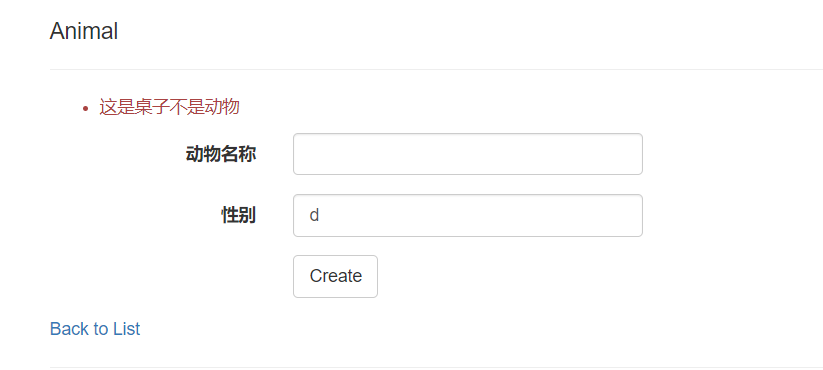
上述红色文字就是ValidationSummary
多个字段错误累积显示
⑤htmlAttributes
设置标签的属性
htmlAttributes:new{}
一般表单页面都有get和post两个请求方式
get 用于显示表单页面
post 处理提交的请求,与数据库交互等等
正式学习MVC 03的更多相关文章
- 正式学习MVC 01
1.新建项目 点击创建新项目,选择ASP.NET web应用程序,对项目进行命名后点击创建. 截图如下: 取消勾选HTTPS配置 可选择空 + mvc 或直接选定MVC 2.目录结构分析 1) App ...
- 正式学习MVC 05
1.剃须刀模板razor的使用 1)混编 循环语法 @model List<MVCStudy.Models.Student> @{ ViewBag.Title = "List&q ...
- 正式学习MVC 02
1.cookie 继续讲解MVC的内置对象cookie 相对不安全 1)保存cookie public ActionResult Index() { // 设置cookie以及过期时间 Respons ...
- 正式学习MVC 06
1.Model常用属性讲解 using System; using System.ComponentModel.DataAnnotations; namespace MVCStudy2.Models ...
- 正式学习MVC 04
1.ActionResult ActionResult是一个父类, 子类包括了我们熟知的 ViewResult 返回相应的视图 ContentResult 返回字符串 RedirectResult( ...
- 白话学习MVC(十)View的呈现二
本节将接着<白话学习MVC(九)View的呈现一>来继续对ViewResult的详细执行过程进行分析! 9.ViewResult ViewResult将视图页的内容响应给客户端! 由于Vi ...
- 学习MVC之租房网站(二)-框架搭建及准备工作
在上一篇<学习MVC之租房网站(一)-项目概况>中,确定了UI+Service的“双层”架构,并据此建立了项目 接下来要编写Common类库.配置AdminWeb和FrontWeb 一.编 ...
- 白话学习MVC(八)Action的执行二
一.概述 上篇博文<白话学习MVC(七)Action的执行一>介绍了ASP.NET MVC中Action的执行的简要流程,并且对TempData的运行机制进行了详细的分析,本篇来分析上一篇 ...
- 白话学习MVC(九)View的呈现一
一.概述 本节来看一下ASP.NET MVC[View的呈现]的内容,View的呈现是在Action执行之后进行,Action的执行生成一个ActionResult,[View的呈现]的功能就是:通过 ...
随机推荐
- Jmeter连接Mysql出现Cannot create PoolableConnectionFactory (Could not create connection to database server.)错误
0 环境 系统环境:win10 1 正文 一般是数据库的驱动包版本不匹配(我是直接放在jmeter/lib下的) 当然有时候需要添加?useUnicode=true&characterEnco ...
- linux_nano命令
nano是一个字符终端的文本编辑器,有点像DOS下的editor程序.它比vi/vim要简单得多,比较适合Linux初学者使用.某些Linux发行版的默认编辑器就是nano. nano命令可以打开指定 ...
- VerificationCodeService
package me.zhengjie.system.domain; import lombok.AllArgsConstructor; import lombok.Data; import lomb ...
- window下mysql安装步骤
1. 官网下载mysql zip包 2. 解压后再D:\database\mysql\mysql-5.7.26-winx64下添加my.ini文件,文件内容如下: [mysql]# 设置mysql客户 ...
- android ijkplayer简单使用
class VideoPlayer : FrameLayout, TextureView.SurfaceTextureListener{ private var url:String? = null ...
- openssl 密钥注意
使用openssl生成的密钥,在对加密字符串进行数字签名的时候,程序一直报错,错误异常: algid parse error, not a sequence 其原因是因为,openssl生成的私钥没 ...
- conditon 实现等待/通知
synchronized 与wait() 和notify() notifyAll() 方法相结合可以实现等待 通知 ReetrantLock也可以实现同样的功能 需要借助condition对象,一个l ...
- [LC] 246. Strobogrammatic Number
A strobogrammatic number is a number that looks the same when rotated 180 degrees (looked at upside ...
- 用两个栈实现一个队列(C++)
分析 栈:后进先出 队列:先进先出 要使用两个栈实现队列(先进先出),主要思路是 1.插入一个元素:直接将元素插入stack1即可. 2.删除一个元素:当stack2不为空时 ,直接弹出栈顶元素,当s ...
- wios设置证书登陆
设置wios为密钥登陆set service ssh 'allow-root' set service ssh 'disable-password-authentication' //禁用密码登陆 s ...