
easypoi 读取 Excel 简单应用
背景
在做接口测试的时候,经常会使用 Excel 来存储对应的接口信息和用例信息,为了方便程序的读取,引入easypoi 工具来读取 Excel 内容。easypoi 比起 poi 使用更加的方便,代码量也少很多。
应用代码
例如我想读取下面 Excel 中的接口信息:

- 引入对应 easypoi 依赖:
<!--easypoi依赖-->

<dependency>

     <groupId>cn.afterturn</groupId>

     <artifactId>easypoi-annotation</artifactId>

     <version>4.0.0</version>

</dependency>

<dependency>

    <groupId>cn.afterturn</groupId>

    <artifactId>easypoi-base</artifactId>

    <version>4.0.0</version>

</dependency>

<!--   添加校验,在easypoi读取Excel时,可以去掉空行,同时对字段进行强制校验    -->

<dependency>

    <groupId>org.hibernate</groupId>

    <artifactId>hibernate-validator</artifactId>

    <version>5.2.4.Final</version>

</dependency>

<dependency>

    <groupId>javax.el</groupId>

    <artifactId>javax.el-api</artifactId>

    <version>2.2.4</version>

</dependency>
- 创建对应的实体类:
package com.ggf.juhe.pojo;

import cn.afterturn.easypoi.excel.annotation.Excel;

import javax.validation.constraints.NotNull;

/**

 * @Description: 接口信息实体类

 * @Author: ggf

 * @Date: 2020/06/13

 */

public class ApiInfo {

    /**

     * 接口编号

     */

    @Excel(name="接口编号")

    private String id;

    /**

     * 接口名称

     */

    @Excel(name="接口名称")

    private String name;

    /**

     * 请求URL

     */

    @Excel(name="接口地址")

    @NotNull

    private String url;

    /**

     * 接口请求方式

     */

    @Excel(name="接口提交方式")

    private String method;

    /**

     * 请求数据类型

     */

    @Excel(name="接口参数类型")

    private String type;

    public ApiInfo() {

    }

    public ApiInfo(String id, String name, String method, String url, String type) {

        this.id = id;

        this.name = name;

        this.method = method;

        this.url = url;

        this.type = type;

    }

    public String getId() {

        return id;

    }

    public void setId(String id) {

        this.id = id;

    }

    public String getName() {

        return name;

    }

    public void setName(String name) {

        this.name = name;

    }

    public String getMethod() {

        return method;

    }

    public void setMethod(String method) {

        this.method = method;

    }

    public String getUrl() {

        return url;

    }

    public void setUrl(String url) {

        this.url = url;

    }

    public String getType() {

        return type;

    }

    public void setType(String type) {

        this.type = type;

    }

    @Override

    public String toString() {

        return "ApiInfo{" +

                "id='" + id + '\'' +

                ", name='" + name + '\'' +

                ", method='" + method + '\'' +

                ", url='" + url + '\'' +

                ", type='" + type + '\'' +

                '}';

    }

}
- easypoi 读取 Excel 代码:
package com.ggf.juhe.demo;

import cn.afterturn.easypoi.excel.ExcelImportUtil;

import cn.afterturn.easypoi.excel.entity.ImportParams;

import com.ggf.juhe.pojo.ApiInfo;

import java.io.FileInputStream;

import java.io.IOException;

import java.util.Collections;

import java.util.List;

/**

 * @Description:

 * @Author: ggf

 * @Date: 2020/06/13

 */

public class EasypoiDemo {

    public static void main(String[] args) {

        String filePath = "src/main/resources/jhapi_case.xlsx";

        List<ApiInfo> apiInfos = readExcel(filePath, 0, ApiInfo.class);

        for (ApiInfo apiInfo : apiInfos) {

            System.out.println(apiInfo);

        }

    }

    /**

     *

     * @param filePath Excel文件路径

     * @param sheetIndex 对应的表单,从0开始,0代表第一个表单

     * @param clazz 对应封装的数据实例对象

     * @return 返回数据集合

     */

    public static <E> List<E> readExcel(String filePath, int sheetIndex, Class<E> clazz) {

        // 定义输入流

        FileInputStream fis = null;

        List<E> datas = null;

        try {

            // 创建输入流对象

            fis = new FileInputStream(filePath);

            // 创建一个easypoi使用的配置类

            ImportParams params = new ImportParams();

            // 设置表格坐标

            params.setStartSheetIndex(sheetIndex);

            // 校验Excel文件,去掉空行

            params.setNeedVerify(true);

            // 读取数据

            datas = ExcelImportUtil.importExcel(fis, clazz, params);

        } catch (Exception e) {

            e.printStackTrace();

        } finally {

            try {

                if (fis != null) {

                    fis.close();

                }

            } catch (IOException e) {

                e.printStackTrace();

            }

        }

        return datas;

    }

}
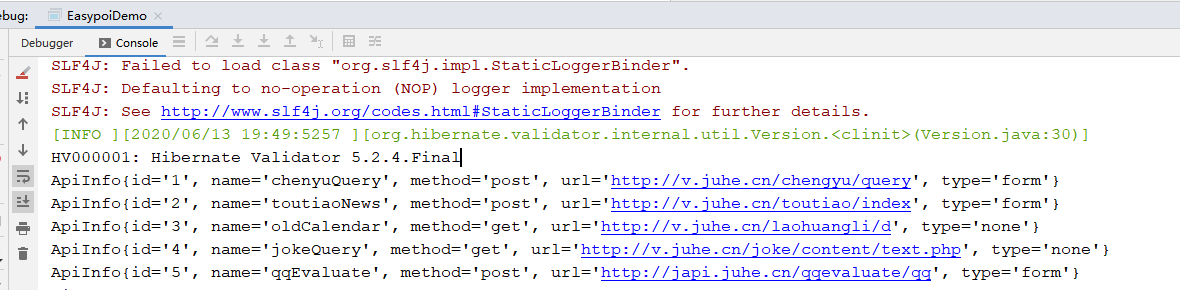
- 打印结果
easypoi 读取 Excel 简单应用的更多相关文章
- 第四篇:java读取Excel简单模板
场景:对于经常需要导入Excel模板或数据来解析后加以应用的,使用频率非常之高,做了一个比较稳定的版本,体现在这些地方工具:org.apache.poi使用前必须了解这些:1.要解析,那肯定先判断是不 ...
- Java web的读取Excel简单Demo
目录结构: Data.xls数据: 后台页面: GetExcelData.java public void doGet(HttpServletRequest request, Http ...
- 简单poi读取excel
1.添加依赖jar包 maven配置: <!-- poi being --> <dependency> <groupId>org.apache.poi</gr ...
- JAVA使用POI读取EXCEL文件的简单model
一.JAVA使用POI读取EXCEL文件的简单model 1.所需要的jar commons-codec-1.10.jarcommons-logging-1.2.jarjunit-4.12.jarlo ...
- Unity用Excel.dll简单读取Excel内容
Unity用Excel.dll简单读取Excel内容 需要Excel.dll 需要如下三个命名空间 using System.IO; using Excel; using System.Data; 1 ...
- C#读取Excel文件的简单方法
一.简述 本文讲C#通过第三方库读取Excel的最简单的方法,下文给一个读取行数的例子. 二.依赖 引入nuget.org包如下: <?xml version="1.0" e ...
- python pandas模块简单使用(读取excel为例)
第一步:模块安装 pip install pandas 第二步:使用(单个工作表为例) 说明:如果有多个工作表,那么只要指定sheetname=索引,(第一个工作表为0,第二个工作表为1,以此类推) ...
- Vue+EasyPOI导出Excel(带图片)
一.前言 平时的工作中,Excel 导入导出功能是非常常见的功能,无论是前端 Vue (js-xlsx) 还是 后端 Java (POI),如果让大家手动编码实现的话,恐怕就很麻烦了,尤其是一些定制化 ...
- 使用Aspose.Cells读取Excel
最新更新请访问: http://denghejun.github.io Aspose.Cells读取Excel非常方便,以下是一个简单的实现读取和导出Excel的操作类: 以下是Aspose.Ce ...
随机推荐
- 基于vue+Django的简迩音乐用户界面实现
应这次软件工程课程要求,我们团队着力打造一个音乐播放器软件. 软件实现主要采用基于Vue.js+Python Django,前后端分离架构实现网页. 用户界面主要功能:呈现用户收藏歌单歌曲信息,并且提 ...
- Python 图像处理 OpenCV (4):图像算数运算以及修改颜色空间
前文传送门: 「Python 图像处理 OpenCV (1):入门」 「Python 图像处理 OpenCV (2):像素处理与 Numpy 操作以及 Matplotlib 显示图像」 「Python ...
- Hyperledger Fabric开发(一):环境配置
macOS系统下配置hyperledger fabric环境 cURL mac中自带curl,如果需要下载最新版本,则可按照以下命令,并将路径添加在系统环境变量的最前面即可 brew install ...
- Poj2965 冰箱的开关
#include<iostream> using namespace std; int flag; int step; ][]; ] = { }; ] = { }; void turn(i ...
- 【Java】几种典型的内存溢出案例,都在这儿了!
写在前面 作为程序员,多多少少都会遇到一些内存溢出的场景,如果你还没遇到,说明你工作的年限可能比较短,或者你根本就是个假程序员!哈哈,开个玩笑.今天,我们就以Java代码的方式来列举几个典型的内存溢出 ...
- 循序渐进VUE+Element 前端应用开发(2)--- Vuex中的API、Store和View的使用
在我们开发Vue应用的时候,很多时候需要记录一些变量的内容,这些可以用来做界面状态的承载,也可以作为页面间交换数据的处理,处理这些内容可以归为Vuex的状态控制.例如我们往往前端需要访问后端数据,一般 ...
- vue 基于elment UI tree 组件实现带引导、提示线
实现样式 准备工作,先实现 树状组件的基本样式 <span style="height:500px; display:block; overflow-y:auto;" cla ...
- 添加nginx新模块,获取客户真实ip
当前是客户端登录软件后台获取不到客户的真实ip而是云盾的代理ip 为了获取到真实ip后来发现通过配置nginx的read_ip模块就可以了 获取客户的真实ip使用Nginx的realip模块 当Ngi ...
- DDD之1微服务设计为什么选择DDD
背景 名词解释 如果你的团队目前正是构建微服务架构风格的软件系统,问自己两个问题? 软件架构演进 软件架构大致经历了从单机架构,集中式架构,分布式微服架构,程序的层次图如下所示. 单机架构 特点如下: ...
- MySQL select from join on where group by having order by limit 执行顺序
书写顺序:select [查询列表] from [表] [连接类型] join [表2] on [连接条件] where [筛选条件] group by [分组列表] having [分组后的筛选条件 ...