
Unity3D 预设打包的注意事项
在平时的开发中,把预设打包成 assetbundle 文件是非常普遍的做法,但是我们不能随便把预设打包成 assetbundle 就算完事,我们应该先清楚把预设打包成 assetbundle 的目的,通常我们把预设打包成 assetbundle 文件是为了压缩预设的文件尺寸以方便从网络快速加载,既然这样,我们就应该知道打包预设的时候应该注意哪些问题。
我们先创建测试环境,场景中的 Stamp7 与 Stamp9 网格不同,但是材质相同,R1_Column1 与 Stamp7 以及 Stamp9 的网格、材质都不相同,场景如图:

.imageplus-append-lu-img-txt { overflow: hidden; margin: 10px 0; font-family: Microsoft YaHei; line-height: normal }
.imageplus-append-lu-img-txt .imageplus-append-content .imageplus-append-img-txt-ad-item { float: left; position: relative; height: 90px; width: 125px }
.imageplus-append-lu-img-txt .imageplus-append-content .imageplus-append-img-txt-ad-item .imageplus-append-img-txt-ad-item-img img { height: 100%; width: 100% }
.imageplus-append-lu-img-txt .imageplus-append-content .imageplus-append-img-txt-ad-item .imageplus-append-img-txt-ad-item-desc { position: absolute; bottom: 0; left: 0; width: 100%; height: 18px; line-height: 18px; font-size: 14px; text-align: center; color: #fff; background-color: rgba(0,0,0,0.6); text-decoration: none }
.imageplus-append-lu-img-txt .imageplus-append-content .imageplus-append-img-txt-ad-item .imageplus-append-img-txt-ad-item-desc span { color: #fff }
.imageplus-append-lu-img-txt .imageplus-append-content .imageplus-append-img-txt-ad-item:hover .imageplus-append-img-txt-ad-item-img { border: 2px solid #f60 }
.imageplus-append-close-btn { display: none }
.imageplus-baidu-logo { position: absolute; bottom: 0; right: 0; z-index: 9999; background: url("http://ecma.bdimg.com/public03/imageplus/logo.png") no-repeat; background-position: 0 -17px; width: 16px; height: 16px }
.imageplus-ad-logo { position: absolute; left: 0; bottom: 0; overflow: hidden; z-index: 12; background: url("http://ecma.bdimg.com/public03/imageplus/logo.png") no-repeat; background-position: 0 0; width: 34px; height: 16px }
.imageplus-append { float: none; margin: 0; padding: 0; border: 0; overflow: hidden; visibility: visible; text-align: left; background: transparent; position: relative; text-indent: 0; display: inline-block }
.imageplus-append div { float: none; margin: 0; padding: 0; border: 0; overflow: hidden; position: static; display: block; visibility: visible; text-align: left; background: transparent; font-family: Microsoft YaHei; line-height: normal }
.imageplus-append a,.imageplus-append img,.imageplus-append span { float: none; margin: 0; padding: 0; border: 0; overflow: visible; position: static; display: inline; visibility: visible; text-align: left; background: transparent; font-family: Microsoft YaHei; line-height: normal }
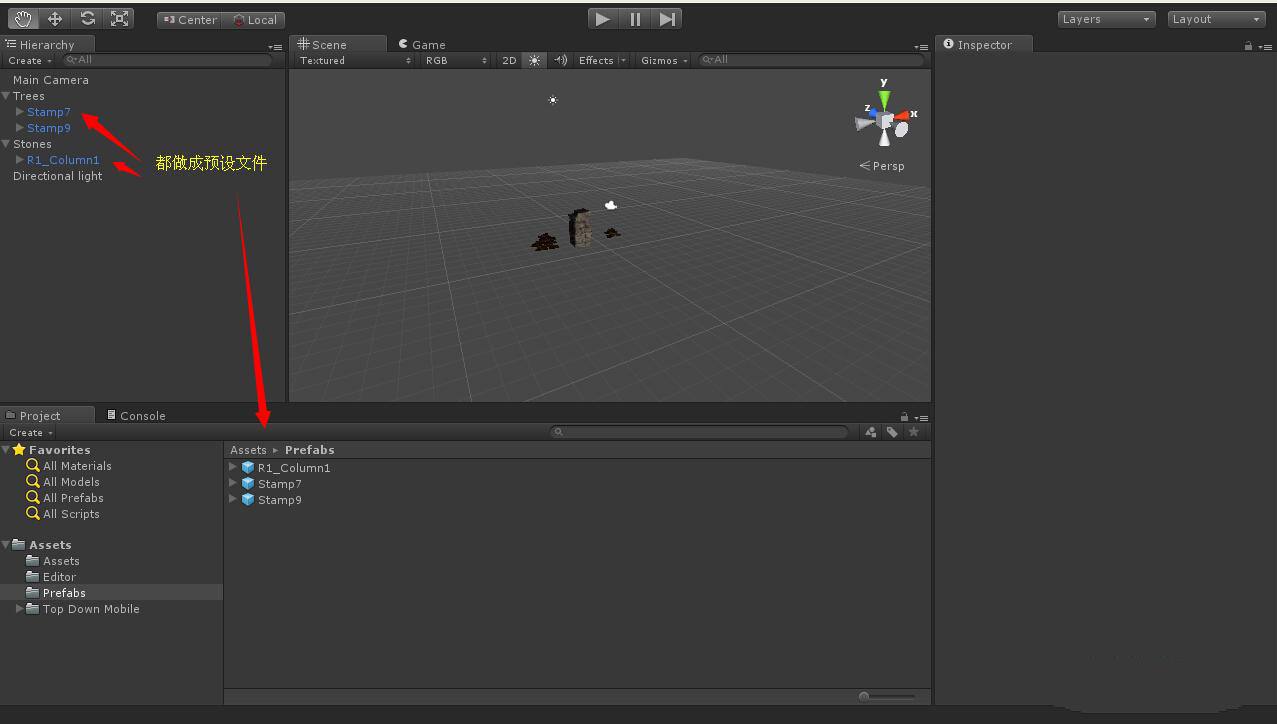
接着我们把场景的子对象(场景中的 Stamp7、Stamp9、R1_Column1)先做成预设,如图:
.imageplus-append-lu-img-txt { overflow: hidden; margin: 10px 0; font-family: Microsoft YaHei; line-height: normal }
.imageplus-append-lu-img-txt .imageplus-append-content .imageplus-append-img-txt-ad-item { float: left; position: relative; height: 90px; width: 125px }
.imageplus-append-lu-img-txt .imageplus-append-content .imageplus-append-img-txt-ad-item .imageplus-append-img-txt-ad-item-img img { height: 100%; width: 100% }
.imageplus-append-lu-img-txt .imageplus-append-content .imageplus-append-img-txt-ad-item .imageplus-append-img-txt-ad-item-desc { position: absolute; bottom: 0; left: 0; width: 100%; height: 18px; line-height: 18px; font-size: 14px; text-align: center; color: #fff; background-color: rgba(0,0,0,0.6); text-decoration: none }
.imageplus-append-lu-img-txt .imageplus-append-content .imageplus-append-img-txt-ad-item .imageplus-append-img-txt-ad-item-desc span { color: #fff }
.imageplus-append-lu-img-txt .imageplus-append-content .imageplus-append-img-txt-ad-item:hover .imageplus-append-img-txt-ad-item-img { border: 2px solid #f60 }
.imageplus-append-close-btn { display: none }
.imageplus-baidu-logo { position: absolute; bottom: 0; right: 0; z-index: 9999; background: url("http://ecma.bdimg.com/public03/imageplus/logo.png") no-repeat; background-position: 0 -17px; width: 16px; height: 16px }
.imageplus-ad-logo { position: absolute; left: 0; bottom: 0; overflow: hidden; z-index: 12; background: url("http://ecma.bdimg.com/public03/imageplus/logo.png") no-repeat; background-position: 0 0; width: 34px; height: 16px }
.imageplus-append { float: none; margin: 0; padding: 0; border: 0; overflow: hidden; visibility: visible; text-align: left; background: transparent; position: relative; text-indent: 0; display: inline-block }
.imageplus-append div { float: none; margin: 0; padding: 0; border: 0; overflow: hidden; position: static; display: block; visibility: visible; text-align: left; background: transparent; font-family: Microsoft YaHei; line-height: normal }
.imageplus-append a,.imageplus-append img,.imageplus-append span { float: none; margin: 0; padding: 0; border: 0; overflow: visible; position: static; display: inline; visibility: visible; text-align: left; background: transparent; font-family: Microsoft YaHei; line-height: normal }
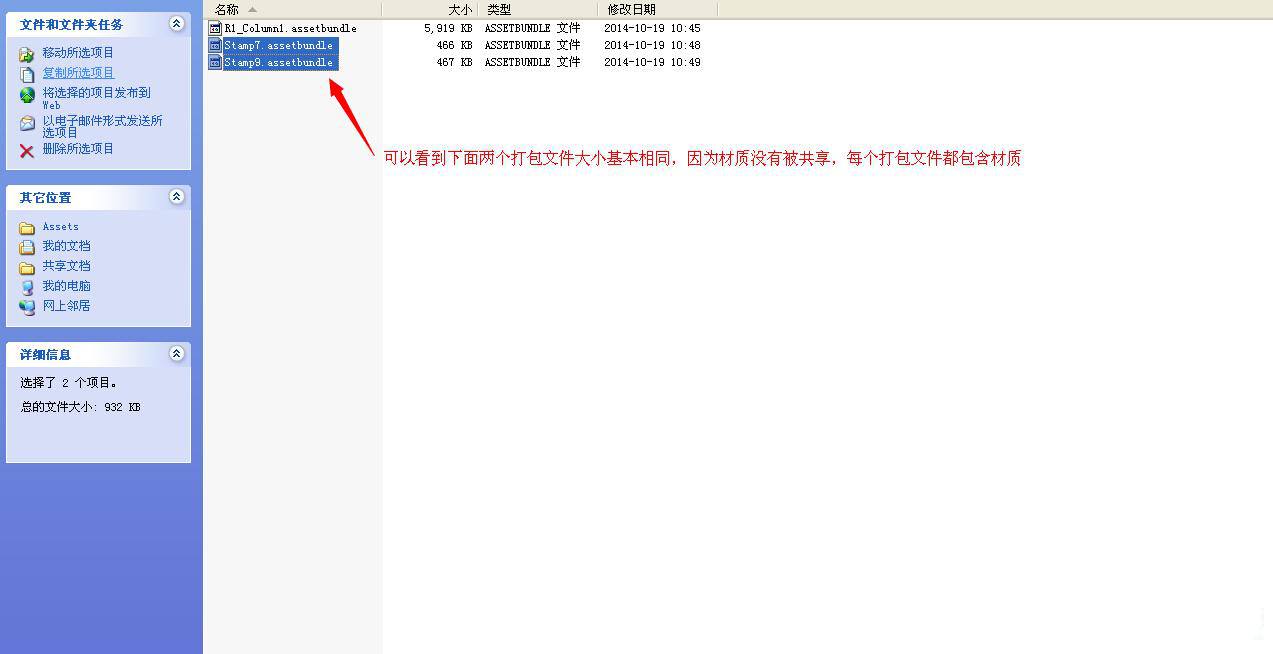
然后我们分别把这三个文件打包成 assetbundle 文件,并观察生成 assetbundle 文件大小,如图:
.imageplus-append-lu-img-txt { overflow: hidden; margin: 10px 0; font-family: Microsoft YaHei; line-height: normal }
.imageplus-append-lu-img-txt .imageplus-append-content .imageplus-append-img-txt-ad-item { float: left; position: relative; height: 90px; width: 125px }
.imageplus-append-lu-img-txt .imageplus-append-content .imageplus-append-img-txt-ad-item .imageplus-append-img-txt-ad-item-img img { height: 100%; width: 100% }
.imageplus-append-lu-img-txt .imageplus-append-content .imageplus-append-img-txt-ad-item .imageplus-append-img-txt-ad-item-desc { position: absolute; bottom: 0; left: 0; width: 100%; height: 18px; line-height: 18px; font-size: 14px; text-align: center; color: #fff; background-color: rgba(0,0,0,0.6); text-decoration: none }
.imageplus-append-lu-img-txt .imageplus-append-content .imageplus-append-img-txt-ad-item .imageplus-append-img-txt-ad-item-desc span { color: #fff }
.imageplus-append-lu-img-txt .imageplus-append-content .imageplus-append-img-txt-ad-item:hover .imageplus-append-img-txt-ad-item-img { border: 2px solid #f60 }
.imageplus-append-close-btn { display: none }
.imageplus-baidu-logo { position: absolute; bottom: 0; right: 0; z-index: 9999; background: url("http://ecma.bdimg.com/public03/imageplus/logo.png") no-repeat; background-position: 0 -17px; width: 16px; height: 16px }
.imageplus-ad-logo { position: absolute; left: 0; bottom: 0; overflow: hidden; z-index: 12; background: url("http://ecma.bdimg.com/public03/imageplus/logo.png") no-repeat; background-position: 0 0; width: 34px; height: 16px }
.imageplus-append { float: none; margin: 0; padding: 0; border: 0; overflow: hidden; visibility: visible; text-align: left; background: transparent; position: relative; text-indent: 0; display: inline-block }
.imageplus-append div { float: none; margin: 0; padding: 0; border: 0; overflow: hidden; position: static; display: block; visibility: visible; text-align: left; background: transparent; font-family: Microsoft YaHei; line-height: normal }
.imageplus-append a,.imageplus-append img,.imageplus-append span { float: none; margin: 0; padding: 0; border: 0; overflow: visible; position: static; display: inline; visibility: visible; text-align: left; background: transparent; font-family: Microsoft YaHei; line-height: normal }
从图中我们可以看出,因为 Stamp7、Stamp9 材质相同,他们生成出来的文件大小差不多大,但是他们是独自打包,所以材质也是独立的,因为材质无法共享。
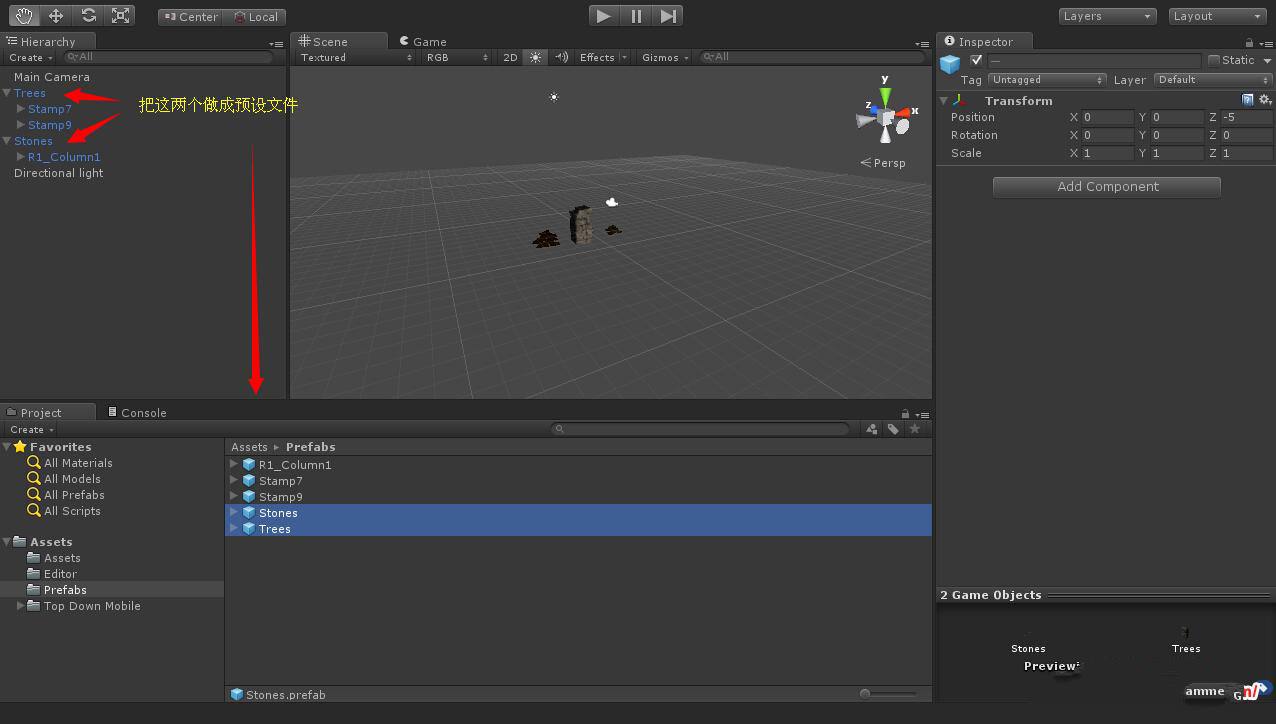
下面我们把 Trees(包括 Stamp7 与 Stamp9)以及 Stones 也做成预设,如图:
.imageplus-append-lu-img-txt { overflow: hidden; margin: 10px 0 }
.imageplus-append-nova-txt { border: 1px solid #f2f2f2; font-family: Microsoft YaHei; line-height: normal }
.imageplus-append-nova-txt .imageplus-append-content .imageplus-append-nova-txt-ad-item { position: relative; width: 100%; height: 50px; background-color: #fff }
.imageplus-append-nova-txt .imageplus-append-content .imageplus-append-nova-txt-ad-item a { text-decoration: none }
.imageplus-append-nova-txt .imageplus-append-content .imageplus-append-nova-txt-ad-item a:hover { text-decoration: underline }
.imageplus-append-nova-txt .imageplus-append-content .imageplus-append-nova-txt-ad-item div { white-space: nowrap; overflow: hidden; width: auto; height: 25px; line-height: 25px; margin: 0 16px; font-weight: normal }
.imageplus-append-nova-txt .imageplus-append-content .imageplus-append-nova-txt-ad-item .imageplus-append-nova-txt-ad-item-title span { font-size: 14px; font-weight: bold; color: #003397 }
.imageplus-append-nova-txt .imageplus-append-content .imageplus-append-nova-txt-ad-item .imageplus-append-nova-txt-ad-item-desc span { font-size: 12px; color: #333 }
.imageplus-append-jian { width: 20px; height: 20px; background-image: url("http://ecmb.bdimg.com/public03/imageplus_m_append_jian_151204.png"); background-repeat: no-repeat; background-position: 0 0; position: absolute; top: 0; left: 0 }
.imageplus-append-close-btn { width: 40px; height: 40px; position: absolute; right: 0; top: 0; background-image: url("http://ecmb.bdimg.com/public03/imageplus_m_append_close_btn_151113.png"); background-repeat: no-repeat; background-position: 0 0; display: none }
.imageplus-append-logo { height: 18px; width: 18px; background: url("http://cpro.baidustatic.com/cpro/ui/noexpire/img/2.0.1/bg.png") no-repeat left top; position: absolute; right: 0; bottom: 0 }
.imageplus-append-nova-txt-ue2 { font-family: Microsoft YaHei; float: left; border: 1px solid #ddd; border-top: 3px solid #ff2f62; background-color: #f9f9f9 }
.imageplus-append-nova-txt-ue2 a:focus { outline: 0 }
.imageplus-append-nova-txt-ue2 .imageplus-append-content { float: left }
.imageplus-append-nova-txt-ue2 .imageplus-append-content .imageplus-append-nova-txt-ad-item { margin-left: 44px; height: 60px; padding-top: 5px; padding-bottom: 5px }
.imageplus-append-nova-txt-ue2 .imageplus-append-content .imageplus-append-nova-txt-ad-item a { text-decoration: none }
.imageplus-append-nova-txt-ue2 .imageplus-append-content .imageplus-append-nova-txt-ad-item div { white-space: nowrap; overflow: hidden }
.imageplus-append-nova-txt-ue2 .imageplus-append-content .imageplus-append-nova-txt-ad-item .imageplus-append-nova-txt-ad-item-title { height: 30px; line-height: 30px; font-size: 16px }
.imageplus-append-nova-txt-ue2 .imageplus-append-content .imageplus-append-nova-txt-ad-item .imageplus-append-nova-txt-ad-item-title a { color: #000 }
.imageplus-append-nova-txt-ue2 .imageplus-append-content .imageplus-append-nova-txt-ad-item .imageplus-append-nova-txt-ad-item-title .imageplus-append-nova-txt-title-true { float: left }
.imageplus-append-nova-txt-ue2 .imageplus-append-content .imageplus-append-nova-txt-ad-item .imageplus-append-nova-txt-ad-item-title .imageplus-append-nova-txt-title-click { float: left; width: 96px }
.imageplus-append-nova-txt-ue2 .imageplus-append-content .imageplus-append-nova-txt-ad-item .imageplus-append-nova-txt-ad-item-title .imageplus-append-nova-txt-title-click a { color: #ff2f62 }
.imageplus-append-nova-txt-ue2 .imageplus-append-content .imageplus-append-nova-txt-ad-item .imageplus-append-nova-txt-ad-item-desc { height: 26px; line-height: 26px; font-size: 12px }
.imageplus-append-nova-txt-ue2 .imageplus-append-content .imageplus-append-nova-txt-ad-item .imageplus-append-nova-txt-ad-item-desc a { color: #7b7b7b }
.imageplus-append-nova-txt-ue2 .imageplus-append-go-btn { float: right; margin-top: 19px; margin-right: 18px }
.imageplus-append-nova-txt-ue2 .imageplus-append-go-btn a { text-decoration: none }
.imageplus-append-nova-txt-ue2 .imageplus-append-go-btn div { width: 100px; height: 32px; line-height: 32px; text-align: center; background-color: #ff2f62; border: 0; color: #fff; font-family: Microsoft YaHei; font-size: 16px; cursor: pointer }
.imageplus-append-nova-txt-ue2 .imageplus-append-jian { position: absolute; top: 3px; left: 10px; width: 22px; height: 40px; background-image: url("http://ecma.bdimg.com/public03/imageplus/append/nova_txt_star_160426.png"); background-position: 0 0; background-repeat: no-repeat }
.imageplus-append-nova-txt-ue2 .imageplus-append-close-btn { display: none }
.imageplus-append-nova-txt-ue2 .imageplus-append-logo { display: none }
.imageplus-append-nova-txt-ue2 .imageplus-baidu-logo { position: absolute; bottom: 0; right: 0; z-index: 9999; background: url("http://ecma.bdimg.com/public03/imageplus/logo.png") no-repeat; background-position: 0 -17px; width: 16px; height: 16px }
.imageplus-append-nova-txt-ue2 .imageplus-ad-logo { position: absolute; left: 0; bottom: 0; overflow: hidden; z-index: 12; background: url("http://ecma.bdimg.com/public03/imageplus/logo.png") no-repeat; background-position: 0 0; width: 34px; height: 16px }
.imageplus-append { float: none; margin: 0; padding: 0; border: 0; overflow: hidden; visibility: visible; text-align: left; background: transparent; position: relative; text-indent: 0; display: inline-block }
.imageplus-append div { float: none; margin: 0; padding: 0; border: 0; overflow: hidden; position: static; display: block; visibility: visible; text-align: left; background: transparent; font-family: Microsoft YaHei; line-height: normal }
.imageplus-append a,.imageplus-append img,.imageplus-append span { float: none; margin: 0; padding: 0; border: 0; overflow: visible; position: static; display: inline; visibility: visible; text-align: left; background: transparent; font-family: Microsoft YaHei; line-height: normal }
然后我们再把 Trees 与 Stones 打包成 assetbundle 文件,如图:
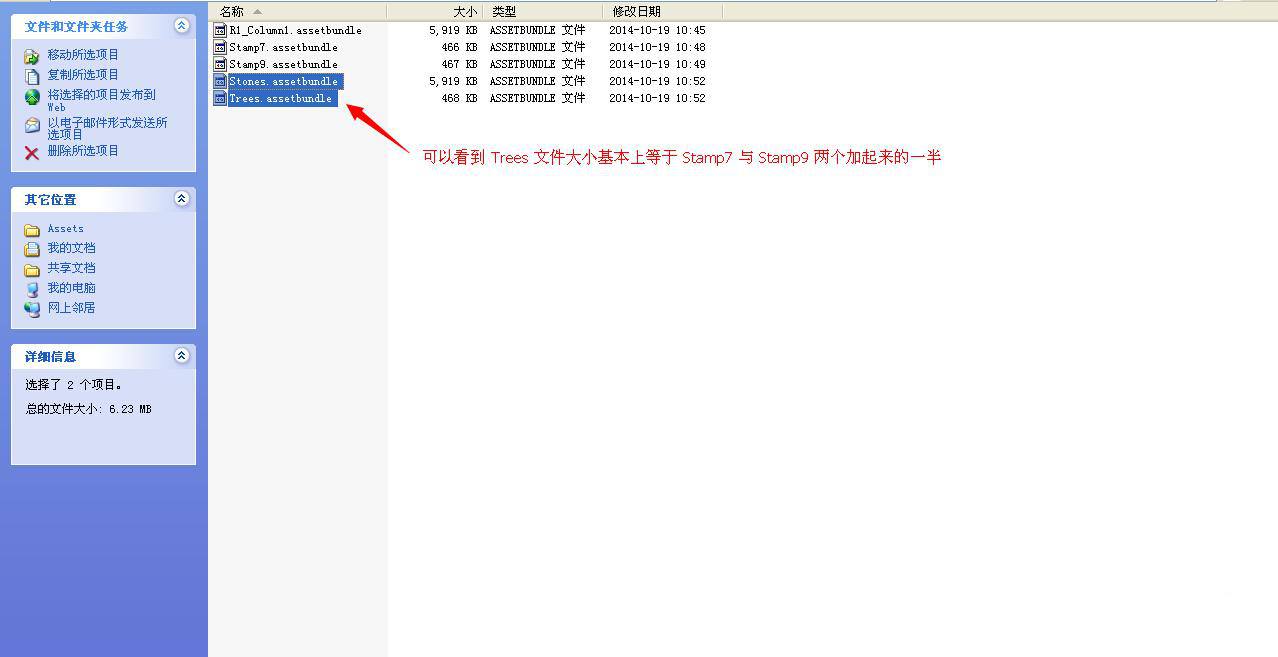
从图中我们可以看出 Trees(包括 Stamp7 与 Stamp9 两个预设文件)的大小差不多是 Stamp7 与 Stamp9 大小的一半,这是因为 Stamp7 与 Stamp9 材质相同,在打包的时候,共享一份材质,所以材质只有一份。
下面我们给 Stamp7 附加 R1_Column1 的材质,如图:
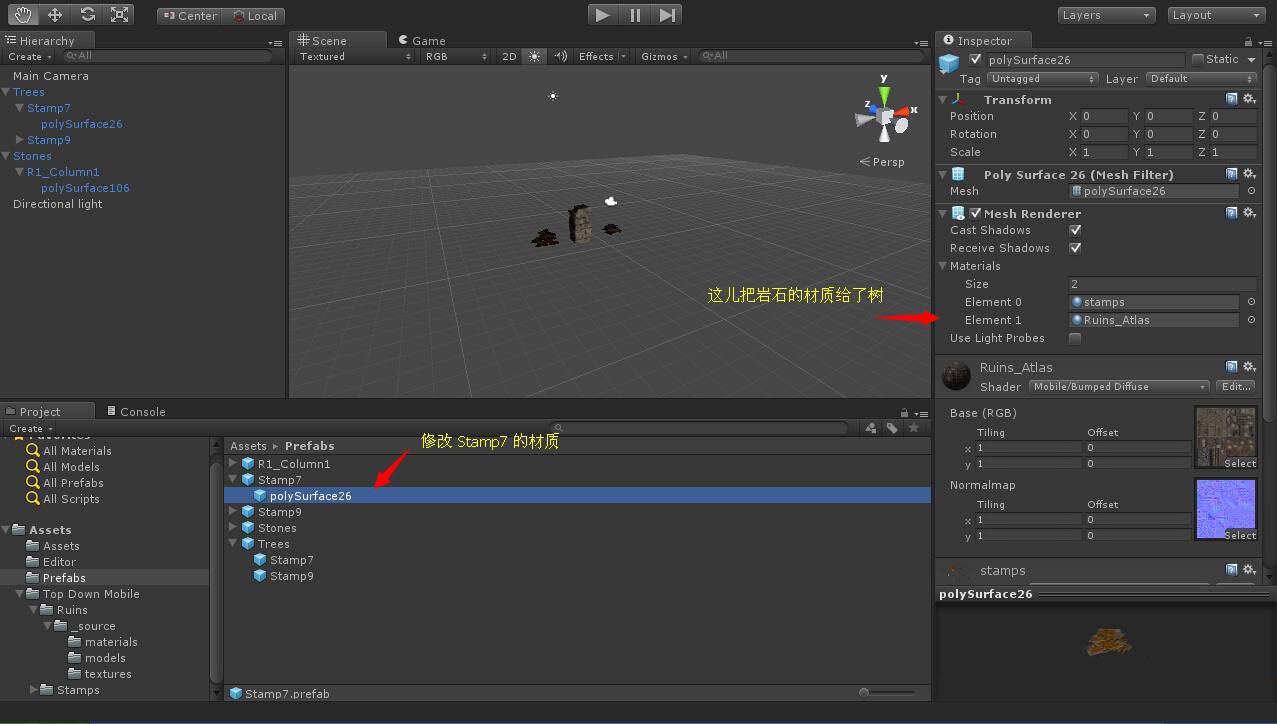
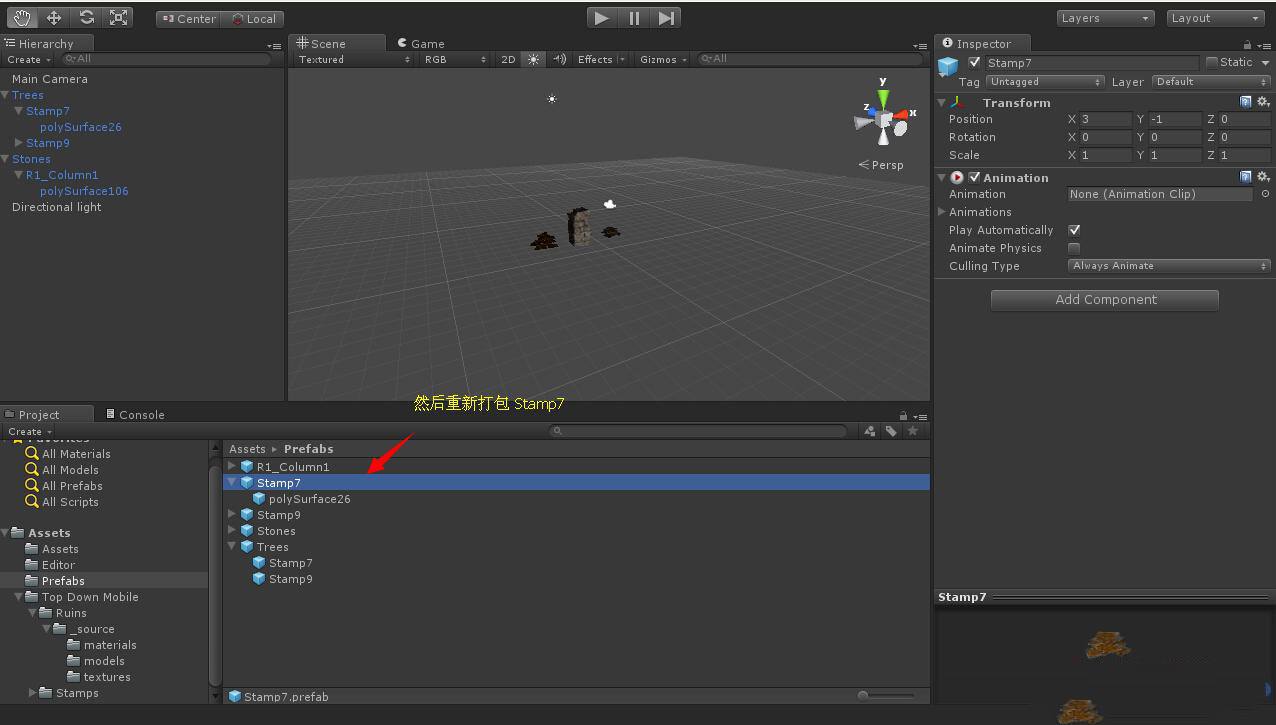
然后我们再打包 Stamp7 文件,如图:
从下图中,我们可以看到 Stamp7_1 的文件大小比 R1_Column1 与 Stamp7 都要大,因为 Stamp7_1 包括了 R1_Column1 与 Stamp7 的材质。
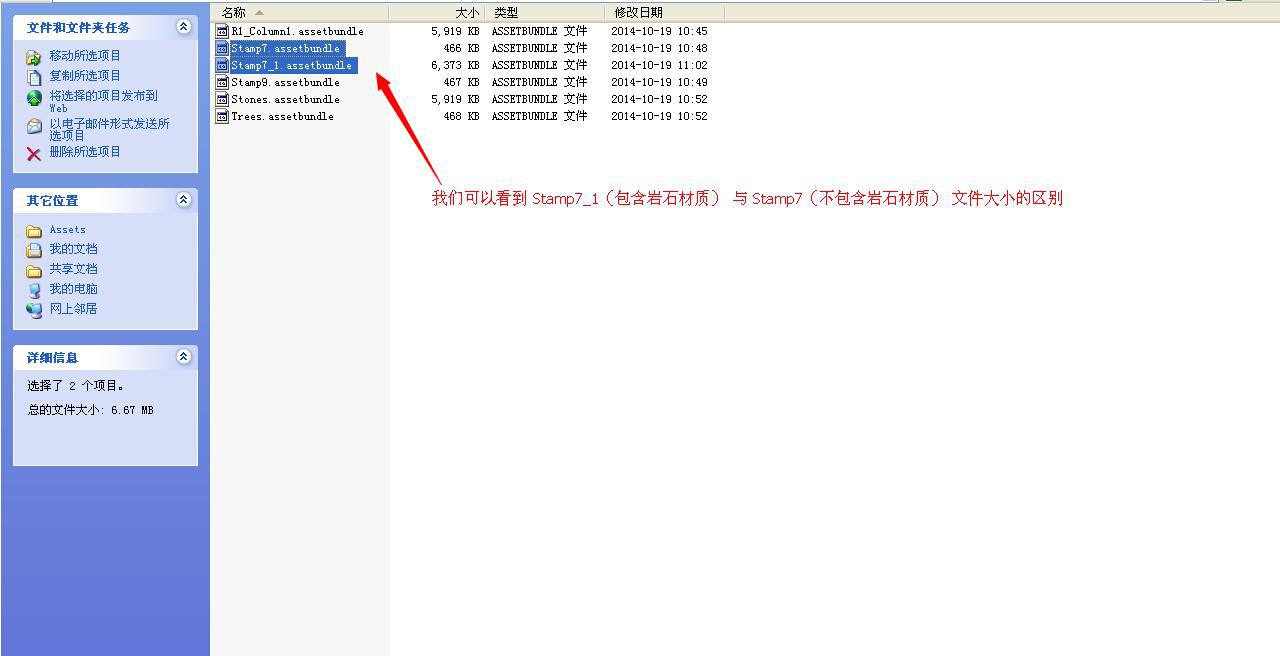
然后我们再把 Trees 文件重新打包,从下图中我们依然能发现 Trees 文件也变大了,因为 Trees 文件也包括了 R1_Column1 的材质文件。

总结:到这儿我们可以对预设的注意事项有一些了解了,那就是尽量把材质相同的预设放在一起打包
Unity3D 预设打包的注意事项的更多相关文章
- installshield 32位打包和64位打包的注意事项
原文:installshield 32位打包和64位打包的注意事项 32/64位问题要把握几点:1. 明确你的产品是否需要区分32/64位2. 明确你的产品中是否有32/64位的服务注册3. 了解In ...
- Unity3D安卓打包
Unity3D安卓打包须知: 最近在接触Unity3D,在打包安卓时,出现了一些问题,在这里写出来跟大家分享: 首先需要安装jdk和android-sdk,安装方法略 Jdk的目录结构如下: andr ...
- Unity3D安卓打包参数配置与兼容性的关系分析
前言 在使用Unity3D工程导出安卓安装包的时候,往往会遇到兼容性的问题,针对某些机型,要么无法打开游戏,要么会出现卡机的现象.面对这种情况,我们可以调节相关的参数来提高兼容性. 为了了解在打包时候 ...
- unity3d assetbundle打包策略
由于assetbundle打包存在依赖的问题,所有资源要进行合理的分包 零.代码 代码都放在本地,包括NGUI等插件的代码.shader代码(内置的shader无需打包,而自定义的shader还是需要 ...
- unity3d 资源打包加密 整理
资源打包脚本,放到Assets\Editor 文件夹下 using UnityEngine; using System.Collections; using UnityEditor; using Sy ...
- Unity3D 程序打包报错(程序是连接数据库进行处理的)
打包这个Unity3D的程序时出现错误(程序是由XML数据改成连接数据库): ArgumentException: The Assembly System.Configuration is refer ...
- 改造的unity3d文件打包脚本
ExportAssetBundles.rar // C# Example // Builds an asset bundle from the selected objects in the proj ...
- 跟我从零基础学习Unity3D开发--U3d脚本注意事项及两个基本函数的简单介绍
经过上一篇的学习,我相信开发环境您已经搭好了,如果还没有搭好可以百度一下. 今天主要讲的有以下几点: 第一:Unity3D中的C#脚本与.net中的C#写法的区别 1.Unity3D C#脚本不支持命 ...
- 使用maven打包的注意事项
maven编译项目的时候,默认使用的GBK,而目前大部分代码都使用的UTF-8的方式,所以这时候打出来的包容易出现乱码. 解决方式: <!-- compiler插件, 设定JDK版本 --> ...
随机推荐
- CSS3与页面布局学习笔记(六)——CSS3新特性(阴影、动画、渐变、变形( transform)、透明、伪元素等)
一.阴影 1.1.文字阴影 text-shadow<length>①: 第1个长度值用来设置对象的阴影水平偏移值.可以为负值 <length>②: 第2个长度值用来设置对象的阴 ...
- js快捷输入日期
点击这里查看效果http://keleyi.com/keleyi/phtml/jstexiao/10.htm 以下式代码: <!DOCTYPE html> <html> < ...
- input标签内容改变的触发事件
---恢复内容开始--- 1. onchange事件与onpropertychange事件的区别: onchange事件在内容改变(两次内容有可能相等)且失去焦点时触发:onpropertychang ...
- iOS NSArray数组过滤
需求:在一个数组里面,将在这个数组中的并且在另一个数组里面的元素过滤掉. 即:在一个数组dataArray里面,将在dataArray数组中的并且在filteredArray数组里面的元素过滤掉. / ...
- JAVA中的Fork/Join框架
看了下Java Tutorials中的fork/join章节,整理下. 什么是fork/join框架 fork/join框架是ExecutorService接口的一个实现,可以帮助开发人员充分利用多核 ...
- mysqldump: Got error: 1142: SELECT, LOCK TABLES command denied to user 'root'@'localhost' for table 'accounts' when using LOCK TABLES
AutoMySQLBackup备份时,出现mysqldump: Got error: 1142: SELECT, LOCK TABLES command denied to user 'root'@' ...
- Linux 格式化扩展分区(Extended)
如果你在Linux系统中格式化磁盘时遇到如下错误,那么表示你正在格式化一个扩展分区. [root@GETTestLNX06 ~]# mkfs.ext4 /dev/sdb1 mke2fs 1.41. ...
- 虚拟机VMware与主机共享文件介绍
我们经常会在Windows平台安装虚拟机VMware,不管是出于实验测试还是工作需要,伴随而来的就是经常需要在Windows系统和虚拟机系统之间进行共享数据文件,例如,需要将Window主机上的Ora ...
- SQL Server 中WITH (NOLOCK)浅析
概念介绍 开发人员喜欢在SQL脚本中使用WITH(NOLOCK), WITH(NOLOCK)其实是表提示(table_hint)中的一种.它等同于 READUNCOMMITTED . 具体的功能作用如 ...
- SQL SERVER 重组含有特殊字符的索引时遇到“关键字 'with' 附近有语法错误.”
案例描述 这是在索引重组过程中遇到的有意思的错误案例,搜索了一下也没有看到相关资料,估计我第一个碰到这类错误的人(It's just a joke).具体情况是YourSQLDba在做维护数据库索引时 ...