
salesforce零基础学习(一百一十)list button实现的一些有趣事情
本篇参考:
salesforce零基础学习(九十五)lightning out
背景: console app,需要在关联列表展示list button,点击以后进行逻辑。关联列表并不要求选择某些数据以后进行操作,只需要获取父记录ID即可。比如account详情页面有一个 contact关联列表,需要在 contact关联列表做一个 contact的list button,这个 contact list button传参不需要传选择的数据(checkbox hide),只需要参数传递一下 account id即可。
方案1. 使用 lightning out。 这个当时被我视为了首选方案,不管是后续需求变更,即使传递需要选择的数据也可以游刃有余,有途径来实现。
实现的大概代码结构: vf -> lightning app -> lightning component(aura) -> lightning web component(lwc)
具体的业务抛开,目前 lwc只有两个功能:
1. 点击按钮展示 toast
2. 点击按钮关闭当前的 console tab
contactListSampleLwc.html
<template>

    {accountId}

    <lightning-button label="show Toast" onclick={handleShowToastEvent}></lightning-button>

    <lightning-button label="close tab" onclick={handleCloseTabEvent}></lightning-button>

</template>
contactListSampleLwc.js
import { LightningElement, track, wire,api } from 'lwc';

import { ShowToastEvent } from 'lightning/platformShowToastEvent';

export default class contactListSampleLwc extends LightningElement {

    @api accountId;

    handleShowToastEvent(event) {

        console.log('handle show toast event');

        this.dispatchEvent(

            new ShowToastEvent({

                title: 'show toast sample',

                message: 'show toast message',

                variant: 'info'

            })

        );

    }

    handleCloseTabEvent(event) {

        this.dispatchEvent(new CustomEvent('closecurrenttab'));

    }

}
ContactListSampleCmp.cmp
<aura:component implements="force:appHostable" access="global">

    <lightning:workspaceAPI aura:id="workspace"/>

    <aura:attribute name="AccountId" type="String"></aura:attribute>

    <aura:handler name="init" value="{!this}" action="{!c.handleInit}"/>

    <c:contactListSampleLwc onclosecurrenttab="{!c.handleCloseCurrentTabEvent}" accountId="{!v.AccountId}"></c:contactListSampleLwc>

</aura:component>
ContactListSampleCmpController.js
({

    handleCloseCurrentTabEvent : function(component, event, helper) {

        console.log('execute this current tab handler');

        let workspaceAPI = component.find("workspace");

        workspaceAPI.getFocusedTabInfo().then(function(response) {

            var focusedTabId = response.tabId;

            workspaceAPI.closeTab({tabId: focusedTabId});

        })

        .catch(function(error) {

            console.log('execute');

            console.log(error);

        });

    },

    handleInit : function(component,event,helper) {

        var workspaceAPI = component.find("workspace");

        workspaceAPI.getFocusedTabInfo().then(function(response) {

            var focusedTabId = response.tabId;

            workspaceAPI.setTabLabel({

                tabId: focusedTabId,

                label: "Updated Tab Label"

            });

            // workspaceAPI.refreshTab({tabId:focusedTabId});

        })

        .catch(function(error) {

            console.log(error);

        });

        // var recordId = component.get("v.pageReference").state.c__RecordId;

        // component.set('v.AccountId', recordId);

    }

})
ContactListSampleApp.app
<aura:application access="GLOBAL" extends="ltng:outApp">

    <aura:dependency resource="c:ContactListSampleCmp"/>

</aura:application>
ContactListSamplePage.page
<apex:page standardController="Contact" recordSetVar="Contacts" showHeader="false">

    <apex:includeLightning/>

    <div id="lightning" />

    <script>

        var recordId = '{!$CurrentPage.Parameters.id}';

        $Lightning.use("c:ContactListSampleApp", function() {

        $Lightning.createComponent("c:ContactListSampleCmp",

            {AccountId : recordId},

            'lightning',

            function(cmp) {

                console.log("component created");

            }

            );

        });

    </script>

</apex:page>
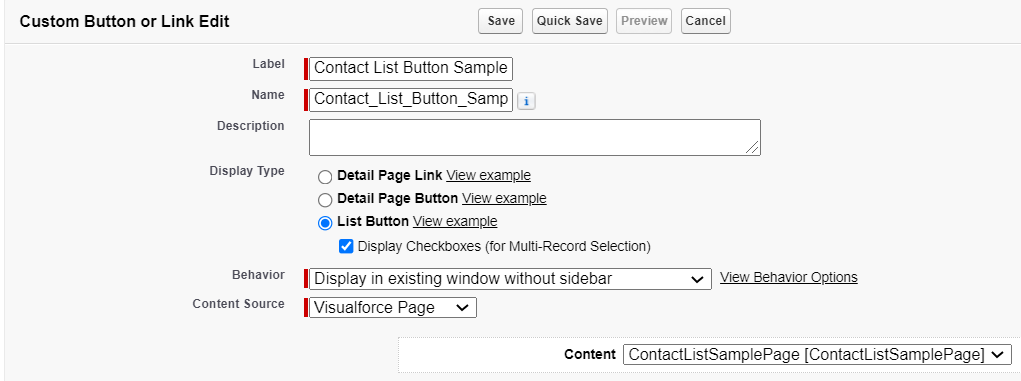
配置一下list button,content source选择Visualforce Page。
遇到的问题:
1. toast 不展示效果
2. close tab 不生效
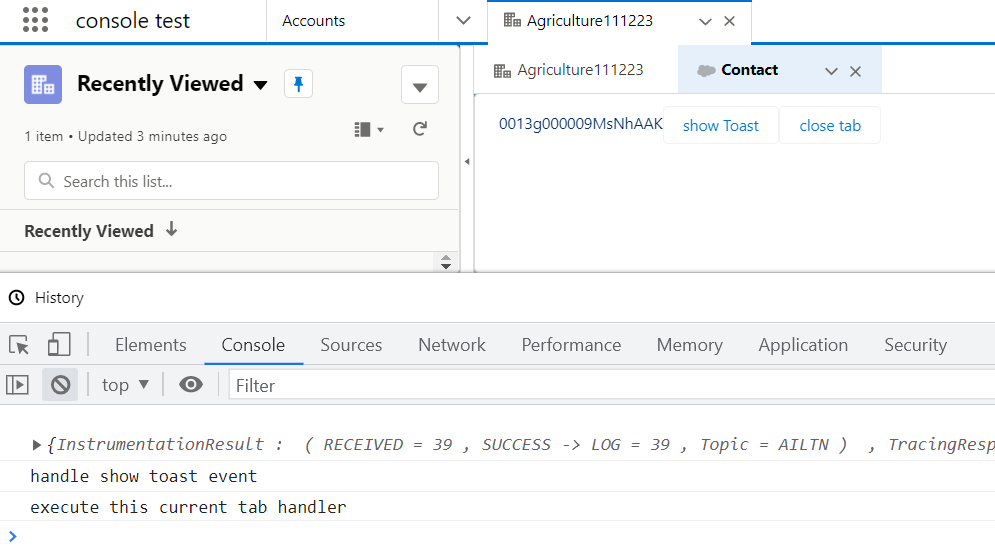
原因为 lightning out场景下,lwc里面用标准的一些功能确实好多不支持,怀疑 lightning out使用了一个单独的 iframe,导致很多标准渲染有问题。既然 lightning out油很多问题,加上我们的需求也不需要选择selected records,而只是需要获取account id,那就曲线救国一下。
2. lightning component可以设置 isUrlAddressable, salesforce component navigation可以通过 implements isUrlAddressable 直接访问,访问的URL为: /cmp/componentName即可,通过传递 c__paramName,aura端就可以获取到 paramName信息。
注意一点的是: community cloud貌似不支持c__paramName方式传递,所以如果是community项目也有这个功能,慎用。
这里我们更改两点。
1. ContactListSampleCmp.cmp的implements增加以下 isUrlAddressable
<aura:component implements="force:appHostable,lightning:isUrlAddressable,force:hasRecordId" access="global">
2. ContactListSampleCmpController.js的handleInit方法,将recordId通过 pageReference获取的代码注释打开。
然后设置一下content source修改成URL,然后填上下图的URL
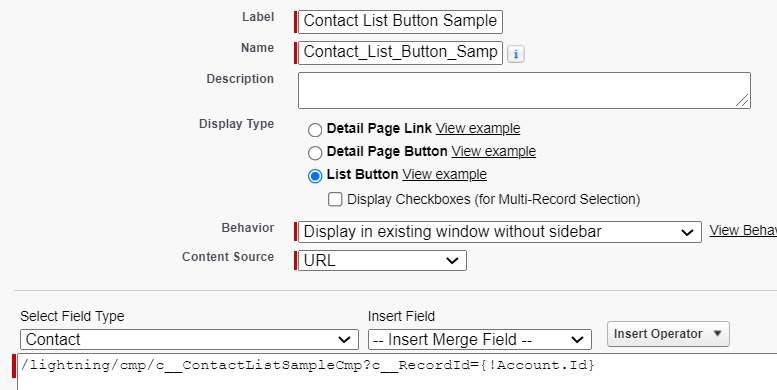
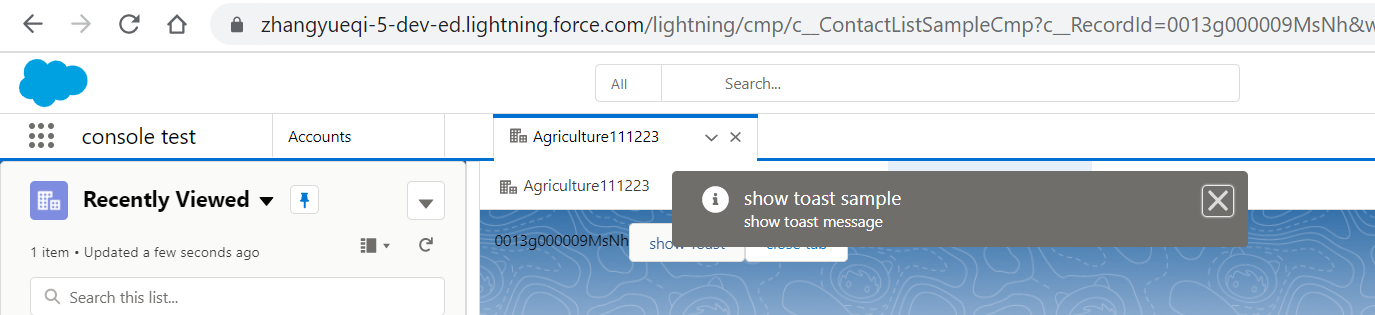
至此我们重新点击按钮以后,我们会发现URL其实是跳转到这个aura上面,所以toast等功能是可以正常使用的。
这里再额外引申一下workspaceAPI.refreshTab的功能,本来再弹出的情况下,偶尔tab不会更新名称,所以当时查看了API在 init方法setLabel以后使用了refreshTab,结果程序死循环了,原因是 refreshTab不只是刷新 tab这个小的区域,这个tab里面包含的内容将会重新的加载,所以千万不要在component生命周期中使用refreshTab从而造成死循环。
总结:或许是 lightning out用的不熟练,使用lightning out的时候,感觉坑还是一堆。salesforce针对 list button目前在lex环境还是支持的不太友好,有 list button的需求还是要多评估一下,避免入坑。篇中有错误欢迎指出,有不懂欢迎留言。
salesforce零基础学习(一百一十)list button实现的一些有趣事情的更多相关文章
- salesforce零基础学习(八十)使用autoComplete 输入内容自动联想结果以及去重实现
项目中,我们有时候会需要实现自动联想功能,比如我们想输入用户或者联系人名称,去联想出系统中有的相关的用户和联系人,当点击以后获取相关的邮箱或者其他信息等等.这种情况下可以使用jquery ui中的au ...
- salesforce零基础学习(八十九)使用 input type=file 以及RemoteAction方式上传附件
在classic环境中,salesforce提供了<apex:inputFile>标签用来实现附件的上传以及内容获取.salesforce 零基础学习(二十四)解析csv格式内容中有类似的 ...
- salesforce 零基础学习(五十二)Trigger使用篇(二)
第十七篇的Trigger用法为通过Handler方式实现Trigger的封装,此种好处是一个Handler对应一个sObject,使本该在Trigger中写的代码分到Handler中,代码更加清晰. ...
- salesforce 零基础学习(六十八)http callout test class写法
此篇可以参考: https://developer.salesforce.com/docs/atlas.en-us.apexcode.meta/apexcode/apex_classes_restfu ...
- salesforce零基础学习(八十二)审批邮件获取最终审批人和审批意见
项目中,审批操作无处不在.配置审批流时,我们有时候会用到queue,related user设置当前步骤的审批人,审批人可以一个或者多个.当审批人有多个时,邮件中获取当前记录的审批人和审批意见就不能随 ...
- salesforce 零基础学习(二十二)Test简单使用
本篇内容只是本人简单的mark开发中常出现的一些疑问,方便后期项目使用时奠定基础,如果对Test零基础童鞋,欢迎查看Test官方的使用介绍: https://help.salesforce.com/a ...
- salesforce 零基础学习(四十八)自定义列表分页之Pagination基类封装 ※※※
我们知道,salesforce中系统标准列表页面提供了相应的分页功能,如果要使用其分页功能,可以访问http://www.cnblogs.com/zero-zyq/p/5343287.html查看相关 ...
- salesforce 零基础学习(二十四)解析csv格式内容
salesforce中支持对csv格式的内容批量导入,可以使用dataloader,然而有些情况下,当用户没有相关权限使用dataloader导入情况下,就的需要使用VF和apex代码来搞定. 基本想 ...
- salesforce 零基础学习(二十)简单APP制作
本篇参考链接:https://developer.salesforce.com/trailhead/project/salesforce_developer_workshop 本篇讲述的是最简单的AP ...
- salesforce 零基础学习(六十九)当新增/修改一条记录以后发生了什么(适合初学者)
salesforce开发中,我们会对object进行很多的操作,比如对object设置字段的必填性唯一性等,设置validation rule实现一下相关的字段的逻辑校验,设置workflow实现某个 ...
随机推荐
- 11. 关于WIN7 64位系统安装ADS的种种意外情况解决方法
安装ADS的环境,以前安装过,觉得应该可以安装呀,没想到,装不上,安装不成功,后来花费好长时间,终于把他装好了,费时费力呀. 特此记录一下,以戒后人.大家安装问题建议整篇看完,再去安装,以防一个问题解 ...
- windows Notepad++ 上配置 vs 编译器 , 编译并运行
windows 中 配置 vs编译器 在Linux下,Kris是倾向于在终端中使用gcc和g++来编译C/C++的,在Windows下相信很多人都是选择臃肿的Visual Studio,我亦不免如此. ...
- STL学习笔记1
STL六大部件 容器.分配器.算法.迭代器.适配器.仿函数 他们的关系如下
- C++构造函数和析构函数初步认识(2)
构造函数的三个作用1.构造对象2.对象初始化3.类型转换 //Test1.h #include<iostream> using namespace std; //构造对象 //初始化对象 ...
- C++最小内积
Description 向量是几何中的一个重要概念. 考虑两个向量 v1=(x1,x2,...,xn)和v2=(y1,y2,...,yn),向量的内积定义为 x1y1+x2y2+...+xnyn 例如 ...
- GO 时间处理
比较大小 比较大小 先把当前时间格式化成相同格式的字符串,然后使用time的Before, After, Equal 方法即可. time1 := "2015-03-20 08:50:29& ...
- spring boot集成mybatis框架
概述 中文官网:http://www.mybatis.cn 参考教程:https://www.w3cschool.cn/mybatis MyBatis Plus:http://mp.baomidou. ...
- 深入 char
深入 char * ,char ** ,char a[ ] ,char *a[] 内核分类: c语言 2013-02-23 15:34 15176人阅读 评论(8) 收藏 举报Charcharchar ...
- 『学了就忘』Linux服务管理 — 77、RPM包安装基于xinetd的服务的管理
目录 1.基于xinetd服务的启动管理 (1)telnet服务安装 (2)telnet服务启动 2.基于xientd服务的自启动管理 现在Linux系统中基于xinetd的服务越来越少了,但Linu ...
- Redis操作命令合集
目录 一.客户端命令 二.sql命令 一.客户端命令 #读取配置文件启动 redis-server redis.conf #关闭 Redis,Redis服务器将断开与客户端链接,产生持久化文件,平滑关 ...