
Git使用教程之初级入门命令行(二)
一、Git 操作流程图
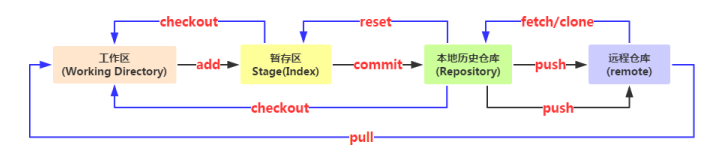
1.git --help 查看帮助
Administrator@PC-xiaobing MINGW64 /d/Git (master)

$ git --help

usage: git [--version] [--help] [-C <path>] [-c name=value]

           [--exec-path[=<path>]] [--html-path] [--man-path] [--info-path]

           [-p | --paginate | --no-pager] [--no-replace-objects] [--bare]

           [--git-dir=<path>] [--work-tree=<path>] [--namespace=<name>]

           <command> [<args>]

These are common Git commands used in various situations:

start a working area (see also: git help tutorial)

   clone      Clone a repository into a new directory

   init       Create an empty Git repository or reinitialize an existing one

work on the current change (see also: git help everyday)

   add        Add file contents to the index

   mv         Move or rename a file, a directory, or a symlink

   reset      Reset current HEAD to the specified state

   rm         Remove files from the working tree and from the index

examine the history and state (see also: git help revisions)

   bisect     Use binary search to find the commit that introduced a bug

   grep       Print lines matching a pattern

   log        Show commit logs

   show       Show various types of objects

   status     Show the working tree status

grow, mark and tweak your common history

   branch     List, create, or delete branches

   checkout   Switch branches or restore working tree files

   commit     Record changes to the repository

   diff       Show changes between commits, commit and working tree, etc

   merge      Join two or more development histories together

   rebase     Reapply commits on top of another base tip

   tag        Create, list, delete or verify a tag object signed with GPG

collaborate (see also: git help workflows)

   fetch      Download objects and refs from another repository

   pull       Fetch from and integrate with another repository or a local branch

   push       Update remote refs along with associated objects

'git help -a' and 'git help -g' list available subcommands and some

concept guides. See 'git help <command>' or 'git help <concept>'

to read about a specific subcommand or concept.
2.git基础操作
Administrator@PC-xiaobing MINGW64 /d

$ cd D:/Git/   //cd到指定文件

Administrator@PC-xiaobing MINGW64 /d/Git

$ pwd  //查看当前文件目录

/d/Git

Administrator@PC-xiaobing MINGW64 /d/Git

$ git init  //初始化本地git仓库

Initialized empty Git repository in D:/Git/.git/

Administrator@PC-xiaobing MINGW64 /d/Git (master)

$ git add test.txt   //从工作区添加本地文件test.txt到暂存区

Administrator@PC-xiaobing MINGW64 /d/Git (master)

$ git commit -m "test"  //从暂存区commit提交到本地仓库

//第一次安装Git提交commit的时候提示设置name和邮箱

*** Please tell me who you are.

Run

  git config //global user.email "you@example.com"

  git config //global user.name "Your Name"

Administrator@PC-xiaobing MINGW64 /d/Git (master)

$ git config //global user.name "xiaobing"   //根据提示设置name

Administrator@PC-xiaobing MINGW64 /d/Git (master)

$ git config //global user.email "you@example.com"  //根据提示设置邮箱

Administrator@PC-xiaobing MINGW64 /d/Git (master)

$ git commit -m "test"  //从暂存区commit提交到本地仓库

[master (root-commit) 9bc4419] test

 1 file changed, 1 insertion(+)

 create mode 100644 test.txt

//接下来从本地仓库push到远程仓库
3.创建远程仓库GitHub或者GitLib

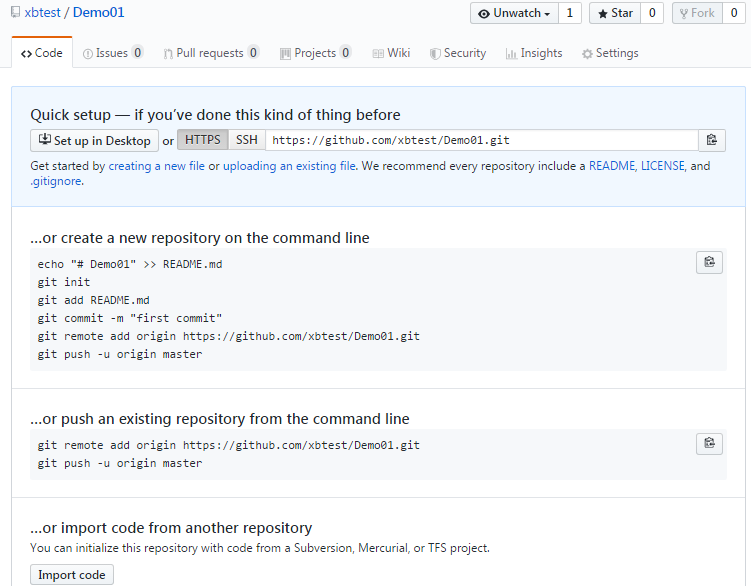
4.提交变更
git remote add origin https://github.com/xbtest/Demo01.git   //git remote 用于管理远程仓库

git push -u origin master    //往名字为origin的仓库的master分支上提交变更的代码
Administrator@PC-xiaobing MINGW64 /d/eclipse-workspace/Demo01 (master)

$ git remote add origin https://github.com/xbtest/Demo01.git   //添加失败

fatal: remote origin already exists.

$ git remote rm origin   //执行rm删除后再次添加

$ git remote add origin https://github.com/xbtest/Demo01.git
第一次提交代码的时候提示登录
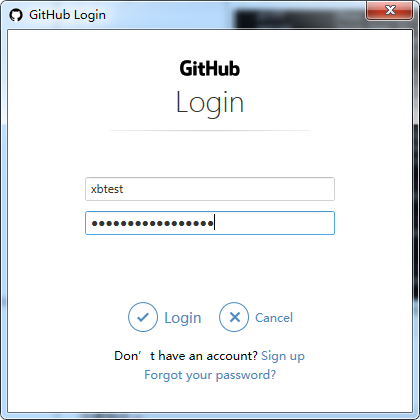
报错:
Administrator@PC-xiaobing MINGW64 /d/Git (master)

$ git push -u origin master

fatal: HttpRequestException encountered.

   ▒▒▒▒▒▒▒▒ʱ▒▒▒▒

Username for 'https://github.com': xbtest

Everything up-to-date

Branch master set up to track remote branch master from origin.
这时候需要 更新Windows的git凭证管理器
点击下载安装 GCMW-1.14.0.exe
下载链接
https://github.com/Microsoft/Git-Credential-Manager-for-Windows/releases/tag/v1.14.0

下载后双击安装即可,再次提交成功:
Administrator@PC-xiaobing MINGW64 /d/Git (master)

$ git push -u origin master

Everything up-to-date

Branch master set up to track remote branch master from origin.
5.验证查看
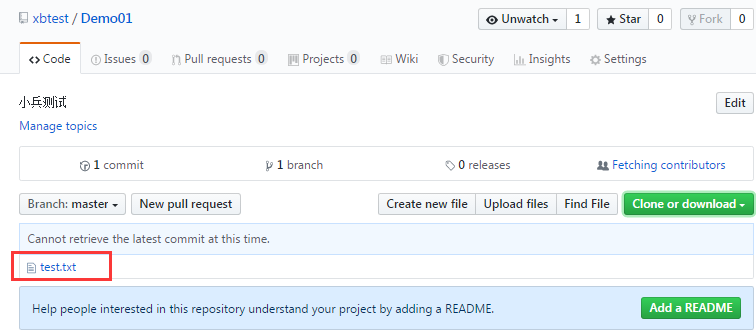
6.待续....
Git使用教程之初级入门命令行(二)的更多相关文章
- Android基础-系统架构分析,环境搭建,下载Android Studio,AndroidDevTools,Git使用教程,Github入门,界面设计介绍
系统架构分析 Android体系结构 安卓结构有四大层,五个部分,Android分四层为: 应用层(Applications),应用框架层(Application Framework),系统运行层(L ...
- [Oracle] SQL*Loader 详细使用教程(2)- 命令行参数
sqlldr工具 SQL*Loader的客户端工具是sqlldr,在操作系统的命令行下输入sqlldr,后面不接任何参数,将显示帮助信息如下所示(所有命令行参数的简单描述及其默认值),所以你并不需 ...
- git以及github的初级入门(一)
本身学习git的操作是没什么兴趣的,毕竟原本是win平台学的java开发,git下那么多复制的命令行操作确实比较让人头疼,直到昨天我打开计算机的时候,我放置项目的E盘,以及F盘,G盘盘符都不见了!!我 ...
- python教程(一)·命令行基本操作
先来了解下 "命令提示符". 等等?!既然本篇文章标题是"命令行基本操作",那怎么又说到"命令提示符"去了呢?客官莫要急,且听我说 命令提示 ...
- IntelliJ IDEA下Git的配置与使用(命令行下)
1. 安装Git并配置好Git 安装与配置参见Git与码云(Git@OSC)入门-如何在实验室和宿舍同步你的代码(1)中的2.在本机安装Git与3.1 配置git. 2. 创建远程仓库 在gitee. ...
- git版本控制 for window安装和命令行使用
Git 安装配置 Windows 平台上安装 在 Windows 平台上安装 Git 同样轻松,有个叫做 msysGit 的项目提供了安装包,可以到 GitHub 的页面上下载 exe 安装文件并运行 ...
- Git工程迁移方法总结(命令行)
Git工程迁移方法总结 Git工程迁移方法总结 Git最近准备迁移一下位置,这里采用命令行的方式,做如下操作. 1.git init 初始化git仓库,这个时候发现本地文件夹多了个.git的文件夹. ...
- Git工程迁移方法总结(命令行) .(转载)
原文地址:http://blog.csdn.net/hongshan50/article/details/236630433 Git工程迁移方法总结 Git工程迁移方法总结 Git最近准备迁移一下位置 ...
- git 工作流中的 Sourcetree 和命令行操作对比
git 工作流操作 1.初始化本地仓库文件夹 终端进入项目文件夹 git init 隐藏文件夹中有 .git 文件夹则初始化成功 2.git 查看仓库状态 这里以新建一个 demo.txt 为例 ① ...
随机推荐
- Linux系列(11) - PATH环境变量
前言 在Liunx当中要想执行"执行脚本"."执行文件"或者"执行命令",需要用绝对路径:因此环境变量就出来了,将路径放到环境变量中,环境变 ...
- MyBatis Plus 批量数据插入功能,yyds!
最近 Review 小伙伴代码的时候,发现了一个小小的问题,小伙伴竟然在 for 循环中进行了 insert (插入)数据库的操作,这就会导致每次循环时都会进行连接.插入.断开连接的操作,从而导致一定 ...
- Java实现四大基本排序算法和二分查找
Java 基本排序算法 二分查找法 二分查找也称为折半查找,是指当每次查询时,将数据分为前后两部分,再用中值和待搜索的值进行比较,如果搜索的值大于中值,则使用同样的方式(二分法)向后搜索,反之则向前搜 ...
- UE4技术总结——委托
UE4技术总结--委托 目录 UE4技术总结--委托 一.定义 二.用法 2.1 声明与调用委托 2.1.1 单播委托 2.1.1.a 声明 2.1.1.b 绑定 2.1.1.c 执行委托 2.1.1 ...
- 11.4.2 LVS—NAT
Virtual Server via NAT(VS-NAT) 用地址翻译实现虚拟服务器。地址转换器有能被外界访问到的合法IP地址,它修改来自专有网络的流出包的地址。外界看起来包是来自地址转换器本身,, ...
- ping探测与Nmap扫描
一.实验目的 学习信息收集的一般步骤 学会使用ping命令 利用Nmap工具进行信息搜集 二.实验环境 系统环境:一台windows7系统.一台XP系统.一台kali系统 软件环境:安装Wiresha ...
- 树莓派3B搭建NODE-RED运行环境并构建数据流
树莓派3B搭建NODE-RED运行环境并构建数据流 树莓派搭建Node-RED环境 树莓派自2015年开始是默认就带NODE-RED的,但是如今已是2018年:)自带的版本已经很老了,可通过下面的命令 ...
- 试题 算法训练 二进制数数 java解题
资源限制 时间限制:1.0s 内存限制:256.0MB 问题描述 给定L,R.统计[L,R]区间内的所有数在二进制下包含的"1"的个数之和. 如5的二进制为101,包含2个&q ...
- FastAPI 学习之路(十二)接口几个额外信息和额外数据类型
系列文章: FastAPI 学习之路(一)fastapi--高性能web开发框架 FastAPI 学习之路(二) FastAPI 学习之路(三) FastAPI 学习之路(四) FastAPI 学习之 ...
- TypeScript中将函数中的局部变量“导出”的方法
首先是在模块a.js中声明一个可导出(export)的数据结构,例如: export class ModelInfo{ id: string; name:string; } 其次是在模块b中声明可导出 ...