
android 32 Gallery:横着滚动的列表
Gallery:横着滚动的列表
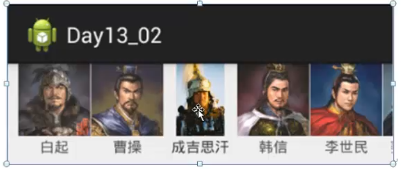
mainActivity.java
package com.sxt.day05_01;

import java.util.ArrayList;

import java.util.List;

import android.app.Activity;

import android.os.Bundle;

import android.view.View;

import android.view.ViewGroup;

import android.widget.AdapterView;

import android.widget.AdapterView.OnItemClickListener;

import android.widget.AdapterView.OnItemLongClickListener;

import android.widget.BaseAdapter;

import android.widget.Gallery;

import android.widget.GridView;

import android.widget.ImageView;

import android.widget.ListView;

import android.widget.TextView;

import android.widget.Toast;

import com.sxt.day05_01.entity.GeneralBean;

public class MainActivity extends Activity {

    Gallery mGallery;

    List<GeneralBean> mGenerals;//代表十个军事家的集合

    GeneralAdapter mAdapter;

    int[] resid={

        R.drawable.baiqi,R.drawable.caocao,R.drawable.chengjisihan,

        R.drawable.hanxin,R.drawable.lishimin,R.drawable.nuerhachi,

        R.drawable.sunbin,R.drawable.sunwu,R.drawable.yuefei,

        R.drawable.zhuyuanzhang

    };

    @Override

    protected void onCreate(Bundle savedInstanceState) {

        super.onCreate(savedInstanceState);

        setContentView(R.layout.activity_main);

        initData();//初始化数据

        initView();

        setListener();

    }

    private void setListener() {

        setOnItemClickListener();

        setOnItemLongClickListener();

    }

    private void setOnItemLongClickListener() {

        mGallery.setOnItemLongClickListener(new OnItemLongClickListener() {

            @Override

            public boolean onItemLongClick(AdapterView<?> parent, View view,

                    int position, long id) {

                Toast.makeText(MainActivity.this, mGenerals.get(position).getName()+"被长按", 2000).show();

                return true;

            }

        });

    }

    private void setOnItemClickListener() {

        mGallery.setOnItemClickListener(new OnItemClickListener() {

            @Override

            public void onItemClick(AdapterView<?> parent, View view,

                    int position, long id) {

                Toast.makeText(MainActivity.this, mGenerals.get(position).getName()+"被短按", 2000).show();

            }

        });

    }

    private void initView() {

        mGallery=(Gallery) findViewById(R.id.galleryGeneral);

        mAdapter=new GeneralAdapter();//创建适配器

        mGallery.setAdapter(mAdapter);//关联适配器

    }

    private void initData() {

        //将资源中的字符串组数转换为Java数组

        String[] names=getResources().getStringArray(R.array.generals);

        mGenerals=new ArrayList<GeneralBean>();

        for (int i = 0; i < names.length; i++) {

            GeneralBean bean=new GeneralBean(resid[i], names[i]);

            mGenerals.add(bean);

        }

    }

    //适配器

    class GeneralAdapter extends BaseAdapter{

        @Override

        public int getCount() {

            return Integer.MAX_VALUE;//设置Gallery的长度为21亿,使得水平滚动的列表到最后的时候又从第一个开始

        }

        @Override

        public GeneralBean getItem(int position) {

            return mGenerals.get(position);

        }

        @Override

        public long getItemId(int position) {

            return position;

        }

        @Override

        //滚动的时候显示Gallery中第position位置的单个布局,position从0到21亿,使得水平滚动的列表到最后的时候又从第一个开始

        public View getView(int position, View convertView, ViewGroup parent) {

            //拿到ListViewItem的布局,转换为View类型的对象

            View layout=View.inflate(MainActivity.this, R.layout.item_generals, null);

            ImageView ivThumb=(ImageView) layout.findViewById(R.id.ivThumb);

            TextView tvName=(TextView) layout.findViewById(R.id.tvName);

            //position%mGenerals.size()使得水平滚动的列表到最后的时候又从第一个开始

            GeneralBean bean=mGenerals.get(position%mGenerals.size());

            ivThumb.setImageResource(bean.getResid());

            tvName.setText(bean.getName());

            return layout;//返回第position位置的单个布局,也就是item_generals.xml的LinearLayout

        }

    }

}
main.xml
<RelativeLayout xmlns:android="http://schemas.android.com/apk/res/android"

    android:layout_width="match_parent"

    android:layout_height="match_parent" >

    <Gallery

        android:id="@+id/galleryGeneral"

        android:layout_width="match_parent"

        android:layout_height="wrap_content"

        android:spacing="2dp"/>

</RelativeLayout>
item_generals.xml
<?xml version="1.0" encoding="utf-8"?>

<LinearLayout xmlns:android="http://schemas.android.com/apk/res/android"

    android:layout_width="match_parent"

    android:layout_height="wrap_content"

    android:orientation="vertical" >

    <ImageView

        android:id="@+id/ivThumb"

        android:layout_width="80dp"        上图下字

        android:layout_height="80dp"

        android:scaleType="fitXY"

        android:src="@drawable/baiqi"/>

    <TextView

        android:id="@+id/tvName"

        android:layout_width="80dp"

        android:layout_height="wrap_content"

        android:text="白起"

        android:textSize="20sp"

        android:gravity="center_horizontal"/>

</LinearLayout>
GeneralBean.java
public class GeneralBean {

    private int resid;//图片的id值

    private String name;//军事家的姓名

    public int getResid() {

        return resid;

    }
android 32 Gallery:横着滚动的列表的更多相关文章
- Android BaseAdapter Gallery 画廊视图 (左右拖动图片列表拖至中间时图片放大显示)
画廊视图使用Gallery表示,能够按水平方向显示内容,并且可以手指直接拖动图片和移动,一般用来浏览图片,,被选中的选项位于中间,并且可以响应事件显示信息.在使用画廊视图时,首先在屏幕上添加Galle ...
- [转] Android SDK manager 无法获取更新版本列表
打开这个网址(LINK)就可以看到adt的详细信息. 或者直接在你的eclipse的Help > Install New Software里面add,地址直接输入 https://dl-ss ...
- Android Material Design-Creating Lists and Cards(创建列表和卡)-(三)
转载请注明出处:http://blog.csdn.net/bbld_/article/details/40430319 翻译自:http://developer.android.com/trainin ...
- Android 解决Gallery下ScrollView滑动事件冲突
在Gallery下,里面内容过长超出屏幕,这时我们可以用ScrollView来滚动,但是这样做了以后,会发现一个问题,Gallery的滑动事件和ScrollView的滑动事件起冲突,这时我们可以自定义 ...
- android学习Gallery和ImageSwitch的使用
Gallery组件被称之为画廊,是一种横向浏览图片的列表,在使用android API 19 Platform 时会发现Gallery被画上了横线,表明谷歌已经不推荐使用该组件了, * @deprec ...
- Android之Gallery和Spinner-Android学习之旅(二十九)
Spinner简介 spinner是竖直方向展开一个列表供选择.和gallery都是继承了AbsSpinner,AbsSpinner继承了AdapterView,因此AdaptyerView的属性都可 ...
- android学习---Gallery画廊视图
Gallery与Spinner有共同父类:AbsPinner.说明Gallery与Spinner都是一个列表框. 它们之间的差别在于Spinner显示的是一个垂直的列表选择框,而Gallery显示的是 ...
- android SDK manager 无法获取更新版本列表【转载】
http://mirrors.neusoft.edu.cn/eclipse/releases/luna/打开这个网址就可以看到adt的详细信息: http://developer.android.c ...
- Android TextView文字横向自动滚动(跑马灯)
TextView实现文字滚动需要以下几个要点: 1.文字长度长于可显示范围:android:singleLine="true" 2.设置可滚到,或显示样式:android: ...
随机推荐
- Maya pywin32
Maya 2011 – 2013 64-bit: maya-64-bit-pywin32.zipMaya 2011 – 2013 32-bit: maya-32-bit-pywin32.zipMaya ...
- 学习总结之Log4NET
通过在网上查找了一些资料,用了些时间学习了log4NET,做了一个小小的总结,说一下它的特点吧 首先呢log4NET是.Net下一个非常优秀的开源日志记录组件.它可以将日志分成不同等级,也可以按照我们 ...
- Android Learning:多线程与异步消息处理机制
在最近学习Android项目源码的过程中,遇到了很多多线程以及异步消息处理的机制.由于之前对这块的知识只是浅尝辄止,并没有系统的理解.但是工程中反复出现让我意识到这个知识的重要性.所以我整理出这篇博客 ...
- IIs工作原理
http://www.cnblogs.com/szhy222/archive/2008/07/14/1242576.html 问题: HTTP.SYS 的内置驱动程序 IIS 工作者进程
- hadoop 异常处理实例(一)hadoop内存配置项
Exception in thread "main" java.io.IOException: Job failed! at org.apache.hadoop.mapred.Jo ...
- 【UVA11019】Matrix Matcher
Description Given an N × M matrix, your task is to find the number of occurences of an X × Y pattern ...
- 在 ActionBar 添加刷新按钮
在以前版本的 Gmail 应用中,ActionBar 上有个刷新菜单,点击一下刷新菜单变成一个转圈的刷新标示动画图片. 之前实现该功能的时候都是使用一个类库 RefreshActionItem来实现的 ...
- MapReduce生成HFile入库到HBase及源码分析
http://blog.pureisle.net/archives/1950.html
- 有关Spring Batch
在使用Spring Batch时,在无法实现StepListener的情况下,如何使用ExecutionContext呢. 解决办法,使用宣言@BeforeStep或@AfterStep.
- HDOJ/HDU 2710 Max Factor(素数快速筛选~)
Problem Description To improve the organization of his farm, Farmer John labels each of his N (1 < ...