
Crontab Build_setting的定期检查
一、脚本功能
(1)检查所有的builting_setting.h是否能够编译通过,并将编译结果写入 编译结果.h文件中。
(2)将编译结果通过邮箱发送给相关负责人。
(3)系统定期执行任务,检查build_setting。
二、发送邮件
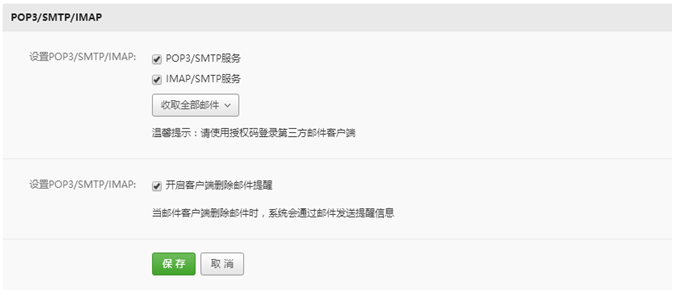
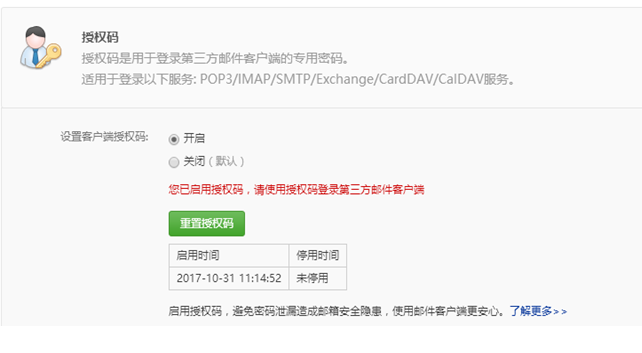
1、要实现发邮件的功能,必须通过网站登陆设置开启SMTP服务和授权码,比如以下是163邮箱的设置过程。

2、在脚本此处设置邮箱的相关内容:(注意:邮箱密码必须是你启用的授权码)
三、crontab定时作业
(1)crontab -e:通过这个命令创建自己的定时作业

crontab -u //设定某个用户的cron服务,一般root用户在执行这个命令的时候需要此参数

crontab -l //列出某个用户cron服务的详细内容

crontab -r //删除某个用户的cron服务

crontab -e //编辑某个用户的cron服务
*   |代表任何时刻均可执行.

,   |代表分隔时段,例如要在3:00和6:00两个时刻执行命令:``` , * * * command```

-   |代表范围,例如要在8:,:,:20三个时刻执行命令:``` - * * * command```

/n  |代表间隔,例如每10分钟执行一次命令:```*/ * * * * command```

注意时间与星期不能同时设置,例如下面就是一个错误的写法:
(2)启动crontab服务:service cron start
(3)关闭服务:service cron stop
(4)查看crontab服务:crontab -l
(5)删除定时作业:crontab -r
(6)查看crontab服务的状态:service cron status
如:每隔10MIN启动一次脚本
*/ * * * * python /home/kk/share/bak/512_new/code/kitking/buildCheck.py
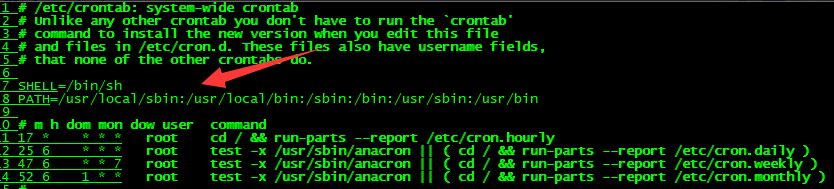
一般设置环境变量的时候,Linux会在/etc/profile里面配置,这样子用户登录,读取这个文件的时候就会读取到配置文件,所有正常的bash shell登录都可以执行我们的脚本。但是crontab就不一样了,在红帽系列的Linux上面,可以在/etc/crontab下发现有重新设置环境变量。
注意crontab运行是的环境变量需要手动添加:
cat /etc/crontab

SHELL=/bin/bash

PATH=/sbin:/bin:/usr/sbin:/usr/bin

MAILTO=root

# For details see man  crontabs

# Example of job definition:

# .---------------- minute ( - )

# | .------------- hour ( - )

# | | .---------- day of month ( - )

# | | | .------- month ( - ) OR jan,feb,mar,apr ...

# | | | | .---- day of week ( - ) (Sunday= or ) OR sun,mon,tue,wed,thu,fri,sat

# | | | | |

# * * * * * user-name command to be executed
手动添加如下:
四、脚本检查:
#!/usr/bin/python

#_*_ coding:utf- _*_

import time

from email.MIMEText import MIMEText

from email.MIMEMultipart import MIMEMultipart

from email.MIMEBase import MIMEBase

from email import Utils, Encoders

from email.header import Header

import mimetypes

import sys

import smtplib

import getopt

import os

import re

import shutil

import time, datetime

'''

脚本功能:

     ()检查所有的builting_setting.h是否能够编译通过,并将编译结果写入 buildLog文件中。

     ()将编译结果通过邮箱发送给负责人。

     ()系统定期执行任务,检查build_setting。

     注意:SRC的绝对路径更新:gPathSrc

'''

gPathSrc = u"/home/kk/share/bak/512_new/code"

gPathBuildList = gPathSrc + u"/kitking/buildList.h"

gPathBuildLog = gPathSrc + u"/kitking/buildLog.h"

def SearchbinFile(curBuildName):

    global gPathSrc

    binFilepath = gPathSrc + "/mergedir"

    IsFindfile =

    for filename in os.listdir(binFilepath):

        if (re.search(".*RR.*\.bin.*",filename)):

            IsFindfile =

            break

        else:

            IsFindfile =

    if IsFindfile == :

        if (os.path.isfile(gPathBuildList)):

            open(gPathBuildLog, "a").writelines(curBuildName)

        else:

            open(gPathBuildLog, "w").writelines(curBuildName)

def Compile():

    buildList = []

    strCurBuildName = ""

    #查看清单文件

    if(os.path.isfile(gPathBuildList)):

        buildList = open(gPathBuildList, "r").readlines()

    #无清单任务,需要重新产生

    if(len(buildList) == ):

        for  dirPath, dirNames, fileNames in os.walk(gPathSrc + "/../BUILD_RECORD"):

            for strCurBuildName in dirNames:

                buildList.append(strCurBuildName+"\n")

    #每次移除一个任务后,更新清单文件

    if(len(buildList)):

        strCurBuildName = buildList.pop()

        open(gPathSrc + "/../BUILD_RECORD/BUILD_NOW.h", "w").write("#define BUILD_NAME " + strCurBuildName)

        os.system(gPathSrc + "/build_history.sh")

        SearchbinFile(strCurBuildName)

    if (len(buildList)):

        open(gPathBuildList, "w").writelines(buildList)

    else:

        # 注意:附件的路径字符串应为unicode编码

        # 发送者邮箱 接收者邮箱   邮箱密码 主题   内容  附件名

        SendMail('rad_xxx@163.com', 'xxx@163.com', 'xxx','编译结果','请查看Log!',gPathBuildLog)

        os.remove(gPathBuildLog)

        os.remove(gPathBuildList)

def SendMail(fromAddress, toAddress, usepassword,subject=None, content=None, attfile=None, \

             subtype='plain', charset='utf-8'):

    username = fromAddress

    #创建一个带附件的实例

    msg = MIMEMultipart()

    msg['From'] = fromAddress

    msg['To'] = toAddress

    if subject:

        #标题

        msg['Subject'] = subject

        msg['Date'] = Utils.formatdate(localtime=)

    if content:

        #添加邮件内容

        txt = MIMEText(content, subtype, charset)

        msg.attach(txt)

    if attfile:

        #构造附件

        #注意:传入的参数attfile为unicode,否则带中文的目录或名称的文件读不出来

        #      basename 为文件名称,由于传入的参数attfile为unicode编码,此处的basename也为unicode编码

        basename = os.path.basename(attfile)

        #print basename

        #注意:指定att的编码方式为gb2312

        att = MIMEText(open(attfile, 'rb').read(), 'base64', 'gb2312')

        att["Content-Type"] = 'application/octet-stream'

        #注意:此处basename要转换为gb2312编码,否则中文会有乱码。

        #      特别,此处的basename为unicode编码,所以可以用basename.encode('gb2312')

        #            如果basename为utf-8编码,要用basename.decode('utf-8').encode('gb2312')

        att["Content-Disposition"] = 'attachment; filename=%s' % basename.encode('gb2312')

        msg.attach(att)

    try:

    #smtp = smtplib

        smtp = smtplib.SMTP()

        #连接服务器

        smtp.connect('smtp.163.com', '')

        #登录

        smtp.login(username, usepassword)

        #发送邮件

        smtp.sendmail(fromAddress, toAddress, msg.as_string())

        #退出

        smtp.quit()

        print('邮件发送成功email has send out !')

    except Exception as e:

        print str(e)

if __name__ == "__main__":

    #获取脚本所在的绝对路径

    AbsolutePath = sys.path[]

    #切换目录进行编译

    os.chdir(gPathSrc)

    #编译

    Compile()

    #sys.exit()
Crontab Build_setting的定期检查的更多相关文章
- redis+crontab+php异步处理任务
2016年1月8日 16:08:43 星期五 情景: 用户登录日志, 发邮件, 发短信等等实时性要求不怎么高的业务通常会异步执行 之前接触过几种redis+crontab配套的实现方法, 比如: cr ...
- 如何在linux设置回收站
修改用户的环境变量 vi ~/.bashrc 注释第5行的别名 #alias rm='rm -i' 最后一行添加如下内容 mkdir -p ~/.trash alias rm=trash alias ...
- Anyconnect的VPN环境部署(2)-在Linux客户机上连接Anyconnect
由于之前已经在机房IDC安装了Anyconnect的VPN服务环境(参考:Anyconnect的VPN环境部署(1)-OpenConnect server(ocserv)服务安装)今天介绍下在linu ...
- 如何在linux设置回收站 - 防止失误操作造成数据清空
linux rm命令是即刻删除的,而且挺多人喜欢加上-f强制命令,更暴力的是删除文件夹直接 rm -rf ,这样子代表你执行完后,就完全被干掉了. 还是推荐在linux下设置回收站,写一个shell脚 ...
- 【Linux】自建回收站
linux rm命令是即刻删除的,而且挺多人喜欢加上-f强制命令,更暴力的是删除文件夹直接 rm -rf ,这样子代表你执行完后,就完全被干掉了. 还是推荐在linux下设置回收站,写一个shell脚 ...
- Python 定期检查Build_setting的编译情况
#!/usr/bin/python #_*_ coding:utf-8 _*_ import time from email.MIMEText import MIMEText from email.M ...
- crontab详解
搜索 纠正错误 添加实例 crontab 提交和管理用户的需要周期性执行的任务 补充说明 crontab命令 被用来提交和管理用户的需要周期性执行的任务,与windows下的计划任务类似,当安装完成 ...
- Linux任务调度进程crontab的使用方法和注意事项
参考文章:Linux任务调度进程crond命令的使用方法和注意事项 一.crond简介 概念 crond的概念和crontab是不可分割的.crontab是一个命令,常见于Unix和类Unix的操作系 ...
- php 执行计划任务方式之 linux crontab 执行命令
一.crond简介 crond 是linux下用来周期性的执行某种任务或等待处理某些事件的一个守护进程,与windows下的计划任务类似,当安装完成操作系统后,默认会安装此服务 工具,并且会自动启动c ...
随机推荐
- 算法笔记字符串处理问题H:编排字符串(2064)
题目描述 请输入字符串,最多输入4 个字符串,要求后输入的字符串排在前面,例如 输入:EricZ 输出:1=EricZ 输入:David 输出:1=David 2=EricZ 输入:Peter 输出: ...
- oracle存储过程中使用字符串拼接
1.使用拼接符号“||” v_sql := 'SELECT * FROM UserInfo WHERE ISDELETED = 0 AND ACCOUNT =''' || vAccount || '' ...
- booth乘法器原理
在微处理器芯片中,乘法器是进行数字信号处理的核心,同一时候也是微处理器中进行数据处理的wd=%E5%85%B3%E9%94%AE%E9%83%A8%E4%BB%B6&hl_tag=textli ...
- Android中怎样自己制作su
本文原博客:http://hubingforever.blog.163.com/blog/static/171040579201372915716149/ 在Android源代码的system\ext ...
- TinyXML:TiXmlNode
TiXmlNode: 对应于DOM结构中的节点,是TinyXML中很重要的一个类,它继承自TiXmlBase TiXmlNode的友元类: friend class TiXmlDocument; fr ...
- Ajax_HTTP请求以及响应
什么是HTTP请求? 就是从用户的浏览器端向服务器端发送请求 一个HTTP请求一般由四个部分组成 1.HTTP请求的方法或者动作,比如GET或者POST请求 2.请求的URL,也就是请求的地址 3.请 ...
- HDU 4085 Peach Blossom Spring 斯坦纳树 状态压缩DP+SPFA
状态压缩dp+spfa解斯坦纳树 枚举子树的形态 dp[i][j] = min(dp[i][j], dp[i][k]+dp[i][l]) 当中k和l是对j的一个划分 依照边进行松弛 dp[i][j] ...
- CGI的知识点
CGI(Common Gateway Interface)是能让webserver和CGI脚本共同处理客户的请求的协议. 它的协议定义文档是http://www.ietf.org/rfc/rfc387 ...
- 1987年国际C语言混乱代码大赛获奖的一行代码
macb() ? lpcbyu(&gbcq/_\021%ocq\012\0_=w(gbcq)/_dak._=}_ugb_[0q60)s+ 这是CoolShell博主之前做了一个非常有意思的在线 ...
- Java,如何获取文件的MD5值
MessageDigest类封装得很不错,简单易用 不多说,直接上代码 import java.io.FileInputStream;import java.security.MessageDiges ...