
MaskRCNN路标:TensorFlow版本用于抠图
MaskRCNN用于检测路标,作为更详细的目标检测,用以得到更精准的额路标位置,路标的几何中心点,用于构建更为精准的拓扑地图,减少构图误差。
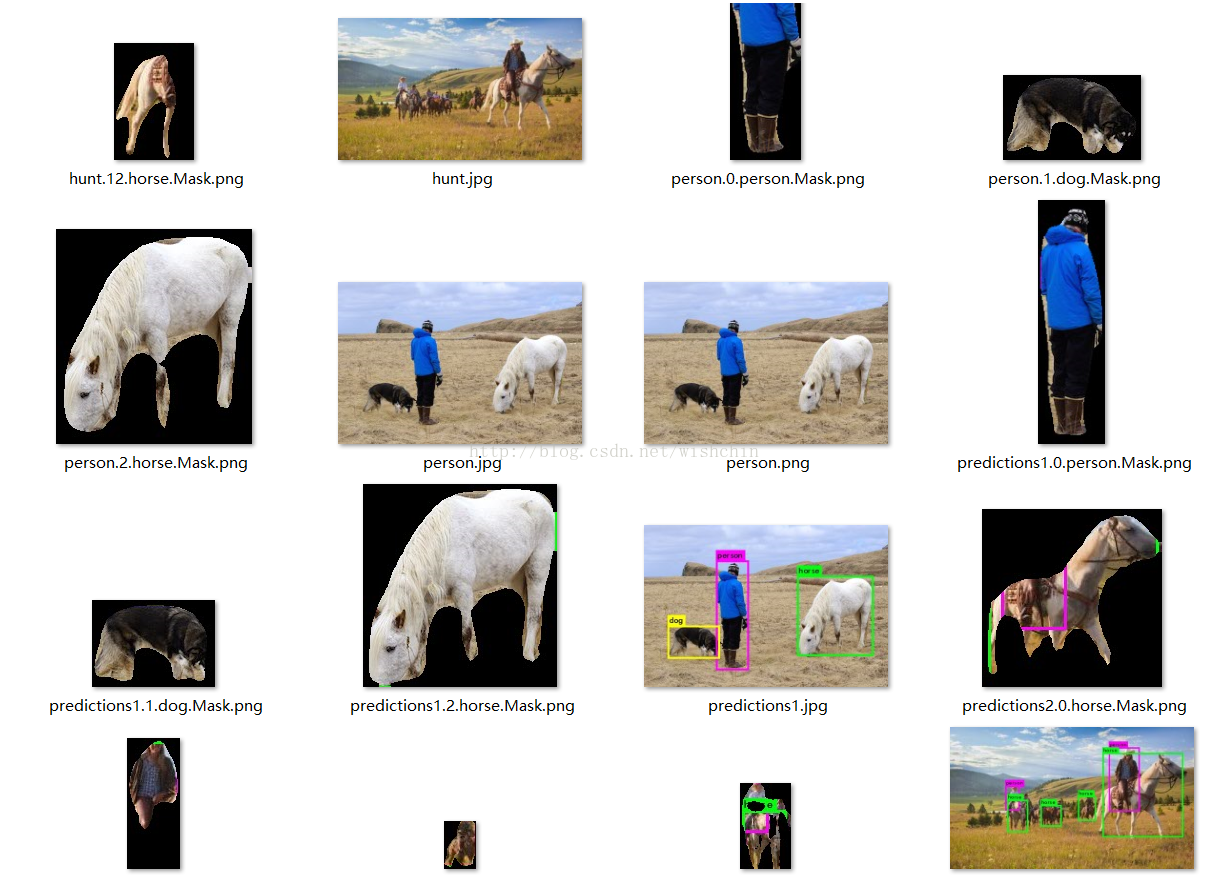
抠图工具已经完成,把框抠出来,用0值表示背景。
python代码:
def mainex():

    #initDir();

    # Root directory of the project

    ROOT_DIR = os.getcwd()

    # Directory to save logs and trained model

    MODEL_DIR = os.path.join(ROOT_DIR, "logs")

    # Path to trained weights file

    # Download this file and place in the root of your

    # project (See README file for details)

    #COCO_MODEL_PATH = os.path.join(ROOT_DIR, "mask_rcnn_coco.h5")

    COCO_MODEL_PATH= "D:/Works/PyProj/MaskRCNN-tensor/data/model/mask_rcnn_coco.h5";

    # Directory of images to run detection on

    #IMAGE_DIR = os.path.join(ROOT_DIR, "images");

    IMAGE_DIR = "data/MedSeaTest/";

    config = InferenceConfig()

    config.display();

    # 3.

    # Create model object in inference mode.

    model = modellib.MaskRCNN(mode="inference", model_dir=MODEL_DIR, config=config)

    # Load weights trained on MS-COCO

    model.load_weights(COCO_MODEL_PATH, by_name=True);

    # 4

    class_names= init_classname();

    IMAGE_DIR = "D:/DataSet/PicStyleTest/Medsea3/deskfilter/";

    proDir(model, class_names, IMAGE_DIR);
处理目录:
def proDir( model,class_names,IMAGE_DIR ):

    # Load a random image from the images folder

    print(IMAGE_DIR);

    extention =".jpg";

    filelist =traverseFolder( IMAGE_DIR , extention);#traverse( IMAGE_DIR , extention);#

    for file in filelist:

        print("Is processing: ");print(file);

        image = skimage.io.imread( file );

        # Run detection

        results = model.detect([image], verbose=1);

        # Visualize results

        #r = results[0];

        fileName = file;

        getAllLabelMask(fileName, image, results[0], class_names)
def getAllLabelMask(fileName,image, maskResult,class_names ):

    """

    boxes: [num_instance, (y1, x1, y2, x2, class_id)] in image coordinates.

    masks: [num_instances, height, width]

    class_ids: [num_instances]

    class_names: list of class names of the dataset

    scores: (optional) confidence scores for each box

    figsize: (optional) the size of the image.

    """

    boxes  = maskResult['rois'];

    masks  = maskResult['masks'];

    scores = maskResult['scores'];

    class_ids = maskResult['class_ids'];

    # Number of instances

    N = boxes.shape[0];

    if not( N<1 or boxes.shape[0] == masks.shape[-1] == class_ids.shape[0]):

        return

    row = image.shape[1];

    col = image.shape[0];

    for i in range(N):

        # Bounding box

        if not np.any(boxes[i]):

            continue;

        y1, x1, y2, x2 = boxes[i];

        # Label

        class_id = class_ids[i];

        score = scores[i] if scores is not None else None

        label = class_names[class_id];

        # Mask

        mask = masks[:, :, i];

        masked_image = np.zeros((col, row, 3), dtype=np.uint8);

        masked_image = apply_maskX(masked_image, mask);

        #frontImage = np.zeros( (col, row), dtype=np.uint8 );

        frontImage = image.copy();

        for m in range(row):

            for n in range(col):

                if(masked_image[n, m, 0]<254):

                    #frontImage[n, m] = 255;

                    frontImage[n,m,0] =0;

                    frontImage[n, m, 1] = 0;

                    frontImage[n, m, 2] = 0;

        #roiMask = masked_image[y1:y2, x1:x2];

        roiImg = frontImage[y1:y2, x1:x2];

        roiImg = cv2.cvtColor(roiImg, cv2.COLOR_BGR2RGB);

        fileMask = fileName[0: len(fileName)-4];

        fileMask = fileMask +"."+ str(i)+"."+label+"."+"Mask.png";

        cv2.imwrite(fileMask, roiImg);
结果:
MaskRCNN路标:TensorFlow版本用于抠图的更多相关文章
- Detectron-MaskRCnn: 用于抠图的FCNN
市面上暂时还没有找到可以在消费机显卡上实时运行的MaskRCnn,TensorFlow即使是C++版本训练在coco数据集上的模型也是慢的要死,最后不堪忍受,只能放弃. 经历了一些列fuckingDo ...
- 查看已安装tensorflow版本
http://blog.csdn.net/u011961856/article/details/76861052 由于tensorflow版本不同,可能一些函数的调用也有变换,这时候可能需要查看ten ...
- Deep Photo的TensorFlow版本
Prisma这个应用,你可能很熟悉.这是一个能将不同的绘画风格,迁移到照片中,形成不同艺术风格的图片. 2017年4月,美国康奈尔大学和Adobe的一个研究团队在arvix上通过论文“Deep Pho ...
- 机器学习&深度学习基础(tensorflow版本实现的算法概述0)
tensorflow集成和实现了各种机器学习基础的算法,可以直接调用. 代码集:https://github.com/ageron/handson-ml 监督学习 1)决策树(Decision Tre ...
- 用anaconda安装最新的TensorFlow版本
Google发布了TensorFlow1.4正式版 在anaconad搜索依旧是1.2的版本,通过一番查阅,找到了方法 1,打开anaconda-prompt 2,激活你要安装的环境 activate ...
- Anaconda多版本Python管理以及TensorFlow版本的选择安装
Anaconda是一个集成python及包管理的软件,记得最早使用时在2014年,那时候网上还没有什么资料,需要同时使用py2和py3的时候,当时的做法是同时安装Anaconda2和Anaconda3 ...
- 查看已安装tensorflow版本以及安装路径
查看版本: import tensorflow as tf tf.__version__ 查看安装路径: tf.__path__
- TensorFlow 版本问题
TensorFlow各个版本均可以在GitHub上下载,之前下载配置的是0.5.0版本,运行的时候,出现很多问题,什么模块缺失attribute,函数参数问题等,修改起来让人抓狂,后来索性下载使用0. ...
- windows tensorflow 版本与升级
tensorflow 的版本在 1.1.0/1.2.0 之后 api 迎来重大变化,有必要将版本升级到最新的 1.1.0 以上. 1. 使用 upgrade CPU:pip3 install –upg ...
随机推荐
- vijos 1439 区间
区间 背景 描述 给定n个闭区间 [ai,bi], i=1,2,...,n. 这些区间的和可以用两两不相交的闭区间的和来表示.你的任务是找到这样的区间数目最少的表示,且把它们按升序的方式写到输出文件中 ...
- 1043 方格取数 2000 noip 提高组
1043 方格取数 2000 noip 提高组 题目描述 Description 设有N*N的方格图(N<=10,我们将其中的某些方格中填入正整数,而其他的方格中则放入数字0.如下图所示(见样 ...
- How to Use DHCP Relay over LAN? - DrayTek Corp
Assuming Vigor2960 has two LAN networks. Network Administrator wants that, when the internal DHCP is ...
- Bitmap工具类BitmapHelper
BitmapHelper 提供一些获取本地缩略图,获取网络图片.dp与px的相互转换等方法. import java.io.ByteArrayInputStream; import java.io.B ...
- Leet Code OJ 26. Remove Duplicates from Sorted Array [Difficulty: Easy]
题目: Given a sorted array, remove the duplicates in place such that each element appear only once and ...
- Python3基础(四) 条件与循环控制
Python的流程控制语句包括:if条件语句.while循环语句.for循环语句.range函数以及break.continue.pass控制语句.这些语句在Python中的语义和在其他语言中基本是一 ...
- Linux gadget驱动分析3------复合设备驱动
windows上面对usb复合设备的识别需要下面条件. “ 如果设备满足下列要求,则总线驱动程序还会报告 USB\COMPOSITE 的兼容标识符: 设备描述符的设备类字段 (bDeviceClass ...
- .NET下WebBrowser的一个BUG以及其替代品——geckofx
今天研究一个小问题,在C#的WebBrowser下打开奇艺网的视频,经常整个FLASH就偏了,进度条控制条什么的都没有. 要全屏一下然后还原才能解决这个问题. 如下,图1为webbrowser打开,图 ...
- bzoj 3301 Cow Line
题目大意: n的排列,K个询问 为P时,读入一个数x,输出第x个全排列 为Q时,读入N个数,求这是第几个全排列 思路: 不知道康拓展开是什么,手推了一个乱七八糟的东西 首先可以知道 把排列看成是一个每 ...
- bzoj3629 [JLOI2014]聪明的燕姿——DFS+约数和定理
题目:https://www.lydsy.com/JudgeOnline/problem.php?id=3629 扫除了一个知识盲点:约数和定理 约数和定理: 对于一个大于1正整数n可以分解质因数:n ...