
Importing Objective-C into Swift
Overview
You can use Objective-C and Swift files together in a single project, no matter which language the project used originally. This makes creating mixed-language app and framework targets as straightforward as creating an app or framework target written in a single language.
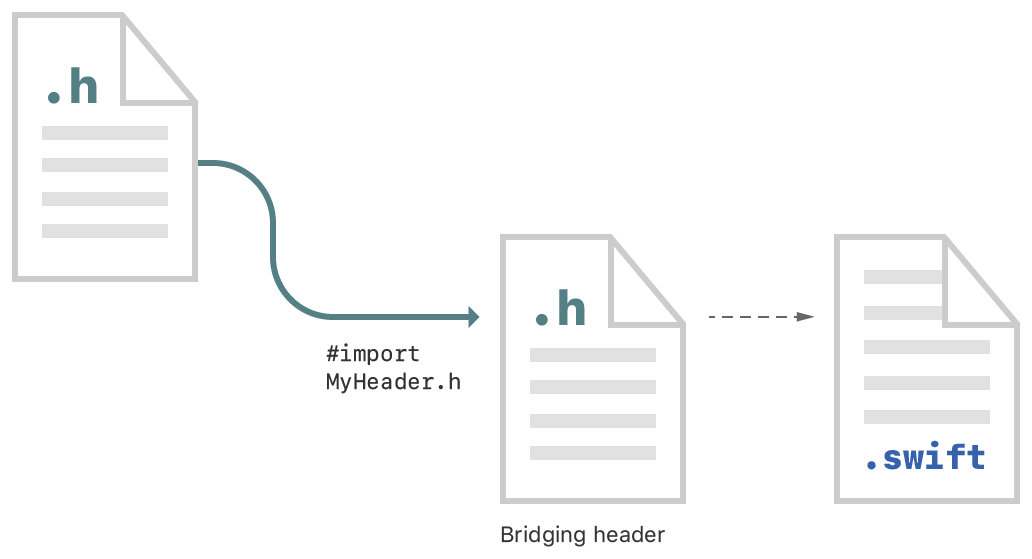
The process for using your Objective-C declarations from your Swift code within mixed-language targets differs slightly depending on whether you’re writing an app or a framework. Both processes are described below.
Import Code Within an App Target
To import a set of Objective-C files into Swift code within the same app target, you rely on an Objective-C bridging header file to expose those files to Swift. Xcode offers to create this header when you add a Swift file to an existing Objective-C app, or an Objective-C file to an existing Swift app.

If you accept, Xcode creates the bridging header file along with the file you were creating, and names it by using your product module name followed by "-Bridging-Header.h". Alternatively, you can create a bridging header yourself by choosing File > New > File > [operating system] > Source > Header File.
Edit the bridging header to expose your Objective-C code to your Swift code:
In your Objective-C bridging header, import every Objective-C header you want to expose to Swift.
In Build Settings, in Swift Compiler - Code Generation, make sure the Objective-C Bridging Header build setting has a path to the bridging header file. The path should be relative to your project, similar to the way your
Info.plistpath is specified in Build Settings. In most cases, you won't need to modify this setting.
Any public Objective-C headers listed in the bridging header are visible to Swift. The Objective-C declarations are automatically available from any Swift file within that target, with no import statements. Use classes and other declarations from your custom Objective-C code with the same Swift syntax you use for system classes.
Import Code Within a Framework Target
To use the Objective-C declarations in files in the same framework target as your Swift code, you’ll need to import those files into the Objective-C umbrella header—the master header for your framework. Import your Objective-C files by configuring the umbrella header:
Under Build Settings, in Packaging, make sure the Defines Module setting for the framework target is set to Yes.
In the umbrella header, import every Objective-C header you want to expose to Swift.
Swift sees every header you expose publicly in your umbrella header. The contents of the Objective-C files in that framework are automatically available from any Swift file within that framework target, with no import statements. Use classes and other declarations from your Objective-C code with the same Swift syntax you use for system classes.
https://developer.apple.com/documentation/swift/imported_c_and_objective-c_apis/importing_objective-c_into_swift
Importing Objective-C into Swift的更多相关文章
- 【转载】谷歌酝酿将苹果Swift作为安卓APP主要开发语言
TNW中文站 4月8日报道 安卓操作系统的软件开发语言是Java,而在过去几年中,有关Java的版权,谷歌(微博)和甲骨文之间发生了长期的诉讼.最新外媒消息称,谷歌正在考虑将苹果开发的Swift作为未 ...
- Object-C与Swift混合开发
Object-C作为Apple的iOS App开发语言服务了很多个年头,2014年Apple推出了新的编程语言Swift.更高效更安全的口号再次吸引了一大批非iOS开发程序猿进入,小编觉得Swift代 ...
- 2016年iOS技术圈回顾
2016年同2015年一样,在我还没有做好心理准备的时候,一晃神就到了年底.年关将近,不知诸君心情如何,年初的规划实现了多少,来年的计划又是否已有了眉目.年过三十的Peak君感觉年关是越来越难过了,越 ...
- fir.im Weekly - 这是一份强大的 SwiftGuide
大新闻!Apple 10 亿美元融资滴滴!库克大叔对中国 iOS 开发者表达了高度认可,同时也传出 iOS 10 将内置滴滴 App 的消息.想像下,某个加班的深夜飙完代码,最性感的事情莫过于:「Si ...
- 设置app的状态栏样式
http://www.jianshu.com/p/9f7f3fa624e7 http://cocoa.venj.me/blog/view-controller-based-status-bar-sty ...
- 转: app端数据库(性能高) realm (ios, android 均支持)
转: http://ios.jobbole.com/85041/ 移动端数据库新王者:realm 2016/05/14 · iOS开发 · 数据库 分享到:0 原文出处: 没故事的卓同学(@没故事的 ...
- realm-java 源码疑问
JNIEXPORT void JNICALL Java_io_realm_internal_Group_nativeWriteToFile( JNIEnv* env, jobject, jlong n ...
- 《JavaScript权威指南》学习——js闭包
序:闭包这个玩意啊~在很多没有代码块的语言中都会出现,已经成为大多程序员入门的一道坎,闭包让很多程序员觉得晦涩(事实上百度一下这个名词,真的说的很晦涩啊亲==|||),我第一次知道闭包这个名词是从&l ...
- 使用Xamarin实现跨平台移动应用开发(转载)
刚在朋友圈看到张善友,转发的一条分享“使用Xamarin实现跨平台移动应用开发”,写的确实很详细得体,从收费到开源,这段时间xamarin受到不少质疑,如此文http://blog.csdn.net/ ...
- Android数据库Realm实践
Android开发中常用的数据库有5个: 1. OrmLite OrmLite 不是 Android 平台专用的ORM框架,它是Java ORM.支持JDBC连接,Spring以及Android平台. ...
随机推荐
- mysql11---主键普通全文索引
.1主键索引添加 当一张表,把某个列设为主键的时候,则该列就是主键索引 create table aaa (id int unsigned primary key auto_increment , n ...
- js控制页面显示
两个菜单切换显示页面内容: js控制代码, /** JS初始化 **/ $(document).ready(function() { $('#email_btn').click(function(){ ...
- bzoj5333: [Sdoi2018]荣誉称号
请不要去改题目给的输入,不然你会wa穿... 这么故弄玄虚的题目,肯定要先转换问题 看到这个不断的除2想起别人家的线段树的写法...x的两个孩子是x<<1和x<<1|1 然后问 ...
- 第十六周 Leetcode 600. Non-negative Integers without Consecutive Ones(HARD) 计数dp
Leetcode600 很简单的一道计数题 给定整数n 求不大于n的正整数中 二进制表示没有连续的1的数字个数 在dp过程中只要保证不出现连续1以及大于n的情况即可. 所以设计按位dp[i][j]表示 ...
- WEB开发框架系列教程 (三)页面功能开发(2)
上一节介绍了,基础资料币别信息的开发,只通过辅助开发工具,创建及资料表,填写 表名,程序就完全好了. 最后也说到,可能我们也会面对另外一些基础资料信息的维护,但是不是简单到只有代码 和名称,可能还有另 ...
- idea 设置项目编码
目前我了解的设置idea编码有两种形式(但深层次不太了解) 方式一: 这个方式需要你点击要设置编码单个文件,选择编码.一次只能修改一个文件编码 方式二: 一般工作时使用这个方式,文件编码,选择项目文件 ...
- HDU1180:诡异的楼梯
传送门 题意 迷宫搜索 分析 这题写起来挺简单的,锻炼搜索基本功,一开始用记忆化搜索TLE了,改用访问标记,0ms过了,用优先队列保证终点最快达到,我会在代码中提供一些强力数据 trick 1.遇到梯 ...
- bzoj 4276: [ONTAK2015]Bajtman i Okrągły Robin【线段树+最大费用最大流】
--因为T点忘记还要+n所以选小了所以WA了一次 注意!题目中所给的时间是一边闭一边开的区间,所以读进来之后先l++(或者r--也行) 线段树优化建图,很神.(我记得还有个主席树优化建树的?)首先考虑 ...
- 4800: [Ceoi2015]Ice Hockey World Championship(折半搜索)
4800: [Ceoi2015]Ice Hockey World Championship Time Limit: 10 Sec Memory Limit: 256 MBSubmit: 622 S ...
- Lodash 方法库 原生实现 待完结。。。
'use strict' let _ = { // 将数组(array)拆分成多个 size 长度的区块,并将这些区块组成一个新数组. 如果array 无法被分割成全部等长的区块,那么最后剩余的元素将 ...